

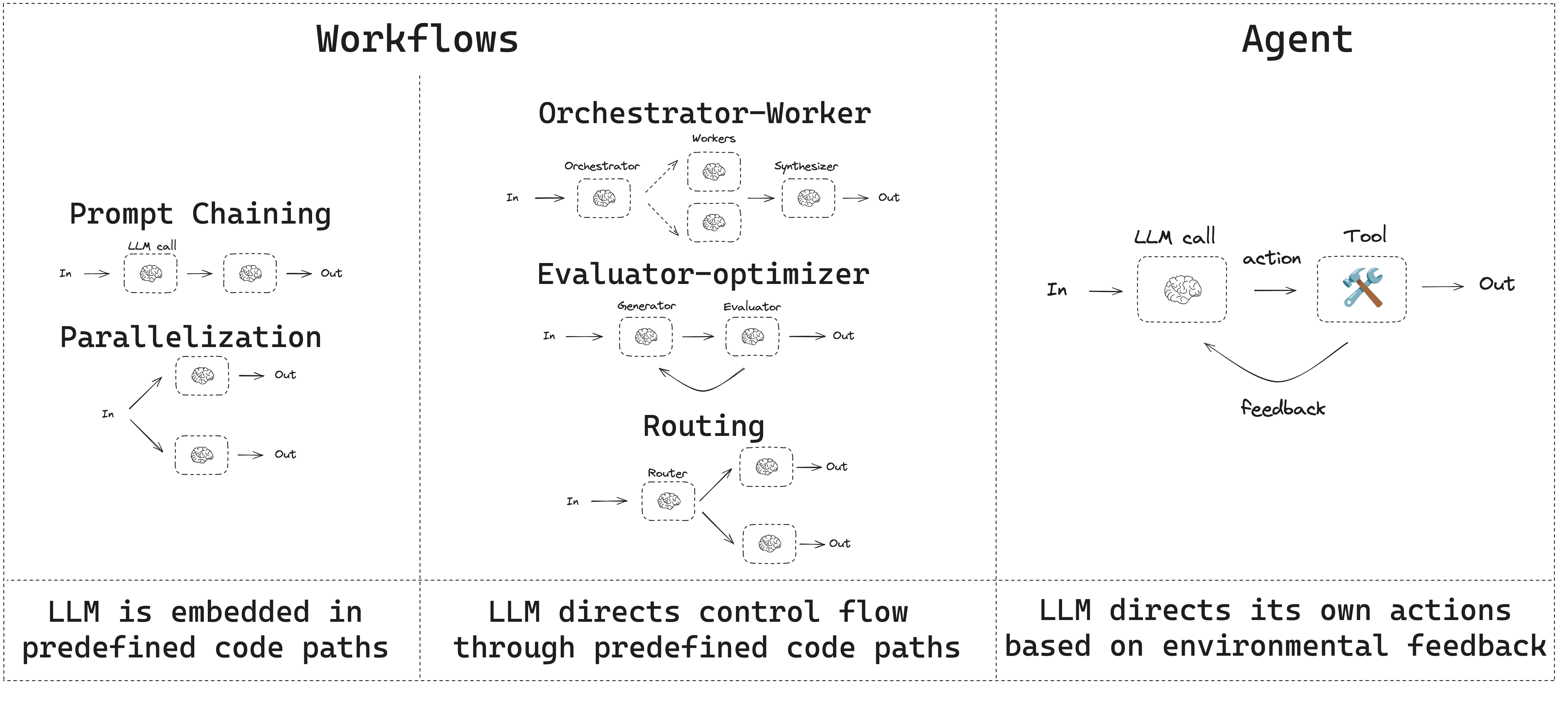
- 工作流具有预定的代码路径,旨在按特定顺序运行。
- 代理是动态的,定义自己的流程和工具使用方式。
设置
要构建工作流或代理,您可以使用任何支持结构化输出和工具调用的聊天模型。以下示例使用 Anthropic:- 安装依赖项
npm install @langchain/langgraph @langchain/core
pnpm add @langchain/langgraph @langchain/core
yarn add @langchain/langgraph @langchain/core
bun add @langchain/langgraph @langchain/core
- 初始化 LLM:
import { ChatAnthropic } from "@langchain/anthropic";

const llm = new ChatAnthropic({
  model: "claude-sonnet-4-6",
  apiKey: "<your_anthropic_key>"
});
LLM 与增强
工作流和代理系统基于 LLM 以及您添加到它们的各种增强功能。工具调用、结构化输出和短期记忆是根据需求定制 LLM 的几个选项。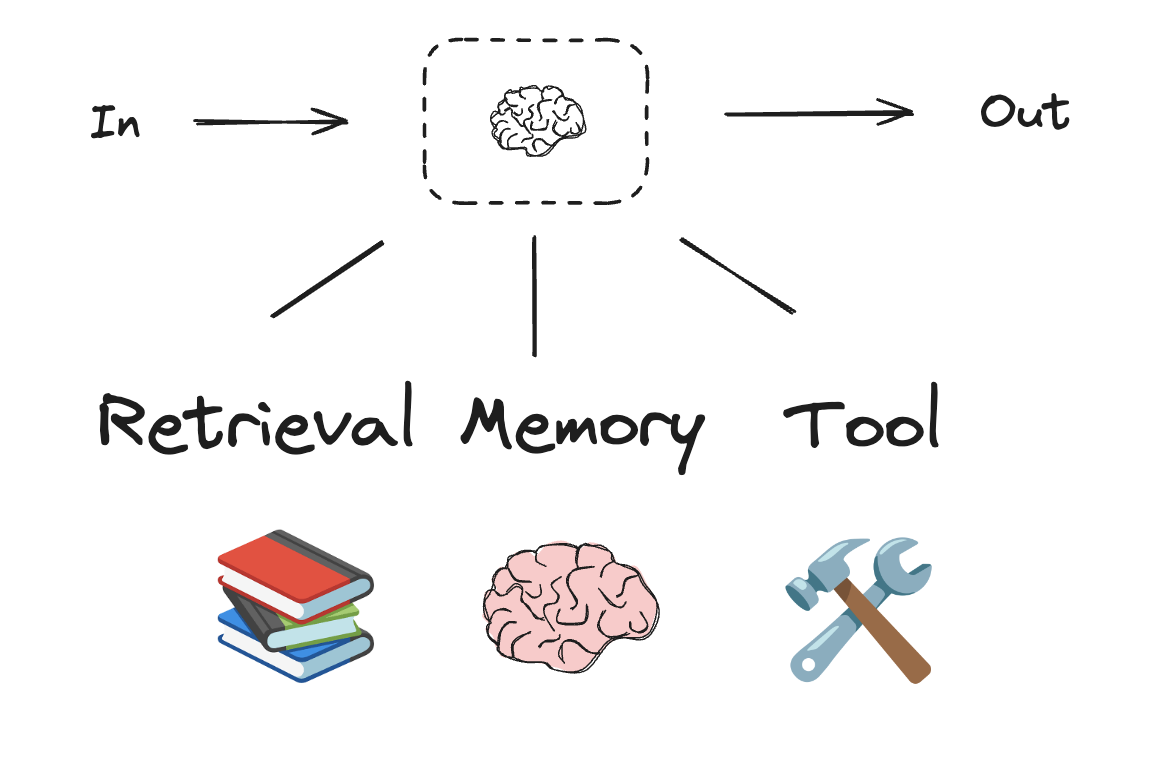
import * as z from "zod";
import { tool } from "langchain";

// 结构化输出的模式
const SearchQuery = z.object({
  search_query: z.string().describe("为网络搜索优化的查询。"),
  justification: z
    .string()
    .describe("为什么此查询与用户的请求相关。"),
});

// 使用结构化输出模式增强 LLM
const structuredLlm = llm.withStructuredOutput(SearchQuery);

// 调用增强后的 LLM
const output = await structuredLlm.invoke(
  "钙 CT 评分与高胆固醇有何关系?"
);

// 定义一个工具
const multiply = tool(
  ({ a, b }) => {
    return a * b;
  },
  {
    name: "multiply",
    description: "将两个数字相乘",
    schema: z.object({
      a: z.number(),
      b: z.number(),
    }),
  }
);

// 使用工具增强 LLM
const llmWithTools = llm.bindTools([multiply]);

// 使用触发工具调用的输入调用 LLM
const msg = await llmWithTools.invoke("2 乘以 3 是多少?");

// 获取工具调用
console.log(msg.tool_calls);
提示链
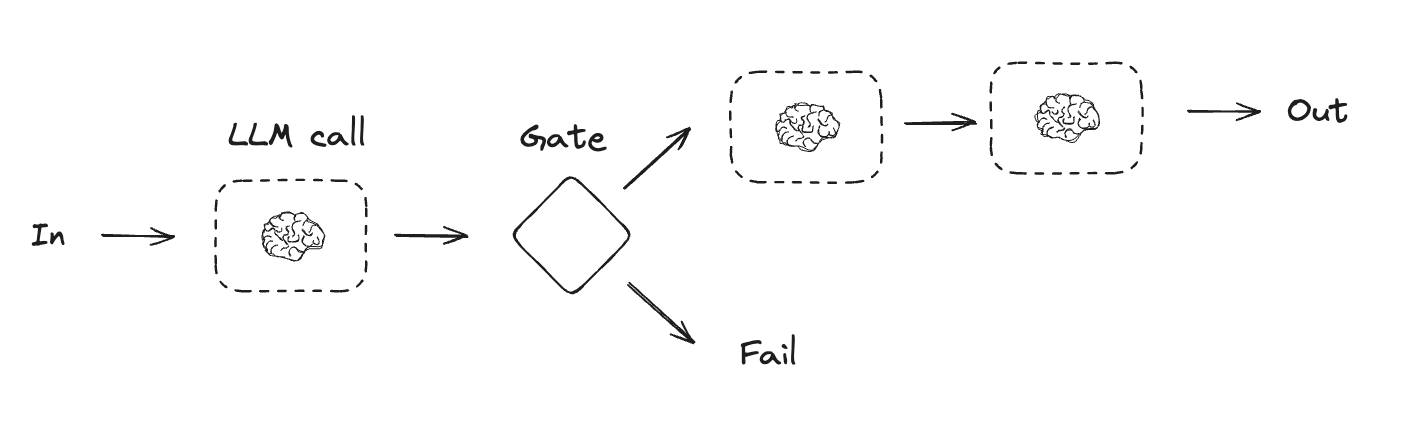
提示链是指每次 LLM 调用都处理前一次调用的输出。它通常用于执行可以分解为更小、可验证步骤的明确任务。一些示例包括:- 将文档翻译成不同语言
- 验证生成内容的一致性
import { StateGraph, StateSchema, GraphNode, ConditionalEdgeRouter } from "@langchain/langgraph";
import { z } from "zod/v4";

// 图状态
const State = new StateSchema({
  topic: z.string(),
  joke: z.string(),
  improvedJoke: z.string(),
  finalJoke: z.string(),
});

// 定义节点函数

// 第一次 LLM 调用生成初始笑话
const generateJoke: GraphNode<typeof State> = async (state) => {
  const msg = await llm.invoke(`写一个关于 ${state.topic} 的简短笑话`);
  return { joke: msg.content };
};

// 门控函数,检查笑话是否有笑点
const checkPunchline: ConditionalEdgeRouter<typeof State, "improveJoke"> = (state) => {
  // 简单检查 - 笑话是否包含 "?" 或 "!"
  if (state.joke?.includes("?") || state.joke?.includes("!")) {
    return "Pass";
  }
  return "Fail";
};

// 第二次 LLM 调用改进笑话
const improveJoke: GraphNode<typeof State> = async (state) => {
  const msg = await llm.invoke(
    `通过添加文字游戏使这个笑话更有趣:${state.joke}`
  );
  return { improvedJoke: msg.content };
};

// 第三次 LLM 调用进行最终润色
const polishJoke: GraphNode<typeof State> = async (state) => {
  const msg = await llm.invoke(
    `为这个笑话添加一个出人意料的转折:${state.improvedJoke}`
  );
  return { finalJoke: msg.content };
};

// 构建工作流
const chain = new StateGraph(State)
  .addNode("generateJoke", generateJoke)
  .addNode("improveJoke", improveJoke)
  .addNode("polishJoke", polishJoke)
  .addEdge("__start__", "generateJoke")
  .addConditionalEdges("generateJoke", checkPunchline, {
    Pass: "improveJoke",
    Fail: "__end__"
  })
  .addEdge("improveJoke", "polishJoke")
  .addEdge("polishJoke", "__end__")
  .compile();

// 调用
const state = await chain.invoke({ topic: "猫" });
console.log("初始笑话:");
console.log(state.joke);
console.log("\n--- --- ---\n");
if (state.improvedJoke !== undefined) {
  console.log("改进后的笑话:");
  console.log(state.improvedJoke);
  console.log("\n--- --- ---\n");

  console.log("最终笑话:");
  console.log(state.finalJoke);
} else {
  console.log("笑话未通过质量门控 - 未检测到笑点!");
}
import { task, entrypoint } from "@langchain/langgraph";

// 任务

// 第一次 LLM 调用生成初始笑话
const generateJoke = task("generateJoke", async (topic: string) => {
  const msg = await llm.invoke(`写一个关于 ${topic} 的简短笑话`);
  return msg.content;
});

// 门控函数,检查笑话是否有笑点
function checkPunchline(joke: string) {
  // 简单检查 - 笑话是否包含 "?" 或 "!"
  if (joke.includes("?") || joke.includes("!")) {
    return "Pass";
  }
  return "Fail";
}

  // 第二次 LLM 调用改进笑话
const improveJoke = task("improveJoke", async (joke: string) => {
  const msg = await llm.invoke(
    `通过添加文字游戏使这个笑话更有趣:${joke}`
  );
  return msg.content;
});

// 第三次 LLM 调用进行最终润色
const polishJoke = task("polishJoke", async (joke: string) => {
  const msg = await llm.invoke(
    `为这个笑话添加一个出人意料的转折:${joke}`
  );
  return msg.content;
});

const workflow = entrypoint(
  "jokeMaker",
  async (topic: string) => {
    const originalJoke = await generateJoke(topic);
    if (checkPunchline(originalJoke) === "Pass") {
      return originalJoke;
    }
    const improvedJoke = await improveJoke(originalJoke);
    const polishedJoke = await polishJoke(improvedJoke);
    return polishedJoke;
  }
);

const stream = await workflow.stream("猫", {
  streamMode: "updates",
});

for await (const step of stream) {
  console.log(step);
}
并行化
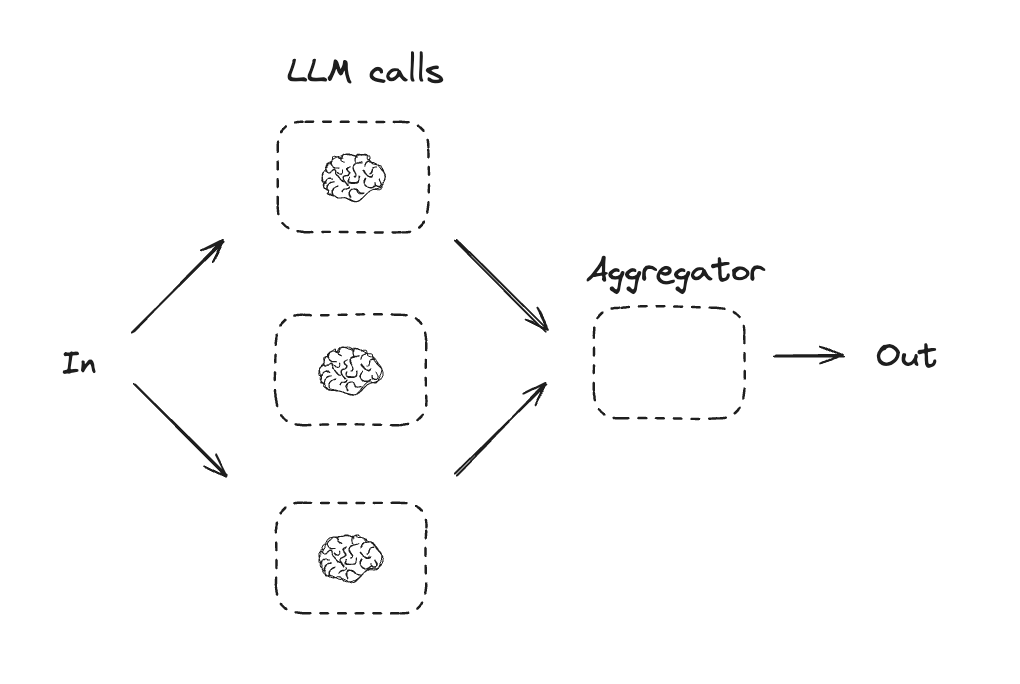
通过并行化,LLM 同时处理一个任务。这可以通过同时运行多个独立的子任务来实现,或者多次运行同一任务以检查不同的输出。并行化通常用于:- 分割子任务并并行运行,从而提高速度
- 多次运行任务以检查不同的输出,从而提高置信度
- 运行一个处理文档关键词的子任务,以及第二个检查格式错误的子任务
- 多次运行一个任务,根据不同的标准(如引用数量、使用的来源数量和来源质量)对文档的准确性进行评分
import { StateGraph, StateSchema, GraphNode } from "@langchain/langgraph";
import * as z from "zod";

// 图状态
const State = new StateSchema({
  topic: z.string(),
  joke: z.string(),
  story: z.string(),
  poem: z.string(),
  combinedOutput: z.string(),
});

// 节点
// 第一次 LLM 调用生成初始笑话
const callLlm1: GraphNode<typeof State> = async (state) => {
  const msg = await llm.invoke(`写一个关于 ${state.topic} 的笑话`);
  return { joke: msg.content };
};

// 第二次 LLM 调用生成故事
const callLlm2: GraphNode<typeof State> = async (state) => {
  const msg = await llm.invoke(`写一个关于 ${state.topic} 的故事`);
  return { story: msg.content };
};

// 第三次 LLM 调用生成诗歌
const callLlm3: GraphNode<typeof State> = async (state) => {
  const msg = await llm.invoke(`写一首关于 ${state.topic} 的诗`);
  return { poem: msg.content };
};

// 将笑话、故事和诗歌合并为单个输出
const aggregator: GraphNode<typeof State> = async (state) => {
  const combined = `这是一个关于 ${state.topic} 的故事、笑话和诗歌!\n\n` +
    `故事:\n${state.story}\n\n` +
    `笑话:\n${state.joke}\n\n` +
    `诗歌:\n${state.poem}`;
  return { combinedOutput: combined };
};

// 构建工作流
const parallelWorkflow = new StateGraph(State)
  .addNode("callLlm1", callLlm1)
  .addNode("callLlm2", callLlm2)
  .addNode("callLlm3", callLlm3)
  .addNode("aggregator", aggregator)
  .addEdge("__start__", "callLlm1")
  .addEdge("__start__", "callLlm2")
  .addEdge("__start__", "callLlm3")
  .addEdge("callLlm1", "aggregator")
  .addEdge("callLlm2", "aggregator")
  .addEdge("callLlm3", "aggregator")
  .addEdge("aggregator", "__end__")
  .compile();

// 调用
const result = await parallelWorkflow.invoke({ topic: "猫" });
console.log(result.combinedOutput);
import { task, entrypoint } from "@langchain/langgraph";

// 任务

// 第一次 LLM 调用生成初始笑话
const callLlm1 = task("generateJoke", async (topic: string) => {
  const msg = await llm.invoke(`写一个关于 ${topic} 的笑话`);
  return msg.content;
});

// 第二次 LLM 调用生成故事
const callLlm2 = task("generateStory", async (topic: string) => {
  const msg = await llm.invoke(`写一个关于 ${topic} 的故事`);
  return msg.content;
});

// 第三次 LLM 调用生成诗歌
const callLlm3 = task("generatePoem", async (topic: string) => {
  const msg = await llm.invoke(`写一首关于 ${topic} 的诗`);
  return msg.content;
});

// 合并输出
const aggregator = task("aggregator", async (params: {
  topic: string;
  joke: string;
  story: string;
  poem: string;
}) => {
  const { topic, joke, story, poem } = params;
  return `这是一个关于 ${topic} 的故事、笑话和诗歌!\n\n` +
    `故事:\n${story}\n\n` +
    `笑话:\n${joke}\n\n` +
    `诗歌:\n${poem}`;
});

// 构建工作流
const workflow = entrypoint(
  "parallelWorkflow",
  async (topic: string) => {
    const [joke, story, poem] = await Promise.all([
      callLlm1(topic),
      callLlm2(topic),
      callLlm3(topic),
    ]);

    return aggregator({ topic, joke, story, poem });
  }
);

// 调用
const stream = await workflow.stream("猫", {
  streamMode: "updates",
});

for await (const step of stream) {
  console.log(step);
}
路由
路由工作流处理输入,然后将其引导至特定上下文的任务。这允许您为复杂任务定义专门的流程。例如,为回答产品相关问题而构建的工作流可能会先处理问题类型,然后将请求路由到定价、退款、退货等特定流程。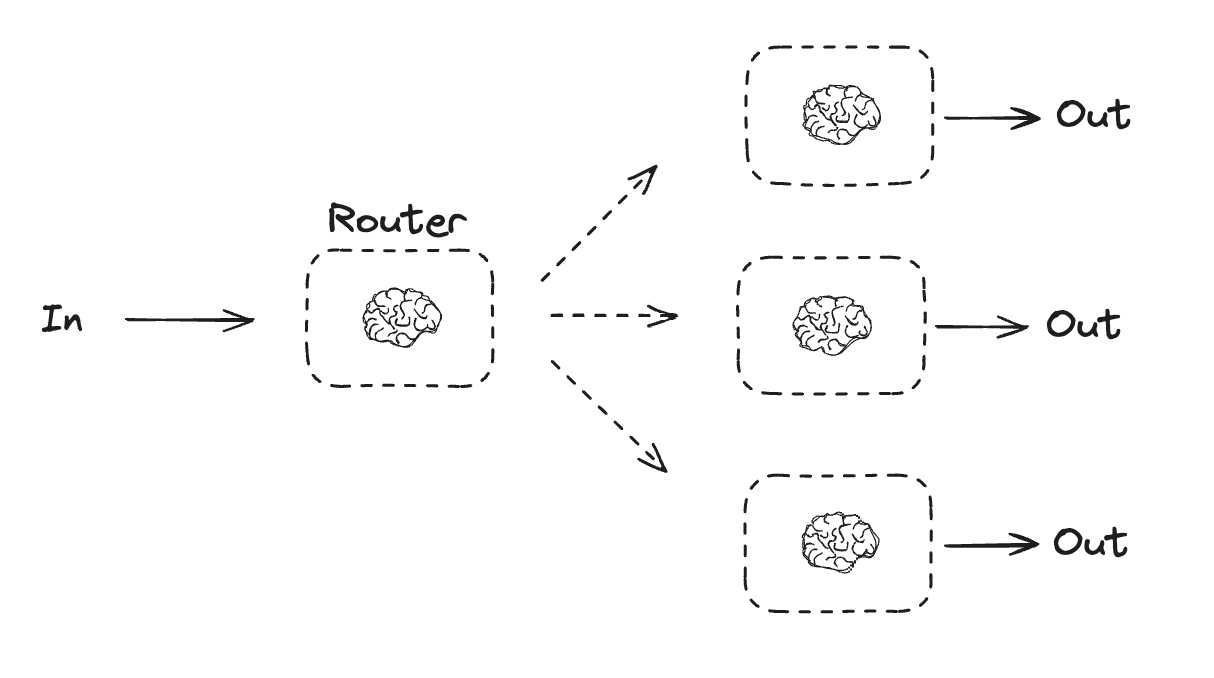
import { StateGraph, StateSchema, GraphNode, ConditionalEdgeRouter } from "@langchain/langgraph";
import * as z from "zod";

// 用作路由逻辑的结构化输出模式
const routeSchema = z.object({
  step: z.enum(["poem", "story", "joke"]).describe(
    "路由过程中的下一步"
  ),
});

// 使用结构化输出模式增强 LLM
const router = llm.withStructuredOutput(routeSchema);

// 图状态
const State = new StateSchema({
  input: z.string(),
  decision: z.string(),
  output: z.string(),
});

// 节点
// 写一个故事
const llmCall1: GraphNode<typeof State> = async (state) => {
  const result = await llm.invoke([{
    role: "system",
    content: "你是一位专业的故事讲述者。",
  }, {
    role: "user",
    content: state.input
  }]);
  return { output: result.content };
};

// 写一个笑话
const llmCall2: GraphNode<typeof State> = async (state) => {
  const result = await llm.invoke([{
    role: "system",
    content: "你是一位专业的喜剧演员。",
  }, {
    role: "user",
    content: state.input
  }]);
  return { output: result.content };
};

// 写一首诗
const llmCall3: GraphNode<typeof State> = async (state) => {
  const result = await llm.invoke([{
    role: "system",
    content: "你是一位专业的诗人。",
  }, {
    role: "user",
    content: state.input
  }]);
  return { output: result.content };
};

const llmCallRouter: GraphNode<typeof State> = async (state) => {
  // 将输入路由到适当的节点
  const decision = await router.invoke([
    {
      role: "system",
      content: "根据用户的请求将输入路由到故事、笑话或诗歌。"
    },
    {
      role: "user",
      content: state.input
    },
  ]);

  return { decision: decision.step };
};

// 条件边函数,路由到适当的节点
const routeDecision: ConditionalEdgeRouter<typeof State, "llmCall1" | "llmCall2" | "llmCall3"> = (state) => {
  // 返回您接下来要访问的节点名称
  if (state.decision === "story") {
    return "llmCall1";
  } else if (state.decision === "joke") {
    return "llmCall2";
  } else {
    return "llmCall3";
  }
};

// 构建工作流
const routerWorkflow = new StateGraph(State)
  .addNode("llmCall1", llmCall1)
  .addNode("llmCall2", llmCall2)
  .addNode("llmCall3", llmCall3)
  .addNode("llmCallRouter", llmCallRouter)
  .addEdge("__start__", "llmCallRouter")
  .addConditionalEdges(
    "llmCallRouter",
    routeDecision,
    ["llmCall1", "llmCall2", "llmCall3"],
  )
  .addEdge("llmCall1", "__end__")
  .addEdge("llmCall2", "__end__")
  .addEdge("llmCall3", "__end__")
  .compile();

// 调用
const state = await routerWorkflow.invoke({
  input: "给我写一个关于猫的笑话"
});
console.log(state.output);
import * as z from "zod";
import { task, entrypoint } from "@langchain/langgraph";

// 用作路由逻辑的结构化输出模式
const routeSchema = z.object({
  step: z.enum(["poem", "story", "joke"]).describe(
    "路由过程中的下一步"
  ),
});

// 使用结构化输出模式增强 LLM
const router = llm.withStructuredOutput(routeSchema);

// 任务
// 写一个故事
const llmCall1 = task("generateStory", async (input: string) => {
  const result = await llm.invoke([{
    role: "system",
    content: "你是一位专业的故事讲述者。",
  }, {
    role: "user",
    content: input
  }]);
  return result.content;
});

// 写一个笑话
const llmCall2 = task("generateJoke", async (input: string) => {
  const result = await llm.invoke([{
    role: "system",
    content: "你是一位专业的喜剧演员。",
  }, {
    role: "user",
    content: input
  }]);
  return result.content;
});

// 写一首诗
const llmCall3 = task("generatePoem", async (input: string) => {
  const result = await llm.invoke([{
    role: "system",
    content: "你是一位专业的诗人。",
  }, {
    role: "user",
    content: input
  }]);
  return result.content;
});

// 将输入路由到适当的节点
const llmCallRouter = task("router", async (input: string) => {
  const decision = await router.invoke([
    {
      role: "system",
      content: "根据用户的请求将输入路由到故事、笑话或诗歌。"
    },
    {
      role: "user",
      content: input
    },
  ]);
  return decision.step;
});

// 构建工作流
const workflow = entrypoint(
  "routerWorkflow",
  async (input: string) => {
    const nextStep = await llmCallRouter(input);

    let llmCall;
    if (nextStep === "story") {
      llmCall = llmCall1;
    } else if (nextStep === "joke") {
      llmCall = llmCall2;
    } else if (nextStep === "poem") {
      llmCall = llmCall3;
    }

    const finalResult = await llmCall(input);
    return finalResult;
  }
);

// 调用
const stream = await workflow.stream("给我写一个关于猫的笑话", {
  streamMode: "updates",
});

for await (const step of stream) {
  console.log(step);
}
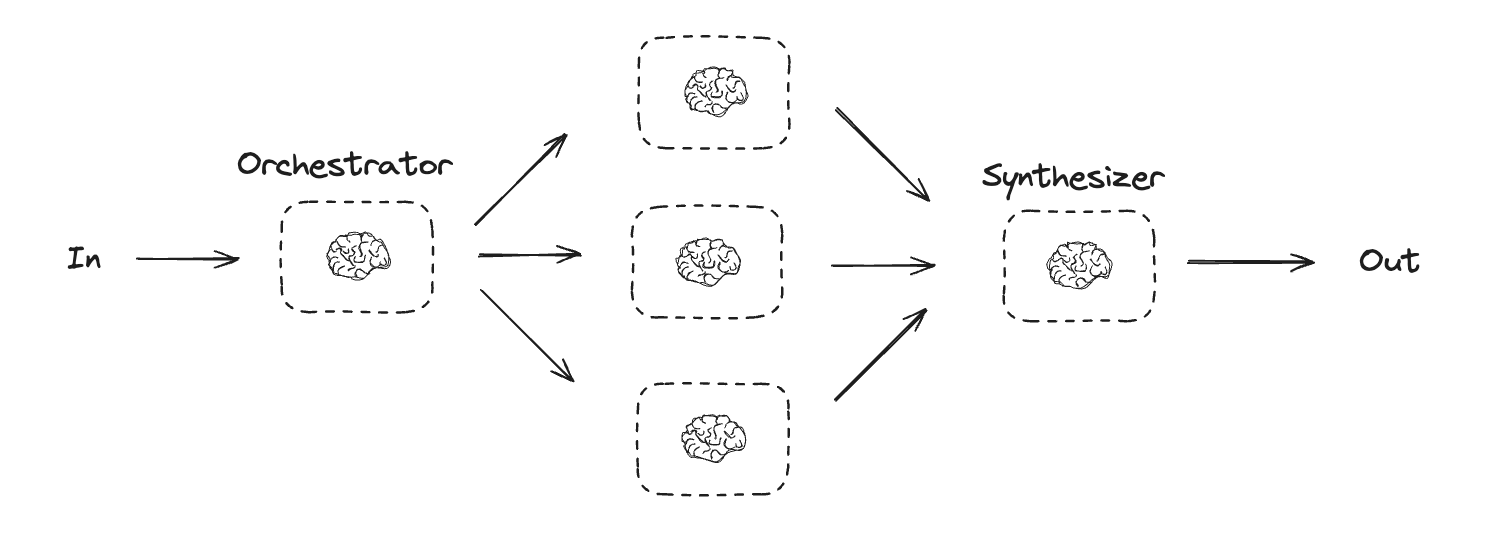
编排器-工作者
在编排器-工作者配置中,编排器:- 将任务分解为子任务
- 将子任务委派给工作者
- 将工作者的输出合成为最终结果
type SectionSchema = {
    name: string;
    description: string;
}
type SectionsSchema = {
    sections: SectionSchema[];
}

// 使用结构化输出模式增强 LLM
const planner = llm.withStructuredOutput(sectionsSchema);
import * as z from "zod";
import { task, entrypoint } from "@langchain/langgraph";

// 用于规划的结构化输出模式
const sectionSchema = z.object({
  name: z.string().describe("报告此部分的名称。"),
  description: z.string().describe(
    "本部分将涵盖的主要主题和概念的简要概述。"
  ),
});

const sectionsSchema = z.object({
  sections: z.array(sectionSchema).describe("报告的各个部分。"),
});

// 使用结构化输出模式增强 LLM
const planner = llm.withStructuredOutput(sectionsSchema);

// 任务
const orchestrator = task("orchestrator", async (topic: string) => {
  // 生成查询
  const reportSections = await planner.invoke([
    { role: "system", content: "生成报告的计划。" },
    { role: "user", content: `以下是报告主题:${topic}` },
  ]);

  return reportSections.sections;
});

const llmCall = task("sectionWriter", async (section: z.infer<typeof sectionSchema>) => {
  // 生成部分
  const result = await llm.invoke([
    {
      role: "system",
      content: "撰写报告的一个部分。",
    },
    {
      role: "user",
      content: `以下是部分名称:${section.name} 和描述:${section.description}`,
    },
  ]);

  return result.content;
});

const synthesizer = task("synthesizer", async (completedSections: string[]) => {
  // 从各个部分合成完整报告
  return completedSections.join("\n\n---\n\n");
});

// 构建工作流
const workflow = entrypoint(
  "orchestratorWorker",
  async (topic: string) => {
    const sections = await orchestrator(topic);
    const completedSections = await Promise.all(
      sections.map((section) => llmCall(section))
    );
    return synthesizer(completedSections);
  }
);

// 调用
const stream = await workflow.stream("创建一份关于 LLM 扩展定律的报告", {
  streamMode: "updates",
});

for await (const step of stream) {
  console.log(step);
}
在 LangGraph 中创建工作者
编排器-工作者工作流很常见,LangGraph 对其提供了内置支持。Send API 允许您动态创建工作者节点并向其发送特定输入。每个工作者都有自己的状态,所有工作者的输出都写入一个共享状态键,该键可由编排器图访问。这使编排器可以访问所有工作者的输出,并允许将其合成为最终输出。下面的示例遍历一个部分列表,并使用 Send API 将每个部分发送给一个工作者。
import { StateGraph, StateSchema, ReducedValue, GraphNode, Send } from "@langchain/langgraph";
import * as z from "zod";

// 图状态
const State = new StateSchema({
  topic: z.string(),
  sections: z.array(z.custom<SectionsSchema>()),
  completedSections: new ReducedValue(
    z.array(z.string()).default(() => []),
    { reducer: (a, b) => a.concat(b) }
  ),
  finalReport: z.string(),
});

// 工作者状态
const WorkerState = new StateSchema({
  section: z.custom<SectionsSchema>(),
  completedSections: new ReducedValue(
    z.array(z.string()).default(() => []),
    { reducer: (a, b) => a.concat(b) }
  ),
});

// 节点
const orchestrator: GraphNode<typeof State> = async (state) => {
  // 生成查询
  const reportSections = await planner.invoke([
    { role: "system", content: "生成报告的计划。" },
    { role: "user", content: `以下是报告主题:${state.topic}` },
  ]);

  return { sections: reportSections.sections };
};

const llmCall: GraphNode<typeof WorkerState> = async (state) => {
  // 生成部分
  const section = await llm.invoke([
    {
      role: "system",
      content: "按照提供的名称和描述撰写报告部分。每个部分不包含前言。使用 markdown 格式。",
    },
    {
      role: "user",
      content: `以下是部分名称:${state.section.name} 和描述:${state.section.description}`,
    },
  ]);

  // 将更新后的部分写入已完成部分
  return { completedSections: [section.content] };
};

const synthesizer: GraphNode<typeof State> = async (state) => {
  // 已完成部分列表
  const completedSections = state.completedSections;

  // 将已完成部分格式化为字符串,用作最终部分的上下文
  const completedReportSections = completedSections.join("\n\n---\n\n");

  return { finalReport: completedReportSections };
};

// 条件边函数,创建 llm_call 工作者,每个工作者撰写报告的一个部分
const assignWorkers: ConditionalEdgeRouter<typeof State, "llmCall"> = (state) => {
  // 通过 Send() API 并行启动部分撰写
  return state.sections.map((section) =>
    new Send("llmCall", { section })
  );
};

// 构建工作流
const orchestratorWorker = new StateGraph(State)
  .addNode("orchestrator", orchestrator)
  .addNode("llmCall", llmCall)
  .addNode("synthesizer", synthesizer)
  .addEdge("__start__", "orchestrator")
  .addConditionalEdges(
    "orchestrator",
    assignWorkers,
    ["llmCall"]
  )
  .addEdge("llmCall", "synthesizer")
  .addEdge("synthesizer", "__end__")
  .compile();

// 调用
const state = await orchestratorWorker.invoke({
  topic: "创建一份关于 LLM 扩展定律的报告"
});
console.log(state.finalReport);
评估器-优化器
在评估器-优化器工作流中,一次 LLM 调用创建响应,另一次调用评估该响应。如果评估器或人在回路中确定响应需要改进,则会提供反馈并重新创建响应。此循环持续进行,直到生成可接受的响应。 评估器-优化器工作流通常在任务有特定成功标准但需要迭代才能满足该标准时使用。例如,在两种语言之间翻译文本时,通常无法完美匹配。可能需要几次迭代才能生成在两种语言中具有相同含义的翻译。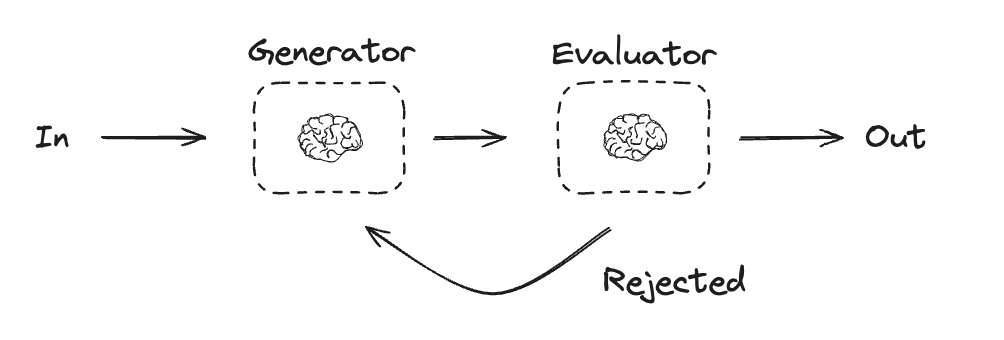
import { StateGraph, StateSchema, GraphNode, ConditionalEdgeRouter } from "@langchain/langgraph";
import * as z from "zod";

// 图状态
const State = new StateSchema({
  joke: z.string(),
  topic: z.string(),
  feedback: z.string(),
  funnyOrNot: z.string(),
});

// 用于评估的结构化输出模式
const feedbackSchema = z.object({
  grade: z.enum(["funny", "not funny"]).describe(
    "判断笑话是否有趣。"
  ),
  feedback: z.string().describe(
    "如果笑话不有趣,请提供如何改进的反馈。"
  ),
});

// 使用结构化输出模式增强 LLM
const evaluator = llm.withStructuredOutput(feedbackSchema);

// 节点
const llmCallGenerator: GraphNode<typeof State> = async (state) => {
  // LLM 生成一个笑话
  let msg;
  if (state.feedback) {
    msg = await llm.invoke(
      `写一个关于 ${state.topic} 的笑话,但要考虑反馈:${state.feedback}`
    );
  } else {
    msg = await llm.invoke(`写一个关于 ${state.topic} 的笑话`);
  }
  return { joke: msg.content };
};

const llmCallEvaluator: GraphNode<typeof State> = async (state) => {
  // LLM 评估笑话
  const grade = await evaluator.invoke(`评估这个笑话 ${state.joke}`);
  return { funnyOrNot: grade.grade, feedback: grade.feedback };
};

// 条件边函数,根据评估器的反馈路由回笑话生成器或结束
const routeJoke: ConditionalEdgeRouter<typeof State, "llmCallGenerator"> = (state) => {
  // 根据评估器的反馈路由回笑话生成器或结束
  if (state.funnyOrNot === "funny") {
    return "Accepted";
  } else {
    return "Rejected + Feedback";
  }
};

// 构建工作流
const optimizerWorkflow = new StateGraph(State)
  .addNode("llmCallGenerator", llmCallGenerator)
  .addNode("llmCallEvaluator", llmCallEvaluator)
  .addEdge("__start__", "llmCallGenerator")
  .addEdge("llmCallGenerator", "llmCallEvaluator")
  .addConditionalEdges(
    "llmCallEvaluator",
    routeJoke,
    {
      // routeJoke 返回的名称 : 下一个要访问的节点名称
      "Accepted": "__end__",
      "Rejected + Feedback": "llmCallGenerator",
    }
  )
  .compile();

// 调用
const state = await optimizerWorkflow.invoke({ topic: "猫" });
console.log(state.joke);
import * as z from "zod";
import { task, entrypoint } from "@langchain/langgraph";

// 用于评估的结构化输出模式
const feedbackSchema = z.object({
  grade: z.enum(["funny", "not funny"]).describe(
    "判断笑话是否有趣。"
  ),
  feedback: z.string().describe(
    "如果笑话不有趣,请提供如何改进的反馈。"
  ),
});

// 使用结构化输出模式增强 LLM
const evaluator = llm.withStructuredOutput(feedbackSchema);

// 任务
const llmCallGenerator = task("jokeGenerator", async (params: {
  topic: string;
  feedback?: z.infer<typeof feedbackSchema>;
}) => {
  // LLM 生成一个笑话
  const msg = params.feedback
    ? await llm.invoke(
        `写一个关于 ${params.topic} 的笑话,但要考虑反馈:${params.feedback.feedback}`
      )
    : await llm.invoke(`写一个关于 ${params.topic} 的笑话`);
  return msg.content;
});

const llmCallEvaluator = task("jokeEvaluator", async (joke: string) => {
  // LLM 评估笑话
  return evaluator.invoke(`评估这个笑话 ${joke}`);
});

// 构建工作流
const workflow = entrypoint(
  "optimizerWorkflow",
  async (topic: string) => {
    let feedback: z.infer<typeof feedbackSchema> | undefined;
    let joke: string;

    while (true) {
      joke = await llmCallGenerator({ topic, feedback });
      feedback = await llmCallEvaluator(joke);

      if (feedback.grade === "funny") {
        break;
      }
    }

    return joke;
  }
);

// 调用
const stream = await workflow.stream("猫", {
  streamMode: "updates",
});

for await (const step of stream) {
  console.log(step);
  console.log("\n");
}
代理
代理通常实现为使用工具执行操作的 LLM。它们在持续的反馈循环中运行,用于问题和解决方案不可预测的情况。代理比工作流具有更大的自主权,可以决定使用哪些工具以及如何解决问题。您仍然可以定义可用的工具集和代理行为准则。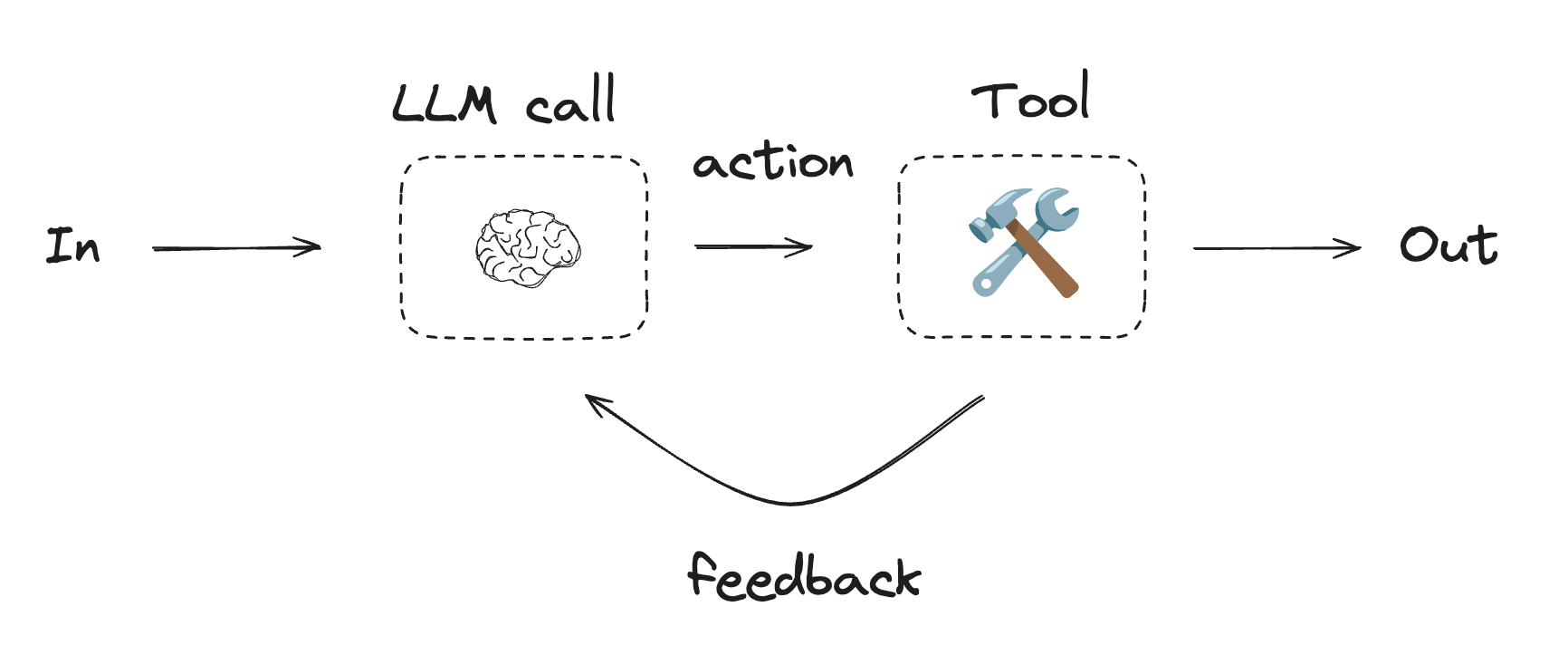
使用工具
import { tool } from "@langchain/core/tools";
import * as z from "zod";

// 定义工具
const multiply = tool(
  ({ a, b }) => {
    return a * b;
  },
  {
    name: "multiply",
    description: "将两个数字相乘",
    schema: z.object({
      a: z.number().describe("第一个数字"),
      b: z.number().describe("第二个数字"),
    }),
  }
);

const add = tool(
  ({ a, b }) => {
    return a + b;
  },
  {
    name: "add",
    description: "将两个数字相加",
    schema: z.object({
      a: z.number().describe("第一个数字"),
      b: z.number().describe("第二个数字"),
    }),
  }
);

const divide = tool(
  ({ a, b }) => {
    return a / b;
  },
  {
    name: "divide",
    description: "将两个数字相除",
    schema: z.object({
      a: z.number().describe("第一个数字"),
      b: z.number().describe("第二个数字"),
    }),
  }
);

// 使用工具增强 LLM
const tools = [add, multiply, divide];
const toolsByName = Object.fromEntries(tools.map((tool) => [tool.name, tool]));
const llmWithTools = llm.bindTools(tools);
import { StateGraph, StateSchema, MessagesValue, GraphNode, ConditionalEdgeRouter } from "@langchain/langgraph";
import { ToolNode } from "@langchain/langgraph/prebuilt";
import {
  SystemMessage,
  ToolMessage
} from "@langchain/core/messages";

// 图状态
const State = new StateSchema({
  messages: MessagesValue,
});

// 节点
const llmCall: GraphNode<typeof State> = async (state) => {
  // LLM 决定是否调用工具
  const result = await llmWithTools.invoke([
    {
      role: "system",
      content: "你是一个有用的助手,负责对一组输入执行算术运算。"
    },
    ...state.messages
  ]);

  return {
    messages: [result]
  };
};

const toolNode = new ToolNode(tools);

// 条件边函数,路由到工具节点或结束
const shouldContinue: ConditionalEdgeRouter<typeof State, "toolNode"> = (state) => {
  const messages = state.messages;
  const lastMessage = messages.at(-1);

  // 如果 LLM 进行了工具调用,则执行操作
  if (lastMessage?.tool_calls?.length) {
    return "toolNode";
  }
  // 否则,我们停止(回复用户)
  return "__end__";
};

// 构建工作流
const agentBuilder = new StateGraph(State)
  .addNode("llmCall", llmCall)
  .addNode("toolNode", toolNode)
  // 添加边以连接节点
  .addEdge("__start__", "llmCall")
  .addConditionalEdges(
    "llmCall",
    shouldContinue,
    ["toolNode", "__end__"]
  )
  .addEdge("toolNode", "llmCall")
  .compile();

// 调用
const messages = [{
  role: "user",
  content: "将 3 和 4 相加。"
}];
const result = await agentBuilder.invoke({ messages });
console.log(result.messages);
import { task, entrypoint, addMessages } from "@langchain/langgraph";
import { BaseMessageLike, ToolCall } from "@langchain/core/messages";

const callLlm = task("llmCall", async (messages: BaseMessageLike[]) => {
  // LLM 决定是否调用工具
  return llmWithTools.invoke([
    {
      role: "system",
      content: "你是一个有用的助手,负责对一组输入执行算术运算。"
    },
    ...messages
  ]);
});

const callTool = task("toolCall", async (toolCall: ToolCall) => {
  // 执行工具调用
  const tool = toolsByName[toolCall.name];
  return tool.invoke(toolCall.args);
});

const agent = entrypoint(
  "agent",
  async (messages) => {
    let llmResponse = await callLlm(messages);

    while (true) {
      if (!llmResponse.tool_calls?.length) {
        break;
      }

      // 执行工具
      const toolResults = await Promise.all(
        llmResponse.tool_calls.map((toolCall) => callTool(toolCall))
      );

      messages = addMessages(messages, [llmResponse, ...toolResults]);
      llmResponse = await callLlm(messages);
    }

    messages = addMessages(messages, [llmResponse]);
    return messages;
  }
);

// 调用
const messages = [{
  role: "user",
  content: "将 3 和 4 相加。"
}];

const stream = await agent.stream([messages], {
  streamMode: "updates",
});

for await (const step of stream) {
  console.log(step);
}
通过 MCP 将这些文档连接到 Claude、VSCode 等,以获取实时答案。