记忆是一个记录先前交互信息的系统。对于 AI 代理而言,记忆至关重要,因为它能让代理记住先前的交互、从反馈中学习并适应用户偏好。随着代理处理更复杂的任务和更多的用户交互,这种能力对于效率和用户满意度都变得必不可少。
短期记忆让您的应用程序能够在单个线程或会话中记住先前的交互。
线程在会话中组织多个交互,类似于电子邮件将消息分组到单个对话中。
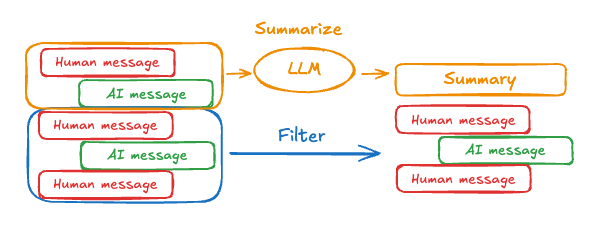
对话历史是短期记忆最常见的形式。长对话对当今的 LLM 构成了挑战;完整的历史可能无法放入 LLM 的上下文窗口中,导致上下文丢失或错误。
即使您的模型支持完整的上下文长度,大多数 LLM 在长上下文上的表现仍然不佳。它们会因陈旧或离题的内容而“分心”,同时还会遭受响应时间变慢和成本增加的影响。
聊天模型使用消息 来接受上下文,这些消息包括指令(系统消息)和输入(人类消息)。在聊天应用程序中,消息在人类输入和模型响应之间交替,从而形成一个随时间增长的消息列表。由于上下文窗口有限,许多应用程序可以从使用技术来移除或“忘记”陈旧信息中受益。
需要跨 对话记住信息?使用长期记忆 来存储和检索跨不同线程和会话的用户特定或应用程序级数据。
要将短期记忆(线程级持久性)添加到代理中,您需要在创建代理时指定一个 checkpointer。
LangChain 的代理将短期记忆作为代理状态的一部分进行管理。 通过将这些存储在图的状态中,代理可以访问给定对话的完整上下文,同时保持不同线程之间的分离。 状态使用检查点持久化到数据库(或内存)中,以便线程可以随时恢复。 当代理被调用或步骤(如工具调用)完成时,短期记忆会更新,并且状态在每个步骤开始时被读取。
import { createAgent } from "langchain" ;
import { MemorySaver } from "@langchain/langgraph" ;
const checkpointer = new MemorySaver () ;
const agent = createAgent ( {
model : "claude-sonnet-4-6" ,
tools : [] ,
checkpointer ,
} ) ;
await agent . invoke (
{ messages : [ { role : "user" , content : "hi! i am Bob" } ] },
{ configurable : { thread_id : "1" } }
) ;
生产环境
在生产环境中,使用由数据库支持的检查点:
import { PostgresSaver } from "@langchain/langgraph-checkpoint-postgres" ;
const DB_URI = "postgresql://postgres:postgres@localhost:5442/postgres?sslmode=disable" ;
const checkpointer = PostgresSaver . fromConnString (DB_URI) ;
有关更多检查点选项,包括 SQLite、Postgres 和 Azure Cosmos DB,请参阅持久性文档中的检查点库列表 。
自定义代理记忆
您可以通过创建带有状态模式的自定义中间件来扩展代理状态。自定义状态模式可以使用中间件中的 stateSchema 参数传递。建议使用 StateSchema 类进行状态定义(也支持纯 Zod 对象)。
import { createAgent , createMiddleware } from "langchain" ;
import { StateSchema , MemorySaver } from "@langchain/langgraph" ;
import * as z from "zod" ;
const CustomState = new StateSchema ( {
userId : z . string () ,
preferences : z . record (z . string () , z . any ()) ,
} ) ;
const stateExtensionMiddleware = createMiddleware ( {
name : "StateExtension" ,
stateSchema : CustomState ,
} ) ;
const checkpointer = new MemorySaver () ;
const agent = createAgent ( {
model : "gpt-5" ,
tools : [] ,
middleware : [stateExtensionMiddleware] ,
checkpointer ,
} ) ;
// 自定义状态可以在调用时传入
const result = await agent . invoke ( {
messages : [ { role : "user" , content : "Hello" } ] ,
userId : "user_123" ,
preferences : { theme : "dark" },
} ) ;
常见模式
启用短期记忆 后,长对话可能会超出 LLM 的上下文窗口。常见的解决方案是:
修剪消息 移除前 N 条或后 N 条消息(在调用 LLM 之前)
删除消息 从 LangGraph 状态中永久删除消息
这允许代理跟踪对话,而不会超出 LLM 的上下文窗口。
修剪消息
大多数 LLM 都有一个最大支持的上下文窗口(以令牌为单位)。
决定何时截断消息的一种方法是计算消息历史中的令牌数,并在接近该限制时进行截断。如果您使用 LangChain,可以使用修剪消息实用程序,并指定要从列表中保留的令牌数量,以及用于处理边界的 strategy(例如,保留最后的 maxTokens)。
要在代理中修剪消息历史,请使用 createMiddleware 和 beforeModel 钩子:
import { RemoveMessage } from "@langchain/core/messages" ;
import { createAgent , createMiddleware } from "langchain" ;
import { MemorySaver , REMOVE_ALL_MESSAGES } from "@langchain/langgraph" ;
const trimMessages = createMiddleware ( {
name : "TrimMessages" ,
beforeModel : ( state ) => {
const messages = state . messages ;
if (messages . length <= 3 ) {
return ; // 无需更改
}
const firstMsg = messages[ 0 ] ;
const recentMessages =
messages . length % 2 === 0 ? messages . slice ( - 3 ) : messages . slice ( - 4 ) ;
const newMessages = [firstMsg , ... recentMessages] ;
return {
messages : [
new RemoveMessage ( { id : REMOVE_ALL_MESSAGES } ) ,
... newMessages ,
] ,
};
},
} ) ;
const checkpointer = new MemorySaver () ;
const agent = createAgent ( {
model : "gpt-4.1" ,
tools : [] ,
middleware : [trimMessages] ,
checkpointer ,
} ) ;
删除消息
您可以从图状态中删除消息以管理消息历史。
当您想要移除特定消息或清除整个消息历史时,这很有用。
要从图状态中删除消息,您可以使用 RemoveMessage。要使 RemoveMessage 生效,您需要使用带有 messagesStateReducer reducer 的状态键,如 MessagesValue。
要移除特定消息:
import { RemoveMessage } from "@langchain/core/messages" ;
const deleteMessages = ( state ) => {
const messages = state . messages ;
if (messages . length > 2 ) {
// 移除最早的两条消息
return {
messages : messages
. slice ( 0 , 2 )
. map ( ( m ) => new RemoveMessage ( { id : m . id } )) ,
};
}
};
删除消息时,请确保 生成的消息历史是有效的。检查您使用的 LLM 提供商的限制。例如:
一些提供商期望消息历史以 user 消息开头
大多数提供商要求带有工具调用的 assistant 消息后面必须跟有相应的 tool 结果消息。
import { RemoveMessage } from "@langchain/core/messages" ;
import { createAgent , createMiddleware } from "langchain" ;
import { MemorySaver } from "@langchain/langgraph" ;
const deleteOldMessages = createMiddleware ( {
name : "DeleteOldMessages" ,
afterModel : ( state ) => {
const messages = state . messages ;
if (messages . length > 2 ) {
// 移除最早的两条消息
return {
messages : messages
. slice ( 0 , 2 )
. map ( ( m ) => new RemoveMessage ( { id : m . id ! } )) ,
};
}
return ;
},
} ) ;
const agent = createAgent ( {
model : "gpt-4.1" ,
tools : [] ,
systemPrompt : "Please be concise and to the point." ,
middleware : [deleteOldMessages] ,
checkpointer : new MemorySaver () ,
} ) ;
const config = { configurable : { thread_id : "1" } };
const streamA = await agent . stream (
{ messages : [ { role : "user" , content : "hi! I'm bob" } ] },
{ ... config , streamMode : "values" }
) ;
for await ( const event of streamA) {
const messageDetails = event . messages . map ( ( message ) => [
message . getType () ,
message . content ,
]) ;
console . log (messageDetails) ;
}
const streamB = await agent . stream (
{
messages : [ { role : "user" , content : "what's my name?" } ] ,
},
{ ... config , streamMode : "values" }
) ;
for await ( const event of streamB) {
const messageDetails = event . messages . map ( ( message ) => [
message . getType () ,
message . content ,
]) ;
console . log (messageDetails) ;
}
[[ "human", "hi! I'm bob" ]]
[[ "human", "hi! I'm bob" ], [ "ai", "Hello, Bob! How can I assist you today?" ]]
[[ "human", "hi! I'm bob" ], [ "ai", "Hello, Bob! How can I assist you today?" ]]
[[ "human", "hi! I'm bob" ], [ "ai", "Hello, Bob! How can I assist you today" ], ["human", "what's my name?" ]]
[[ "human", "hi! I'm bob" ], [ "ai", "Hello, Bob! How can I assist you today?" ], ["human", "what's my name?"], [ "ai", "Your name is Bob, as you mentioned. How can I help you further?" ]]
[[ "human", "what's my name?" ], [ "ai", "Your name is Bob, as you mentioned. How can I help you further?" ]]
总结消息
如上所示,修剪或移除消息的问题在于,您可能会因清理消息队列而丢失信息。因此,一些应用程序受益于使用聊天模型总结消息历史的更复杂方法。
要在代理中总结消息历史,请使用内置的 summarizationMiddleware :
import { createAgent , summarizationMiddleware } from "langchain" ;
import { MemorySaver } from "@langchain/langgraph" ;
const checkpointer = new MemorySaver () ;
const agent = createAgent ( {
model : "gpt-4.1" ,
tools : [] ,
middleware : [
summarizationMiddleware ( {
model : "gpt-4.1-mini" ,
trigger : { tokens : 4000 },
keep : { messages : 20 },
} ) ,
] ,
checkpointer ,
} ) ;
const config = { configurable : { thread_id : "1" } };
await agent . invoke ( { messages : "hi, my name is bob" }, config) ;
await agent . invoke ( { messages : "write a short poem about cats" }, config) ;
await agent . invoke ( { messages : "now do the same but for dogs" }, config) ;
const finalResponse = await agent . invoke ( { messages : "what's my name?" }, config) ;
console . log (finalResponse . messages . at ( - 1 ) ?. content) ;
// Your name is Bob!
有关更多配置选项,请参见 summarizationMiddleware 。
访问记忆
您可以通过多种方式访问和修改代理的短期记忆(状态):
在工具中读取短期记忆
使用 runtime 参数(类型为 ToolRuntime)在工具中访问短期记忆(状态)。
runtime 参数在工具签名中是隐藏的(因此模型看不到它),但工具可以通过它访问状态。
import { createAgent , tool , type ToolRuntime } from "langchain" ;
import { StateSchema } from "@langchain/langgraph" ;
import * as z from "zod" ;
const CustomState = new StateSchema ( {
userId : z . string () ,
} ) ;
const getUserInfo = tool (
async ( _ , config : ToolRuntime < typeof CustomState . State > ) => {
const userId = config . state . userId ;
return userId === "user_123" ? "John Doe" : "Unknown User" ;
},
{
name : "get_user_info" ,
description : "Get user info" ,
schema : z . object ( {} ) ,
}
) ;
const agent = createAgent ( {
model : "gpt-5-nano" ,
tools : [getUserInfo] ,
stateSchema : CustomState ,
} ) ;
const result = await agent . invoke (
{
messages : [ { role : "user" , content : "what's my name?" } ] ,
userId : "user_123" ,
},
{
context : {},
}
) ;
console . log (result . messages . at ( - 1 ) ?. content) ;
// Outputs: "Your name is John Doe."
从工具写入短期记忆
要在执行期间修改代理的短期记忆(状态),您可以直接从工具返回状态更新。
这对于持久化中间结果或使信息可供后续工具或提示使用非常有用。
import { tool , createAgent , ToolMessage , type ToolRuntime } from "langchain" ;
import { Command , StateSchema } from "@langchain/langgraph" ;
import * as z from "zod" ;
const CustomState = new StateSchema ( {
userId : z . string () . optional () ,
} ) ;
const updateUserInfo = tool (
async ( _ , config : ToolRuntime < typeof CustomState . State > ) => {
const userId = config . state . userId ;
const name = userId === "user_123" ? "John Smith" : "Unknown user" ;
return new Command ( {
update : {
userName : name ,
// 更新消息历史
messages : [
new ToolMessage ( {
content : "Successfully looked up user information" ,
tool_call_id : config . toolCall ?. id ?? "" ,
} ) ,
] ,
},
} ) ;
},
{
name : "update_user_info" ,
description : "Look up and update user info." ,
schema : z . object ( {} ) ,
}
) ;
const greet = tool (
async ( _ , config ) => {
const userName = config . context ?. userName ;
return `Hello ${ userName } !` ;
},
{
name : "greet" ,
description : "Use this to greet the user once you found their info." ,
schema : z . object ( {} ) ,
}
) ;
const agent = createAgent ( {
model : "openai:gpt-5-mini" ,
tools : [updateUserInfo , greet] ,
stateSchema : CustomState ,
} ) ;
const result = await agent . invoke ( {
messages : [ { role : "user" , content : "greet the user" } ] ,
userId : "user_123" ,
} ) ;
console . log (result . messages . at ( - 1 ) ?. content) ;
// Output: "Hello! I’m here to help — what would you like to do today?"
在中间件中访问短期记忆(状态),以根据对话历史或自定义状态字段创建动态提示。
import * as z from "zod" ;
import { createAgent , tool , dynamicSystemPromptMiddleware } from "langchain" ;
const contextSchema = z . object ( {
userName : z . string () ,
} ) ;
type ContextSchema = z . infer < typeof contextSchema > ;
const getWeather = tool (
async ({ city }) => {
return `The weather in ${ city } is always sunny!` ;
},
{
name : "get_weather" ,
description : "Get user info" ,
schema : z . object ( {
city : z . string () ,
} ) ,
}
) ;
const agent = createAgent ( {
model : "gpt-5-nano" ,
tools : [getWeather] ,
contextSchema ,
middleware : [
dynamicSystemPromptMiddleware < ContextSchema > ( ( _ , config ) => {
return `You are a helpful assistant. Address the user as ${ config . context ?. userName } .` ;
} ) ,
] ,
} ) ;
const result = await agent . invoke (
{
messages : [ { role : "user" , content : "What is the weather in SF?" } ] ,
},
{
context : {
userName : "John Smith" ,
},
}
) ;
for ( const message of result . messages) {
console . log (message) ;
}
/**
* HumanMessage {
* "content": "What is the weather in SF?",
* // ...
* }
* AIMessage {
* // ...
* "tool_calls": [
* {
* "name": "get_weather",
* "args": {
* "city": "San Francisco"
* },
* "type": "tool_call",
* "id": "call_tCidbv0apTpQpEWb3O2zQ4Yx"
* }
* ],
* // ...
* }
* ToolMessage {
* "content": "The weather in San Francisco is always sunny!",
* "tool_call_id": "call_tCidbv0apTpQpEWb3O2zQ4Yx"
* // ...
* }
* AIMessage {
* "content": "John Smith, here's the latest: The weather in San Francisco is always sunny!\n\nIf you'd like more details (temperature, wind, humidity) or a forecast for the next few days, I can pull that up. What would you like?",
* // ...
* }
*/
模型之前
import { RemoveMessage } from "@langchain/core/messages" ;
import { createAgent , createMiddleware , trimMessages } from "langchain" ;
import { MemorySaver } from "@langchain/langgraph" ;
import { REMOVE_ALL_MESSAGES } from "@langchain/langgraph" ;
const trimMessageHistory = createMiddleware ( {
name : "TrimMessages" ,
beforeModel : async ( state ) => {
const trimmed = await trimMessages (state . messages , {
maxTokens : 384 ,
strategy : "last" ,
startOn : "human" ,
endOn : [ "human" , "tool" ] ,
tokenCounter : ( msgs ) => msgs . length ,
} ) ;
return {
messages : [ new RemoveMessage ( { id : REMOVE_ALL_MESSAGES } ) , ... trimmed] ,
};
},
} ) ;
const checkpointer = new MemorySaver () ;
const agent = createAgent ( {
model : "gpt-5-nano" ,
tools : [] ,
middleware : [trimMessageHistory] ,
checkpointer ,
} ) ;
模型之后
import { RemoveMessage } from "@langchain/core/messages" ;
import { createAgent , createMiddleware } from "langchain" ;
import { REMOVE_ALL_MESSAGES } from "@langchain/langgraph" ;
const validateResponse = createMiddleware ( {
name : "ValidateResponse" ,
afterModel : ( state ) => {
const lastMessage = state . messages . at ( - 1 ) ?. content ;
if (
typeof lastMessage === "string" &&
lastMessage . toLowerCase () . includes ( "confidential" )
) {
return {
messages : [
new RemoveMessage ( { id : REMOVE_ALL_MESSAGES } ) ,
] ,
};
}
return ;
},
} ) ;
const agent = createAgent ( {
model : "gpt-5-nano" ,
tools : [] ,
middleware : [validateResponse] ,
} ) ;