概述

构建代理(或任何 LLM 应用程序)的难点在于使其足够可靠。虽然它们可能适用于原型,但它们通常在实际用例中失败。

代理为什么会失败?

当代理失败时,通常是因为代理内部的 LLM 调用采取了错误的操作/没有做我们期望的事情。LLM 失败的原因有两个:
  1. 底层 LLM 不够强大
  2. 没有将“正确”的上下文传递给 LLM
通常情况下——实际上是第二个原因导致代理不可靠。 上下文工程 是以正确的格式提供正确的信息和工具,以便 LLM 能够完成任务。这是 AI 工程师的首要工作。缺乏“正确”的上下文是更可靠代理的头号障碍,而 LangChain 的代理抽象设计独特,旨在促进上下文工程。
刚接触上下文工程?从 概念概述 开始,了解不同类型的上下文以及何时使用它们。

代理循环

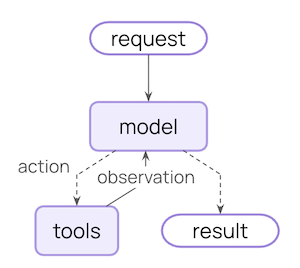
典型的代理循环包含两个主要步骤:
  1. 模型调用 - 使用提示和可用工具调用 LLM,返回响应或执行工具的请求
  2. 工具执行 - 执行 LLM 请求的工具,返回工具结果
Core agent loop diagram
此循环持续进行,直到 LLM 决定完成。

您可以控制什么

为了构建可靠的代理,您需要控制代理循环每一步发生的事情,以及步骤之间发生的事情。
上下文类型您控制的内容瞬态或持久
模型上下文进入模型调用的内容(指令、消息历史记录、工具、响应格式)瞬态
工具上下文工具可以访问和产生的内容(读取/写入状态、存储、运行时上下文)持久
生命周期上下文模型和工具调用之间发生的事情(摘要、防护栏、日志记录等)持久

瞬态上下文

LLM 在单次调用中看到的内容。您可以修改消息、工具或提示,而无需更改保存在状态中的内容。

持久上下文

跨轮次保存在状态中的内容。生命周期钩子和工具写入会永久修改此内容。

数据源

在此过程中,您的代理访问(读取/写入)不同的数据源:
数据源也称为范围示例
运行时上下文静态配置对话范围用户 ID、API 密钥、数据库连接、权限、环境设置
状态短期记忆对话范围当前消息、上传的文件、身份验证状态、工具结果
存储长期记忆跨对话用户偏好、提取的见解、记忆、历史数据

工作原理

LangChain 中间件 是底层的机制,使得上下文工程对于使用 LangChain 的开发人员来说变得切实可行。 中间件允许您挂钩到代理生命周期的任何步骤,并且:
  • 更新上下文
  • 跳转到代理生命周期中的不同步骤
在本指南中,您将看到经常使用中间件 API 作为实现上下文工程目的的手段。

模型上下文

控制每次模型调用的内容——指令、可用工具、使用的模型和输出格式。这些决策直接影响可靠性和成本。 所有这些类型的模型上下文都可以从 状态(短期记忆)、存储(长期记忆)或 运行时上下文(静态配置)中提取。

系统提示

系统提示设置 LLM 的行为和能力。不同的用户、上下文或对话阶段需要不同的指令。成功的代理利用记忆、偏好和配置为当前对话状态提供正确的指令。
从状态访问消息计数或对话上下文:
import { createAgent } from "langchain";

const agent = createAgent({
  model: "gpt-4.1",
  tools: [...],
  middleware: [
    dynamicSystemPromptMiddleware((state) => {
      // Read from State: check conversation length
      const messageCount = state.messages.length;

      let base = "You are a helpful assistant.";

      if (messageCount > 10) {
        base += "\nThis is a long conversation - be extra concise.";
      }

      return base;
    }),
  ],
});

消息

消息构成发送给 LLM 的提示。 管理消息的内容对于确保 LLM 拥有正确的信息以做出良好响应至关重要。
当与当前查询相关时,从状态注入上传的文件上下文:
import { createMiddleware } from "langchain";

const injectFileContext = createMiddleware({
  name: "InjectFileContext",
  wrapModelCall: (request, handler) => {
    // request.state is a shortcut for request.state.messages
    const uploadedFiles = request.state.uploadedFiles || [];

    if (uploadedFiles.length > 0) {
      // Build context about available files
      const fileDescriptions = uploadedFiles.map(file =>
        `- ${file.name} (${file.type}): ${file.summary}`
      );

      const fileContext = `Files you have access to in this conversation:
${fileDescriptions.join("\n")}

Reference these files when answering questions.`;

      // Inject file context before recent messages
      const messages = [  
        ...request.messages,  // Rest of conversation
        { role: "user", content: fileContext }
      ];
      request = request.override({ messages });
    }

    return handler(request);
  },
});

const agent = createAgent({
  model: "gpt-4.1",
  tools: [...],
  middleware: [injectFileContext],
});
瞬态与持久消息更新:上面的示例使用 wrap_model_call 进行 瞬态 更新——修改单次调用发送给模型的消息,而不更改保存在状态中的内容。对于修改状态的 持久 更新(如 生命周期上下文 中的摘要示例),请使用像 before_modelafter_model 这样的生命周期钩子来永久更新对话历史记录。有关更多详细信息,请参阅 中间件文档

工具

工具让模型与数据库、API 和外部系统交互。您如何定义和选择工具直接影响模型是否可以有效地完成任务。

定义工具

每个工具都需要清晰的名称、描述、参数名称和参数描述。这些不仅仅是元数据——它们指导模型关于何时以及如何使用工具的推理。
import { tool } from "@langchain/core/tools";
import { z } from "zod";

const searchOrders = tool(
  async ({ userId, status, limit }) => {
    // Implementation here
  },
  {
    name: "search_orders",
    description: `Search for user orders by status.

    Use this when the user asks about order history or wants to check
    order status. Always filter by the provided status.`,
    schema: z.object({
      userId: z.string().describe("Unique identifier for the user"),
      status: z.enum(["pending", "shipped", "delivered"]).describe("Order status to filter by"),
      limit: z.number().default(10).describe("Maximum number of results to return"),
    }),
  }
);

选择工具

并非每个工具都适合每种情况。太多的工具可能会让模型不知所措(上下文过载)并增加错误;太少则限制了能力。动态工具选择根据身份验证状态、用户权限、功能标志或对话阶段来调整可用的工具集。
仅在某些对话里程碑后启用高级工具:
import { createMiddleware } from "langchain";

const stateBasedTools = createMiddleware({
  name: "StateBasedTools",
  wrapModelCall: (request, handler) => {
    // Read from State: check authentication and conversation length
    const state = request.state;
    const isAuthenticated = state.authenticated || false;
    const messageCount = state.messages.length;

    let filteredTools = request.tools;

    // Only enable sensitive tools after authentication
    if (!isAuthenticated) {
      filteredTools = request.tools.filter(t => t.name.startsWith("public_"));
    } else if (messageCount < 5) {
      filteredTools = request.tools.filter(t => t.name !== "advanced_search");
    }

    return handler({ ...request, tools: filteredTools });
  },
});
有关过滤预注册工具和在运行时注册工具(例如,从 MCP 服务器)的示例,请参阅 动态工具

模型

不同的模型有不同的优势、成本和上下文窗口。为手头的任务选择合适的模型,这可能会在代理运行期间发生变化。
根据状态中的对话长度使用不同的模型:
import { createMiddleware, initChatModel } from "langchain";

// Initialize models once outside the middleware
const largeModel = initChatModel("claude-sonnet-4-6");
const standardModel = initChatModel("gpt-4.1");
const efficientModel = initChatModel("gpt-4.1-mini");

const stateBasedModel = createMiddleware({
  name: "StateBasedModel",
  wrapModelCall: (request, handler) => {
    // request.messages is a shortcut for request.state.messages
    const messageCount = request.messages.length;
    let model;

    if (messageCount > 20) {
      model = largeModel;
    } else if (messageCount > 10) {
      model = standardModel;
    } else {
      model = efficientModel;
    }

    return handler({ ...request, model });
  },
});
有关更多示例,请参阅 动态模型

响应格式

结构化输出将非结构化文本转换为经过验证的结构化数据。在提取特定字段或为下游系统返回数据时,自由格式的文本是不够的。 工作原理: 当您提供模式作为响应格式时,模型的最终响应保证符合该模式。代理运行模型/工具调用循环,直到模型完成调用工具,然后将最终响应强制转换为提供的格式。

定义格式

架构定义指导模型。字段名称、类型和描述准确指定输出应遵循的格式。
import { z } from "zod";

const customerSupportTicket = z.object({
  category: z.enum(["billing", "technical", "account", "product"]).describe(
    "Issue category"
  ),
  priority: z.enum(["low", "medium", "high", "critical"]).describe(
    "Urgency level"
  ),
  summary: z.string().describe(
    "One-sentence summary of the customer's issue"
  ),
  customerSentiment: z.enum(["frustrated", "neutral", "satisfied"]).describe(
    "Customer's emotional tone"
  ),
}).describe("Structured ticket information extracted from customer message");

选择格式

动态响应格式选择根据用户偏好、对话阶段或角色调整模式——早期返回简单格式,随着复杂性增加返回详细格式。
根据对话状态配置结构化输出:
import { createMiddleware } from "langchain";
import { z } from "zod";

const simpleResponse = z.object({
  answer: z.string().describe("A brief answer"),
});

const detailedResponse = z.object({
  answer: z.string().describe("A detailed answer"),
  reasoning: z.string().describe("Explanation of reasoning"),
  confidence: z.number().describe("Confidence score 0-1"),
});

const stateBasedOutput = createMiddleware({
  name: "StateBasedOutput",
  wrapModelCall: (request, handler) => {
    // request.state is a shortcut for request.state.messages
    const messageCount = request.messages.length;

    let responseFormat;
    if (messageCount < 3) {
      // Early conversation - use simple format
      responseFormat = simpleResponse;
    } else {
      // Established conversation - use detailed format
      responseFormat = detailedResponse;
    }

    return handler({ ...request, responseFormat });
  },
});

工具上下文

工具的特殊之处在于它们既读取又写入上下文。 在最基本的情况下,当工具执行时,它接收 LLM 的请求参数并将工具消息返回。工具执行其工作并产生结果。 工具还可以获取对模型执行和完成任务至关重要的信息。

读取

大多数现实世界的工具需要的不仅仅是 LLM 的参数。它们需要用于数据库查询的用户 ID、用于外部服务的 API 密钥或当前会话状态来做出决策。工具从状态、存储和运行时上下文中读取以访问此信息。
从状态读取以检查当前会话信息:
import * as z from "zod";
import { createAgent, tool, type ToolRuntime } from "langchain";

const checkAuthentication = tool(
  async (_, runtime: ToolRuntime) => {
    // Read from State: check current auth status
    const currentState = runtime.state;
    const isAuthenticated = currentState.authenticated || false;

    if (isAuthenticated) {
      return "User is authenticated";
    } else {
      return "User is not authenticated";
    }
  },
  {
    name: "check_authentication",
    description: "Check if user is authenticated",
    schema: z.object({}),
  }
);

写入

工具结果可用于帮助代理完成给定任务。工具既可以直接将结果返回给模型,也可以更新代理的记忆,以便为未来的步骤提供重要的上下文。
使用 Command 写入状态以跟踪会话特定信息:
import * as z from "zod";
import { tool } from "@langchain/core/tools";
import { createAgent } from "langchain";
import { Command } from "@langchain/langgraph";

const authenticateUser = tool(
  async ({ password }) => {
    // Perform authentication
    if (password === "correct") {
      // Write to State: mark as authenticated using Command
      return new Command({
        update: { authenticated: true },
      });
    } else {
      return new Command({ update: { authenticated: false } });
    }
  },
  {
    name: "authenticate_user",
    description: "Authenticate user and update State",
    schema: z.object({
      password: z.string(),
    }),
  }
);
有关在工具中访问状态、存储和运行时上下文的综合示例,请参阅 工具

生命周期的上下文

控制核心代理步骤 之间 发生的事情——拦截数据流以实施横切关注点,如摘要、防护栏和日志记录。 正如您在 模型上下文工具上下文 中看到的那样,中间件 是使上下文工程变得切实可行的机制。中间件允许您挂钩到代理生命周期的任何步骤,并且可以:
  1. 更新上下文 - 修改状态和存储以持久保存更改、更新对话历史记录或保存见解
  2. 生命周期中的跳转 - 根据上下文移动到代理周期中的不同步骤(例如,如果满足条件则跳过工具执行,使用修改后的上下文重复模型调用)
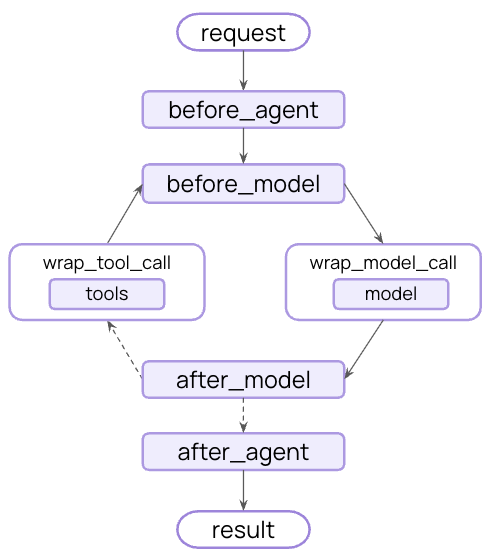
Middleware hooks in the agent loop

示例:摘要

最常见的生命周期模式之一是当对话历史记录过长时自动压缩它。与 模型上下文 中显示的瞬态消息修剪不同,摘要 持久更新状态 - 永久替换旧消息为摘要,以便保存用于所有未来的轮次。 LangChain 为此提供了内置中间件:
import { createAgent, summarizationMiddleware } from "langchain";

const agent = createAgent({
  model: "gpt-4.1",
  tools: [...],
  middleware: [
    summarizationMiddleware({
      model: "gpt-4.1-mini",
      trigger: { tokens: 4000 },
      keep: { messages: 20 },
    }),
  ],
});
当对话超过令牌限制时,SummarizationMiddleware 会自动:
  1. 使用单独的 LLM 调用总结较旧的消息
  2. 将它们替换为状态中的摘要消息(永久地)
  3. 保持最近的消息完整以提供上下文
总结后的对话历史记录将永久更新——未来的轮次将看到摘要而不是原始消息。
有关内置中间件、可用钩子以及如何创建自定义中间件的完整列表,请参阅 中间件文档

最佳实践

  1. 从简单开始 - 从静态提示和工具开始,仅在需要时添加动态特性
  2. 增量测试 - 一次添加一个上下文工程功能
  3. 监控性能 - 跟踪模型调用、令牌使用情况和延迟
  4. 使用内置中间件 - 利用 SummarizationMiddlewareLLMToolSelectorMiddleware
  5. 记录您的上下文策略 - 清楚地说明正在传递什么上下文以及原因
  6. 了解瞬态与持久:模型上下文更改是瞬态的(每次调用),而生命周期上下文更改持久保存到状态

相关资源