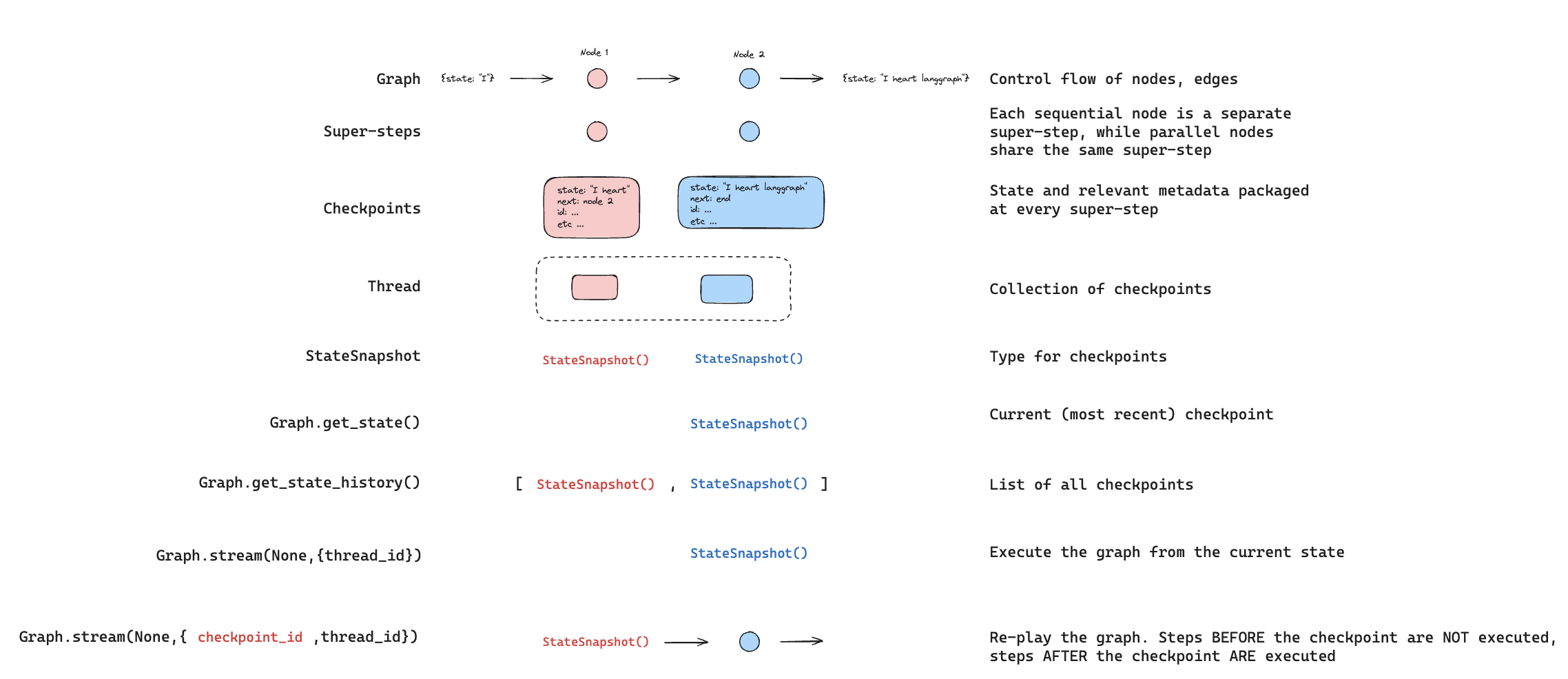
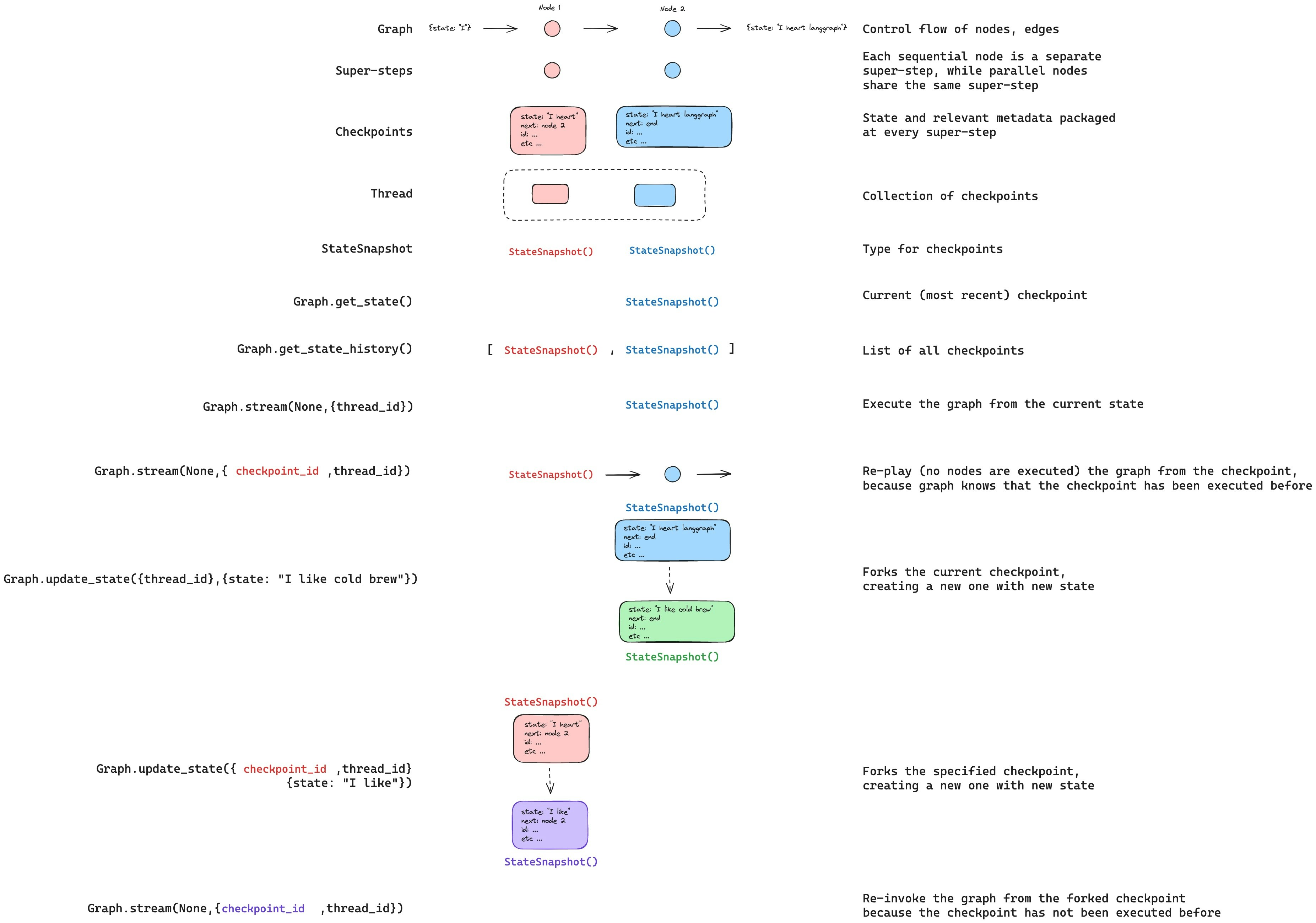
概述

LangGraph 通过检查点支持时间旅行:
  • 重放:从先前的检查点重试。
  • 分叉:从先前的检查点分支,使用修改后的状态探索替代路径。
两者都通过从先前的检查点恢复来工作。检查点之前的节点不会重新执行(结果已保存)。检查点之后的节点会重新执行,包括任何 LLM 调用、API 请求和中断(这可能会产生不同的结果)。

重放

使用先前检查点的配置调用图,从该点重放。
重放会重新执行节点——它不仅仅是从缓存中读取。LLM 调用、API 请求和中断会再次触发,并可能返回不同的结果。从最终检查点(没有 next 节点)重放是一个无操作。
重放 使用 getStateHistory 查找要从中重放的检查点,然后使用该检查点的配置调用 invoke
import { v7 as uuid7 } from "uuid";
import { StateGraph, MemorySaver, START } from "@langchain/langgraph";

const StateAnnotation = Annotation.Root({
  topic: Annotation<string>(),
  joke: Annotation<string>(),
});

function generateTopic(state: typeof StateAnnotation.State) {
  return { topic: "socks in the dryer" };
}

function writeJoke(state: typeof StateAnnotation.State) {
  return { joke: `Why do ${state.topic} disappear? They elope!` };
}

const checkpointer = new MemorySaver();
const graph = new StateGraph(StateAnnotation)
  .addNode("generateTopic", generateTopic)
  .addNode("writeJoke", writeJoke)
  .addEdge(START, "generateTopic")
  .addEdge("generateTopic", "writeJoke")
  .compile({ checkpointer });

// 步骤 1:运行图
const config = { configurable: { thread_id: uuid7() } };
const result = await graph.invoke({}, config);

// 步骤 2:查找要重放的检查点
const states = [];
for await (const state of graph.getStateHistory(config)) {
  states.push(state);
}

// 步骤 3:从特定检查点重放
const beforeJoke = states.find((s) => s.next.includes("writeJoke"));
const replayResult = await graph.invoke(null, beforeJoke.config);
// writeJoke 重新执行(再次运行),generateTopic 不执行

分叉

分叉从过去的检查点创建一个新分支,并修改状态。在先前的检查点调用 update_state 以创建分叉,然后使用 None 调用 invoke 以继续执行。 分叉
update_state 不会回滚线程。它会创建一个从指定点分支的新检查点。原始执行历史保持不变。
// 查找 writeJoke 之前的检查点
const states = [];
for await (const state of graph.getStateHistory(config)) {
  states.push(state);
}
const beforeJoke = states.find((s) => s.next.includes("writeJoke"));

// 分叉:更新状态以更改主题
const forkConfig = await graph.updateState(
  beforeJoke.config,
  { topic: "chickens" },
);

// 从分叉恢复——writeJoke 使用新主题重新执行
const forkResult = await graph.invoke(null, forkConfig);
console.log(forkResult.joke); // 一个关于鸡的笑话,而不是袜子

从特定节点

当您调用 update_state 时,值使用指定节点的写入器(包括归约器)应用。检查点记录该节点产生了更新,并从该节点的后续节点恢复执行。 默认情况下,LangGraph 从检查点的版本历史推断 as_node。当从特定检查点分叉时,此推断几乎总是正确的。 在以下情况下明确指定 as_node
  • 并行分支:多个节点在同一步骤中更新了状态,LangGraph 无法确定哪个是最后一个(InvalidUpdateError)。
  • 无执行历史:在新线程上设置状态(在测试中常见)。
  • 跳过节点:将 as_node 设置为后面的节点,使图认为该节点已运行。
// 图:generateTopic -> writeJoke

// 将此更新视为由 generateTopic 产生。
// 执行在 writeJoke(generateTopic 的后续节点)恢复。
const forkConfig = await graph.updateState(
  beforeJoke.config,
  { topic: "chickens" },
  { asNode: "generateTopic" },
);

中断

如果您的图使用 interrupt 进行人机回环工作流,中断在时间旅行期间总是会重新触发。包含中断的节点会重新执行,并且 interrupt() 会暂停以等待新的 Command(resume=...)
import { interrupt, Command } from "@langchain/langgraph";

function askHuman(state: { value: string[] }) {
  const answer = interrupt("What is your name?");
  return { value: [`Hello, ${answer}!`] };
}

function finalStep(state: { value: string[] }) {
  return { value: ["Done"] };
}

// ... 使用检查点构建图 ...

// 第一次运行:遇到中断
await graph.invoke({ value: [] }, config);
// 使用答案恢复
await graph.invoke(new Command({ resume: "Alice" }), config);

// 从 askHuman 之前重放
const states = [];
for await (const state of graph.getStateHistory(config)) {
  states.push(state);
}
const beforeAsk = states.filter((s) => s.next.includes("askHuman")).pop();

const replayResult = await graph.invoke(null, beforeAsk.config);
// 在中断处暂停——等待新的 Command({ resume: ... })

// 从 askHuman 之前分叉
const forkConfig = await graph.updateState(beforeAsk.config, { value: ["forked"] });
const forkResult = await graph.invoke(null, forkConfig);
// 在中断处暂停——等待新的 Command({ resume: ... })

// 使用不同的答案恢复分叉的中断
await graph.invoke(new Command({ resume: "Bob" }), forkConfig);
// 结果:{ value: ["forked", "Hello, Bob!", "Done"] }

多个中断

如果您的图在多个点收集输入(例如,一个多步骤表单),您可以在中断之间分叉,以更改后面的答案,而无需重新询问前面的问题。
// 在两个中断之间分叉(在 askName 之后,在 askAge 之前)
const states = [];
for await (const state of graph.getStateHistory(config)) {
  states.push(state);
}
const between = states.filter((s) => s.next.includes("askAge")).pop();

const forkConfig = await graph.updateState(between.config, { value: ["modified"] });
const result = await graph.invoke(null, forkConfig);
// askName 结果保留("name:Alice")
// askAge 在中断处暂停——等待新答案

子图

使用子图的时间旅行取决于子图是否有自己的检查点。这决定了您可以从中进行时间旅行的检查点粒度。
默认情况下,子图继承父图的检查点。父图将整个子图视为单个超级步骤——整个子图执行只有一个父级检查点。从子图之前进行时间旅行会从头开始重新执行它。您无法在默认子图中时间旅行到节点之间的点——您只能从父级进行时间旅行。
// 没有自己检查点的子图(默认)
const subgraph = new StateGraph(StateAnnotation)
  .addNode("stepA", stepA)       // 有 interrupt()
  .addNode("stepB", stepB)       // 有 interrupt()
  .addEdge(START, "stepA")
  .addEdge("stepA", "stepB")
  .compile();  // 无检查点——从父图继承

const graph = new StateGraph(StateAnnotation)
  .addNode("subgraphNode", subgraph)
  .addEdge(START, "subgraphNode")
  .compile({ checkpointer });

// 完成两个中断
await graph.invoke({ value: [] }, config);
await graph.invoke(new Command({ resume: "Alice" }), config);
await graph.invoke(new Command({ resume: "30" }), config);

// 从子图之前进行时间旅行
const states = [];
for await (const state of graph.getStateHistory(config)) {
  states.push(state);
}
const beforeSub = states.filter((s) => s.next.includes("subgraphNode")).pop();

const forkConfig = await graph.updateState(beforeSub.config, { value: ["forked"] });
const result = await graph.invoke(null, forkConfig);
// 整个子图从头开始重新执行
// 您无法在 stepA 和 stepB 之间进行时间旅行
有关配置子图检查点的更多信息,请参见子图持久化