中断允许你在特定点暂停图的执行,并在继续之前等待外部输入。这启用了需要外部输入才能继续的人机交互模式。当触发中断时,LangGraph 使用其持久化层保存图状态,并无限期等待直到你恢复执行。 中断的工作原理是在图节点的任何点调用 interrupt() 函数。该函数接受任何可 JSON 序列化的值,该值会呈现给调用者。当你准备好继续时,通过使用 Command 重新调用图来恢复执行,Command 将成为节点内 interrupt() 调用的返回值。 与静态断点(在特定节点之前或之后暂停)不同,中断是动态的——它们可以放置在代码的任何位置,并且可以基于应用程序逻辑进行条件判断。
  • 检查点保持你的位置: checkpointer 写入确切的图状态,以便你可以稍后恢复,即使处于错误状态。
  • thread_id 是你的指针: 使用 { configurable: { thread_id: ... } } 作为 invoke 方法的选项来告诉 checkpointer 加载哪个状态。
  • 中断负载呈现为 __interrupt__ 你传递给 interrupt() 的值会在 __interrupt__ 字段中返回给调用者,以便你知道图在等待什么。
你选择的 thread_id 实际上是你的持久游标。重用它会恢复同一个检查点;使用新值会启动一个状态为空的全新线程。

使用 interrupt 暂停

interrupt 函数暂停图执行并将值返回给调用者。当你在节点内调用 interrupt 时,LangGraph 保存当前图状态并等待你使用输入恢复执行。 要使用 interrupt,你需要:
  1. 一个 checkpointer 来持久化图状态(在生产环境中使用持久 checkpointer)
  2. 配置中的 thread ID,以便运行时知道从哪个状态恢复
  3. 在你想暂停的地方调用 interrupt()(负载必须是 JSON 可序列化的)
import { interrupt } from "@langchain/langgraph";

async function approvalNode(state: State) {
    // 暂停并请求批准
    const approved = interrupt("Do you approve this action?");

    // Command({ resume: ... }) 提供返回到此变量的值
    return { approved };
}
当你调用 interrupt 时,会发生以下情况:
  1. 图执行在调用 interrupt 的确切点暂停
  2. 状态被保存使用 checkpointer,以便稍后恢复执行。在生产环境中,这应该是一个持久 checkpointer(例如由数据库支持)
  3. 值被返回给调用者,位于 __interrupt__ 下;它可以是任何 JSON 可序列化的值(字符串、对象、数组等)
  4. 图无限期等待直到你用响应恢复执行
  5. 响应被传回节点,当你恢复时,成为 interrupt() 调用的返回值

恢复中断

在中断暂停执行后,你通过使用包含恢复值的 Command 再次调用图来恢复它。恢复值被传回 interrupt 调用,允许节点使用外部输入继续执行。
import { Command } from "@langchain/langgraph";

// 初始运行 - 命中中断并暂停
// thread_id 是指回保存的检查点的持久指针
const config = { configurable: { thread_id: "thread-1" } };
const result = await graph.invoke({ input: "data" }, config);

// 检查中断的内容
// __interrupt__ 镜像了你传递给 interrupt() 的每个负载
console.log(result.__interrupt__);
// [{ value: 'Do you approve this action?', ... }]

// 使用人类的响应恢复
// Command({ resume }) 从节点中的 interrupt() 返回该值
await graph.invoke(new Command({ resume: true }), config);
关于恢复的关键点:
  • 恢复时必须使用与中断发生时相同的 thread ID
  • 传递给 new Command({ resume: ... }) 的值成为 interrupt 调用的返回值
  • 恢复时,节点从调用 interrupt 的节点的开头重新启动,因此 interrupt 之前的任何代码都会再次运行
  • 你可以传递任何 JSON 可序列化的值作为恢复值
new Command({ resume: ... })唯一旨在作为 invoke()/stream() 输入的 Command 模式。其他 Command 参数(updategotograph)旨在用于从节点函数返回。不要传递 new Command({ update: ... }) 作为输入来继续多轮对话——而是传递一个普通的输入对象。

常见模式

中断解锁的关键是暂停执行并等待外部输入的能力。这对各种用例都很有用,包括:
  • 审批工作流:在执行关键操作(API 调用、数据库更改、金融交易)之前暂停
  • 处理多个中断:在单次调用中恢复多个中断时,将中断 ID 与恢复值配对
  • 审查和编辑:让人们在继续之前审查和修改 LLM 输出或工具调用
  • 中断工具调用:在执行工具调用之前暂停,以便在执行之前审查和编辑工具调用
  • 验证人工输入:在进行下一步之前暂停以验证人工输入

带有中途中断 (HITL) 的流式传输

当构建带有人机交互工作流的交互式代理时,你可以同时流式传输消息块和节点更新,以便在处理中断的同时提供实时反馈。 使用多个流模式("messages""updates")以及 subgraphs=True(如果存在子图)来:
  • 随着生成实时流式传输 AI 响应
  • 检测图何时遇到中断
  • 处理用户输入并无缝恢复执行
async for metadata, mode, chunk in graph.astream(
    initial_input,
    stream_mode=["messages", "updates"],
    subgraphs=True,
    config=config
):
    if mode == "messages":
        # Handle streaming message content
        msg, _ = chunk
        if isinstance(msg, AIMessageChunk) and msg.content:
            # Display content in real-time
            display_streaming_content(msg.content)

    elif mode == "updates":
        # Check for interrupts
        if "__interrupt__" in chunk:
            # Stop streaming display
            interrupt_info = chunk["__interrupt__"][0].value

            # Handle user input
            user_response = get_user_input(interrupt_info)

            # Resume graph with updated input
            initial_input = Command(resume=user_response)
            break

        else:
            # Track node transitions
            current_node = list(chunk.keys())[0]
  • stream_mode=["messages", "updates"]:启用消息块和图状态更新的双重流式传输
  • subgraphs=True:嵌套图中检测中断所必需的
  • "__interrupt__" 检测:发信号表示需要人工输入
  • Command(resume=...):使用用户提供的数据恢复图执行

处理多个中断

当并行分支同时中断(例如,扇出到多个节点,每个节点都调用 interrupt())时,你可能需要在单次调用中恢复多个中断。 当使用单次调用恢复多个中断时,将每个中断 ID 映射到其恢复值。 这确保每个响应在运行时与正确的中断配对。
import {
  Annotation,
  Command,
  END,
  INTERRUPT,
  MemorySaver,
  START,
  StateGraph,
  interrupt,
  isInterrupted,
} from "@langchain/langgraph";

const State = Annotation.Root({
  vals: Annotation<string[]>({
    reducer: (left, right) =>
      left.concat(Array.isArray(right) ? right : [right]),
    default: () => [],
  }),
});

function nodeA(_state: typeof State.State) {
  const answer = interrupt("question_a") as string;
  return { vals: [`a:${answer}`] };
}

function nodeB(_state: typeof State.State) {
  const answer = interrupt("question_b") as string;
  return { vals: [`b:${answer}`] };
}

const graph = new StateGraph(State)
  .addNode("a", nodeA)
  .addNode("b", nodeB)
  .addEdge(START, "a")
  .addEdge(START, "b")
  .addEdge("a", END)
  .addEdge("b", END)
  .compile({ checkpointer: new MemorySaver() });

const config = { configurable: { thread_id: "1" } };

async function main() {
  // Step 1: invoke — both parallel nodes hit interrupt() and pause
  const interruptedResult = await graph.invoke({ vals: [] }, config);
  console.log(interruptedResult);
  /*
  {
    vals: [],
    __interrupt__: [
      { id: '...', value: 'question_a' },
      { id: '...', value: 'question_b' }
    ]
  }
  */

  // Step 2: resume all pending interrupts at once
  const resumeMap: Record<string, string> = {};
  if (isInterrupted(interruptedResult)) {
    for (const i of interruptedResult[INTERRUPT]) {
      if (i.id != null) {
        resumeMap[i.id] = `answer for ${i.value}`;
      }
    }
  }
  const result = await graph.invoke(new Command({ resume: resumeMap }), config);

  console.log("Final state:", result);
  //> Final state: { vals: ['a:answer for question_a', 'b:answer for question_b'] }
}

main().catch(console.error);

批准或拒绝

中断最常见的用途之一是在关键操作之前暂停并请求批准。例如,你可能想要求人类批准 API 调用、数据库更改或任何其他重要决定。
import { interrupt, Command } from "@langchain/langgraph";

const approvalNode: typeof State.Node = (state) => {
  // Pause execution; payload surfaces in result.__interrupt__
  const isApproved = interrupt({
    question: "Do you want to proceed?",
    details: state.actionDetails
  });

  // Route based on the response
  if (isApproved) {
    return new Command({ goto: "proceed" }); // Runs after the resume payload is provided
  } else {
    return new Command({ goto: "cancel" });
  }
}
当你恢复图时,传递 true 以批准或 false 以拒绝:
// To approve
await graph.invoke(new Command({ resume: true }), config);

// To reject
await graph.invoke(new Command({ resume: false }), config);
import {
  Command,
  MemorySaver,
  START,
  END,
  StateGraph,
  StateSchema,
  interrupt,
} from "@langchain/langgraph";
import * as z from "zod";

const State = new StateSchema({
  actionDetails: z.string(),
  status: z.enum(["pending", "approved", "rejected"]).nullable(),
});

const graphBuilder = new StateGraph(State)
  .addNode("approval", async (state) => {
    // Expose details so the caller can render them in a UI
    const decision = interrupt({
      question: "Approve this action?",
      details: state.actionDetails,
    });
    return new Command({ goto: decision ? "proceed" : "cancel" });
  }, { ends: ['proceed', 'cancel'] })
  .addNode("proceed", () => ({ status: "approved" }))
  .addNode("cancel", () => ({ status: "rejected" }))
  .addEdge(START, "approval")
  .addEdge("proceed", END)
  .addEdge("cancel", END);

// Use a more durable checkpointer in production
const checkpointer = new MemorySaver();
const graph = graphBuilder.compile({ checkpointer });

const config = { configurable: { thread_id: "approval-123" } };
const initial = await graph.invoke(
  { actionDetails: "Transfer $500", status: "pending" },
  config,
);
console.log(initial.__interrupt__);
// [{ value: { question: ..., details: ... } }]

// Resume with the decision; true routes to proceed, false to cancel
const resumed = await graph.invoke(new Command({ resume: true }), config);
console.log(resumed.status); // -> "approved"

审查和编辑状态

有时你想让人类在继续之前审查和编辑部分图状态。这对于纠正 LLM、添加缺失信息或进行调整很有用。
import { interrupt } from "@langchain/langgraph";

const reviewNode: typeof State.Node = (state) => {
  // Pause and show the current content for review (surfaces in result.__interrupt__)
  const editedContent = interrupt({
    instruction: "Review and edit this content",
    content: state.generatedText
  });

  // Update the state with the edited version
  return { generatedText: editedContent };
}
恢复时,提供编辑后的内容:
await graph.invoke(
  new Command({ resume: "The edited and improved text" }), // 值成为 interrupt() 的返回值
  config
);
import {
  Command,
  MemorySaver,
  START,
  END,
  StateGraph,
  StateSchema,
  interrupt,
} from "@langchain/langgraph";
import * as z from "zod";

const State = new StateSchema({
  generatedText: z.string(),
});

const builder = new StateGraph(State)
  .addNode("review", async (state) => {
    // Ask a reviewer to edit the generated content
    const updated = interrupt({
      instruction: "Review and edit this content",
      content: state.generatedText,
    });
    return { generatedText: updated };
  })
  .addEdge(START, "review")
  .addEdge("review", END);

const checkpointer = new MemorySaver();
const graph = builder.compile({ checkpointer });

const config = { configurable: { thread_id: "review-42" } };
const initial = await graph.invoke({ generatedText: "Initial draft" }, config);
console.log(initial.__interrupt__);
// [{ value: { instruction: ..., content: ... } }]

// Resume with the edited text from the reviewer
const finalState = await graph.invoke(
  new Command({ resume: "Improved draft after review" }),
  config,
);
console.log(finalState.generatedText); // -> "Improved draft after review"

工具中的中断

你也可以将中断直接放在工具函数中。这使得工具本身在每次被调用时都会暂停以获得批准,并允许在执行之前对工具调用进行人工审查和编辑。 首先,定义一个使用 interrupt 的工具:
import { tool } from "@langchain/core/tools";
import { interrupt } from "@langchain/langgraph";
import * as z from "zod";

const sendEmailTool = tool(
  async ({ to, subject, body }) => {
    // Pause before sending; payload surfaces in result.__interrupt__
    const response = interrupt({
      action: "send_email",
      to,
      subject,
      body,
      message: "Approve sending this email?",
    });

    if (response?.action === "approve") {
      // Resume value can override inputs before executing
      const finalTo = response.to ?? to;
      const finalSubject = response.subject ?? subject;
      const finalBody = response.body ?? body;
      return `Email sent to ${finalTo} with subject '${finalSubject}'`;
    }
    return "Email cancelled by user";
  },
  {
    name: "send_email",
    description: "Send an email to a recipient",
    schema: z.object({
      to: z.string(),
      subject: z.string(),
      body: z.string(),
    }),
  },
);
当你想让批准逻辑与工具本身在一起,使其在图的不同部分可重用时,这种方法很有用。LLM 可以自然地调用工具,而在调用工具时中断将暂停执行,允许你批准、编辑或取消操作。
import { tool } from "@langchain/core/tools";
import { ChatAnthropic } from "@langchain/anthropic";
import {
  Command,
  MemorySaver,
  START,
  END,
  StateGraph,
  StateSchema,
  MessagesValue,
  GraphNode,
  interrupt,
} from "@langchain/langgraph";
import * as z from "zod";

const sendEmailTool = tool(
  async ({ to, subject, body }) => {
    // Pause before sending; payload surfaces in result.__interrupt__
    const response = interrupt({
      action: "send_email",
      to,
      subject,
      body,
      message: "Approve sending this email?",
    });

    if (response?.action === "approve") {
      const finalTo = response.to ?? to;
      const finalSubject = response.subject ?? subject;
      const finalBody = response.body ?? body;
      console.log("[sendEmailTool]", finalTo, finalSubject, finalBody);
      return `Email sent to ${finalTo}`;
    }
    return "Email cancelled by user";
  },
  {
    name: "send_email",
    description: "Send an email to a recipient",
    schema: z.object({
      to: z.string(),
      subject: z.string(),
      body: z.string(),
    }),
  },
);

const model = new ChatAnthropic({ model: "claude-sonnet-4-6" }).bindTools([sendEmailTool]);

const State = new StateSchema({
  messages: MessagesValue,
});

const agent: typeof State.Node = async (state) => {
  // LLM may decide to call the tool; interrupt pauses before sending
  const response = await model.invoke(state.messages);
  return { messages: [response] };
};

const graphBuilder = new StateGraph(State)
  .addNode("agent", agent)
  .addEdge(START, "agent")
  .addEdge("agent", END);

const checkpointer = new MemorySaver();
const graph = graphBuilder.compile({ checkpointer });

const config = { configurable: { thread_id: "email-workflow" } };
const initial = await graph.invoke(
  {
    messages: [
      { role: "user", content: "Send an email to alice@example.com about the meeting" },
    ],
  },
  config,
);
console.log(initial.__interrupt__); // -> [{ value: { action: 'send_email', ... } }]

// Resume with approval and optionally edited arguments
const resumed = await graph.invoke(
  new Command({
    resume: { action: "approve", subject: "Updated subject" },
  }),
  config,
);
console.log(resumed.messages.at(-1)); // -> Tool result returned by send_email

验证人工输入

有时你需要验证来自人类的输入,如果无效则再次询问。你可以通过在循环中使用多个 interrupt 调用来实现这一点。
import { interrupt } from "@langchain/langgraph";

const getAgeNode: typeof State.Node = (state) => {
  let prompt = "What is your age?";

  while (true) {
    const answer = interrupt(prompt); // payload surfaces in result.__interrupt__

    // Validate the input
    if (typeof answer === "number" && answer > 0) {
      // Valid input - continue
      return { age: answer };
    } else {
      // Invalid input - ask again with a more specific prompt
      prompt = `'${answer}' is not a valid age. Please enter a positive number.`;
    }
  }
}
每次你用无效输入恢复图时,它都会以更清晰的消息再次询问。一旦提供了有效输入,节点完成,图继续。
import {
  Command,
  MemorySaver,
  START,
  END,
  StateGraph,
  StateSchema,
  interrupt,
} from "@langchain/langgraph";
import * as z from "zod";

const State = new StateSchema({
  age: z.number().nullable(),
});

const builder = new StateGraph(State)
  .addNode("collectAge", (state) => {
    let prompt = "What is your age?";

    while (true) {
      const answer = interrupt(prompt); // payload surfaces in result.__interrupt__

      if (typeof answer === "number" && answer > 0) {
        return { age: answer };
      }

      prompt = `'${answer}' is not a valid age. Please enter a positive number.`;
    }
  })
  .addEdge(START, "collectAge")
  .addEdge("collectAge", END);

const checkpointer = new MemorySaver();
const graph = builder.compile({ checkpointer });

const config = { configurable: { thread_id: "form-1" } };
const first = await graph.invoke({ age: null }, config);
console.log(first.__interrupt__); // -> [{ value: "What is your age?", ... }]

// Provide invalid data; the node re-prompts
const retry = await graph.invoke(new Command({ resume: "thirty" }), config);
console.log(retry.__interrupt__); // -> [{ value: "'thirty' is not a valid age...", ... }]

// Provide valid data; loop exits and state updates
const final = await graph.invoke(new Command({ resume: 30 }), config);
console.log(final.age); // -> 30

中断规则

当你在节点内调用 interrupt 时,LangGraph 通过引发一个信号运行时暂停的异常来暂停执行。此异常通过调用堆栈向上传播并被运行时捕获,运行时通知图保存当前状态并等待外部输入。 当执行恢复时(在你提供请求的输入后),运行时从头开始重新启动整个节点——它不会从调用 interrupt 的确切行恢复。这意味着 interrupt 之前的任何代码都会再次执行。因此,在使用中断时需要遵循一些重要规则,以确行为符合预期。

不要将 interrupt 调用包装在 try/catch 中

interrupt 在调用点暂停执行的方式是抛出一个特殊异常。如果你将 interrupt 调用包装在 try/catch 块中,你将捕获此异常,并且中断将不会传回图。
  • ✅ 将 interrupt 调用与容易出错的代码分开
  • ✅ 如果需要,有条件地捕获错误
const nodeA: GraphNode<typeof State> = async (state) => {
  // ✅ Good: 先中断,然后分别处理错误条件
  const name = interrupt("What's your name?");
  try {
    await fetchData(); // This can fail
  } catch (err) {
    console.error(error);
  }
  return state;
}
  • 🔴 不要将 interrupt 调用包装在裸 try/catch 块中
async function nodeA(state: State) {
    // ❌ Bad: 将 interrupt 包装在裸 try/catch 中会捕获 interrupt 异常
    try {
        const name = interrupt("What's your name?");
    } catch (err) {
        console.error(error);
    }
    return state;
}

不要在节点内重新排序 interrupt 调用

在单个节点中使用多个中断很常见,但是如果不小心处理,这可能会导致意外行为。 当节点包含多个中断调用时,LangGraph 保留特定于执行该节点的任务的恢复值列表。每当执行恢复时,它从节点的开头开始。对于遇到的每个中断,LangGraph 检查任务的恢复列表中是否存在匹配值。匹配是严格基于索引的,因此节点内中断调用的顺序很重要。
  • ✅ 保持 interrupt 调用在节点执行之间的一致性
async function nodeA(state: State) {
    // ✅ Good: interrupt calls happen in the same order every time
    const name = interrupt("What's your name?");
    const age = interrupt("What's your age?");
    const city = interrupt("What's your city?");

    return {
        name,
        age,
        city
    };
}
  • 🔴 不要在节点内有条件地跳过 interrupt 调用
  • 🔴 不要使用在执行之间不确定的逻辑循环 interrupt 调用
const nodeA: GraphNode<typeof State> = async (state) => {
  // ❌ Bad: conditionally skipping interrupts changes the order
  const name = interrupt("What's your name?");

  // On first run, this might skip the interrupt
  // On resume, it might not skip it - causing index mismatch
  if (state.needsAge) {
    const age = interrupt("What's your age?");
  }

  const city = interrupt("What's your city?");

  return { name, city };
}

不要在 interrupt 调用中返回复杂值

根据使用的 checkpointer,复杂值可能不可序列化(例如,你无法序列化函数)。为了使你的图适应任何部署,最佳实践是仅使用可以合理序列化的值。
  • ✅ 传递简单的、JSON 可序列化的类型给 interrupt
  • ✅ 传递具有简单值的字典/对象
const nodeA: GraphNode<typeof State> = async (state) => {
  // ✅ Good: passing simple types that are serializable
  const name = interrupt("What's your name?");
  const count = interrupt(42);
  const approved = interrupt(true);

  return { name, count, approved };
}
  • 🔴 不要传递函数、类实例或其他复杂对象给 interrupt
function validateInput(value: string): boolean {
    return value.length > 0;
}

const nodeA: GraphNode<typeof State> = async (state) => {
  // ❌ Bad: passing a function to interrupt
  // The function cannot be serialized
  const response = interrupt({
    question: "What's your name?",
    validator: validateInput  // This will fail
  });
  return { name: response };
}

interrupt 之前调用的副作用必须是幂等的

因为中断的工作原理是重新运行调用它们的节点,所以在 interrupt 之前调用的副作用(理想情况下)应该是幂等的。就上下文而言,幂等性意味着同一操作可以应用多次,而不会在初始执行之外改变结果。 作为一个例子,你可能在节点内有一个 API 调用来更新记录。如果 interrupt 在该调用之后被调用,那么当节点恢复时,它将被多次重新运行,可能会覆盖初始更新或创建重复记录。
  • ✅ 在 interrupt 之前使用幂等操作
  • ✅ 将副作用放在 interrupt 调用之后
  • ✅ 尽可能将副作用分离到单独的节点中
const nodeA: GraphNode<typeof State> = async (state) => {
  // ✅ Good: using upsert operation which is idempotent
  // Running this multiple times will have the same result
  await db.upsertUser({
    userId: state.userId,
    status: "pending_approval"
  });

  const approved = interrupt("Approve this change?");

  return { approved };
}
  • 🔴 不要在 interrupt 之前执行非幂等操作
  • 🔴 不要在不检查是否存在的情况下创建新记录
const nodeA: GraphNode<typeof State> = async (state) => {
  // ❌ Bad: creating a new record before interrupt
  // This will create duplicate records on each resume
  const auditId = await db.createAuditLog({
    userId: state.userId,
    action: "pending_approval",
    timestamp: new Date()
  });

  const approved = interrupt("Approve this change?");

  return { approved, auditId };
}

与作为函数调用的子图一起使用

当在节点内调用子图时,父图将从调用子图并触发 interrupt节点的开头恢复执行。同样,子图也将从调用 interrupt 的节点的开头恢复。
async function nodeInParentGraph(state: State) {
    someCode(); // <-- This will re-execute when resumed
    // Invoke a subgraph as a function.
    // The subgraph contains an `interrupt` call.
    const subgraphResult = await subgraph.invoke(someInput);
    // ...
}

async function nodeInSubgraph(state: State) {
    someOtherCode(); // <-- This will also re-execute when resumed
    const result = interrupt("What's your name?");
    // ...
}

使用中断进行调试

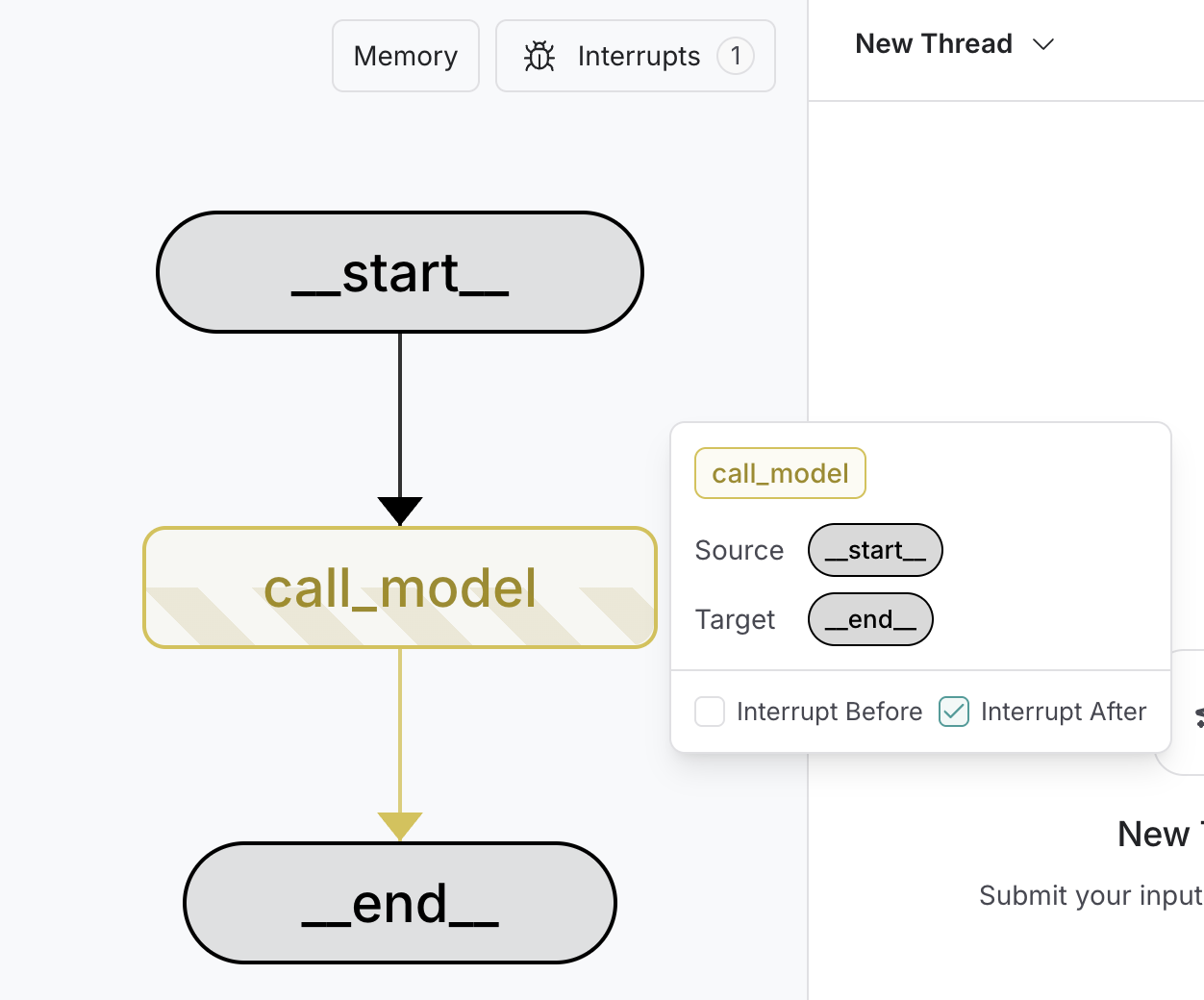
为了调试和测试图,你可以使用静态中断作为断点,一次一个节点地单步执行图。静态中断在节点执行之前或之后的定义点触发。你可以在编译图时通过指定 interruptBeforeinterruptAfter 来设置这些。
静态中断推荐用于人机交互工作流。请改用 interrupt 函数。
const graph = builder.compile({
    interruptBefore: ["node_a"],
    interruptAfter: ["node_b", "node_c"],
    checkpointer,
});

// Pass a thread ID to the graph
const config = {
    configurable: {
        thread_id: "some_thread"
    }
};

// Run the graph until the breakpoint
await graph.invoke(inputs, config);# [!code highlight]

await graph.invoke(null, config);  # [!code highlight]
  1. 断点在 compile 时设置。
  2. interruptBefore 指定应在节点执行之前暂停执行的节点。
  3. interruptAfter 指定应在节点执行之后暂停执行的节点。
  4. 需要 checkpointer 来启用断点。
  5. 图运行直到遇到第一个断点。
  6. 通过传入 null 作为输入来恢复图。这将运行图直到遇到下一个断点。
要调试你的中断,请使用 LangSmith

使用 LangSmith Studio

你可以使用 LangSmith Studio 在运行图之前在 UI 中设置静态中断。你还可以使用 UI 检查执行中任何点的图状态。 image