

添加短期内存
短期内存(线程级持久化)使智能体能够跟踪多轮对话。要添加短期内存:import { MemorySaver, StateGraph } from "@langchain/langgraph";
const checkpointer = new MemorySaver();
const builder = new StateGraph(...);
const graph = builder.compile({ checkpointer });
await graph.invoke(
{ messages: [{ role: "user", content: "hi! i am Bob" }] },
{ configurable: { thread_id: "1" } }
);
在生产环境中使用
在生产环境中,使用由数据库支持的检查点:- Postgres
- MongoDB
import { PostgresSaver } from "@langchain/langgraph-checkpoint-postgres";

const DB_URI = "postgresql://postgres:postgres@localhost:5442/postgres?sslmode=disable";
const checkpointer = PostgresSaver.fromConnString(DB_URI);

const builder = new StateGraph(...);
const graph = builder.compile({ checkpointer });
import { MongoClient } from "mongodb";
import { MongoDBSaver } from "@langchain/langgraph-checkpoint-mongodb";

const client = new MongoClient("mongodb://user:password@localhost:27017");
const checkpointer = new MongoDBSaver({ client });

const builder = new StateGraph(...);
const graph = builder.compile({ checkpointer });
示例:使用 Postgres 检查点
示例:使用 Postgres 检查点
npm install @langchain/langgraph-checkpoint-postgres
首次使用 Postgres 检查点时,你需要调用
checkpointer.setup()import { ChatAnthropic } from "@langchain/anthropic";
import { StateGraph, StateSchema, MessagesValue, GraphNode, START } from "@langchain/langgraph";
import { PostgresSaver } from "@langchain/langgraph-checkpoint-postgres";
const State = new StateSchema({
messages: MessagesValue,
});
const model = new ChatAnthropic({ model: "claude-haiku-4-5-20251001" });
const DB_URI = "postgresql://postgres:postgres@localhost:5442/postgres?sslmode=disable";
const checkpointer = PostgresSaver.fromConnString(DB_URI);
// await checkpointer.setup();
const callModel: GraphNode<typeof State> = async (state) => {
const response = await model.invoke(state.messages);
return { messages: [response] };
};
const builder = new StateGraph(State)
.addNode("call_model", callModel)
.addEdge(START, "call_model");
const graph = builder.compile({ checkpointer });
const config = {
configurable: {
thread_id: "1"
}
};
for await (const chunk of await graph.stream(
{ messages: [{ role: "user", content: "hi! I'm bob" }] },
{ ...config, streamMode: "values" }
)) {
console.log(chunk.messages.at(-1)?.content);
}
for await (const chunk of await graph.stream(
{ messages: [{ role: "user", content: "what's my name?" }] },
{ ...config, streamMode: "values" }
)) {
console.log(chunk.messages.at(-1)?.content);
}
示例:使用 MongoDB 检查点
示例:使用 MongoDB 检查点
npm install @langchain/langgraph-checkpoint-mongodb
设置
要使用
MongoDBSaver,你需要一个 MongoDB 集群。如果你还没有,请按照此指南创建一个集群。import { ChatAnthropic } from "@langchain/anthropic";
import { StateGraph, StateSchema, MessagesValue, GraphNode, START } from "@langchain/langgraph";
import { MongoDBSaver } from "@langchain/langgraph-checkpoint-mongodb";
import { MongoClient } from "mongodb";
const State = new StateSchema({
messages: MessagesValue,
});
const model = new ChatAnthropic({ model: "claude-haiku-4-5-20251001" });
const client = new MongoClient("mongodb://user:password@localhost:27017");
const checkpointer = new MongoDBSaver({ client, dbName: "langgraph" });
const callModel: GraphNode<typeof State> = async (state) => {
const response = await model.invoke(state.messages);
return { messages: [response] };
};
const builder = new StateGraph(State)
.addNode("call_model", callModel)
.addEdge(START, "call_model");
const graph = builder.compile({ checkpointer });
const config = { configurable: { thread_id: "1" } };
for await (const chunk of await graph.stream(
{ messages: [{ role: "user", content: "hi! I'm bob" }] },
{ ...config, streamMode: "values" }
)) {
console.log(chunk.messages.at(-1)?.content);
}
for await (const chunk of await graph.stream(
{ messages: [{ role: "user", content: "what's my name?" }] },
{ ...config, streamMode: "values" }
)) {
console.log(chunk.messages.at(-1)?.content);
}
在子图中使用
如果你的图包含子图,你只需在编译父图时提供检查点。LangGraph 会自动将检查点传播到子图。import { StateGraph, StateSchema, START, MemorySaver } from "@langchain/langgraph";
import { z } from "zod/v4";
const State = new StateSchema({ foo: z.string() });
const subgraphBuilder = new StateGraph(State)
.addNode("subgraph_node_1", (state) => {
return { foo: state.foo + "bar" };
})
.addEdge(START, "subgraph_node_1");
const subgraph = subgraphBuilder.compile();
const builder = new StateGraph(State)
.addNode("node_1", subgraph)
.addEdge(START, "node_1");
const checkpointer = new MemorySaver();
const graph = builder.compile({ checkpointer });
const subgraphBuilder = new StateGraph(...);
const subgraph = subgraphBuilder.compile({ checkpointer: true });
添加长期内存
使用长期内存来跨对话存储用户特定或应用特定的数据。import { InMemoryStore, StateGraph } from "@langchain/langgraph";
const store = new InMemoryStore();
const builder = new StateGraph(...);
const graph = builder.compile({ store });
在节点内访问存储
一旦你用存储编译了图,LangGraph 会自动将存储注入到你的节点函数中。推荐的访问存储方式是通过Runtime 对象。
import { StateGraph, StateSchema, MessagesValue, GraphNode, START } from "@langchain/langgraph";
import { v4 as uuidv4 } from "uuid";

const State = new StateSchema({
  messages: MessagesValue,
});

const callModel: GraphNode<typeof State> = async (state, runtime) => {
  const userId = runtime.context?.userId;
  const namespace = [userId, "memories"];

  // 搜索相关记忆
  const memories = await runtime.store?.search(namespace, {
    query: state.messages.at(-1)?.content,
    limit: 3,
  });
  const info = memories?.map((d) => d.value.data).join("\n") || "";

  // ... 在模型调用中使用记忆

  // 存储新记忆
  await runtime.store?.put(namespace, uuidv4(), { data: "User prefers dark mode" });
};

const builder = new StateGraph(State)
  .addNode("call_model", callModel)
  .addEdge(START, "call_model");
const graph = builder.compile({ store });

// 在调用时传递上下文
await graph.invoke(
  { messages: [{ role: "user", content: "hi" }] },
  { configurable: { thread_id: "1" }, context: { userId: "1" } }
);
在生产环境中使用
在生产环境中,使用由数据库支持的存储:- Postgres
- MongoDB
import { PostgresStore } from "@langchain/langgraph-checkpoint-postgres/store";

const DB_URI = "postgresql://postgres:postgres@localhost:5442/postgres?sslmode=disable";
const store = PostgresStore.fromConnString(DB_URI);

const builder = new StateGraph(...);
const graph = builder.compile({ store });
import { MongoDBStore } from "@langchain/langgraph-checkpoint-mongodb";

const MONGODB_URI = "mongodb://user:password@localhost:27017";
const store = await MongoDBStore.fromConnString(MONGODB_URI, {
  dbName: "langgraph",
  collectionName: "store",
});

const builder = new StateGraph(...);
const graph = builder.compile({ store });
示例:使用 Postgres 存储
示例:使用 Postgres 存储
npm install @langchain/langgraph-checkpoint-postgres
首次使用 Postgres 存储时,你需要调用
store.setup()import { ChatAnthropic } from "@langchain/anthropic";
import { StateGraph, StateSchema, MessagesValue, GraphNode, START } from "@langchain/langgraph";
import { PostgresSaver } from "@langchain/langgraph-checkpoint-postgres";
import { PostgresStore } from "@langchain/langgraph-checkpoint-postgres/store";
import { v4 as uuidv4 } from "uuid";
const State = new StateSchema({
messages: MessagesValue,
});
const model = new ChatAnthropic({ model: "claude-haiku-4-5-20251001" });
const callModel: GraphNode<typeof State> = async (state, runtime) => {
const userId = runtime.context?.userId;
const namespace = ["memories", userId];
const memories = await runtime.store?.search(namespace, { query: state.messages.at(-1)?.content });
const info = memories?.map(d => d.value.data).join("\n") || "";
const systemMsg = `You are a helpful assistant talking to the user. User info: ${info}`;
// 如果用户要求模型记住,则存储新记忆
const lastMessage = state.messages.at(-1);
if (lastMessage?.content?.toLowerCase().includes("remember")) {
const memory = "User name is Bob";
await runtime.store?.put(namespace, uuidv4(), { data: memory });
}
const response = await model.invoke([
{ role: "system", content: systemMsg },
...state.messages
]);
return { messages: [response] };
};
const DB_URI = "postgresql://postgres:postgres@localhost:5442/postgres?sslmode=disable";
const store = PostgresStore.fromConnString(DB_URI);
const checkpointer = PostgresSaver.fromConnString(DB_URI);
// await store.setup();
// await checkpointer.setup();
const builder = new StateGraph(State)
.addNode("call_model", callModel)
.addEdge(START, "call_model");
const graph = builder.compile({
checkpointer,
store,
});
for await (const chunk of await graph.stream(
{ messages: [{ role: "user", content: "Hi! Remember: my name is Bob" }] },
{ configurable: { thread_id: "1" }, context: { userId: "1" }, streamMode: "values" }
)) {
console.log(chunk.messages.at(-1)?.content);
}
for await (const chunk of await graph.stream(
{ messages: [{ role: "user", content: "what is my name?" }] },
{ configurable: { thread_id: "2" }, context: { userId: "1" }, streamMode: "values" }
)) {
console.log(chunk.messages.at(-1)?.content);
}
示例:使用 MongoDB 存储
示例:使用 MongoDB 存储
npm install @langchain/langgraph-checkpoint-mongodb
import { ChatAnthropic } from "@langchain/anthropic";
import { MemorySaver, StateGraph, StateSchema, MessagesValue, GraphNode, START } from "@langchain/langgraph";
import { MongoDBStore } from "@langchain/langgraph-checkpoint-mongodb";
import { v4 as uuidv4 } from "uuid";

const State = new StateSchema({
  messages: MessagesValue,
});

const model = new ChatAnthropic({ model: "claude-sonnet-4-6" });

const callModel: GraphNode<typeof State> = async (state, runtime) => {
  const userId = runtime.context?.userId;
  const namespace = ["memories", userId];
  const memories = await runtime.store?.search(namespace);
  const info = memories?.map(d => d.value.data).join("\n") || "n/a";
  const systemMsg = `You are a helpful assistant talking to the user. User info: ${info}`;

  // 如果用户要求模型记住,则存储新记忆
  const lastMessage = state.messages.at(-1);
  if (lastMessage?.content?.toLowerCase().includes("remember")) {
    const memory = "User name is Bob";
    await runtime.store?.put(namespace, uuidv4(), { data: memory });
  }

  const response = await model.invoke([
    { role: "system", content: systemMsg },
    ...state.messages
  ]);
  return { messages: [response] };
};

const MONGODB_URI = "mongodb://user:password@localhost:27017";

const store = await MongoDBStore.fromConnString(MONGODB_URI, {
  dbName: "langgraph",
  collectionName: "store",
});

const checkpointer = new MemorySaver();

const builder = new StateGraph(State)
  .addNode("call_model", callModel)
  .addEdge(START, "call_model");

const graph = builder.compile({ checkpointer, store });

for await (const chunk of await graph.stream(
  { messages: [{ role: "user", content: "Hi! Remember: my name is Bob" }] },
  { configurable: { thread_id: "1" }, context: { userId: "1" }, streamMode: "values" }
)) {
  console.log(chunk.messages.at(-1)?.content);
}

for await (const chunk of await graph.stream(
  { messages: [{ role: "user", content: "what is my name?" }] },
  { configurable: { thread_id: "2" }, context: { userId: "1" }, streamMode: "values" }
)) {
  console.log(chunk.messages.at(-1)?.content);
}
使用语义搜索
在图的内存存储中启用语义搜索,让图智能体可以通过语义相似性搜索存储中的项目。import { OpenAIEmbeddings } from "@langchain/openai";
import { InMemoryStore } from "@langchain/langgraph";
// 创建启用了语义搜索的存储
const embeddings = new OpenAIEmbeddings({ model: "text-embedding-3-small" });
const store = new InMemoryStore({
index: {
embeddings,
dims: 1536,
},
});
await store.put(["user_123", "memories"], "1", { text: "I love pizza" });
await store.put(["user_123", "memories"], "2", { text: "I am a plumber" });
const items = await store.search(["user_123", "memories"], {
query: "I'm hungry",
limit: 1,
});
InMemoryStore 适用于开发。对于生产环境,请使用持久化存储,如 PostgresStore、MongoDBStore 或 RedisStore。带语义搜索的长期内存
带语义搜索的长期内存
- InMemoryStore
- MongoDB (手动嵌入)
- MongoDB (自动嵌入)
import { OpenAIEmbeddings, ChatOpenAI } from "@langchain/openai";
import { StateGraph, StateSchema, MessagesValue, GraphNode, START, InMemoryStore } from "@langchain/langgraph";

const State = new StateSchema({
  messages: MessagesValue,
});

const model = new ChatOpenAI({ model: "gpt-5.4-mini" });

// 创建启用了语义搜索的存储
const embeddings = new OpenAIEmbeddings({ model: "text-embedding-3-small" });
const store = new InMemoryStore({
  index: {
    embeddings,
    dims: 1536,
  }
});

await store.put(["user_123", "memories"], "1", { text: "I love pizza" });
await store.put(["user_123", "memories"], "2", { text: "I am a plumber" });

const chat: GraphNode<typeof State> = async (state, runtime) => {
  // 基于用户的最后一条消息进行搜索
  const items = await runtime.store.search(
    ["user_123", "memories"],
    { query: state.messages.at(-1)?.content, limit: 2 }
  );
  const memories = items.map(item => item.value.text).join("\n");
  const memoriesText = memories ? `## Memories of user\n${memories}` : "";

  const response = await model.invoke([
    { role: "system", content: `You are a helpful assistant.\n${memoriesText}` },
    ...state.messages,
  ]);

  return { messages: [response] };
};

const builder = new StateGraph(State)
  .addNode("chat", chat)
  .addEdge(START, "chat");
const graph = builder.compile({ store });

for await (const [message, metadata] of await graph.stream(
  { messages: [{ role: "user", content: "I'm hungry" }] },
  { streamMode: "messages" }
)) {
  if (message.content) {
    console.log(message.content);
  }
}
import { ChatOpenAI, OpenAIEmbeddings } from "@langchain/openai";
import { MongoDBStore } from "@langchain/langgraph-checkpoint-mongodb";
import { StateGraph, StateSchema, MessagesValue, GraphNode, START } from "@langchain/langgraph";

const State = new StateSchema({
  messages: MessagesValue,
});

const model = new ChatOpenAI({ model: "gpt-5.4-mini" });

// 创建启用了语义搜索的存储
const MONGODB_URI = "mongodb://user:password@localhost:27017";
const store = await MongoDBStore.fromConnString(MONGODB_URI, {
  dbName: "langgraph",
  collectionName: "store",
  embeddings: new OpenAIEmbeddings({ model: "text-embedding-3-small" }),
  indexConfig: {
    name: "store_vector_index",
    dims: 1536,
    embeddingKey: "text",
  },
});

await store.put(["user_123", "memories"], "1", { text: "I love pizza" });
await store.put(["user_123", "memories"], "2", { text: "I am a plumber" });

const chat: GraphNode<typeof State> = async (state, runtime) => {
  // 基于用户的最后一条消息进行搜索
  const items = await runtime.store.search(
    ["user_123", "memories"],
    { query: state.messages.at(-1)?.content, limit: 2 }
  );
  const memories = items.map(item => item.value.text).join("\n");
  const memoriesText = memories ? `## Memories of user\n${memories}` : "";

  const response = await model.invoke([
    { role: "system", content: `You are a helpful assistant.\n${memoriesText}` },
    ...state.messages,
  ]);

  return { messages: [response] };
};

const builder = new StateGraph(State)
  .addNode("chat", chat)
  .addEdge(START, "chat");
const graph = builder.compile({ store });

for await (const [message, metadata] of await graph.stream(
  { messages: [{ role: "user", content: "I'm hungry" }] },
  { streamMode: "messages" }
)) {
  if (message.content) {
    console.log(message.content);
  }
}
自动嵌入需要 MongoDB Atlas。MongoDB 通过 Voyage AI 在服务器端生成嵌入。有关更多信息,请参阅自动嵌入文档。
import { StateGraph, StateSchema, MessagesValue, GraphNode, START } from "@langchain/langgraph";
import { MongoDBStore } from "@langchain/langgraph-checkpoint-mongodb";
import { ChatOpenAI } from "@langchain/openai";

const State = new StateSchema({
  messages: MessagesValue,
});

const model = new ChatOpenAI({ model: "gpt-5.4-mini" });

// 自动嵌入:不需要嵌入实例。
// 配置 Voyage AI 模型和 MongoDB 将在服务器端读取的字段路径。
const MONGODB_URI = "mongodb://user:password@localhost:27017";
const store = await MongoDBStore.fromConnString(MONGODB_URI, {
  dbName: "langgraph",
  collectionName: "store",
  indexConfig: {
    name: "store_vector_index",
    path: "value.content",  // MongoDB 读取此字段并在服务器端嵌入
    model: "voyage-4",      // MongoDB Atlas 使用的 Voyage AI 模型
  },
});

// 值必须具有与配置路径 (value.content) 匹配的 content 字段
await store.put(["user_123", "memories"], "1", { content: "I love pizza" });
await store.put(["user_123", "memories"], "2", { content: "I am a plumber" });

const chat: GraphNode<typeof State> = async (state, runtime) => {
  // MongoDB 在服务器端生成查询嵌入
  const items = await runtime.store.search(
    ["user_123", "memories"],
    { query: state.messages.at(-1)?.content, limit: 2 }
  );
  const memories = items.map(item => item.value.content).join("\n");
  const memoriesText = memories ? `## Memories of user\n${memories}` : "";

  const response = await model.invoke([
    { role: "system", content: `You are a helpful assistant.\n${memoriesText}` },
    ...state.messages,
  ]);

  return { messages: [response] };
};

const builder = new StateGraph(State)
  .addNode("chat", chat)
  .addEdge(START, "chat");
const graph = builder.compile({ store });

for await (const [message, metadata] of await graph.stream(
  { messages: [{ role: "user", content: "I'm hungry" }] },
  { streamMode: "messages" }
)) {
  if (message.content) {
    console.log(message.content);
  }
}
管理短期内存
启用短期内存后,长对话可能会超出 LLM 的上下文窗口。常见的解决方案有:- 裁剪消息:移除前 N 条或后 N 条消息(在调用 LLM 之前)
- 从 LangGraph 状态中永久删除消息
- 总结消息:总结历史中的早期消息,并用摘要替换它们
- 管理检查点以存储和检索消息历史
- 自定义策略(例如,消息过滤等)
裁剪消息
大多数 LLM 都有最大支持的上下文窗口(以令牌为单位)。决定何时截断消息的一种方法是计算消息历史中的令牌数,并在接近该限制时进行截断。如果你使用 LangChain,你可以使用裁剪消息工具,并指定要从列表中保留的令牌数量,以及用于处理边界的strategy(例如,保留最后 maxTokens)。
要裁剪消息历史,请使用 trimMessages 函数:
import { trimMessages } from "@langchain/core/messages";
import { StateSchema, MessagesValue, GraphNode } from "@langchain/langgraph";

const State = new StateSchema({
  messages: MessagesValue,
});

const callModel: GraphNode<typeof State> = async (state) => {
  const messages = trimMessages(state.messages, {
    strategy: "last",
    maxTokens: 128,
    startOn: "human",
    endOn: ["human", "tool"],
  });
  const response = await model.invoke(messages);
  return { messages: [response] };
};

const builder = new StateGraph(State)
  .addNode("call_model", callModel);
  // ...
完整示例:裁剪消息
完整示例:裁剪消息
import { trimMessages } from "@langchain/core/messages";
import { ChatAnthropic } from "@langchain/anthropic";
import { StateGraph, StateSchema, MessagesValue, GraphNode, START, MemorySaver } from "@langchain/langgraph";

const State = new StateSchema({
  messages: MessagesValue,
});

const model = new ChatAnthropic({ model: "claude-3-5-sonnet-20241022" });

const callModel: GraphNode<typeof State> = async (state) => {
  const messages = trimMessages(state.messages, {
    strategy: "last",
    maxTokens: 128,
    startOn: "human",
    endOn: ["human", "tool"],
    tokenCounter: model,
  });
  const response = await model.invoke(messages);
  return { messages: [response] };
};

const checkpointer = new MemorySaver();
const builder = new StateGraph(State)
  .addNode("call_model", callModel)
  .addEdge(START, "call_model");
const graph = builder.compile({ checkpointer });

const config = { configurable: { thread_id: "1" } };
await graph.invoke({ messages: [{ role: "user", content: "hi, my name is bob" }] }, config);
await graph.invoke({ messages: [{ role: "user", content: "write a short poem about cats" }] }, config);
await graph.invoke({ messages: [{ role: "user", content: "now do the same but for dogs" }] }, config);
const finalResponse = await graph.invoke({ messages: [{ role: "user", content: "what's my name?" }] }, config);

console.log(finalResponse.messages.at(-1)?.content);
Your name is Bob, as you mentioned when you first introduced yourself.
删除消息
你可以从图状态中删除消息以管理消息历史。当你想要移除特定消息或清除整个消息历史时,这很有用。 要从图状态中删除消息,你可以使用RemoveMessage。要使 RemoveMessage 工作,你需要使用带有 messagesStateReducer reducer 的状态键,如 MessagesValue。
要移除特定消息:
import { RemoveMessage } from "@langchain/core/messages";

const deleteMessages = (state) => {
  const messages = state.messages;
  if (messages.length > 2) {
    // 移除最早的两条消息
    return {
      messages: messages
        .slice(0, 2)
        .map((m) => new RemoveMessage({ id: m.id })),
    };
  }
};
删除消息时,请确保生成的消息历史是有效的。检查你使用的 LLM 提供商的限制。例如:
- 一些提供商期望消息历史以
user消息开始 - 大多数提供商要求带有工具调用的
assistant消息后面必须跟有相应的tool结果消息。
完整示例:删除消息
完整示例:删除消息
import { RemoveMessage } from "@langchain/core/messages";
import { ChatAnthropic } from "@langchain/anthropic";
import { StateGraph, StateSchema, MessagesValue, GraphNode, START, MemorySaver } from "@langchain/langgraph";

const State = new StateSchema({
  messages: MessagesValue,
});

const model = new ChatAnthropic({ model: "claude-3-5-sonnet-20241022" });

const deleteMessages: GraphNode<typeof State> = (state) => {
  const messages = state.messages;
  if (messages.length > 2) {
    // 移除最早的两条消息
    return { messages: messages.slice(0, 2).map(m => new RemoveMessage({ id: m.id })) };
  }
  return {};
};

const callModel: GraphNode<typeof State> = async (state) => {
  const response = await model.invoke(state.messages);
  return { messages: [response] };
};

const builder = new StateGraph(State)
  .addNode("call_model", callModel)
  .addNode("delete_messages", deleteMessages)
  .addEdge(START, "call_model")
  .addEdge("call_model", "delete_messages");

const checkpointer = new MemorySaver();
const app = builder.compile({ checkpointer });

const config = { configurable: { thread_id: "1" } };

for await (const event of await app.stream(
  { messages: [{ role: "user", content: "hi! I'm bob" }] },
  { ...config, streamMode: "values" }
)) {
  console.log(event.messages.map(message => [message.getType(), message.content]));
}

for await (const event of await app.stream(
  { messages: [{ role: "user", content: "what's my name?" }] },
  { ...config, streamMode: "values" }
)) {
  console.log(event.messages.map(message => [message.getType(), message.content]));
}
[['human', "hi! I'm bob"]]
[['human', "hi! I'm bob"], ['ai', 'Hi Bob! How are you doing today? Is there anything I can help you with?']]
[['human', "hi! I'm bob"], ['ai', 'Hi Bob! How are you doing today? Is there anything I can help you with?'], ['human', "what's my name?"]]
[['human', "hi! I'm bob"], ['ai', 'Hi Bob! How are you doing today? Is there anything I can help you with?'], ['human', "what's my name?"], ['ai', 'Your name is Bob.']]
[['human', "what's my name?"], ['ai', 'Your name is Bob.']]
总结消息
如上所示,裁剪或删除消息的问题在于,你可能会因消息队列的筛选而丢失信息。因此,一些应用程序受益于使用聊天模型总结消息历史的更复杂方法。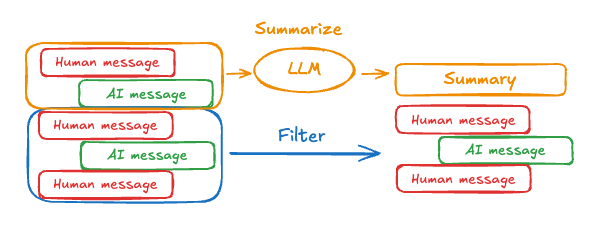
summary 键,与 messages 键并列:
import { StateSchema, MessagesValue, GraphNode } from "@langchain/langgraph";
import { z } from "zod/v4";

const State = new StateSchema({
  messages: MessagesValue,
  summary: z.string().optional(),
});
summarizeConversation 节点可以在 messages 状态键中积累了一些消息后被调用。
import { RemoveMessage, HumanMessage } from "@langchain/core/messages";

const summarizeConversation: GraphNode<typeof State> = async (state) => {
  // 首先,我们获取任何现有摘要
  const summary = state.summary || "";

  // 创建我们的总结提示
  let summaryMessage: string;
  if (summary) {
    // 已存在摘要
    summaryMessage =
      `This is a summary of the conversation to date: ${summary}\n\n` +
      "Extend the summary by taking into account the new messages above:";
  } else {
    summaryMessage = "Create a summary of the conversation above:";
  }

  // 将提示添加到我们的历史中
  const messages = [
    ...state.messages,
    new HumanMessage({ content: summaryMessage })
  ];
  const response = await model.invoke(messages);

  // 删除除最近 2 条消息外的所有消息
  const deleteMessages = state.messages
    .slice(0, -2)
    .map(m => new RemoveMessage({ id: m.id }));

  return {
    summary: response.content,
    messages: deleteMessages
  };
};
完整示例:总结消息
完整示例:总结消息
import { ChatAnthropic } from "@langchain/anthropic";
import {
  SystemMessage,
  HumanMessage,
  RemoveMessage,
} from "@langchain/core/messages";
import {
  StateGraph,
  StateSchema,
  MessagesValue,
  GraphNode,
  ConditionalEdgeRouter,
  START,
  END,
  MemorySaver,
} from "@langchain/langgraph";
import * as z from "zod";
import { v4 as uuidv4 } from "uuid";

const memory = new MemorySaver();

// 我们将添加一个 `summary` 属性(除了 `messages` 键之外)
const GraphState = new StateSchema({
  messages: MessagesValue,
  summary: z.string().default(""),
});

// 我们将使用此模型进行对话和总结
const model = new ChatAnthropic({ model: "claude-haiku-4-5-20251001" });

// 定义调用模型的逻辑
const callModel: GraphNode<typeof GraphState> = async (state) => {
  // 如果存在摘要,我们将其作为系统消息添加
  const { summary } = state;
  let { messages } = state;
  if (summary) {
    const systemMessage = new SystemMessage({
      id: uuidv4(),
      content: `Summary of conversation earlier: ${summary}`,
    });
    messages = [systemMessage, ...messages];
  }
  const response = await model.invoke(messages);
  // 我们返回一个对象,因为它将被添加到现有状态中
  return { messages: [response] };
};

// 我们现在定义确定是结束还是总结对话的逻辑
const shouldContinue: ConditionalEdgeRouter<typeof GraphState, "summarize_conversation"> = (state) => {
  const messages = state.messages;
  // 如果有超过六条消息,那么我们总结对话
  if (messages.length > 6) {
    return "summarize_conversation";
  }
  // 否则我们可以直接结束
  return END;
};

const summarizeConversation: GraphNode<typeof GraphState> = async (state) => {
  // 首先,我们总结对话
  const { summary, messages } = state;
  let summaryMessage: string;
  if (summary) {
    // 如果已存在摘要,我们使用不同的系统提示来总结它
    summaryMessage =
      `This is summary of the conversation to date: ${summary}\n\n` +
      "Extend the summary by taking into account the new messages above:";
  } else {
    summaryMessage = "Create a summary of the conversation above:";
  }

  const allMessages = [
    ...messages,
    new HumanMessage({ id: uuidv4(), content: summaryMessage }),
  ];

  const response = await model.invoke(allMessages);

  // 我们现在需要删除我们不再希望显示的消息
  // 我将删除除最后两条消息外的所有消息,但你可以更改此设置
  const deleteMessages = messages
    .slice(0, -2)
    .map((m) => new RemoveMessage({ id: m.id! }));

  if (typeof response.content !== "string") {
    throw new Error("Expected a string response from the model");
  }

  return { summary: response.content, messages: deleteMessages };
};

// 定义一个新图
const workflow = new StateGraph(GraphState)
  // 定义对话节点和总结节点
  .addNode("conversation", callModel)
  .addNode("summarize_conversation", summarizeConversation)
  // 将入口点设置为对话
  .addEdge(START, "conversation")
  // 我们现在添加一个条件边
  .addConditionalEdges(
    // 首先,我们定义起始节点。我们使用 `conversation`。
    // 这意味着这些是在调用 `conversation` 节点后采取的边。
    "conversation",
    // 接下来,我们传入将确定接下来调用哪个节点的函数。
    shouldContinue,
  )
  // 我们现在添加从 `summarize_conversation` 到 END 的普通边。
  // 这意味着在调用 `summarize_conversation` 后,我们结束。
  .addEdge("summarize_conversation", END);

// 最后,我们编译它!
const app = workflow.compile({ checkpointer: memory });
管理检查点
你可以查看和删除检查点存储的信息。查看线程状态
const config = {
  configurable: {
    thread_id: "1",
    // 可选地提供特定检查点的 ID,
    // 否则将显示最新的检查点
    // checkpoint_id: "1f029ca3-1f5b-6704-8004-820c16b69a5a"
  },
};
await graph.getState(config);
{
  values: { messages: [HumanMessage(...), AIMessage(...), HumanMessage(...), AIMessage(...)] },
  next: [],
  config: { configurable: { thread_id: '1', checkpoint_ns: '', checkpoint_id: '1f029ca3-1f5b-6704-8004-820c16b69a5a' } },
  metadata: {
    source: 'loop',
    writes: { call_model: { messages: AIMessage(...) } },
    step: 4,
    parents: {},
    thread_id: '1'
  },
  createdAt: '2025-05-05T16:01:24.680462+00:00',
  parentConfig: { configurable: { thread_id: '1', checkpoint_ns: '', checkpoint_id: '1f029ca3-1790-6b0a-8003-baf965b6a38f' } },
  tasks: [],
  interrupts: []
}
查看线程的历史记录
const config = {
  configurable: {
    thread_id: "1",
  },
};

const history = [];
for await (const state of graph.getStateHistory(config)) {
  history.push(state);
}
删除线程的所有检查点
const threadId = "1";
await checkpointer.deleteThread(threadId);
数据库管理
如果你使用任何基于数据库的持久化实现(如 Postgres 或 Redis)来存储短期和/或长期内存,你需要在将其与数据库一起使用之前运行迁移以设置所需的模式。 按照惯例,大多数特定于数据库的库在检查点或存储实例上定义一个setup() 方法,该方法运行所需的迁移。但是,你应该检查你的 BaseCheckpointSaver 或 BaseStore 的具体实现,以确认确切的方法名称和用法。
我们建议将迁移作为专用部署步骤运行,或者你可以确保它们在服务器启动时运行。
将这些文档通过 MCP 连接到 Claude、VSCode 等,以获取实时答案。