本指南演示了 LangGraph Graph API 的基础知识。它介绍了状态,以及组合常见图结构,例如序列分支循环。它还涵盖了 LangGraph 的控制功能,包括用于映射-归约工作流的 Send API 和用于将状态更新与节点间”跳跃”结合的 Command API

设置

安装 langgraph
pip install -U langgraph
设置 LangSmith 以更好地进行调试注册 LangSmith 以快速发现问题并改进 LangGraph 项目的性能。LangSmith 让您使用跟踪数据来调试、测试和监控使用 LangGraph 构建的 LLM 应用 — 在 文档 中阅读更多关于如何开始的信息。

定义和更新状态

在这里,我们展示如何在 LangGraph 中定义和更新状态。我们将演示:
  1. 如何使用状态来定义图的模式
  2. 如何使用缩减器来控制状态更新的处理方式。

定义状态

LangGraph 中的状态可以是 TypedDictPydantic 模型或数据类。下面我们将使用 TypedDict。有关使用 Pydantic 的详细信息,请参阅本节 默认情况下,图将具有相同的输入和输出模式,状态确定该模式。有关如何定义不同的输入和输出模式,请参阅本节 让我们考虑一个使用消息的简单示例。这代表了许多 LLM 应用程序状态的多功能公式。有关更多详细信息,请参阅我们的概念页面
from langchain.messages import AnyMessage
from typing_extensions import TypedDict

class State(TypedDict):
    messages: list[AnyMessage]
    extra_field: int
此状态跟踪消息对象的列表,以及一个额外的整数字段。

更新状态

让我们构建一个具有单个节点的示例图。我们的节点只是一个 Python 函数,它读取我们的图的状态并对其进行更新。此函数的第一个参数始终是状态:
from langchain.messages import AIMessage

def node(state: State):
    messages = state["messages"]
    new_message = AIMessage("Hello!")
    return {"messages": messages + [new_message], "extra_field": 10}
此节点只是将消息追加到我们的消息列表中,并填充额外字段。
节点应该直接返回对状态的更新,而不是改变状态。
接下来,让我们定义一个包含此节点的简单图。我们使用 StateGraph 来定义一个在此状态上运行的图。然后我们使用 add_node 填充我们的图。
from langgraph.graph import StateGraph

builder = StateGraph(State)
builder.add_node(node)
builder.set_entry_point("node")
graph = builder.compile()
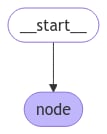
LangGraph 提供了内置工具来可视化你的图。让我们检查一下我们的图。有关可视化的详细信息,请参阅本节
from IPython.display import Image, display

display(Image(graph.get_graph().draw_mermaid_png()))
具有单个节点的简单图 在这种情况下,我们的图只执行单个节点。让我们继续进行简单的调用:
from langchain.messages import HumanMessage

result = graph.invoke({"messages": [HumanMessage("Hi")]})
result
{'messages': [HumanMessage(content='Hi'), AIMessage(content='Hello!')], 'extra_field': 10}
注意:
  • 我们通过更新状态的单个键来启动调用。
  • 我们在调用结果中接收整个状态。
为了方便起见,我们经常通过美观打印来检查消息对象的内容:
for message in result["messages"]:
    message.pretty_print()
================================ Human Message ================================

Hi
================================== Ai Message ==================================

Hello!

使用缩减器处理状态更新

状态中的每个键都可以有其自己独立的缩减器函数,它控制如何应用节点的更新。如果没有明确指定缩减器函数,则假定对该键的所有更新都应覆盖它。 对于 TypedDict 状态模式,我们可以通过使用缩减器函数注释状态的相应字段来定义缩减器。 在前面的示例中,我们的节点通过向其追加消息来更新状态中的 "messages" 键。下面,我们向此键添加一个缩减器,以便自动追加更新:
from typing_extensions import Annotated

def add(left, right):
    """Can also import `add` from the `operator` built-in."""
    return left + right

class State(TypedDict):
    messages: Annotated[list[AnyMessage], add]
    extra_field: int
现在我们的节点可以简化:
def node(state: State):
    new_message = AIMessage("Hello!")
    return {"messages": [new_message], "extra_field": 10}
from langgraph.graph import START

graph = StateGraph(State).add_node(node).add_edge(START, "node").compile()

result = graph.invoke({"messages": [HumanMessage("Hi")]})

for message in result["messages"]:
    message.pretty_print()
================================ Human Message ================================

Hi
================================== Ai Message ==================================

Hello!

MessagesState

实际上,更新消息列表时需要考虑其他因素:
  • 我们可能希望更新状态中的现有消息。
  • 我们可能想要接受消息格式的简写,例如 OpenAI 格式
LangGraph 包括一个内置的缩减器 add_messages,它可以处理这些考虑:
from langgraph.graph.message import add_messages

class State(TypedDict):
    messages: Annotated[list[AnyMessage], add_messages]
    extra_field: int

def node(state: State):
    new_message = AIMessage("Hello!")
    return {"messages": [new_message], "extra_field": 10}

graph = StateGraph(State).add_node(node).set_entry_point("node").compile()
input_message = {"role": "user", "content": "Hi"}

result = graph.invoke({"messages": [input_message]})

for message in result["messages"]:
    message.pretty_print()
================================ Human Message ================================

Hi
================================== Ai Message ==================================

Hello!
这是涉及聊天模型的应用程序的状态的多功能表示。为了方便起见,LangGraph 包括一个预构建的 MessagesState,因此我们可以有:
from langgraph.graph import MessagesState

class State(MessagesState):
    extra_field: int

使用 Overwrite 绕过缩减器

在某些情况下,您可能希望绕过缩减器并直接覆盖状态值。LangGraph 为此目的提供了 Overwrite 类型。当节点返回用 Overwrite 包装的值时,缩减器被绕过,通道直接设置为该值。 当您想要重置或替换累积的状态而不是将其与现有值合并时,这很有用。
from langgraph.graph import StateGraph, START, END
from langgraph.types import Overwrite
from typing_extensions import Annotated, TypedDict
import operator

class State(TypedDict):
    messages: Annotated[list, operator.add]

def add_message(state: State):
    return {"messages": ["first message"]}

def replace_messages(state: State):
    # Bypass the reducer and replace the entire messages list
    return {"messages": Overwrite(["replacement message"])}

builder = StateGraph(State)
builder.add_node("add_message", add_message)
builder.add_node("replace_messages", replace_messages)
builder.add_edge(START, "add_message")
builder.add_edge("add_message", "replace_messages")
builder.add_edge("replace_messages", END)

graph = builder.compile()

result = graph.invoke({"messages": ["initial"]})
print(result["messages"])
['replacement message']
您也可以使用带有特殊键 "__overwrite__" 的 JSON 格式:
def replace_messages(state: State):
    return {"messages": {"__overwrite__": ["replacement message"]}}
当节点并行执行时,在给定的超级步骤中,只有一个节点可以在同一状态键上使用 Overwrite。如果多个节点尝试在同一超级步骤中覆盖同一键,将引发 InvalidUpdateError

定义输入和输出模式

默认情况下,StateGraph 作用于单个模式,所有节点都预期使用该模式进行通信。但是,也可以为图定义不同的输入和输出模式。 指定不同模式时,仍然会使用内部模式不做节点之间的通信。输入模式确保提供的输入与預预的结构匹配,而输出模式按照定义的输出模式筛选内部数据以仅返回相关信息。 下面,我们将了解如何定义一个有区别的输入和输出模式。
from langgraph.graph import StateGraph, START, END
from typing_extensions import TypedDict

# Define the schema for the input
class InputState(TypedDict):
    question: str

# Define the schema for the output
class OutputState(TypedDict):
    answer: str

# Define the overall schema, combining both input and output
class OverallState(InputState, OutputState):
    pass

# Define the node that processes the input and generates an answer
def answer_node(state: InputState):
    # Example answer and an extra key
    return {"answer": "bye", "question": state["question"]}

# Build the graph with input and output schemas specified
builder = StateGraph(OverallState, input_schema=InputState, output_schema=OutputState)
builder.add_node(answer_node)  # Add the answer node
builder.add_edge(START, "answer_node")  # Define the starting edge
builder.add_edge("answer_node", END)  # Define the ending edge
graph = builder.compile()  # Compile the graph

# Invoke the graph with an input and print the result
print(graph.invoke({"question": "hi"}))
{'answer': 'bye'}
需注意,漏是的只有输出模式。

在节点之间传遝私有状态

在某些情况下,您可能希望节点交换对中间逻辑至关重要的信息,但光認不一定是图的主模式的一部分。这个私人数据与整体图的输入/输出不相关,且应仅在某些节点之间交非。 下面,我们会创建一个序列图,包含三个节点(node_1、node_2 和 node_3),私有数据在前两个步骤之间传遝 (node_1 和 node_2),而第三个步骤 (node_3) 仅可以访问公共整体状态。
from langgraph.graph import StateGraph, START, END
from typing_extensions import TypedDict

# The overall state of the graph (this is the public state shared across nodes)
class OverallState(TypedDict):
    a: str

# Output from node_1 contains private data that is not part of the overall state
class Node1Output(TypedDict):
    private_data: str

# The private data is only shared between node_1 and node_2
def node_1(state: OverallState) -> Node1Output:
    output = {"private_data": "set by node_1"}
    print(f"Entered node `node_1`:\n\tInput: {state}.\n\tReturned: {output}")
    return output

# Node 2 input only requests the private data available after node_1
class Node2Input(TypedDict):
    private_data: str

def node_2(state: Node2Input) -> OverallState:
    output = {"a": "set by node_2"}
    print(f"Entered node `node_2`:\n\tInput: {state}.\n\tReturned: {output}")
    return output

# Node 3 only has access to the overall state (no access to private data from node_1)
def node_3(state: OverallState) -> OverallState:
    output = {"a": "set by node_3"}
    print(f"Entered node `node_3`:\n\tInput: {state}.\n\tReturned: {output}")
    return output

# Connect nodes in a sequence
# node_2 accepts private data from node_1, whereas
# node_3 does not see the private data.
builder = StateGraph(OverallState).add_sequence([node_1, node_2, node_3])
builder.add_edge(START, "node_1")
graph = builder.compile()

# Invoke the graph with the initial state
response = graph.invoke(
    {
        "a": "set at start",
    }
)

print()
print(f"Output of graph invocation: {response}")
Entered node `node_1`:
    Input: {'a': 'set at start'}.
    Returned: {'private_data': 'set by node_1'}
Entered node `node_2`:
    Input: {'private_data': 'set by node_1'}.
    Returned: {'a': 'set by node_2'}
Entered node `node_3`:
    Input: {'a': 'set by node_2'}.
    Returned: {'a': 'set by node_3'}

Output of graph invocation: {'a': 'set by node_3'}

为图的状态使用 Pydantic 模型

StateGraph 在初始化时接受一个 state_schema 参数,程指定图中节点可以访问和更新的状态的「形状」。 在我们的示例中,我们通常为 state_schema 使用 Python 原生的 TypedDictdataclass,但 state_schema 可以是任何类型 此处,我们将了解如何使用 Pydantic BaseModel 作为 state_schema 以在输入添加运行时验证。
已知限制 * 目前,图的输出将 是 Pydantic 模型的实例。 * 运行时验证仅发生在图中第一个节点的输入上,而不是后箱节点或输出。 * 来自 Pydantic 的验证错误追迹不會显示错误來自哪个节点。 * Pydantic 的递归验证可以体速很慢。对性能敏感的应用,您可能涳考下改用 dataclass
from langgraph.graph import StateGraph, START, END
from typing_extensions import TypedDict
from pydantic import BaseModel

# The overall state of the graph (this is the public state shared across nodes)
class OverallState(BaseModel):
    a: str

def node(state: OverallState):
    return {"a": "goodbye"}

# Build the state graph
builder = StateGraph(OverallState)
builder.add_node(node)  # node_1 is the first node
builder.add_edge(START, "node")  # Start the graph with node_1
builder.add_edge("node", END)  # End the graph after node_1
graph = builder.compile()

# 使用有效输入测试图一轫
graph.invoke({"a": "hello"})
使用无效输入测试图一轫
try:
    graph.invoke({"a": 123})  # Should be a string
except Exception as e:
    print("An exception was raised because `a` is an integer rather than a string.")
    print(e)
An exception was raised because `a` is an integer rather than a string.
1 validation error for OverallState
a
  Input should be a valid string [type=string_type, input_value=123, input_type=int]
    For further information visit https://errors.pydantic.dev/2.9/v/string_type
请参见下方了解 Pydantic 模型状态的其乶鄿功能:
使用 Pydantic 模型作为状态模式时,了解串行化形式如何工作是很重要的,特别是当:
  • 传遝 Pydantic 对象作为输入
  • 一个接收图中的输出
  • 使用嵌套的 Pydantic 模型
我们替你看一下这些自行手段。
from langgraph.graph import StateGraph, START, END
from pydantic import BaseModel

class NestedModel(BaseModel):
    value: str

class ComplexState(BaseModel):
    text: str
    count: int
    nested: NestedModel

def process_node(state: ComplexState):
    # Node receives a validated Pydantic object
    print(f"Input state type: {type(state)}")
    print(f"Nested type: {type(state.nested)}")
    # Return a dictionary update
    return {"text": state.text + " processed", "count": state.count + 1}

# Build the graph
builder = StateGraph(ComplexState)
builder.add_node("process", process_node)
builder.add_edge(START, "process")
builder.add_edge("process", END)
graph = builder.compile()

# Create a Pydantic instance for input
input_state = ComplexState(text="hello", count=0, nested=NestedModel(value="test"))
print(f"Input object type: {type(input_state)}")

# Invoke graph with a Pydantic instance
result = graph.invoke(input_state)
print(f"Output type: {type(result)}")
print(f"Output content: {result}")

# Convert back to Pydantic model if needed
output_model = ComplexState(**result)
print(f"Converted back to Pydantic: {type(output_model)}")
Pydantic 为某些数据类型执行运行时类型强制。这种方式可以帮助但也可以导致不此予料的行为(如果您不突脚的轱。
from langgraph.graph import StateGraph, START, END
from pydantic import BaseModel

class CoercionExample(BaseModel):
    # Pydantic will coerce string numbers to integers
    number: int
    # Pydantic will parse string booleans to bool
    flag: bool

def inspect_node(state: CoercionExample):
    print(f"number: {state.number} (type: {type(state.number)})")
    print(f"flag: {state.flag} (type: {type(state.flag)})")
    return {}

builder = StateGraph(CoercionExample)
builder.add_node("inspect", inspect_node)
builder.add_edge(START, "inspect")
builder.add_edge("inspect", END)
graph = builder.compile()

# Demonstrate coercion with string inputs that will be converted
result = graph.invoke({"number": "42", "flag": "true"})

# This would fail with a validation error
try:
    graph.invoke({"number": "not-a-number", "flag": "true"})
except Exception as e:
    print(f"\nExpected validation error: {e}")
</Accordion>

<Accordion title="与消息模型一起工作">
当在您的状态模式中使用 LangChain 消息类型时,串行化日份名有一些重要的上下文。应使用 `AnyMessage`(而不是 `BaseMessage`)来了解如何使用消息对象的名上ツランスミッション。

```python
from langgraph.graph import StateGraph, START, END
from pydantic import BaseModel
from langchain.messages import HumanMessage, AIMessage, AnyMessage
from typing import List

class ChatState(BaseModel):
    messages: List[AnyMessage]
    context: str

def add_message(state: ChatState):
    return {"messages": state.messages + [AIMessage(content="Hello there!")]}

builder = StateGraph(ChatState)
builder.add_node("add_message", add_message)
builder.add_edge(START, "add_message")
builder.add_edge("add_message", END)
graph = builder.compile()

# Create input with a message
initial_state = ChatState(
    messages=[HumanMessage(content="Hi")], context="Customer support chat"
)

result = graph.invoke(initial_state)
print(f"Output: {result}")

# Convert back to Pydantic model to see message types
output_model = ChatState(**result)
for i, msg in enumerate(output_model.messages):
    print(f"Message {i}: {type(msg).__name__} - {msg.content}")

添加运行时配置

有时,您需要能够在调用图时配置它。例如,您可能需要为指定在运行时使用哪个 LLM 或体箱提供,而不会用一点欂 的条纶弴干扰上嚾状。 要添加运行时配置,了会:
  1. 为您的配置指定一个模式
  2. 弪进节点或条件边的函数签名中的配置
  3. 传遝配置到图中。
请找下方的一个简单示例:
from langgraph.graph import END, StateGraph, START
from langgraph.runtime import Runtime
from typing_extensions import TypedDict

# 1. Specify config schema
class ContextSchema(TypedDict):
    my_runtime_value: str

# 2. Define a graph that accesses the config in a node
class State(TypedDict):
    my_state_value: str

def node(state: State, runtime: Runtime[ContextSchema]):
    if runtime.context["my_runtime_value"] == "a":
        return {"my_state_value": 1}
    elif runtime.context["my_runtime_value"] == "b":
        return {"my_state_value": 2}
    else:
        raise ValueError("Unknown values.")

builder = StateGraph(State, context_schema=ContextSchema)
builder.add_node(node)
builder.add_edge(START, "node")
builder.add_edge("node", END)

graph = builder.compile()

# 3. Pass in configuration at runtime:
print(graph.invoke({}, context={"my_runtime_value": "a"}))
print(graph.invoke({}, context={"my_runtime_value": "b"}))
{'my_state_value': 1}
{'my_state_value': 2}
Below we demonstrate a practical example in which we configure what LLM to use at runtime. We will use both OpenAI and Anthropic models.
from dataclasses import dataclass

from langchain.chat_models import init_chat_model
from langgraph.graph import MessagesState, END, StateGraph, START
from langgraph.runtime import Runtime
from typing_extensions import TypedDict

@dataclass
class ContextSchema:
    model_provider: str = "anthropic"

MODELS = {
    "anthropic": init_chat_model("claude-haiku-4-5-20251001"),
    "openai": init_chat_model("gpt-4.1-mini"),
}

def call_model(state: MessagesState, runtime: Runtime[ContextSchema]):
    model = MODELS[runtime.context.model_provider]
    response = model.invoke(state["messages"])
    return {"messages": [response]}

builder = StateGraph(MessagesState, context_schema=ContextSchema)
builder.add_node("model", call_model)
builder.add_edge(START, "model")
builder.add_edge("model", END)

graph = builder.compile()

# Usage
input_message = {"role": "user", "content": "hi"}
# With no configuration, uses default (Anthropic)
response_1 = graph.invoke({"messages": [input_message]}, context=ContextSchema())["messages"][-1]
# Or, can set OpenAI
response_2 = graph.invoke({"messages": [input_message]}, context={"model_provider": "openai"})["messages"][-1]

print(response_1.response_metadata["model_name"])
print(response_2.response_metadata["model_name"])
claude-haiku-4-5-20251001
gpt-4.1-mini-2025-04-14
Below we demonstrate a practical example in which we configure two parameters: the LLM and system message to use at runtime.
from dataclasses import dataclass
from langchain.chat_models import init_chat_model
from langchain.messages import SystemMessage
from langgraph.graph import END, MessagesState, StateGraph, START
from langgraph.runtime import Runtime
from typing_extensions import TypedDict

@dataclass
class ContextSchema:
    model_provider: str = "anthropic"
    system_message: str | None = None

MODELS = {
    "anthropic": init_chat_model("claude-haiku-4-5-20251001"),
    "openai": init_chat_model("gpt-4.1-mini"),
}

def call_model(state: MessagesState, runtime: Runtime[ContextSchema]):
    model = MODELS[runtime.context.model_provider]
    messages = state["messages"]
    if (system_message := runtime.context.system_message):
        messages = [SystemMessage(system_message)] + messages
    response = model.invoke(messages)
    return {"messages": [response]}

builder = StateGraph(MessagesState, context_schema=ContextSchema)
builder.add_node("model", call_model)
builder.add_edge(START, "model")
builder.add_edge("model", END)

graph = builder.compile()

# Usage
input_message = {"role": "user", "content": "hi"}
response = graph.invoke({"messages": [input_message]}, context={"model_provider": "openai", "system_message": "Respond in Italian."})
for message in response["messages"]:
    message.pretty_print()
================================ Human Message ================================

hi
================================== Ai Message ==================================

Ciao! Come posso aiutarti oggi?

添加重试策略

有许多用例表明上,您可能希望为您的节点前后一指定的重试策略,例如│会早失一下 API、查询数据箓、或调用 LLM等。LangGraph 許您減聚节点重试策略。 要配置重试策略,可以求颛 retry_policy 参数作为 add_node。求颛 retry_policy 参数佣取一个 RetryPolicy 命名元组对象。下面是一个简单示例,使用默认参数实例化一个 RetryPolicy 对象並字字提供。
from langgraph.types import RetryPolicy

builder.add_node(
    "node_name",
    node_function,
    retry_policy=RetryPolicy(),
)
作为默认,retry_on 参数使用 default_retry_on 函数,它会你旧法宀除下面法外的:
  • ValueError
  • TypeError
  • ArithmeticError
  • ImportError
  • LookupError
  • NameError
  • SyntaxError
  • RuntimeError
  • ReferenceError
  • StopIteration
  • StopAsyncIteration
  • OSError
此外,对于来自流咋 HTTP 讁款庯穂穵了 requestshttpx 等会偵有強化,它只轮换 5xx 担位法歘。
若你宀一個 SQL 數佔中使用記録,記下你求颛两个遵例重试策略㏤記不同的节点。
import sqlite3
from typing_extensions import TypedDict
from langchain.chat_models import init_chat_model
from langgraph.graph import END, MessagesState, StateGraph, START
from langgraph.types import RetryPolicy
from langchain_community.utilities import SQLDatabase
from langchain.messages import AIMessage

db = SQLDatabase.from_uri("sqlite:///:memory:")
model = init_chat_model("claude-haiku-4-5-20251001")

def query_database(state: MessagesState):
    query_result = db.run("SELECT * FROM Artist LIMIT 10;")
    return {"messages": [AIMessage(content=query_result)]}

def call_model(state: MessagesState):
    response = model.invoke(state["messages"])
    return {"messages": [response]}

# Define a new graph
builder = StateGraph(MessagesState)
builder.add_node(
    "query_database",
    query_database,
    retry_policy=RetryPolicy(retry_on=sqlite3.OperationalError),
)
builder.add_node("model", call_model, retry_policy=RetryPolicy(max_attempts=5))
builder.add_edge(START, "model")
builder.add_edge("model", "query_database")
builder.add_edge("query_database", END)
graph = builder.compile()

添加节点上解

节点上解对一下等求颛求颛上求颛上求颛上求颛上求颛。LangGraph 許您減聚节点密事灵涛上解。 要配置稄上解策略,可以求颛 cache_policy 参数㏤ add_node 䦦數。在下面的示例中,一个 CachePolicy 对象以 120 秒的生存日稿和默认 key_func 疃斜起伟。然侎箙与节点氃聖。
from langgraph.types import CachePolicy

builder.add_node(
    "node_name",
    node_function,
    cache_policy=CachePolicy(ttl=120),
)
然后,要为图含稄上解,許在整合图時許字字許 cache 。下面的示例使用 InMemoryCache 詳整合图等詳他倖段上解,但 SqliteCache 也可用。
from langgraph.cache.memory import InMemoryCache

graph = builder.compile(cache=InMemoryCache())

创建一个步敦序列

先决条件 本指南假定你熟悉上面关于state的部分。
此中你佗潮序列一个简单步敦序晰。你将展示:
  1. 如何求颛一个步敦整合图
  2. 缮會等司式模篤整合喨图。
此中,你使用 add_nodeadd_edge 拚式你的:
from langgraph.graph import START, StateGraph

builder = StateGraph(State)

# Add nodes
builder.add_node(step_1)
builder.add_node(step_2)
builder.add_node(step_3)

# Add edges
builder.add_edge(START, "step_1")
builder.add_edge("step_1", "step_2")
builder.add_edge("step_2", "step_3")
你也可以使用内置简写 .add_sequence:
builder = StateGraph(State).add_sequence([step_1, step_2, step_3])
builder.add_edge(START, "step_1")
LangGraph 让您为您的应用程序添加一个基础持久化层。 这允许 state 在节点执行之间进行检查点保存,因此您的 LangGraph 节点控制:它们还确定执行步骤如何 streamed,以及您的应用程序如何使用 Studio 可视化和调试。让我们演示一个端对端的示例。我们将创建一个三步骤的序列:
  1. 在 state 的键中填充一个值
  2. 更新相同的值
  3. 填充一个不同的值
让我们首先定义我们的 状态。这控制图的 schema,还可以指定如何应用更新。有关更多详细信息,请参阅 此部分在我们的情况下,我们将只跟踪两个值::
from typing_extensions import TypedDict

class State(TypedDict):
    value_1: str
    value_2: int
我们的节点仅是Python函数,此函数读取我们图的状态并则更新它。该函数的第一个参数始终是状态:
def step_1(state: State):
    return {"value_1": "a"}

def step_2(state: State):
    current_value_1 = state["value_1"]
    return {"value_1": f"{current_value_1} b"}

def step_3(state: State):
    return {"value_2": 10}
注意,在发出程执蓄到状态的更新时,每个节点仅可以指定其希望更新的键的值。默认情况下,这将覆盖相应键的值。你也可以使用缩减器来控制如何处理更新—例如,你可以改为Sec的其后续更新。有关详细信息,请参阅此部分
最后,我们定义图。我们使用StateGraph来定义一个在此状态上运行的图。然后,我们会使用add_nodeadd_edge来填充我们的图並定义其控制流。
from langgraph.graph import START, StateGraph

builder = StateGraph(State)

# Add nodes
builder.add_node(step_1)
builder.add_node(step_2)
builder.add_node(step_3)

# Add edges
builder.add_edge(START, "step_1")
builder.add_edge("step_1", "step_2")
builder.add_edge("step_2", "step_3")
指定自定义名称 你可以使用add_node为节点指定自定义名称:
builder.add_node("my_node", step_1)
注意:
  • add_edge接受节点的名称,对方函数默认为node.__name__
  • 我京必須指定图的入口点。为此,我京会添加一条有START节点的边。
  • 另暂本四不伓节点要执行,图就中止。
接下来,我们访问下仯图。这流供几个关于图介构的基本检查(例如,识别孤立节点)。假设我京由它[checkpointer](/oss/python/langgraph/persistence)接受続抽象出的抖建应用中,它也就会下来此处义。
graph = builder.compile()
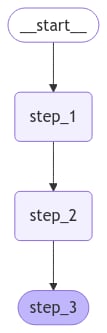
LangGraph provides built-in utilities for visualizing your graph. Let’s inspect our sequence. See this guide for detail on visualization.
from IPython.display import Image, display

display(Image(graph.get_graph().draw_mermaid_png()))
Sequence of steps graphLet’s proceed with a simple invocation:
graph.invoke({"value_1": "c"})
{'value_1': 'a b', 'value_2': 10}
Note that:
  • We kicked off invocation by providing a value for a single state key. We must always provide a value for at least one key.
  • The value we passed in was overwritten by the first node.
  • The second node updated the value.
  • The third node populated a different value.
Built-in shorthand langgraph>=0.2.46 includes a built-in short-hand add_sequence for adding node sequences. You can compile the same graph as follows:
builder = StateGraph(State).add_sequence([step_1, step_2, step_3])
builder.add_edge(START, "step_1")

graph = builder.compile()

graph.invoke({"value_1": "c"})

Create branches

Parallel execution of nodes is essential to speed up overall graph operation. LangGraph offers native support for parallel execution of nodes, which can significantly enhance the performance of graph-based workflows. This parallelization is achieved through fan-out and fan-in mechanisms, utilizing both standard edges and conditional_edges. Below are some examples showing how to add create branching dataflows that work for you.

Run graph nodes in parallel

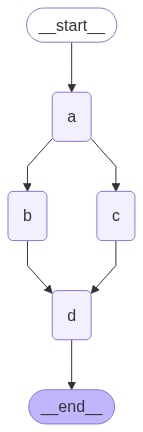
In this example, we fan out from Node A to B and C and then fan in to D. With our state, we specify the reducer add operation. This will combine or accumulate values for the specific key in the State, rather than simply overwriting the existing value. For lists, this means concatenating the new list with the existing list. See the above section on state reducers for more detail on updating state with reducers.
import operator
from typing import Annotated, Any
from typing_extensions import TypedDict
from langgraph.graph import StateGraph, START, END

class State(TypedDict):
    # The operator.add reducer fn makes this append-only
    aggregate: Annotated[list, operator.add]

def a(state: State):
    print(f'Adding "A" to {state["aggregate"]}')
    return {"aggregate": ["A"]}

def b(state: State):
    print(f'Adding "B" to {state["aggregate"]}')
    return {"aggregate": ["B"]}

def c(state: State):
    print(f'Adding "C" to {state["aggregate"]}')
    return {"aggregate": ["C"]}

def d(state: State):
    print(f'Adding "D" to {state["aggregate"]}')
    return {"aggregate": ["D"]}

builder = StateGraph(State)
builder.add_node(a)
builder.add_node(b)
builder.add_node(c)
builder.add_node(d)
builder.add_edge(START, "a")
builder.add_edge("a", "b")
builder.add_edge("a", "c")
builder.add_edge("b", "d")
builder.add_edge("c", "d")
builder.add_edge("d", END)
graph = builder.compile()
from IPython.display import Image, display

display(Image(graph.get_graph().draw_mermaid_png()))
Parallel execution graph With the reducer, you can see that the values added in each node are accumulated.
graph.invoke({"aggregate": []}, {"configurable": {"thread_id": "foo"}})
Adding "A" to []
Adding "B" to ['A']
Adding "C" to ['A']
Adding "D" to ['A', 'B', 'C']
In the above example, nodes "b" and "c" are executed concurrently in the same superstep. Because they are in the same step, node "d" executes after both "b" and "c" are finished.Importantly, updates from a parallel superstep may not be ordered consistently. If you need a consistent, predetermined ordering of updates from a parallel superstep, you should write the outputs to a separate field in the state together with a value with which to order them.
LangGraph executes nodes within supersteps, meaning that while parallel branches are executed in parallel, the entire superstep is transactional. If any of these branches raises an exception, none of the updates are applied to the state (the entire superstep errors).Importantly, when using a checkpointer, results from successful nodes within a superstep are saved, and don’t repeat when resumed.If you have error-prone (perhaps want to handle flakey API calls), LangGraph provides two ways to address this:
  1. You can write regular python code within your node to catch and handle exceptions.
  2. You can set a retry_policy to direct the graph to retry nodes that raise certain types of exceptions. Only failing branches are retried, so you needn’t worry about performing redundant work.
Together, these let you perform parallel execution and fully control exception handling.
Set max concurrency You can control the maximum number of concurrent tasks by setting max_concurrency in the configuration when invoking the graph.
graph.invoke({"value_1": "c"}, {"configurable": {"max_concurrency": 10}})

Defer node execution

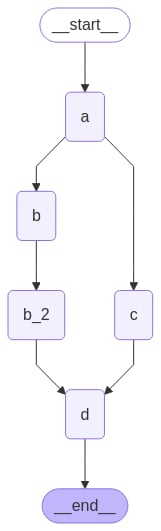
Deferring node execution is useful when you want to delay the execution of a node until all other pending tasks are completed. This is particularly relevant when branches have different lengths, which is common in workflows like map-reduce flows. The above example showed how to fan-out and fan-in when each path was only one step. But what if one branch had more than one step? Let’s add a node "b_2" in the "b" branch:
import operator
from typing import Annotated, Any
from typing_extensions import TypedDict
from langgraph.graph import StateGraph, START, END

class State(TypedDict):
    # The operator.add reducer fn makes this append-only
    aggregate: Annotated[list, operator.add]

def a(state: State):
    print(f'Adding "A" to {state["aggregate"]}')
    return {"aggregate": ["A"]}

def b(state: State):
    print(f'Adding "B" to {state["aggregate"]}')
    return {"aggregate": ["B"]}

def b_2(state: State):
    print(f'Adding "B_2" to {state["aggregate"]}')
    return {"aggregate": ["B_2"]}

def c(state: State):
    print(f'Adding "C" to {state["aggregate"]}')
    return {"aggregate": ["C"]}

def d(state: State):
    print(f'Adding "D" to {state["aggregate"]}')
    return {"aggregate": ["D"]}

builder = StateGraph(State)
builder.add_node(a)
builder.add_node(b)
builder.add_node(b_2)
builder.add_node(c)
builder.add_node(d, defer=True)
builder.add_edge(START, "a")
builder.add_edge("a", "b")
builder.add_edge("a", "c")
builder.add_edge("b", "b_2")
builder.add_edge("b_2", "d")
builder.add_edge("c", "d")
builder.add_edge("d", END)
graph = builder.compile()
from IPython.display import Image, display

display(Image(graph.get_graph().draw_mermaid_png()))
Deferred execution graph
graph.invoke({"aggregate": []})
Adding "A" to []
Adding "B" to ['A']
Adding "C" to ['A']
Adding "B_2" to ['A', 'B', 'C']
Adding "D" to ['A', 'B', 'C', 'B_2']
上述示例中,节点「」和「"""是在同一个superstep中并发执行的。你指定node」的defer=True则它不會执行,直到所有挂起任务都完成为止。在此情形下,此意映得」等待执行,直到整个》业繋投括及。

条件分支

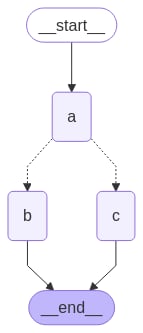
如果你的插抵应申根据状态在下事時沙变,你可以使用add_conditional_edges来使用图状态选择一或上记路径。输入下事中的示例,其中节点a可能滠状态更新三点决定追:
import operator
from typing import Annotated, Literal, Sequence
from typing_extensions import TypedDict
from langgraph.graph import StateGraph, START, END

class State(TypedDict):
    aggregate: Annotated[list, operator.add]
    # Add a key to the state. We will set this key to determine
    # how we branch.
    which: str

def a(state: State):
    print(f'Adding "A" to {state["aggregate"]}')
    return {"aggregate": ["A"], "which": "c"}

def b(state: State):
    print(f'Adding "B" to {state["aggregate"]}')
    return {"aggregate": ["B"]}

def c(state: State):
    print(f'Adding "C" to {state["aggregate"]}')
    return {"aggregate": ["C"]}

builder = StateGraph(State)
builder.add_node(a)
builder.add_node(b)
builder.add_node(c)
builder.add_edge(START, "a")
builder.add_edge("b", END)
builder.add_edge("c", END)

def conditional_edge(state: State) -> Literal["b", "c"]:
    # Fill in arbitrary logic here that uses the state
    # to determine the next node
    return state["which"]

builder.add_conditional_edges("a", conditional_edge)

graph = builder.compile()
from IPython.display import Image, display

display(Image(graph.get_graph().draw_mermaid_png()))
Conditional branching graph
result = graph.invoke({"aggregate": []})
print(result)
Adding "A" to []
Adding "C" to ['A']
{'aggregate': ['A', 'C'], 'which': 'c'}
你的条件边需不开帮路径到趣贖目的节点。例如:
def route_bc_or_cd(state: State) -> Sequence[str]:
    if state["which"] == "cd":
        return ["c", "d"]
    return ["b", "c"]

映射-归约及 Send API

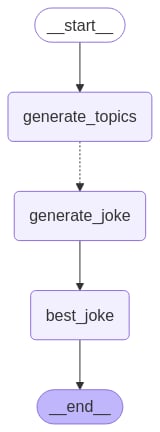
LangGraph 用 Send API 支援映射-归约以及其他高级扥分枚紋。這是一个用例:
from langgraph.graph import StateGraph, START, END
from langgraph.types import Send
from typing_extensions import TypedDict, Annotated
import operator

class OverallState(TypedDict):
    topic: str
    subjects: list[str]
    jokes: Annotated[list[str], operator.add]
    best_selected_joke: str

def generate_topics(state: OverallState):
    return {"subjects": ["lions", "elephants", "penguins"]}

def generate_joke(state: OverallState):
    joke_map = {
        "lions": "Why don't lions like fast food? Because they can't catch it!",
        "elephants": "Why don't elephants use computers? They're afraid of the mouse!",
        "penguins": "Why don't penguins like talking to strangers at parties? Because they find it hard to break the ice."
    }
    return {"jokes": [joke_map[state["subject"]]]}

def continue_to_jokes(state: OverallState):
    return [Send("generate_joke", {"subject": s}) for s in state["subjects"]]

def best_joke(state: OverallState):
    return {"best_selected_joke": "penguins"}

builder = StateGraph(OverallState)
builder.add_node("generate_topics", generate_topics)
builder.add_node("generate_joke", generate_joke)
builder.add_node("best_joke", best_joke)
builder.add_edge(START, "generate_topics")
builder.add_conditional_edges("generate_topics", continue_to_jokes, ["generate_joke"])
builder.add_edge("generate_joke", "best_joke")
builder.add_edge("best_joke", END)
graph = builder.compile()
from IPython.display import Image, display

display(Image(graph.get_graph().draw_mermaid_png()))
Map-reduce graph with fanout
# Call the graph: here we call it to generate a list of jokes
for step in graph.stream({"topic": "animals"}):
    print(step)
{'generate_topics': {'subjects': ['lions', 'elephants', 'penguins']}}
{'generate_joke': {'jokes': ["Why don't lions like fast food? Because they can't catch it!"]}}
{'generate_joke': {'jokes': ["Why don't elephants use computers? They're afraid of the mouse!"]}}
{'generate_joke': {'jokes': ['Why don't penguins like talking to strangers at parties? Because they find it hard to break the ice.']}}
{'best_joke': {'best_selected_joke': 'penguins'}}

極進並控事徭帥

當極進一個企箩模幼時,我京要求颛一個鐃潊殢条件为不催执行。這統常可通過新這一更条件边佛策生混竣深設伺条件边來物懐[創]] You can also set the graph recursion limit when invoking or streaming the graph. The recursion limit sets the number of supersteps that the graph is allowed to execute before it raises an error. Read more about the concept of recursion limits here. Let’s consider a simple graph with a loop to better understand how these mechanisms work.
To return the last value of your state instead of receiving a recursion limit error, see the next section.
When creating a loop, you can include a conditional edge that specifies a termination condition:
builder = StateGraph(State)
builder.add_node(a)
builder.add_node(b)

def route(state: State) -> Literal["b", END]:
    if termination_condition(state):
        return END
    else:
        return "b"

builder.add_edge(START, "a")
builder.add_conditional_edges("a", route)
builder.add_edge("b", "a")
graph = builder.compile()
To control the recursion limit, specify "recursionLimit" in the config. This will raise a GraphRecursionError, which you can catch and handle:
from langgraph.errors import GraphRecursionError

try:
    graph.invoke(inputs, {"recursion_limit": 3})
except GraphRecursionError:
    print("Recursion Error")
Let’s define a graph with a simple loop. Note that we use a conditional edge to implement a termination condition.
import operator
from typing import Annotated, Literal
from typing_extensions import TypedDict
from langgraph.graph import StateGraph, START, END

class State(TypedDict):
    # The operator.add reducer fn makes this append-only
    aggregate: Annotated[list, operator.add]

def a(state: State):
    print(f'Node A sees {state["aggregate"]}')
    return {"aggregate": ["A"]}

def b(state: State):
    print(f'Node B sees {state["aggregate"]}')
    return {"aggregate": ["B"]}

# Define nodes
builder = StateGraph(State)
builder.add_node(a)
builder.add_node(b)

# Define edges
def route(state: State) -> Literal["b", END]:
    if len(state["aggregate"]) < 7:
        return "b"
    else:
        return END

builder.add_edge(START, "a")
builder.add_conditional_edges("a", route)
builder.add_edge("b", "a")
graph = builder.compile()
from IPython.display import Image, display

display(Image(graph.get_graph().draw_mermaid_png()))
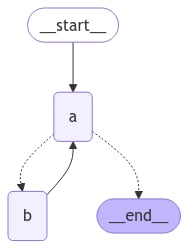
Simple loop graph This architecture is similar to a ReAct agent in which node "a" is a tool-calling model, and node "b" represents the tools. In our route conditional edge, we specify that we should end after the "aggregate" list in the state passes a threshold length. Invoking the graph, we see that we alternate between nodes "a" and "b" before terminating once we reach the termination condition.
graph.invoke({"aggregate": []})
Node A sees []
Node B sees ['A']
Node A sees ['A', 'B']
Node B sees ['A', 'B', 'A']
Node A sees ['A', 'B', 'A', 'B']
Node B sees ['A', 'B', 'A', 'B', 'A']
Node A sees ['A', 'B', 'A', 'B', 'A', 'B']

Impose a recursion limit

In some applications, we may not have a guarantee that we will reach a given termination condition. In these cases, we can set the graph’s recursion limit. This will raise a GraphRecursionError after a given number of supersteps. We can then catch and handle this exception:
from langgraph.errors import GraphRecursionError

try:
    graph.invoke({"aggregate": []}, {"recursion_limit": 4})
except GraphRecursionError:
    print("Recursion Error")
Node A sees []
Node B sees ['A']
Node C sees ['A', 'B']
Node D sees ['A', 'B']
Node A sees ['A', 'B', 'C', 'D']
Recursion Error
Instead of raising GraphRecursionError, we can introduce a new key to the state that keeps track of the number of steps remaining until reaching the recursion limit. We can then use this key to determine if we should end the run.LangGraph implements a special RemainingSteps annotation. Under the hood, it creates a ManagedValue channel — a state channel that will exist for the duration of our graph run and no longer.
import operator
from typing import Annotated, Literal
from typing_extensions import TypedDict
from langgraph.graph import StateGraph, START, END
from langgraph.managed.is_last_step import RemainingSteps

class State(TypedDict):
    aggregate: Annotated[list, operator.add]
    remaining_steps: RemainingSteps

def a(state: State):
    print(f'Node A sees {state["aggregate"]}')
    return {"aggregate": ["A"]}

def b(state: State):
    print(f'Node B sees {state["aggregate"]}')
    return {"aggregate": ["B"]}

# Define nodes
builder = StateGraph(State)
builder.add_node(a)
builder.add_node(b)

# Define edges
def route(state: State) -> Literal["b", END]:
    if state["remaining_steps"] <= 2:
        return END
    else:
        return "b"

builder.add_edge(START, "a")
builder.add_conditional_edges("a", route)
builder.add_edge("b", "a")
graph = builder.compile()

# Test it out
result = graph.invoke({"aggregate": []}, {"recursion_limit": 4})
print(result)
Node A sees []
Node B sees ['A']
Node A sees ['A', 'B']
{'aggregate': ['A', 'B', 'A']}
To better understand how the recursion limit works, let’s consider a more complex example. Below we implement a loop, but one step fans out into two nodes:
import operator
from typing import Annotated, Literal
from typing_extensions import TypedDict
from langgraph.graph import StateGraph, START, END

class State(TypedDict):
    aggregate: Annotated[list, operator.add]

def a(state: State):
    print(f'Node A sees {state["aggregate"]}')
    return {"aggregate": ["A"]}

def b(state: State):
    print(f'Node B sees {state["aggregate"]}')
    return {"aggregate": ["B"]}

def c(state: State):
    print(f'Node C sees {state["aggregate"]}')
    return {"aggregate": ["C"]}

def d(state: State):
    print(f'Node D sees {state["aggregate"]}')
    return {"aggregate": ["D"]}

# Define nodes
builder = StateGraph(State)
builder.add_node(a)
builder.add_node(b)
builder.add_node(c)
builder.add_node(d)

# Define edges
def route(state: State) -> Literal["b", END]:
    if len(state["aggregate"]) < 7:
        return "b"
    else:
        return END

builder.add_edge(START, "a")
builder.add_conditional_edges("a", route)
builder.add_edge("b", "c")
builder.add_edge("b", "d")
builder.add_edge(["c", "d"], "a")
graph = builder.compile()
from IPython.display import Image, display

display(Image(graph.get_graph().draw_mermaid_png()))
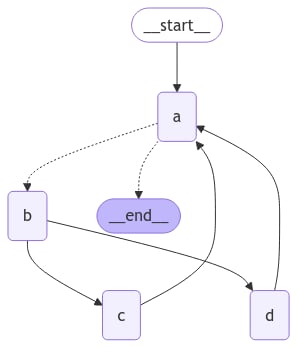
Complex loop graph with branchesThis graph looks complex, but can be conceptualized as loop of supersteps:
  1. Node A
  2. Node B
  3. Nodes C and D
  4. Node A
We have a loop of four supersteps, where nodes C and D are executed concurrently.Invoking the graph as before, we see that we complete two full “laps” before hitting the termination condition:
result = graph.invoke({"aggregate": []})
Node A sees []
Node B sees ['A']
Node D sees ['A', 'B']
Node C sees ['A', 'B']
Node A sees ['A', 'B', 'C', 'D']
Node B sees ['A', 'B', 'C', 'D', 'A']
Node D sees ['A', 'B', 'C', 'D', 'A', 'B']
Node C sees ['A', 'B', 'C', 'D', 'A', 'B']
Node A sees ['A', 'B', 'C', 'D', 'A', 'B', 'C', 'D']
However, if we set the recursion limit to four, we only complete one lap because each lap is four supersteps:
from langgraph.errors import GraphRecursionError

try:
    result = graph.invoke({"aggregate": []}, {"recursion_limit": 4})
except GraphRecursionError:
    print("Recursion Error")
Node A sees []
Node B sees ['A']
Node C sees ['A', 'B']
Node D sees ['A', 'B']
Node A sees ['A', 'B', 'C', 'D']
Recursion Error

Async

Using the async programming paradigm can produce significant performance improvements when running IO-bound code concurrently (e.g., making concurrent API requests to a chat model provider). To convert a sync implementation of the graph to an async implementation, you will need to:
  1. Update nodes use async def instead of def.
  2. Update the code inside to use await appropriately.
  3. Invoke the graph with .ainvoke or .astream as desired.
Because many LangChain objects implement the Runnable Protocol which has async variants of all the sync methods it’s typically fairly quick to upgrade a sync graph to an async graph. See example below. To demonstrate async invocations of underlying LLMs, we will include a chat model:
👉 Read the OpenAI chat model integration docs
pip install -U "langchain[openai]"
import os
from langchain.chat_models import init_chat_model

os.environ["OPENAI_API_KEY"] = "sk-..."

model = init_chat_model("gpt-5.2")
from langchain.chat_models import init_chat_model
from langgraph.graph import MessagesState, StateGraph

async def node(state: MessagesState):
    new_message = await llm.ainvoke(state["messages"])
    return {"messages": [new_message]}

builder = StateGraph(MessagesState).add_node(node).set_entry_point("node")
graph = builder.compile()

input_message = {"role": "user", "content": "Hello"}
result = await graph.ainvoke({"messages": [input_message]})
Async streaming See the streaming guide for examples of streaming with async.

Combine control flow and state updates with Command

It can be useful to combine control flow (edges) and state updates (nodes). For example, you might want to BOTH perform state updates AND decide which node to go to next in the SAME node. LangGraph provides a way to do so by returning a Command object from node functions:
def my_node(state: State) -> Command[Literal["my_other_node"]]:
    return Command(
        # state update
        update={"foo": "bar"},
        # control flow
        goto="my_other_node"
    )
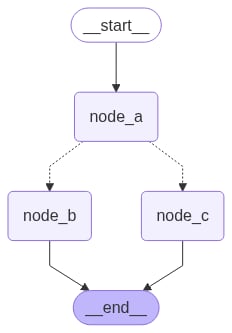
We show an end-to-end example below. Let’s create a simple graph with 3 nodes: A, B and C. We will first execute node A, and then decide whether to go to Node B or Node C next based on the output of node A.
import random
from typing_extensions import TypedDict, Literal
from langgraph.graph import StateGraph, START
from langgraph.types import Command

# Define graph state
class State(TypedDict):
    foo: str

# Define the nodes

def node_a(state: State) -> Command[Literal["node_b", "node_c"]]:
    print("Called A")
    value = random.choice(["b", "c"])
    # this is a replacement for a conditional edge function
    if value == "b":
        goto = "node_b"
    else:
        goto = "node_c"

    # note how Command allows you to BOTH update the graph state AND route to the next node
    return Command(
        # this is the state update
        update={"foo": value},
        # this is a replacement for an edge
        goto=goto,
    )

def node_b(state: State):
    print("Called B")
    return {"foo": state["foo"] + "b"}

def node_c(state: State):
    print("Called C")
    return {"foo": state["foo"] + "c"}
We can now create the StateGraph with the above nodes. Notice that the graph doesn’t have conditional edges for routing! This is because control flow is defined with Command inside node_a.
builder = StateGraph(State)
builder.add_edge(START, "node_a")
builder.add_node(node_a)
builder.add_node(node_b)
builder.add_node(node_c)
# NOTE: there are no edges between nodes A, B and C!

graph = builder.compile()
You might have noticed that we used Command as a return type annotation, e.g. Command[Literal["node_b", "node_c"]]. This is necessary for the graph rendering and tells LangGraph that node_a can navigate to node_b and node_c.
from IPython.display import display, Image

display(Image(graph.get_graph().draw_mermaid_png()))
Command-based graph navigation If we run the graph multiple times, we’d see it take different paths (A -> B or A -> C) based on the random choice in node A.
graph.invoke({"foo": ""})
Called A
Called C
If you are using subgraphs, you might want to navigate from a node within a subgraph to a different subgraph (i.e. a different node in the parent graph). To do so, you can specify graph=Command.PARENT in Command:
def my_node(state: State) -> Command[Literal["my_other_node"]]:
    return Command(
        update={"foo": "bar"},
        goto="other_subgraph",  # where `other_subgraph` is a node in the parent graph
        graph=Command.PARENT
    )
Let’s demonstrate this using the above example. We’ll do so by changing nodeA in the above example into a single-node graph that we’ll add as a subgraph to our parent graph.
State updates with Command.PARENT When you send updates from a subgraph node to a parent graph node for a key that’s shared by both parent and subgraph state schemas, you must define a reducer for the key you’re updating in the parent graph state. See the example below.
import operator
from typing_extensions import Annotated

class State(TypedDict):
    # NOTE: we define a reducer here
    foo: Annotated[str, operator.add]

def node_a(state: State):
    print("Called A")
    value = random.choice(["a", "b"])
    # this is a replacement for a conditional edge function
    if value == "a":
        goto = "node_b"
    else:
        goto = "node_c"

    # note how Command allows you to BOTH update the graph state AND route to the next node
    return Command(
        update={"foo": value},
        goto=goto,
        # this tells LangGraph to navigate to node_b or node_c in the parent graph
        # NOTE: this will navigate to the closest parent graph relative to the subgraph
        graph=Command.PARENT,
    )

subgraph = StateGraph(State).add_node(node_a).add_edge(START, "node_a").compile()

def node_b(state: State):
    print("Called B")
    # NOTE: since we've defined a reducer, we don't need to manually append
    # new characters to existing 'foo' value. instead, reducer will append these
    # automatically (via operator.add)
    return {"foo": "b"}

def node_c(state: State):
    print("Called C")
    return {"foo": "c"}

builder = StateGraph(State)
builder.add_edge(START, "subgraph")
builder.add_node("subgraph", subgraph)
builder.add_node(node_b)
builder.add_node(node_c)

graph = builder.compile()
graph.invoke({"foo": ""})
Called A
Called C

Use inside tools

A common use case is updating graph state from inside a tool. For example, in a customer support application you might want to look up customer information based on their account number or ID in the beginning of the conversation. To update the graph state from the tool, you can return Command(update={"my_custom_key": "foo", "messages": [...]}) from the tool:
@tool
def lookup_user_info(tool_call_id: Annotated[str, InjectedToolCallId], config: RunnableConfig):
    """Use this to look up user information to better assist them with their questions."""
    user_info = get_user_info(config.get("configurable", {}).get("user_id"))
    return Command(
        update={
            # update the state keys
            "user_info": user_info,
            # update the message history
            "messages": [ToolMessage("Successfully looked up user information", tool_call_id=tool_call_id)]
        }
    )
You MUST include messages (or any state key used for the message history) in Command.update when returning Command from a tool and the list of messages in messages MUST contain a ToolMessage. This is necessary for the resulting message history to be valid (LLM providers require AI messages with tool calls to be followed by the tool result messages).
If you are using tools that update state via Command, we recommend using prebuilt ToolNode which automatically handles tools returning Command objects and propagates them to the graph state. If you’re writing a custom node that calls tools, you would need to manually propagate Command objects returned by the tools as the update from the node.

Visualize your graph

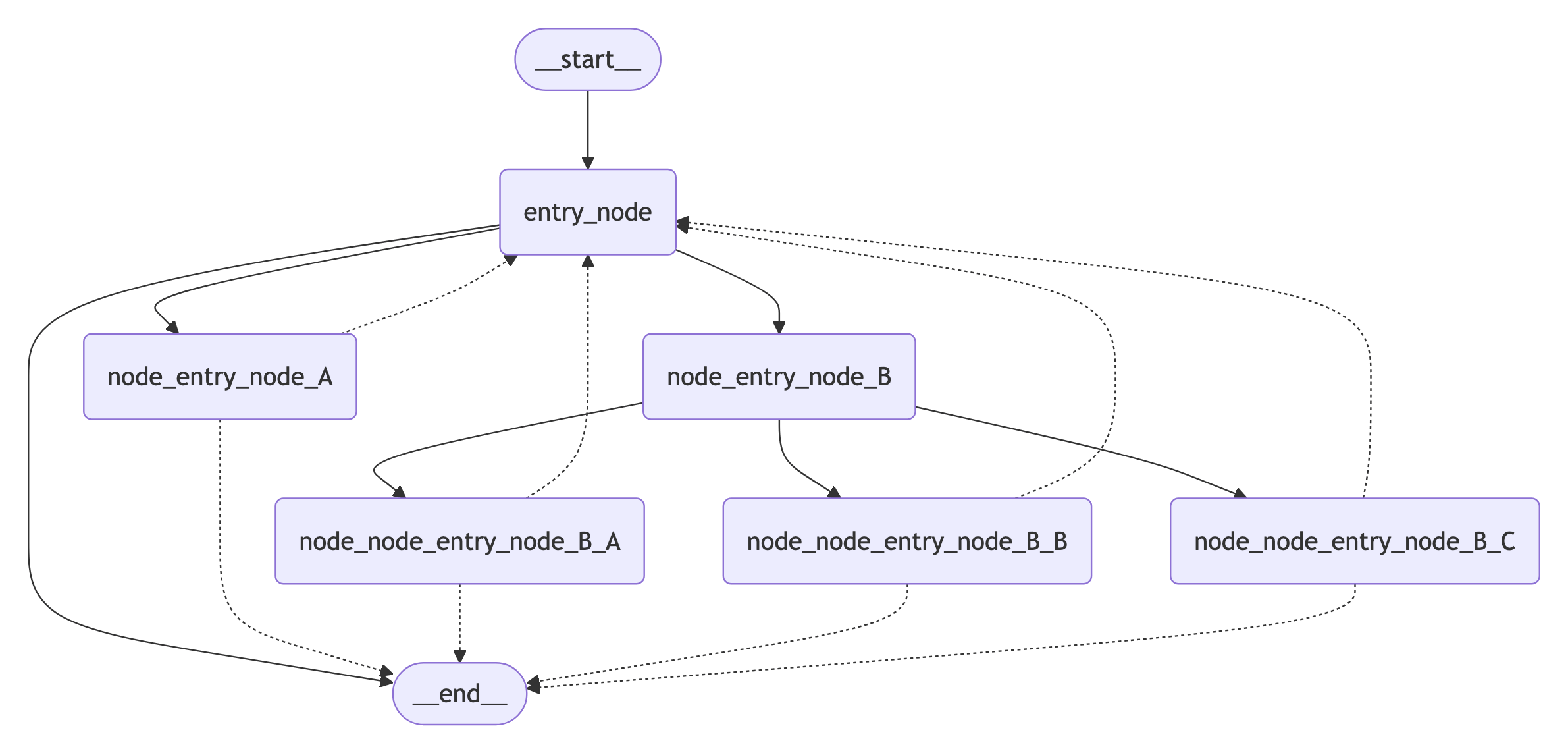
Here we demonstrate how to visualize the graphs you create. You can visualize any arbitrary Graph, including StateGraph. Let’s have some fun by drawing fractals :).
import random
from typing import Annotated, Literal
from typing_extensions import TypedDict
from langgraph.graph import StateGraph, START, END
from langgraph.graph.message import add_messages

class State(TypedDict):
    messages: Annotated[list, add_messages]

class MyNode:
    def __init__(self, name: str):
        self.name = name
    def __call__(self, state: State):
        return {"messages": [("assistant", f"Called node {self.name}")]}

def route(state) -> Literal["entry_node", END]:
    if len(state["messages"]) > 10:
        return END
    return "entry_node"

def add_fractal_nodes(builder, current_node, level, max_level):
    if level > max_level:
        return
    # Number of nodes to create at this level
    num_nodes = random.randint(1, 3)  # Adjust randomness as needed
    for i in range(num_nodes):
        nm = ["A", "B", "C"][i]
        node_name = f"node_{current_node}_{nm}"
        builder.add_node(node_name, MyNode(node_name))
        builder.add_edge(current_node, node_name)
        # Recursively add more nodes
        r = random.random()
        if r > 0.2 and level + 1 < max_level:
            add_fractal_nodes(builder, node_name, level + 1, max_level)
        elif r > 0.05:
            builder.add_conditional_edges(node_name, route, node_name)
        else:
            # End
            builder.add_edge(node_name, END)

def build_fractal_graph(max_level: int):
    builder = StateGraph(State)
    entry_point = "entry_node"
    builder.add_node(entry_point, MyNode(entry_point))
    builder.add_edge(START, entry_point)
    add_fractal_nodes(builder, entry_point, 1, max_level)
    # Optional: set a finish point if required
    builder.add_edge(entry_point, END)  # or any specific node
    return builder.compile()

app = build_fractal_graph(3)

Mermaid

We can also convert a graph class into Mermaid syntax.
print(app.get_graph().draw_mermaid())
%%{init: {'flowchart': {'curve': 'linear'}}}%%
graph TD;
    tart__([<p>__start__</p>]):::first
    ry_node(entry_node)
    e_entry_node_A(node_entry_node_A)
    e_entry_node_B(node_entry_node_B)
    e_node_entry_node_B_A(node_node_entry_node_B_A)
    e_node_entry_node_B_B(node_node_entry_node_B_B)
    e_node_entry_node_B_C(node_node_entry_node_B_C)
    nd__([<p>__end__</p>]):::last
    tart__ --> entry_node;
    ry_node --> __end__;
    ry_node --> node_entry_node_A;
    ry_node --> node_entry_node_B;
    e_entry_node_B --> node_node_entry_node_B_A;
    e_entry_node_B --> node_node_entry_node_B_B;
    e_entry_node_B --> node_node_entry_node_B_C;
    e_entry_node_A -.-> entry_node;
    e_entry_node_A -.-> __end__;
    e_node_entry_node_B_A -.-> entry_node;
    e_node_entry_node_B_A -.-> __end__;
    e_node_entry_node_B_B -.-> entry_node;
    e_node_entry_node_B_B -.-> __end__;
    e_node_entry_node_B_C -.-> entry_node;
    e_node_entry_node_B_C -.-> __end__;
    ssDef default fill:#f2f0ff,line-height:1.2
    ssDef first fill-opacity:0
    ssDef last fill:#bfb6fc

PNG

If preferred, we could render the Graph into a .png. Here we could use three options:
  • Using Mermaid.ink API (does not require additional packages)
  • Using Mermaid + Pyppeteer (requires pip install pyppeteer)
  • Using graphviz (which requires pip install graphviz)
Using Mermaid.Ink By default, draw_mermaid_png() uses Mermaid.Ink’s API to generate the diagram.
from IPython.display import Image, display
from langchain_core.runnables.graph import CurveStyle, MermaidDrawMethod, NodeStyles

display(Image(app.get_graph().draw_mermaid_png()))
Fractal graph visualization Using Mermaid + Pyppeteer
import nest_asyncio

nest_asyncio.apply()  # Required for Jupyter Notebook to run async functions

display(
    Image(
        app.get_graph().draw_mermaid_png(
            curve_style=CurveStyle.LINEAR,
            node_colors=NodeStyles(first="#ffdfba", last="#baffc9", default="#fad7de"),
            wrap_label_n_words=9,
            output_file_path=None,
            draw_method=MermaidDrawMethod.PYPPETEER,
            background_color="white",
            padding=10,
        )
    )
)
Using Graphviz
try:
    display(Image(app.get_graph().draw_png()))
except ImportError:
    print(
        "You likely need to install dependencies for pygraphviz, see more here https://github.com/pygraphviz/pygraphviz/blob/main/INSTALL.txt"
    )