

- 构建多智能体系统
- 在多个图中复用一组节点
- 分布式开发:当您希望不同团队独立处理图的不同部分时,可以将每个部分定义为一个子图,只要遵循子图接口(输入和输出模式),父图就可以在不了解子图任何细节的情况下构建。
设置
pip install -U langgraph
uv add langgraph
为 LangGraph 开发设置 LangSmith
注册 LangSmith 以快速发现问题并提升 LangGraph 项目的性能。LangSmith 允许您使用跟踪数据来调试、测试和监控使用 LangGraph 构建的 LLM 应用——阅读更多关于如何开始使用 LangSmith的信息。
定义子图通信
添加子图时,您需要定义父图和子图如何通信:在节点内调用子图
当父图和子图具有不同的状态模式(没有共享键)时,在节点函数内调用子图。当您想在多智能体系统中为每个智能体保留私有消息历史时,这很常见。 节点函数在调用子图之前将父状态转换为子图状态,并在返回之前将结果转换回父状态。from typing_extensions import TypedDict
from langgraph.graph.state import StateGraph, START
class SubgraphState(TypedDict):
bar: str
# Subgraph
def subgraph_node_1(state: SubgraphState):
return {"bar": "hi! " + state["bar"]}
subgraph_builder = StateGraph(SubgraphState)
subgraph_builder.add_node(subgraph_node_1)
subgraph_builder.add_edge(START, "subgraph_node_1")
subgraph = subgraph_builder.compile()
# Parent graph
class State(TypedDict):
foo: str
def call_subgraph(state: State):
# Transform the state to the subgraph state
subgraph_output = subgraph.invoke({"bar": state["foo"]})
# Transform response back to the parent state
return {"foo": subgraph_output["bar"]}
builder = StateGraph(State)
builder.add_node("node_1", call_subgraph)
builder.add_edge(START, "node_1")
graph = builder.compile()
完整示例:不同的状态模式
完整示例:不同的状态模式
from typing_extensions import TypedDict
from langgraph.graph.state import StateGraph, START

# Define subgraph
class SubgraphState(TypedDict):
    # note that none of these keys are shared with the parent graph state
    bar: str
    baz: str

def subgraph_node_1(state: SubgraphState):
    return {"baz": "baz"}

def subgraph_node_2(state: SubgraphState):
    return {"bar": state["bar"] + state["baz"]}

subgraph_builder = StateGraph(SubgraphState)
subgraph_builder.add_node(subgraph_node_1)
subgraph_builder.add_node(subgraph_node_2)
subgraph_builder.add_edge(START, "subgraph_node_1")
subgraph_builder.add_edge("subgraph_node_1", "subgraph_node_2")
subgraph = subgraph_builder.compile()

# Define parent graph
class ParentState(TypedDict):
    foo: str

def node_1(state: ParentState):
    return {"foo": "hi! " + state["foo"]}

def node_2(state: ParentState):
    # Transform the state to the subgraph state
    response = subgraph.invoke({"bar": state["foo"]})
    # Transform response back to the parent state
    return {"foo": response["bar"]}


builder = StateGraph(ParentState)
builder.add_node("node_1", node_1)
builder.add_node("node_2", node_2)
builder.add_edge(START, "node_1")
builder.add_edge("node_1", "node_2")
graph = builder.compile()

for chunk in graph.stream({"foo": "foo"}, subgraphs=True, version="v2"):
    if chunk["type"] == "updates":
        print(chunk["ns"], chunk["data"])
() {'node_1': {'foo': 'hi! foo'}}
('node_2:577b710b-64ae-31fb-9455-6a4d4cc2b0b9',) {'subgraph_node_1': {'baz': 'baz'}}
('node_2:577b710b-64ae-31fb-9455-6a4d4cc2b0b9',) {'subgraph_node_2': {'bar': 'hi! foobaz'}}
() {'node_2': {'foo': 'hi! foobaz'}}
完整示例:不同的状态模式(两级子图)
完整示例:不同的状态模式(两级子图)
这是一个包含两级子图的示例:父图 -> 子图 -> 孙图。
# Grandchild graph
from typing_extensions import TypedDict
from langgraph.graph.state import StateGraph, START, END

class GrandChildState(TypedDict):
    my_grandchild_key: str

def grandchild_1(state: GrandChildState) -> GrandChildState:
    # NOTE: child or parent keys will not be accessible here
    return {"my_grandchild_key": state["my_grandchild_key"] + ", how are you"}


grandchild = StateGraph(GrandChildState)
grandchild.add_node("grandchild_1", grandchild_1)

grandchild.add_edge(START, "grandchild_1")
grandchild.add_edge("grandchild_1", END)

grandchild_graph = grandchild.compile()

# Child graph
class ChildState(TypedDict):
    my_child_key: str

def call_grandchild_graph(state: ChildState) -> ChildState:
    # NOTE: parent or grandchild keys won't be accessible here
    grandchild_graph_input = {"my_grandchild_key": state["my_child_key"]}
    grandchild_graph_output = grandchild_graph.invoke(grandchild_graph_input)
    return {"my_child_key": grandchild_graph_output["my_grandchild_key"] + " today?"}

child = StateGraph(ChildState)
# We're passing a function here instead of just compiled graph (`grandchild_graph`)
child.add_node("child_1", call_grandchild_graph)
child.add_edge(START, "child_1")
child.add_edge("child_1", END)
child_graph = child.compile()

# Parent graph
class ParentState(TypedDict):
    my_key: str

def parent_1(state: ParentState) -> ParentState:
    # NOTE: child or grandchild keys won't be accessible here
    return {"my_key": "hi " + state["my_key"]}

def parent_2(state: ParentState) -> ParentState:
    return {"my_key": state["my_key"] + " bye!"}

def call_child_graph(state: ParentState) -> ParentState:
    child_graph_input = {"my_child_key": state["my_key"]}
    child_graph_output = child_graph.invoke(child_graph_input)
    return {"my_key": child_graph_output["my_child_key"]}

parent = StateGraph(ParentState)
parent.add_node("parent_1", parent_1)
# We're passing a function here instead of just a compiled graph (`child_graph`)
parent.add_node("child", call_child_graph)
parent.add_node("parent_2", parent_2)

parent.add_edge(START, "parent_1")
parent.add_edge("parent_1", "child")
parent.add_edge("child", "parent_2")
parent.add_edge("parent_2", END)

parent_graph = parent.compile()

for chunk in parent_graph.stream({"my_key": "Bob"}, subgraphs=True, version="v2"):
    if chunk["type"] == "updates":
        print(chunk["ns"], chunk["data"])
() {'parent_1': {'my_key': 'hi Bob'}}
('child:2e26e9ce-602f-862c-aa66-1ea5a4655e3b', 'child_1:781bb3b1-3971-84ce-810b-acf819a03f9c') {'grandchild_1': {'my_grandchild_key': 'hi Bob, how are you'}}
('child:2e26e9ce-602f-862c-aa66-1ea5a4655e3b',) {'child_1': {'my_child_key': 'hi Bob, how are you today?'}}
() {'child': {'my_key': 'hi Bob, how are you today?'}}
() {'parent_2': {'my_key': 'hi Bob, how are you today? bye!'}}
将子图添加为节点
当父图和子图共享状态键时,您可以将编译后的子图直接传递给add_node。不需要包装函数——子图会自动从父状态通道读取和写入。例如,在多智能体系统中,智能体通常通过共享的 messages 键进行通信。
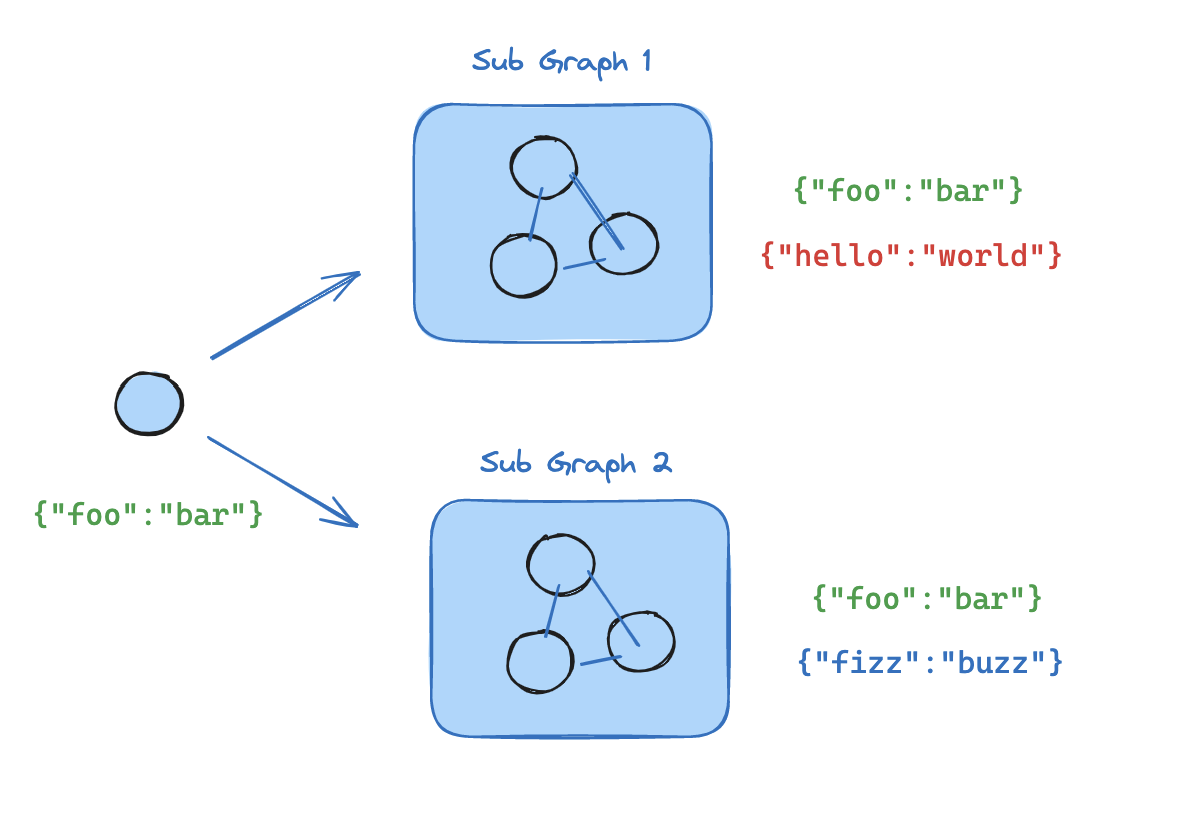
- 定义子图工作流(下面示例中的
subgraph_builder)并编译它 - 在定义父图工作流时,将编译后的子图传递给
add_node方法
from typing_extensions import TypedDict
from langgraph.graph.state import StateGraph, START

class State(TypedDict):
    foo: str

# Subgraph

def subgraph_node_1(state: State):
    return {"foo": "hi! " + state["foo"]}

subgraph_builder = StateGraph(State)
subgraph_builder.add_node(subgraph_node_1)
subgraph_builder.add_edge(START, "subgraph_node_1")
subgraph = subgraph_builder.compile()

# Parent graph

builder = StateGraph(State)
builder.add_node("node_1", subgraph)
builder.add_edge(START, "node_1")
graph = builder.compile()
完整示例:共享状态模式
完整示例:共享状态模式
from typing_extensions import TypedDict
from langgraph.graph.state import StateGraph, START

# Define subgraph
class SubgraphState(TypedDict):
    foo: str  # shared with parent graph state
    bar: str  # private to SubgraphState

def subgraph_node_1(state: SubgraphState):
    return {"bar": "bar"}

def subgraph_node_2(state: SubgraphState):
    # note that this node is using a state key ('bar') that is only available in the subgraph
    # and is sending update on the shared state key ('foo')
    return {"foo": state["foo"] + state["bar"]}

subgraph_builder = StateGraph(SubgraphState)
subgraph_builder.add_node(subgraph_node_1)
subgraph_builder.add_node(subgraph_node_2)
subgraph_builder.add_edge(START, "subgraph_node_1")
subgraph_builder.add_edge("subgraph_node_1", "subgraph_node_2")
subgraph = subgraph_builder.compile()

# Define parent graph
class ParentState(TypedDict):
    foo: str

def node_1(state: ParentState):
    return {"foo": "hi! " + state["foo"]}

builder = StateGraph(ParentState)
builder.add_node("node_1", node_1)
builder.add_node("node_2", subgraph)
builder.add_edge(START, "node_1")
builder.add_edge("node_1", "node_2")
graph = builder.compile()

for chunk in graph.stream({"foo": "foo"}, version="v2"):
    if chunk["type"] == "updates":
        print(chunk["data"])
{'node_1': {'foo': 'hi! foo'}}
{'node_2': {'foo': 'hi! foobar'}}
子图持久化
当您使用子图时,需要决定其内部数据在调用之间如何处理。考虑一个委托给专业子智能体的客户支持机器人:“计费专家”子智能体是应该记住客户之前的问题,还是每次调用时都重新开始?.compile() 上的 checkpointer 参数控制子图持久化:
对于大多数应用程序,包括子智能体处理独立请求的多智能体系统,每次调用是正确的选择。当子智能体需要多轮对话记忆时(例如,一个在多次交互中构建上下文的研究助手),请使用每线程模式。
父图必须使用检查点编译,子图持久化功能(中断、状态检查、每线程记忆)才能工作。参见持久化。
下面的示例使用 LangChain 的
create_agent,这是构建智能体的常用方式。create_agent 底层生成一个 LangGraph 图,因此所有子图持久化概念都直接适用。如果您使用原始的 LangGraph StateGraph 构建,相同的模式和配置选项也适用——详情请参阅 Graph API。有状态
有状态子图继承父图的检查点,这支持中断、持久执行和状态检查。两种有状态模式在状态保留时长上有所不同。每次调用(默认)
当对子图的每次调用都是独立的,并且子智能体不需要记住之前调用的任何内容时,请使用每次调用持久化。这是最常见的模式,特别是对于处理一次性请求(如“查找此客户的订单”或“总结此文档”)的多智能体系统。 省略checkpointer 或将其设置为 None。每次调用都重新开始,但在单次调用内,子图继承父图的检查点,并可以使用 interrupt() 暂停和恢复。
以下示例使用两个子智能体(水果专家、蔬菜专家)包装为外部智能体的工具:
from langchain.agents import create_agent
from langchain.tools import tool
from langgraph.checkpoint.memory import MemorySaver
from langgraph.types import Command, interrupt

@tool
def fruit_info(fruit_name: str) -> str:
    """Look up fruit info."""
    return f"Info about {fruit_name}"

@tool
def veggie_info(veggie_name: str) -> str:
    """Look up veggie info."""
    return f"Info about {veggie_name}"

# Subagents - no checkpointer setting (inherits parent)
fruit_agent = create_agent(
    model="gpt-5.4-mini",
    tools=[fruit_info],
    prompt="You are a fruit expert. Use the fruit_info tool. Respond in one sentence.",
)

veggie_agent = create_agent(
    model="gpt-5.4-mini",
    tools=[veggie_info],
    prompt="You are a veggie expert. Use the veggie_info tool. Respond in one sentence.",
)

# Wrap subagents as tools for the outer agent
@tool
def ask_fruit_expert(question: str) -> str:
    """Ask the fruit expert. Use for ALL fruit questions."""
    response = fruit_agent.invoke(
        {"messages": [{"role": "user", "content": question}]},
    )
    return response["messages"][-1].content

@tool
def ask_veggie_expert(question: str) -> str:
    """Ask the veggie expert. Use for ALL veggie questions."""
    response = veggie_agent.invoke(
        {"messages": [{"role": "user", "content": question}]},
    )
    return response["messages"][-1].content

# Outer agent with checkpointer
agent = create_agent(
    model="gpt-5.4-mini",
    tools=[ask_fruit_expert, ask_veggie_expert],
    prompt=(
        "You have two experts: ask_fruit_expert and ask_veggie_expert. "
        "ALWAYS delegate questions to the appropriate expert."
    ),
    checkpointer=MemorySaver(),
)
- 中断
- 多轮对话
- 多次子图调用
每次调用都可以使用
interrupt() 暂停和恢复。在工具函数中添加 interrupt() 以要求用户批准后才能继续:@tool
def fruit_info(fruit_name: str) -> str:
"""Look up fruit info."""
interrupt("continue?")
return f"Info about {fruit_name}"
config = {"configurable": {"thread_id": "1"}}

# Invoke - the subagent's tool calls interrupt()
response = agent.invoke(
    {"messages": [{"role": "user", "content": "Tell me about apples"}]},
    config=config,
)
# response contains __interrupt__

# Resume - approve the interrupt
response = agent.invoke(Command(resume=True), config=config)
# Subagent message count: 4
每次调用都从全新的子智能体状态开始。子智能体不记得之前的调用:
config = {"configurable": {"thread_id": "1"}}

# First call
response = agent.invoke(
    {"messages": [{"role": "user", "content": "Tell me about apples"}]},
    config=config,
)
# Subagent message count: 4

# Second call - subagent starts fresh, no memory of apples
response = agent.invoke(
    {"messages": [{"role": "user", "content": "Now tell me about bananas"}]},
    config=config,
)
# Subagent message count: 4 (still fresh!)
对同一子图的多次调用可以无冲突地工作,因为每次调用都有自己的检查点命名空间:
config = {"configurable": {"thread_id": "1"}}

# LLM calls ask_fruit_expert for both apples and bananas
response = agent.invoke(
    {"messages": [{"role": "user", "content": "Tell me about apples and bananas"}]},
    config=config,
)
# Subagent message count: 4 (apples - fresh)
# Subagent message count: 4 (bananas - fresh)
每线程
当子智能体需要记住之前的交互时,请使用每线程持久化。例如,一个在多次交互中构建上下文的研究助手,或一个跟踪已编辑文件的编码助手。子智能体的对话历史和数据在同一线程上的多次调用中累积。每次调用都从上次停止的地方继续。 使用checkpointer=True 编译以启用此行为。
每线程子图不支持并行工具调用。当 LLM 可以访问每线程子智能体作为工具时,它可能会尝试并行多次调用该工具(例如,同时向水果专家询问苹果和香蕉)。这会导致检查点冲突,因为两次调用都写入相同的命名空间。下面的示例使用 LangChain 的
ToolCallLimitMiddleware 来防止这种情况。如果您使用纯 LangGraph StateGraph 构建,您需要自己防止并行工具调用——例如,通过配置模型禁用并行工具调用,或添加逻辑确保同一子图不会被并行多次调用。checkpointer=True 编译的水果专家子智能体:
from langchain.agents import create_agent
from langchain.agents.middleware import ToolCallLimitMiddleware
from langchain.tools import tool
from langgraph.checkpoint.memory import MemorySaver
from langgraph.types import Command, interrupt

@tool
def fruit_info(fruit_name: str) -> str:
    """Look up fruit info."""
    return f"Info about {fruit_name}"

# Subagent with checkpointer=True for persistent state
fruit_agent = create_agent(
    model="gpt-5.4-mini",
    tools=[fruit_info],
    prompt="You are a fruit expert. Use the fruit_info tool. Respond in one sentence.",
    checkpointer=True,
)

# Wrap subagent as a tool for the outer agent
@tool
def ask_fruit_expert(question: str) -> str:
    """Ask the fruit expert. Use for ALL fruit questions."""
    response = fruit_agent.invoke(
        {"messages": [{"role": "user", "content": question}]},
    )
    return response["messages"][-1].content

# Outer agent with checkpointer
# Use ToolCallLimitMiddleware to prevent parallel calls to per-thread subagents,
# which would cause checkpoint conflicts.
agent = create_agent(
    model="gpt-5.4-mini",
    tools=[ask_fruit_expert],
    prompt="You have a fruit expert. ALWAYS delegate fruit questions to ask_fruit_expert.",
    middleware=[
        ToolCallLimitMiddleware(tool_name="ask_fruit_expert", run_limit=1),
    ],
    checkpointer=MemorySaver(),
)
- 中断
- 多轮对话
- 多次子图调用
每线程子智能体与每次调用一样支持
interrupt()。在工具函数中添加 interrupt() 以要求用户批准:@tool
def fruit_info(fruit_name: str) -> str:
"""Look up fruit info."""
interrupt("continue?")
return f"Info about {fruit_name}"
config = {"configurable": {"thread_id": "1"}}

# Invoke - the subagent's tool calls interrupt()
response = agent.invoke(
    {"messages": [{"role": "user", "content": "Tell me about apples"}]},
    config=config,
)
# response contains __interrupt__

# Resume - approve the interrupt
response = agent.invoke(Command(resume=True), config=config)
# Subagent message count: 4
状态在多次调用中累积——子智能体记住过去的对话:
config = {"configurable": {"thread_id": "1"}}

# First call
response = agent.invoke(
    {"messages": [{"role": "user", "content": "Tell me about apples"}]},
    config=config,
)
# Subagent message count: 4

# Second call - subagent REMEMBERS apples conversation
response = agent.invoke(
    {"messages": [{"role": "user", "content": "Now tell me about bananas"}]},
    config=config,
)
# Subagent message count: 8 (accumulated!)
当您有多个不同的每线程子图(例如,水果专家和蔬菜专家)时,每个子图都需要自己的存储空间,这样它们的检查点才不会相互覆盖。这称为命名空间隔离。如果您在节点内调用子图,LangGraph 会根据调用顺序(第一次调用、第二次调用等)分配命名空间。这意味着重新排序调用可能会混淆哪个子图加载哪个状态。为避免这种情况,请将每个子智能体包装在自己的 添加为节点的子图已经自动获得基于名称的命名空间,因此不需要此包装。
StateGraph 中,并使用唯一的节点名称——这为每个子图提供稳定、唯一的命名空间:from langgraph.graph import MessagesState, StateGraph
def create_sub_agent(model, *, name, **kwargs):
"""Wrap an agent with a unique node name for namespace isolation."""
agent = create_agent(model=model, name=name, **kwargs)
return (
StateGraph(MessagesState)
.add_node(name, agent) # unique name → stable namespace #
.add_edge("__start__", name)
.compile()
)
fruit_agent = create_sub_agent(
"gpt-5.4-mini", name="fruit_agent",
tools=[fruit_info], prompt="...", checkpointer=True,
)
veggie_agent = create_sub_agent(
"gpt-5.4-mini", name="veggie_agent",
tools=[veggie_info], prompt="...", checkpointer=True,
)
config = {"configurable": {"thread_id": "1"}}
# First call - LLM calls both fruit and veggie experts
response = agent.invoke(
{"messages": [{"role": "user", "content": "Tell me about cherries and broccoli"}]},
config=config,
)
# Fruit subagent message count: 4
# Veggie subagent message count: 4
# Second call - both agents accumulate independently
response = agent.invoke(
{"messages": [{"role": "user", "content": "Now tell me about oranges and carrots"}]},
config=config,
)
# Fruit subagent message count: 8 (remembers cherries!)
# Veggie subagent message count: 8 (remembers broccoli!)
无状态
当您希望像普通函数调用一样运行子智能体,没有检查点开销时,请使用此模式。子图无法暂停/恢复,也无法从持久执行中受益。使用checkpointer=False 编译。
没有检查点,子图就没有持久执行。如果进程在运行过程中崩溃,子图无法恢复,必须从头开始重新运行。
subgraph_builder = StateGraph(...)
subgraph = subgraph_builder.compile(checkpointer=False)
检查点参考
使用.compile() 上的 checkpointer 参数控制子图持久化:
subgraph = builder.compile(checkpointer=False) # or True / None
| 功能 | 每次调用(默认) | 每线程 | 无状态 |
|---|---|---|---|
checkpointer= | None | True | False |
| 中断 (HITL) | ✅ | ✅ | ❌ |
| 多轮对话记忆 | ❌ | ✅ | ❌ |
| 多次调用(不同子图) | ✅ | ✅ | |
| 多次调用(同一子图) | ✅ | ❌ | ✅ |
| 状态检查 | ✅ | ❌ |
- 中断 (HITL):子图可以使用 interrupt() 暂停执行并等待用户输入,然后从停止的地方恢复。
- 多轮对话记忆:子图在同一线程内的多次调用中保留其状态。每次调用都从上次停止的地方继续,而不是重新开始。
- 多次调用(不同子图):可以在单个节点内调用多个不同的子图实例,而不会发生检查点命名空间冲突。
- 多次调用(同一子图):可以在单个节点内多次调用同一子图实例。使用有状态持久化时,这些调用会写入相同的检查点命名空间并发生冲突——请改用每次调用持久化。
- 状态检查:子图的状态可通过
get_state(config, subgraphs=True)用于调试和监控。
查看子图状态
当您启用持久化时,可以使用 subgraphs 选项检查子图状态。使用无状态检查点(checkpointer=False)时,不会保存子图检查点,因此子图状态不可用。
- 每次调用
- 每线程
仅返回当前调用的子图状态。每次调用都重新开始。
from langgraph.graph import START, StateGraph
from langgraph.checkpoint.memory import MemorySaver
from langgraph.types import interrupt, Command
from typing_extensions import TypedDict

class State(TypedDict):
    foo: str

# Subgraph
def subgraph_node_1(state: State):
    value = interrupt("Provide value:")
    return {"foo": state["foo"] + value}

subgraph_builder = StateGraph(State)
subgraph_builder.add_node(subgraph_node_1)
subgraph_builder.add_edge(START, "subgraph_node_1")
subgraph = subgraph_builder.compile()  # inherits parent checkpointer

# Parent graph
builder = StateGraph(State)
builder.add_node("node_1", subgraph)
builder.add_edge(START, "node_1")

checkpointer = MemorySaver()
graph = builder.compile(checkpointer=checkpointer)

config = {"configurable": {"thread_id": "1"}}

graph.invoke({"foo": ""}, config)

# View subgraph state for the current invocation
subgraph_state = graph.get_state(config, subgraphs=True).tasks[0].state

# Resume the subgraph
graph.invoke(Command(resume="bar"), config)
返回此线程上所有调用的累积子图状态。
from langgraph.graph import START, StateGraph, MessagesState
from langgraph.checkpoint.memory import MemorySaver

# Subgraph with its own persistent state
subgraph_builder = StateGraph(MessagesState)
# ... add nodes and edges
subgraph = subgraph_builder.compile(checkpointer=True)

# Parent graph
builder = StateGraph(MessagesState)
builder.add_node("agent", subgraph)
builder.add_edge(START, "agent")

checkpointer = MemorySaver()
graph = builder.compile(checkpointer=checkpointer)

config = {"configurable": {"thread_id": "1"}}

graph.invoke({"messages": [{"role": "user", "content": "hi"}]}, config)
graph.invoke({"messages": [{"role": "user", "content": "what did I say?"}]}, config)

# View accumulated subgraph state (includes messages from both invocations)
subgraph_state = graph.get_state(config, subgraphs=True).tasks[0].state
流式传输子图输出
要将子图的输出包含在流式输出中,可以在父图的 stream 方法中设置 subgraphs 选项。这将流式传输父图和任何子图的输出。- v2 (LangGraph >= 1.1)
- v1 (默认)
使用
version="v2" 时,子图事件使用相同的 StreamPart 格式。ns 字段标识源图:for chunk in graph.stream(
{"foo": "foo"},
subgraphs=True,
stream_mode="updates",
version="v2",
):
print(chunk["type"]) # "updates"
print(chunk["ns"]) # () for root, ("node_2:<task_id>",) for subgraph
print(chunk["data"]) # {"node_name": {"key": "value"}}
for chunk in graph.stream(
    {"foo": "foo"},
    subgraphs=True,
    stream_mode="updates",
):
    print(chunk)
从子图流式传输
从子图流式传输
from typing_extensions import TypedDict
from langgraph.graph.state import StateGraph, START

# Define subgraph
class SubgraphState(TypedDict):
    foo: str
    bar: str

def subgraph_node_1(state: SubgraphState):
    return {"bar": "bar"}

def subgraph_node_2(state: SubgraphState):
    # note that this node is using a state key ('bar') that is only available in the subgraph
    # and is sending update on the shared state key ('foo')
    return {"foo": state["foo"] + state["bar"]}

subgraph_builder = StateGraph(SubgraphState)
subgraph_builder.add_node(subgraph_node_1)
subgraph_builder.add_node(subgraph_node_2)
subgraph_builder.add_edge(START, "subgraph_node_1")
subgraph_builder.add_edge("subgraph_node_1", "subgraph_node_2")
subgraph = subgraph_builder.compile()

# Define parent graph
class ParentState(TypedDict):
    foo: str

def node_1(state: ParentState):
    return {"foo": "hi! " + state["foo"]}

builder = StateGraph(ParentState)
builder.add_node("node_1", node_1)
builder.add_node("node_2", subgraph)
builder.add_edge(START, "node_1")
builder.add_edge("node_1", "node_2")
graph = builder.compile()

for chunk in graph.stream(
    {"foo": "foo"},
    stream_mode="updates",
    subgraphs=True,
    version="v2",
):
    if chunk["type"] == "updates":
        print(chunk["ns"], chunk["data"])
() {'node_1': {'foo': 'hi! foo'}}
('node_2:e58e5673-a661-ebb0-70d4-e298a7fc28b7',) {'subgraph_node_1': {'bar': 'bar'}}
('node_2:e58e5673-a661-ebb0-70d4-e298a7fc28b7',) {'subgraph_node_2': {'foo': 'hi! foobar'}}
() {'node_2': {'foo': 'hi! foobar'}}
将这些文档连接到 Claude、VSCode 等,通过 MCP 获取实时答案。