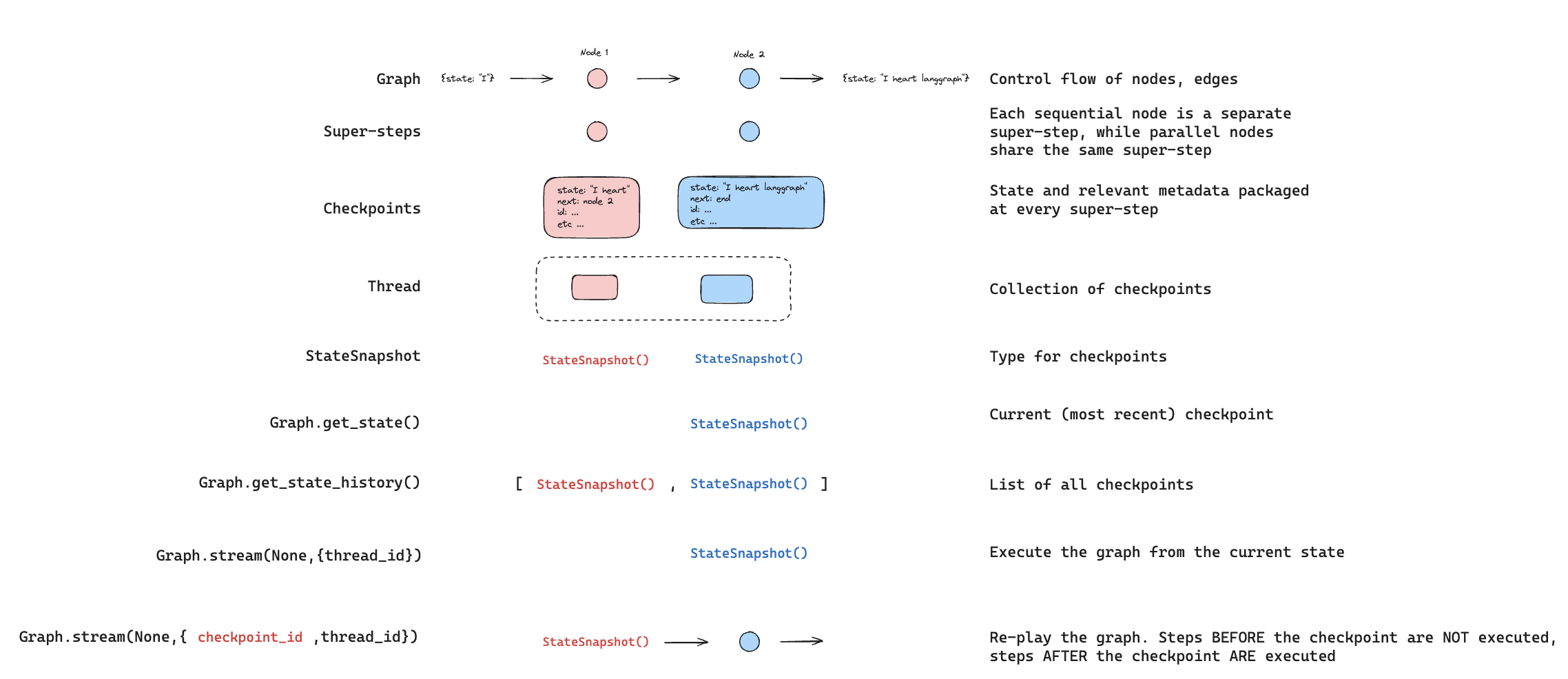
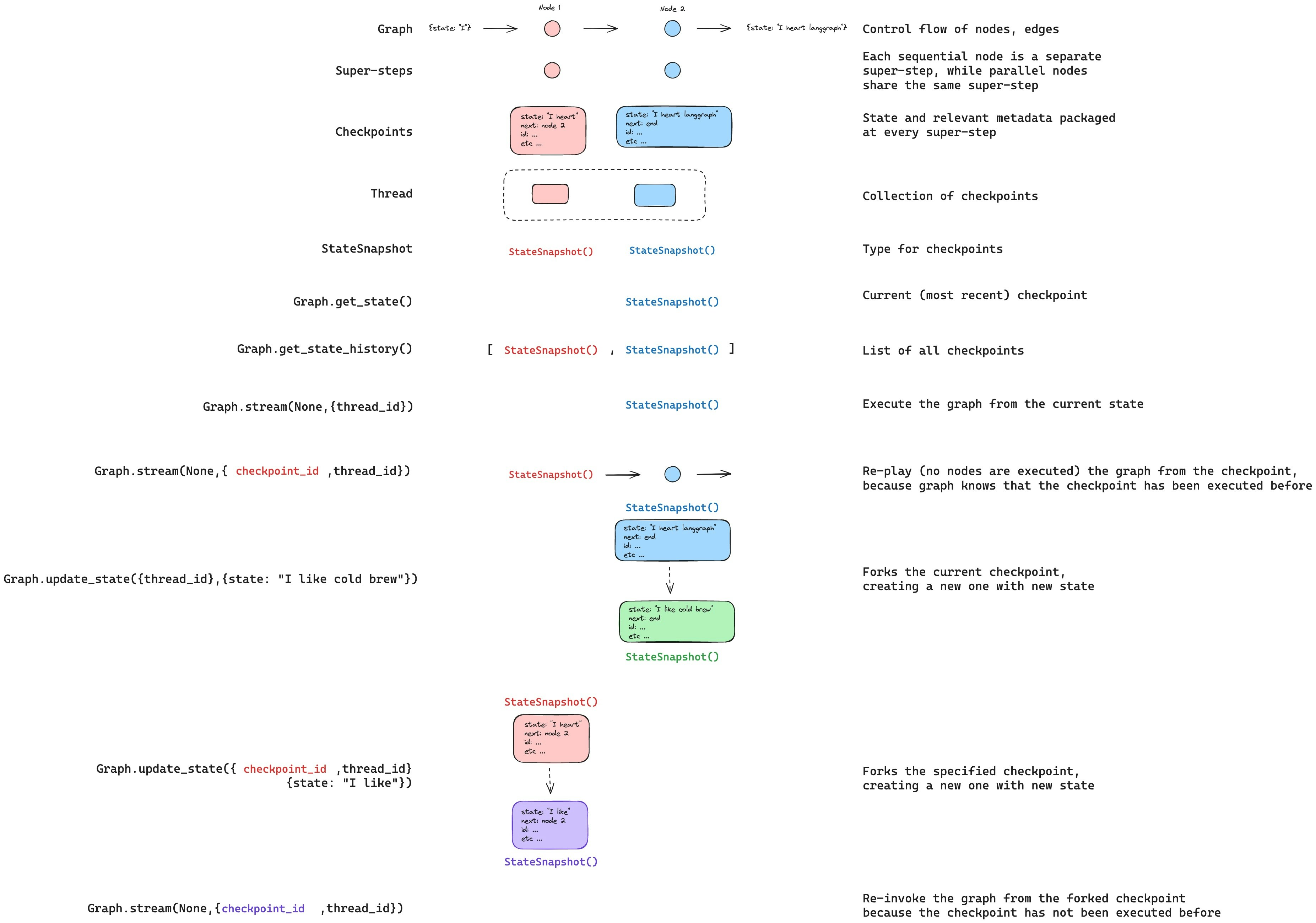
在使用基于模型进行决策的非确定性系统(例如由 LLM 驱动的智能体)时,详细检查其决策过程往往很有价值:
  1. 理解推理过程:分析导致成功结果的步骤。
  2. 调试错误:找出错误发生的位置和原因。
  3. 探索替代方案:测试不同路径以发现更优解。
LangGraph 提供了时间旅行功能来支持上述使用场景。具体而言,你可以从先前的检查点恢复执行——既可以重放相同的状态,也可以修改状态以探索替代方案。在所有情况下,从过去的执行点恢复都会在历史记录中产生一个新的分叉。 要在 LangGraph 中使用时间旅行:
  1. 使用 invokestream 方法以初始输入运行图
  2. 在现有线程中识别检查点:使用 get_state_history 方法检索特定 thread_id 的执行历史,并找到所需的 checkpoint_id。 或者,在希望暂停执行的节点之前设置中断。随后可找到在该中断之前记录的最新检查点。
  3. 更新图状态(可选):使用 update_state 方法修改检查点处的图状态,并从替代状态恢复执行。
  4. 从检查点恢复执行:使用 invokestream 方法,将输入设为 None,并在配置中提供相应的 thread_idcheckpoint_id

在工作流中使用

本示例构建了一个简单的 LangGraph 工作流,该工作流使用 LLM 生成笑话主题并编写笑话。示例演示了如何运行图、检索过去的执行检查点、选择性地修改状态,以及从所选检查点恢复执行以探索不同的结果。

设置

要构建本示例中的工作流,需要设置 Anthropic LLM 并安装所需依赖:
  1. 安装依赖:
pip install langchain_core langchain-anthropic langgraph
  1. 初始化 LLM:
import os
import getpass

from langchain_anthropic import ChatAnthropic

def _set_env(var: str):
    if not os.environ.get(var):
        os.environ[var] = getpass.getpass(f"{var}: ")


_set_env("ANTHROPIC_API_KEY")

llm = ChatAnthropic(model="claude-sonnet-4-6")
注册 LangSmith 可快速发现问题并提升你的 LangGraph 项目性能。LangSmith 让你利用追踪数据来调试、测试和监控基于 LangGraph 构建的 LLM 应用。你还可以从 LangSmith 获取追踪记录,在本地重放和调试生产环境问题。
  1. 实现工作流 该工作流的实现是一个包含两个节点的简单图:一个节点用于生成笑话主题,另一个节点用于编写笑话本身,并通过状态存储中间值。
import uuid

from typing_extensions import TypedDict, NotRequired
from langgraph.graph import StateGraph, START, END
from langchain.chat_models import init_chat_model
from langgraph.checkpoint.memory import InMemorySaver


class State(TypedDict):
    topic: NotRequired[str]
    joke: NotRequired[str]


model = init_chat_model(
    "claude-sonnet-4-6",
    temperature=0,
)


def generate_topic(state: State):
    """LLM call to generate a topic for the joke"""
    msg = model.invoke("Give me a funny topic for a joke")
    return {"topic": msg.content}


def write_joke(state: State):
    """LLM call to write a joke based on the topic"""
    msg = model.invoke(f"Write a short joke about {state['topic']}")
    return {"joke": msg.content}


# Build workflow
workflow = StateGraph(State)

# Add nodes
workflow.add_node("generate_topic", generate_topic)
workflow.add_node("write_joke", write_joke)

# Add edges to connect nodes
workflow.add_edge(START, "generate_topic")
workflow.add_edge("generate_topic", "write_joke")
workflow.add_edge("write_joke", END)

# Compile
checkpointer = InMemorySaver()
graph = workflow.compile(checkpointer=checkpointer)
graph

1. 运行图

要启动工作流,调用 invoke 时不传入任何输入。记录 thread_id 以跟踪本次执行并在之后检索其检查点。
config = {
    "configurable": {
        "thread_id": uuid.uuid4(),
    }
}
state = graph.invoke({}, config)

print(state["topic"])
print()
print(state["joke"])
输出:
How about "The Secret Life of Socks in the Dryer"? You know, exploring the mysterious phenomenon of how socks go into the laundry as pairs but come out as singles. Where do they go? Are they starting new lives elsewhere? Is there a sock paradise we don't know about? There's a lot of comedic potential in the everyday mystery that unites us all!

# The Secret Life of Socks in the Dryer

I finally discovered where all my missing socks go after the dryer. Turns out they're not missing at all—they've just eloped with someone else's socks from the laundromat to start new lives together.

My blue argyle is now living in Bermuda with a red polka dot, posting vacation photos on Sockstagram and sending me lint as alimony.

2. 识别检查点

要从图运行的某个先前节点继续,使用 get_state_history 检索所有状态,并选择希望恢复执行的那个状态。
# The states are returned in reverse chronological order.
states = list(graph.get_state_history(config))

for state in states:
    print(state.next)
    print(state.config["configurable"]["checkpoint_id"])
    print()
输出:
()
1f02ac4a-ec9f-6524-8002-8f7b0bbeed0e

('write_joke',)
1f02ac4a-ce2a-6494-8001-cb2e2d651227

('generate_topic',)
1f02ac4a-a4e0-630d-8000-b73c254ba748

('__start__',)
1f02ac4a-a4dd-665e-bfff-e6c8c44315d9
# This is the state before last (states are listed in chronological order)
selected_state = states[1]
print(selected_state.next)
print(selected_state.values)
输出:
('write_joke',)
{'topic': 'How about "The Secret Life of Socks in the Dryer"? You know, exploring the mysterious phenomenon of how socks go into the laundry as pairs but come out as singles. Where do they go? Are they starting new lives elsewhere? Is there a sock paradise we don\\'t know about? There\\'s a lot of comedic potential in the everyday mystery that unites us all!'}

3. 更新状态(可选)

update_state 将创建一个新的检查点。新检查点将与同一线程关联,但拥有新的检查点 ID。
new_config = graph.update_state(selected_state.config, values={"topic": "chickens"})
print(new_config)
输出:
{'configurable': {'thread_id': 'c62e2e03-c27b-4cb6-8cea-ea9bfedae006', 'checkpoint_ns': '', 'checkpoint_id': '1f02ac4a-ecee-600b-8002-a1d21df32e4c'}}

4. 从检查点恢复执行

要从所选检查点恢复执行,使用指向新检查点的配置调用 invoke
graph.invoke(None, new_config)
输出:
{'topic': 'chickens',
 'joke': 'Why did the chicken join a band?\n\nBecause it had excellent drumsticks!'}