Please read the LangSmith architectural overview and guide on connecting to external ClickHouse before proceeding with this guide.
LangSmith uses ClickHouse as the primary storage engine for traces and feedback. For easier management and scaling, it is recommended to connect a self-hosted LangSmith instance to an external ClickHouse instance. LangSmith-managed ClickHouse is an option that allows you to use a fully managed ClickHouse instance that is monitored and maintained by the LangSmith team.

Architecture overview

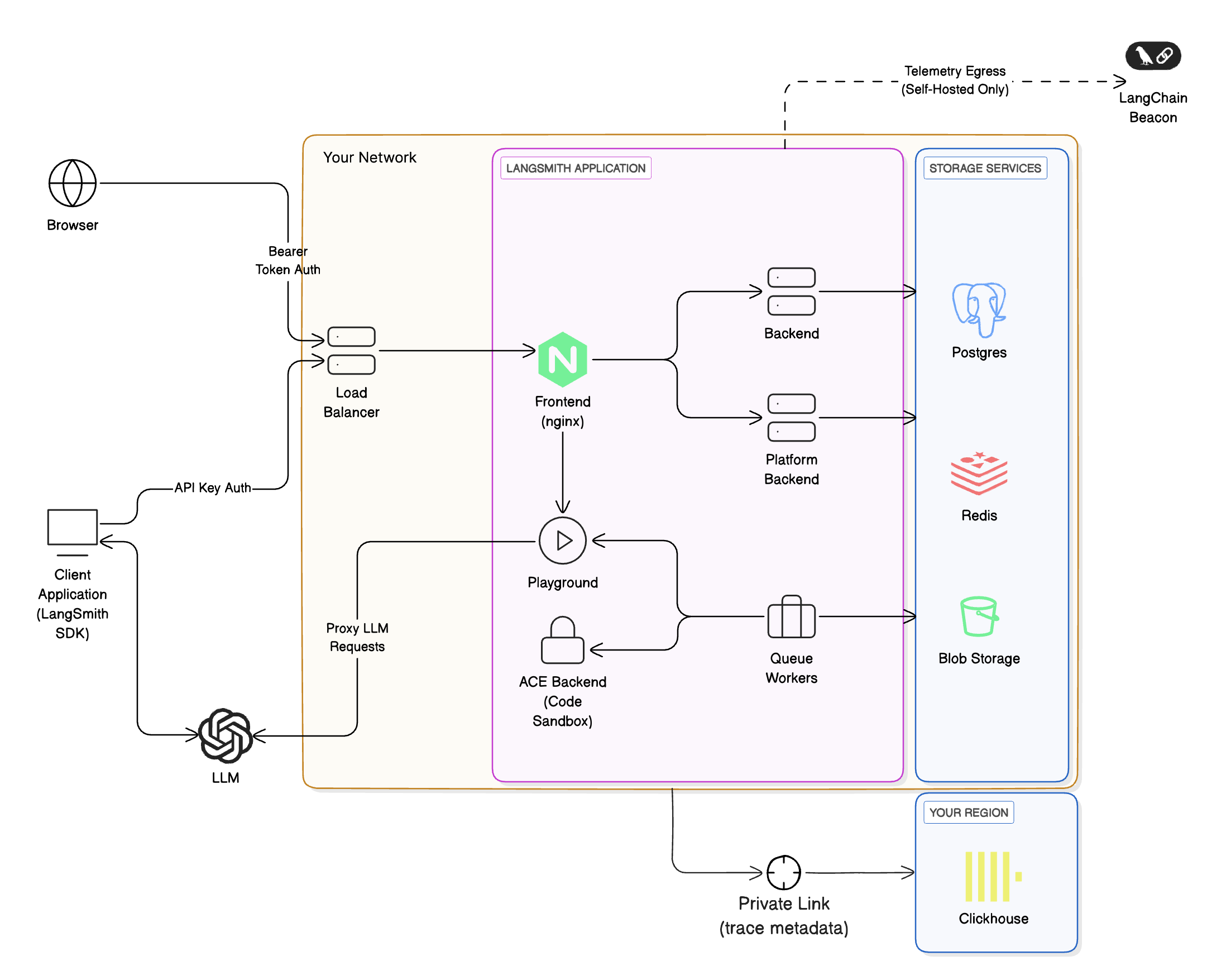
The architecture of using LangSmith-managed ClickHouse with your self-hosted LangSmith instance is similar to using a fully self-hosted ClickHouse instance, with a few key differences:
  • You will need to set up a private network connection between your LangSmith instance and the LangSmith-managed ClickHouse instance. This is to ensure that your data is secure and that you can connect to the ClickHouse instance from your self-hosted LangSmith instance.
  • With this option, sensitive information (inputs and outputs) of your traces will be stored in cloud object storage (S3 or GCS) within your cloud instead of ClickHouse to ensure that sensitive information doesn’t leave your VPC. For more details on where particular data fields are stored, refer to Data storage.
  • The LangSmith team will monitor your ClickHouse instance and ensure that it is running smoothly. This allows us to track metrics like run-ingestion delay and query performance.
The overall architecture looks like this: LangSmith managed ClickHouse architecture.

Requirements

  • You must use a supported blob storage option. Read the blob storage guide for more information.
  • To use private endpoints, ensure that your VPC is in a ClickHouse Cloud supported region. Otherwise, you will need to use a public endpoint we will secure with firewall rules. Your VPC will need to have a NAT gateway to allow us to allowlist your traffic.
  • You must have a VPC that can connect to the LangSmith-managed ClickHouse service. You will need to work with our team to set up the necessary networking.
  • You must have a LangSmith self-hosted instance running. You can use our managed ClickHouse service with both Kubernetes and Docker installations.

Data storage

ClickHouse stores runs and feedback data, specifically:
  • All feedback data fields.
  • Some run data fields.
For a list of fields, refer to Stored run data fields and Stored feedback data fields. LangChain defines sensitive application data as inputs, outputs, errors, manifests, extras, and events of a run, since these fields may contain LLM prompts and completions. With LangSmith-managed ClickHouse, these sensitive fields are stored in cloud object storage (S3 or GCS) within your cloud, while the rest of the run data is stored in ClickHouse, ensuring sensitive information never leaves your VPC.

Stored feedback data fields

Because all feedback data is stored in ClickHouse, do not send sensitive information in feedback (scores and annotations/comments) or in any other run fields that are mentioned in Stored run data fields.
Using a LangSmith-managed ClickHouse setup, all feedback data fields are stored in ClickHouse:
字段名称 (Field Name)类型 (Type)描述 (Description)
idUUID记录本身的唯一标识符
created_atdatetime记录创建时的时间戳
modified_atdatetime记录最后修改时的时间戳
session_idUUID运行所属的实验或追踪项目的唯一标识符
run_idUUID会话中特定运行的唯一标识符
keystring描述反馈标准的键,例如 'correctness'
scorenumber与反馈键关联的数值评分
valuestring保留用于存储与评分关联的值。适用于分类反馈。
commentstring与记录关联的任何评论或注释。这可以是所给评分的理由。
correctionobject保留用于存储更正详情(如有)
feedback_sourceobject包含反馈来源信息的对象
feedback_source.typestring反馈来源的类型,例如 'api''app''evaluator'
feedback_source.metadataobject保留用于额外元数据,当前
feedback_source.user_idUUID提供反馈的用户的唯一标识符
This reference doc explains the stored feedback format, which is the LangSmith’s way of representing evaluation scores and annotations on runs.

Stored run data fields

Run data fields are split between the managed ClickHouse database and your cloud object storage (e.g., S3 or GCS).
For run fields stored in object storage, only a reference or pointer is kept in ClickHouse. For example, inputs and outputs content are offloaded to S3/GCS, with the ClickHouse record storing corresponding S3 URLs in the inputs_s3_urls and outputs_s3_urls fields.
The table details each run field and where it is stored:
FieldStorage Location
idClickHouse
nameClickHouse
inputsObject Storage
run_typeClickHouse
start_timeClickHouse
end_timeClickHouse
extraObject Storage
errorObject Storage
outputsObject Storage
eventsObject Storage
tagsClickHouse
trace_idClickHouse
dotted_orderClickHouse
statusClickHouse
child_run_idsClickHouse
direct_child_run_idsClickHouse
parent_run_idsClickHouse
feedback_statsClickHouse
reference_example_idClickHouse
total_tokensClickHouse
prompt_tokensClickHouse
completion_tokensClickHouse
total_costClickHouse
prompt_costClickHouse
completion_costClickHouse
first_token_timeClickHouse
session_idClickHouse
in_datasetClickHouse
parent_run_idClickHouse
execution_order (deprecated)ClickHouse
serializedClickHouse
manifest_id (deprecated)ClickHouse
manifest_s3_idClickHouse
inputs_s3_urlsClickHouse
outputs_s3_urlsClickHouse
price_model_idClickHouse
app_pathClickHouse
last_queued_atClickHouse
share_tokenClickHouse
This reference doc explains the format of stored runs (spans), which are the building blocks of traces.