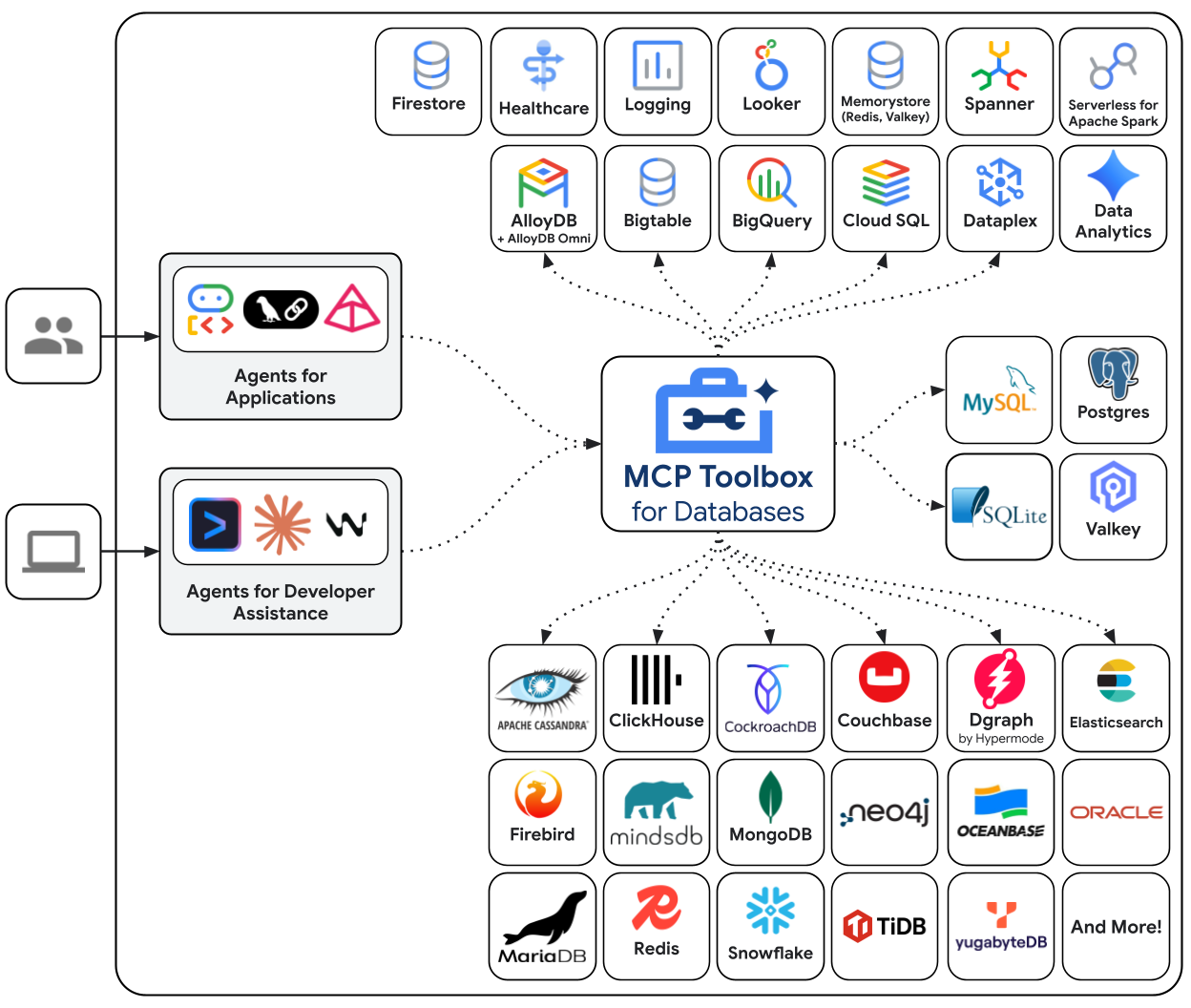
使用 MCP Toolbox 将您的数据库与 LangChain 智能体集成。

概述

MCP Toolbox for Databases 是一个面向数据库的开源 MCP 服务器,以企业级和生产级质量为设计目标。它通过处理连接池、身份验证等复杂性,使您能够更轻松、更快速、更安全地开发工具。 Toolbox 工具可以无缝集成到 LangChain 应用程序中。更多关于 快速入门配置 MCP Toolbox 的信息,请参阅 文档 architecture

设置

本指南假设您已完成以下操作:
  1. 安装了 Python 3.9+pip
  2. 安装了 PostgreSQL 16+ 及 psql 命令行客户端

1. 设置数据库

首先,我们来设置一个 PostgreSQL 数据库。我们将创建一个新数据库、一个专用于 MCP Toolbox 的用户,以及一个包含示例数据的 hotels 表。 使用 psql 命令连接到 PostgreSQL。您可能需要根据您的 PostgreSQL 配置调整命令(例如,需要指定主机或不同的超级用户)。
psql -U postgres
运行以下 SQL 命令以创建用户、数据库并授予必要权限:
CREATE USER toolbox_user WITH PASSWORD 'my-password';
CREATE DATABASE toolbox_db;
GRANT ALL PRIVILEGES ON DATABASE toolbox_db TO toolbox_user;
ALTER DATABASE toolbox_db OWNER TO toolbox_user;
使用新用户连接到新创建的数据库:
\c toolbox_db toolbox_user
最后,创建 hotels 表并插入一些数据:
CREATE TABLE hotels(
  id            INTEGER NOT NULL PRIMARY KEY,
  name          VARCHAR NOT NULL,
  location      VARCHAR NOT NULL,
  price_tier    VARCHAR NOT NULL,
  booked        BIT     NOT NULL
);

INSERT INTO hotels(id, name, location, price_tier, booked)
VALUES
  (1, 'Hilton Basel', 'Basel', 'Luxury', B'0'),
  (2, 'Marriott Zurich', 'Zurich', 'Upscale', B'0'),
  (3, 'Hyatt Regency Basel', 'Basel', 'Upper Upscale', B'0');
现在您可以输入 \q 退出 psql

2. 安装 MCP toolbox

接下来,我们将安装 MCP Toolbox,在 tools.yaml 配置文件中定义工具,并运行 MCP Toolbox 服务器。 对于 macOS 用户,最简单的安装方式是使用 Homebrew
brew install mcp-toolbox
对于其他平台,请下载适用于您操作系统和架构的最新 MCP Toolbox 二进制文件。 创建一个 tools.yaml 文件。此文件定义了 MCP Toolbox 可以连接的数据源以及可向智能体暴露的工具。在生产环境中,请始终使用环境变量存储密钥。
sources:
  my-pg-source:
    kind: postgres
    host: 127.0.0.1
    port: 5432
    database: toolbox_db
    user: toolbox_user
    password: my-password

tools:
  search-hotels-by-location:
    kind: postgres-sql
    source: my-pg-source
    description: Search for hotels based on location.
    parameters:
      - name: location
        type: string
        description: The location of the hotel.
    statement: SELECT id, name, location, price_tier FROM hotels WHERE location ILIKE '%' || $1 || '%';
  book-hotel:
    kind: postgres-sql
    source: my-pg-source
    description: >-
        Book a hotel by its ID. If the hotel is successfully booked, returns a confirmation message.
    parameters:
      - name: hotel_id
        type: integer
        description: The ID of the hotel to book.
    statement: UPDATE hotels SET booked = B'1' WHERE id = $1;

toolsets:
  hotel_toolset:
    - search-hotels-by-location
    - book-hotel
现在,在单独的终端窗口中启动 MCP Toolbox 服务器。如果您通过 Homebrew 安装,只需运行 toolbox;如果您手动下载了二进制文件,则需要从保存它的目录中运行 ./toolbox
toolbox --tools-file "tools.yaml"
MCP Toolbox 默认在 http://127.0.0.1:5000 上启动,如果您对 tools.yaml 文件做了更改,它会自动热重载。

实例化

!pip install toolbox-langchain
from toolbox_langchain import ToolboxClient

with ToolboxClient("http://127.0.0.1:5000") as client:
    search_tool = await client.aload_tool("search-hotels-by-location")

调用

from toolbox_langchain import ToolboxClient

with ToolboxClient("http://127.0.0.1:5000") as client:
    search_tool = await client.aload_tool("search-hotels-by-location")
    results = search_tool.invoke({"location": "Basel"})
    print(results)
[{"id":1,"location":"Basel","name":"Hilton Basel","price_tier":"Luxury"},{"id":3,"location":"Basel","name":"Hyatt Regency Basel","price_tier":"Upper Upscale"}]

在智能体中使用

接下来是有趣的部分!我们将安装所需的 LangChain 包,并创建一个可以使用我们在 MCP Toolbox 中定义的工具的智能体。
pip install -qU toolbox-langchain langgraph langchain-google-vertexai
安装好包后,我们可以定义智能体。我们将使用 ChatVertexAI 作为模型,并使用 ToolboxClient 加载工具。langchain.agents 中的 create_agent 创建了一个能够推理应调用哪些工具的健壮智能体。 注意: 在执行以下代码之前,请确保您的 MCP Toolbox 服务器在单独的终端中运行。
from langchain.agents import create_agent
from langchain_google_vertexai import ChatVertexAI
from langgraph.checkpoint.memory import MemorySaver
from toolbox_langchain import ToolboxClient


prompt = """
You're a helpful hotel assistant. You handle hotel searching and booking.
When the user searches for a hotel, list the full details for each hotel found: id, name, location, and price tier.
Always use the hotel ID for booking operations.
For any bookings, provide a clear confirmation message.
Don't ask for clarification or confirmation from the user; perform the requested action directly.
"""


async def run_queries(agent_executor):
    config = {"configurable": {"thread_id": "hotel-thread-1"}}

    # --- Query 1: Search for hotels ---
    query1 = "I need to find a hotel in Basel."
    print(f'\n--- USER: "{query1}" ---')
    inputs1 = {"messages": [("user", prompt + query1)]}
    async for event in agent_executor.astream_events(
        inputs1, config=config, version="v2"
    ):
        if event["event"] == "on_chat_model_end" and event["data"]["output"].content:
            print(f"--- AGENT: ---\n{event['data']['output'].content}")

    # --- Query 2: Book a hotel ---
    query2 = "Great, please book the Hyatt Regency Basel for me."
    print(f'\n--- USER: "{query2}" ---')
    inputs2 = {"messages": [("user", query2)]}
    async for event in agent_executor.astream_events(
        inputs2, config=config, version="v2"
    ):
        if event["event"] == "on_chat_model_end" and event["data"]["output"].content:
            print(f"--- AGENT: ---\n{event['data']['output'].content}")

运行智能体

async def main():
    await run_hotel_agent()


async def run_hotel_agent():
    model = ChatVertexAI(model_name="gemini-2.5-flash")

    # Load the tools from the running MCP Toolbox server
    async with ToolboxClient("http://127.0.0.1:5000") as client:
        tools = await client.aload_toolset("hotel_toolset")

        agent = create_agent(model, tools, checkpointer=MemorySaver())

        await run_queries(agent)


await main()
您已成功使用 MCP Toolbox 将 LangChain 智能体连接到本地数据库!🥳

API 参考

此集成的主要类是 ToolboxClient 更多信息,请参阅以下资源: MCP Toolbox 提供多种功能,使数据库 Gen AI 工具的开发更加无缝:
  • 已认证参数:自动将工具输入绑定到 OIDC 令牌中的值,便于在不泄露数据的情况下运行敏感查询
  • 授权调用:根据用户 Auth 令牌限制工具使用权限
  • OpenTelemetry:通过 OpenTelemetry 从 MCP Toolbox 获取指标和追踪

社区与支持

我们鼓励您参与社区: