什么是 Langfuse? Langfuse 是一个开源的 LLM 工程平台,帮助团队追踪 API 调用、监控性能,并调试 AI 应用中的问题。

追踪 LangChain

Langfuse 追踪通过 LangChain Callbacks(PythonJS)与 LangChain 集成。因此,Langfuse SDK 会自动为 LangChain 应用的每次运行创建嵌套追踪,让您可以记录、分析和调试 LangChain 应用。 您可以通过(1)构造函数参数或(2)环境变量来配置集成。在 cloud.langfuse.com 注册或自托管 Langfuse 以获取凭据。

构造函数参数

pip install langfuse
from langfuse import Langfuse, get_client
from langfuse.langchain import CallbackHandler
from langchain_openai import ChatOpenAI  # Example LLM
from langchain_core.prompts import ChatPromptTemplate

# Initialize Langfuse client with constructor arguments
Langfuse(
    public_key="your-public-key",
    secret_key="your-secret-key",
    host="https://cloud.langfuse.com"  # Optional: defaults to https://cloud.langfuse.com
)

# Get the configured client instance
langfuse = get_client()

# Initialize the Langfuse handler
langfuse_handler = CallbackHandler()

# Create your LangChain components
llm = ChatOpenAI(model_name="gpt-4.1")
prompt = ChatPromptTemplate.from_template("Tell me a joke about {topic}")
chain = prompt | llm

# Run your chain with Langfuse tracing
response = chain.invoke({"topic": "cats"}, config={"callbacks": [langfuse_handler]})
print(response.content)

# Flush events to Langfuse in short-lived applications
langfuse.flush()

环境变量

LANGFUSE_SECRET_KEY="sk-lf-..."
LANGFUSE_PUBLIC_KEY="pk-lf-..."
# 🇪🇺 欧盟区域
LANGFUSE_HOST="https://cloud.langfuse.com"
# 🇺🇸 美国区域
# LANGFUSE_HOST="https://us.cloud.langfuse.com"
# Initialize Langfuse handler
from langfuse.langchain import CallbackHandler
langfuse_handler = CallbackHandler()

# Your LangChain code

# Add Langfuse handler as callback (classic and LCEL)
chain.invoke({"input": "<user_input>"}, config={"callbacks": [langfuse_handler]})
要了解如何将此集成与其他 Langfuse 功能结合使用,请查看此端到端示例

追踪 LangGraph

本节演示如何使用 Langfuse 通过 LangChain 集成调试、分析和迭代 LangGraph 应用。

初始化 langfuse

注意: 您需要运行至少 Python 3.11(GitHub Issue)。 使用项目设置中 Langfuse UI 的 API 密钥初始化 Langfuse 客户端,并将其添加到您的环境中。
pip install langfuse
pip install langchain langgraph langchain_openai langchain_community
import os

# get keys for your project from https://cloud.langfuse.com
os.environ["LANGFUSE_PUBLIC_KEY"] = "pk-lf-***"
os.environ["LANGFUSE_SECRET_KEY"] = "sk-lf-***"
os.environ["LANGFUSE_HOST"] = "https://cloud.langfuse.com" # for EU data region
# os.environ["LANGFUSE_HOST"] = "https://us.cloud.langfuse.com" # for US data region

# your openai key
os.environ["OPENAI_API_KEY"] = "***"

使用 LangGraph 构建简单对话应用

本节将完成以下内容:
  • 使用 LangGraph 构建一个可回答常见问题的支持聊天机器人
  • 使用 Langfuse 追踪聊天机器人的输入和输出
我们将从一个基础聊天机器人开始,在下一节引入更高级的多 Agent 设置,同时介绍 LangGraph 的关键概念。

创建 Agent

首先创建一个 StateGraphStateGraph 对象将我们的聊天机器人结构定义为状态机。我们将添加节点来表示 LLM 和聊天机器人可调用的函数,以及边来指定机器人如何在这些函数之间转换。
from typing import Annotated

from langchain_openai import ChatOpenAI
from langchain.messages import HumanMessage
from typing_extensions import TypedDict

from langgraph.graph import StateGraph
from langgraph.graph.message import add_messages

class State(TypedDict):
    # Messages have the type "list". The `add_messages` function in the annotation defines how this state key should be updated
    # (in this case, it appends messages to the list, rather than overwriting them)
    messages: Annotated[list, add_messages]

graph_builder = StateGraph(State)

llm = ChatOpenAI(model = "gpt-4.1", temperature = 0.2)

# The chatbot node function takes the current State as input and returns an updated messages list.
def chatbot(state: State):
    return {"messages": [llm.invoke(state["messages"])]}

# Add a "chatbot" node. Nodes represent units of work. They are typically regular python functions.
graph_builder.add_node("chatbot", chatbot)

# Add an entry point. This tells our graph where to start its work each time we run it.
graph_builder.set_entry_point("chatbot")

# Set a finish point. This instructs the graph "any time this node is run, you can exit."
graph_builder.set_finish_point("chatbot")

# To be able to run our graph, call "compile()" on the graph builder.
graph = graph_builder.compile()

将 langfuse 作为回调添加到调用中

现在,我们将 LangChain 的 Langfuse 回调处理器 添加到追踪中:config={"callbacks": [langfuse_handler]}
from langfuse.langchain import CallbackHandler

# Initialize Langfuse CallbackHandler for LangChain (tracing)
langfuse_handler = CallbackHandler()

for s in graph.stream({"messages": [HumanMessage(content = "What is Langfuse?")]},
                      config={"callbacks": [langfuse_handler]}):
    print(s)
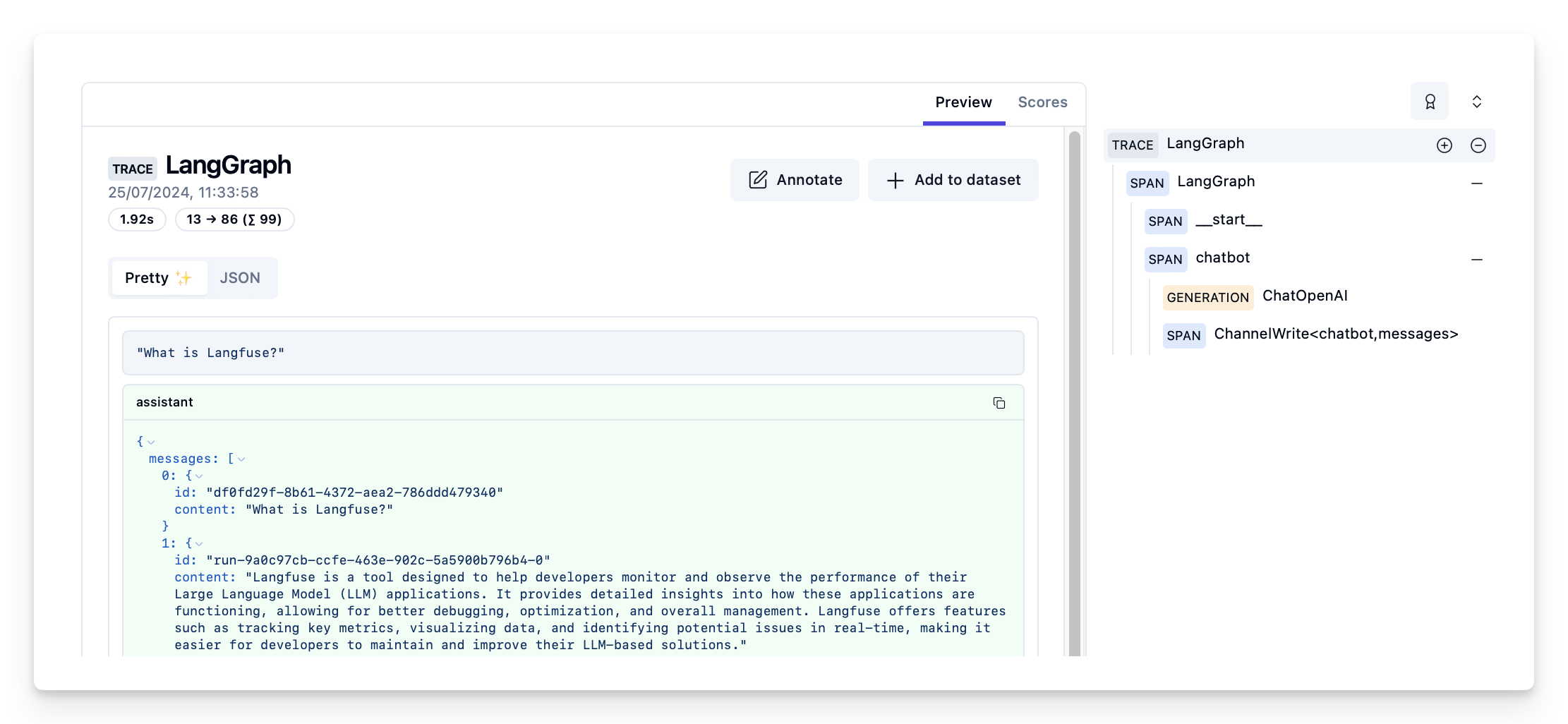
{'chatbot': {'messages': [AIMessage(content='Langfuse is a tool designed to help developers monitor and observe the performance of their Large Language Model (LLM) applications. It provides detailed insights into how these applications are functioning, allowing for better debugging, optimization, and overall management. Langfuse offers features such as tracking key metrics, visualizing data, and identifying potential issues in real-time, making it easier for developers to maintain and improve their LLM-based solutions.', response_metadata={'token_usage': {'completion_tokens': 86, 'prompt_tokens': 13, 'total_tokens': 99}, 'model_name': 'gpt-4o-2024-05-13', 'system_fingerprint': 'fp_400f27fa1f', 'finish_reason': 'stop', 'logprobs': None}, id='run-9a0c97cb-ccfe-463e-902c-5a5900b796b4-0', usage_metadata={'input_tokens': 13, 'output_tokens': 86, 'total_tokens': 99})]}}

在 langfuse 中查看追踪

Langfuse 中的示例追踪:https://cloud.langfuse.com/project/cloramnkj0002jz088vzn1ja4/traces/d109e148-d188-4d6e-823f-aac0864afbab Langfuse 中对话应用的追踪视图