

沙盒功能目前处于私有预览阶段。API 和功能可能会随着我们的迭代而改变。注册等待列表 以获取访问权限。
Service URLs let you access an HTTP service running inside a sandbox (a REST API, a Streamlit app, a Jupyter notebook, API documentation) without tunnels, port forwarding, or CLI tools. Each sandbox + port combination gets its own URL that you can open in a browser, call from code, or share with a teammate. Service URLs view

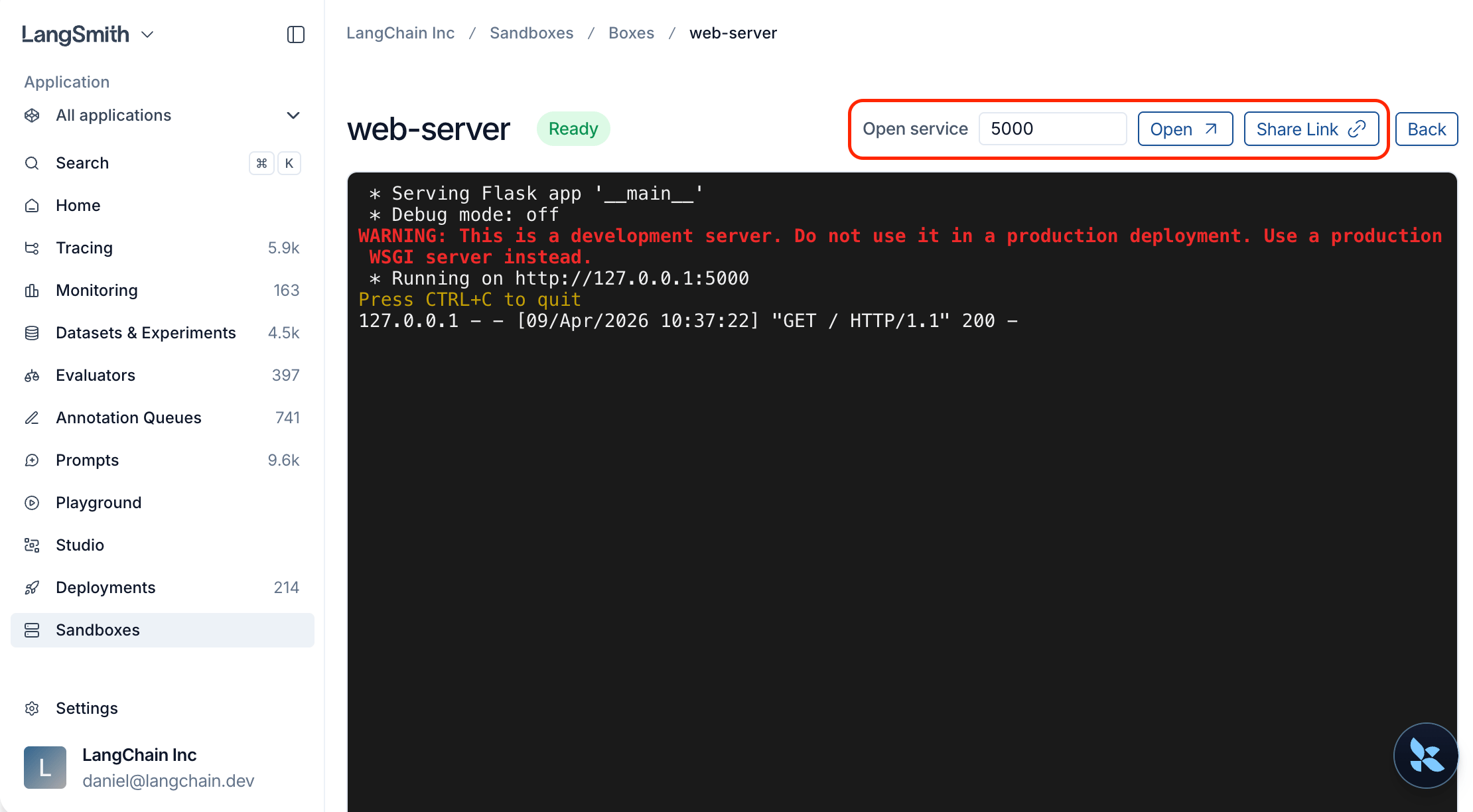
Quick start

Start an HTTP server inside a sandbox, then get a URL to access it:
from langsmith.sandbox import SandboxClient

client = SandboxClient()

with client.sandbox(template_name="python-sandbox") as sb:
    handle = sb.run("python -m http.server 8000", timeout=0, wait=False)

    svc = sb.service(port=8000)

    # Open in a browser
    print(svc.browser_url)

    # Or make requests programmatically
    resp = svc.get("/")
    print(resp.status_code)

    handle.kill()

Use cases

ScenarioHow
Preview a web app (Streamlit, Jupyter, etc.)sb.service(port=<PORT>) then open browser_url
Call an API from code or CIsvc.get(...) / svc.post(...) or curl with the service token
Share a live demo with a teammateClick Share Link in the UI and send the URL

Open a service from the UI

  1. Open the sandbox detail page.
  2. Find the Open service widget.
  3. Type a port number (e.g. 3000).
  4. Click Open to launch in a new tab, or Share Link to copy a URL you can send to a teammate.
Anyone with the link can access the service, even without a LangSmith account. After the token expires, generate a new link from the UI.

Open a service from the SDK

Get a service URL

Call service() on a sandbox instance or on the client directly:
svc = sb.service(port=3000)

# Or from the client, by sandbox name
svc = client.service("my-sandbox", port=3000)

# Customize token lifetime (default: 10 minutes, max: 24 hours)
svc = sb.service(port=3000, expires_in_seconds=3600)
The service must be running and listening on the specified port before you request a service URL. The URL only routes traffic and does not start a service for you.

Make requests

The returned ServiceURL object has built-in HTTP helpers that handle authentication automatically. Tokens refresh transparently before they expire, so no manual management is needed.
svc = sb.service(port=8000)

resp = svc.get("/api/items")
resp = svc.post("/api/items", json={"name": "widget"})
resp = svc.put("/api/items/1", json={"name": "updated"})
resp = svc.patch("/api/items/1", json={"status": "active"})
resp = svc.delete("/api/items/1")

Use your own HTTP client

If you prefer a different HTTP client, use the raw URL and token:
import httpx

svc = sb.service(port=8000)

resp = httpx.get(
    svc.service_url + "api/items",
    headers={"X-Langsmith-Sandbox-Service-Token": svc.token},
)

Open in a browser

Use browser_url to open the service in a browser. It sets an authentication cookie automatically, so all subsequent page loads, images, and API calls are authenticated without tokens in the URL.
svc = sb.service(port=8000)
print(svc.browser_url)
You can share this URL with teammates. No LangSmith login is required to access it.

Generate a URL via the REST API

curl -X POST \
  "$LANGSMITH_ENDPOINT/api/v2/sandboxes/boxes/{sandbox_name}/service-url" \
  -H "x-api-key: $LANGSMITH_API_KEY" \
  -H "Content-Type: application/json" \
  -d '{"port": 3000, "expires_in_seconds": 3600}'
Response:
{
  "browser_url": "https://{sandbox-id}--3000.smithbox.dev/_svc/auth?token=ey...",
  "service_url": "https://{sandbox-id}--3000.smithbox.dev/",
  "token": "ey...",
  "expires_at": "2026-04-08T15:30:00Z"
}

Example: serve a FastAPI app

from langsmith.sandbox import SandboxClient

client = SandboxClient()

with client.sandbox(template_name="python-sandbox") as sb:
    sb.write("/app/main.py", """
from fastapi import FastAPI

app = FastAPI()
items = []

@app.get("/items")
def list_items():
    return items

@app.post("/items")
def create_item(item: dict):
    items.append(item)
    return item
""")

    sb.run("pip install fastapi uvicorn", timeout=120)
    handle = sb.run(
        "uvicorn main:app --host 0.0.0.0 --port 8000",
        timeout=0,
        wait=False,
        env={"PYTHONPATH": "/app"},
    )

    import time
    time.sleep(3)

    svc = sb.service(port=8000)

    svc.post("/items", json={"name": "widget", "price": 9.99})
    svc.post("/items", json={"name": "gadget", "price": 24.99})

    resp = svc.get("/items")
    print(resp.json())
    # [{"name": "widget", "price": 9.99}, {"name": "gadget", "price": 24.99}]

    # Open the auto-generated API docs in a browser
    print(svc.browser_url)

    handle.kill()

Service URLs vs TCP tunnels

Service URLsTCP tunnels
ProtocolHTTPAny TCP (databases, Redis, SSH, HTTP)
SetupZero — just a URLRequires SDK or CLI
Access fromBrowser, scripts, CI, anywhereLocal machine only
SharingCopy the URL and send itNot shareable
Multi-page web appsFull support (subdomain routing)Full support (local port)
Non-HTTP servicesNot supportedFull support
Use service URLs for HTTP services you want to access from a browser or share with others. Use TCP tunnels for non-HTTP protocols (like psql or redis-cli) or when you need local-only access.

Troubleshoot

ErrorCauseFix
”Service link has expired”Token lifetime exceededOpen the service again from LangSmith or call sb.service() for a fresh URL
”Service is not reachable”Nothing is listening on that portVerify the server is running inside the sandbox
”Authentication required”No token in header or cookieUse browser_url for browser access or set the X-Langsmith-Sandbox-Service-Token header