> ## Documentation Index
> Fetch the complete documentation index at: https://cndoc-langchain.site/llms.txt
> Use this file to discover all available pages before exploring further.
# 内存
AI 应用需要[内存](/oss/python/concepts/memory)来在多次交互中共享上下文。在 LangGraph 中,你可以添加两种类型的内存:
* [添加短期内存](#add-short-term-memory)作为智能体[状态](/oss/python/langgraph/graph-api#state)的一部分,以实现多轮对话。
* [添加长期内存](#add-long-term-memory)以跨会话存储用户特定或应用级别的数据。
## 添加短期内存
**短期**内存(线程级[持久化](/oss/python/langgraph/persistence))使智能体能够跟踪多轮对话。要添加短期内存:
```python theme={"theme":{"light":"catppuccin-latte","dark":"catppuccin-mocha"}}
from langgraph.checkpoint.memory import InMemorySaver # [!code highlight]
from langgraph.graph import StateGraph
checkpointer = InMemorySaver() # [!code highlight]
builder = StateGraph(...)
graph = builder.compile(checkpointer=checkpointer) # [!code highlight]
graph.invoke(
{"messages": [{"role": "user", "content": "hi! i am Bob"}]},
{"configurable": {"thread_id": "1"}}, # [!code highlight]
)
```
### 在生产环境中使用
在生产环境中,使用由数据库支持的检查点:
```python theme={"theme":{"light":"catppuccin-latte","dark":"catppuccin-mocha"}}
from langgraph.checkpoint.postgres import PostgresSaver
DB_URI = "postgresql://postgres:postgres@localhost:5442/postgres?sslmode=disable"
with PostgresSaver.from_conn_string(DB_URI) as checkpointer: # [!code highlight]
builder = StateGraph(...)
graph = builder.compile(checkpointer=checkpointer) # [!code highlight]
```
```
pip install -U "psycopg[binary,pool]" langgraph langgraph-checkpoint-postgres
```
首次使用 Postgres 检查点时,你需要调用 `checkpointer.setup()`。
```python theme={"theme":{"light":"catppuccin-latte","dark":"catppuccin-mocha"}}
from langchain.chat_models import init_chat_model
from langgraph.graph import StateGraph, MessagesState, START
from langgraph.checkpoint.postgres import PostgresSaver # [!code highlight]
model = init_chat_model(model="claude-haiku-4-5-20251001")
DB_URI = "postgresql://postgres:postgres@localhost:5442/postgres?sslmode=disable"
with PostgresSaver.from_conn_string(DB_URI) as checkpointer: # [!code highlight]
# checkpointer.setup()
def call_model(state: MessagesState):
response = model.invoke(state["messages"])
return {"messages": response}
builder = StateGraph(MessagesState)
builder.add_node(call_model)
builder.add_edge(START, "call_model")
graph = builder.compile(checkpointer=checkpointer) # [!code highlight]
config = {
"configurable": {
"thread_id": "1" # [!code highlight]
}
}
for chunk in graph.stream(
{"messages": [{"role": "user", "content": "hi! I'm bob"}]},
config, # [!code highlight]
stream_mode="values"
):
chunk["messages"][-1].pretty_print()
for chunk in graph.stream(
{"messages": [{"role": "user", "content": "what's my name?"}]},
config, # [!code highlight]
stream_mode="values"
):
chunk["messages"][-1].pretty_print()
```
```python theme={"theme":{"light":"catppuccin-latte","dark":"catppuccin-mocha"}}
from langchain.chat_models import init_chat_model
from langgraph.graph import StateGraph, MessagesState, START
from langgraph.checkpoint.postgres.aio import AsyncPostgresSaver # [!code highlight]
model = init_chat_model(model="claude-haiku-4-5-20251001")
DB_URI = "postgresql://postgres:postgres@localhost:5442/postgres?sslmode=disable"
async with AsyncPostgresSaver.from_conn_string(DB_URI) as checkpointer: # [!code highlight]
# await checkpointer.setup()
async def call_model(state: MessagesState):
response = await model.ainvoke(state["messages"])
return {"messages": response}
builder = StateGraph(MessagesState)
builder.add_node(call_model)
builder.add_edge(START, "call_model")
graph = builder.compile(checkpointer=checkpointer) # [!code highlight]
config = {
"configurable": {
"thread_id": "1" # [!code highlight]
}
}
async for chunk in graph.astream(
{"messages": [{"role": "user", "content": "hi! I'm bob"}]},
config, # [!code highlight]
stream_mode="values"
):
chunk["messages"][-1].pretty_print()
async for chunk in graph.astream(
{"messages": [{"role": "user", "content": "what's my name?"}]},
config, # [!code highlight]
stream_mode="values"
):
chunk["messages"][-1].pretty_print()
```
```
pip install -U pymongo langgraph langgraph-checkpoint-mongodb
```
**设置**
要使用 [MongoDB 检查点](https://pypi.org/project/langgraph-checkpoint-mongodb/),你需要一个 MongoDB 集群。如果你还没有集群,请按照[此指南](https://www.mongodb.com/docs/guides/atlas/cluster/)创建一个。
```python theme={"theme":{"light":"catppuccin-latte","dark":"catppuccin-mocha"}}
from langchain.chat_models import init_chat_model
from langgraph.graph import StateGraph, MessagesState, START
from langgraph.checkpoint.mongodb import MongoDBSaver # [!code highlight]
model = init_chat_model(model="claude-haiku-4-5-20251001")
MONGODB_URI = "localhost:27017"
with MongoDBSaver.from_conn_string(MONGODB_URI) as checkpointer: # [!code highlight]
def call_model(state: MessagesState):
response = model.invoke(state["messages"])
return {"messages": response}
builder = StateGraph(MessagesState)
builder.add_node(call_model)
builder.add_edge(START, "call_model")
graph = builder.compile(checkpointer=checkpointer) # [!code highlight]
config = {
"configurable": {
"thread_id": "1" # [!code highlight]
}
}
for chunk in graph.stream(
{"messages": [{"role": "user", "content": "hi! I'm bob"}]},
config, # [!code highlight]
stream_mode="values"
):
chunk["messages"][-1].pretty_print()
for chunk in graph.stream(
{"messages": [{"role": "user", "content": "what's my name?"}]},
config, # [!code highlight]
stream_mode="values"
):
chunk["messages"][-1].pretty_print()
```
```python theme={"theme":{"light":"catppuccin-latte","dark":"catppuccin-mocha"}}
from langchain.chat_models import init_chat_model
from langgraph.graph import StateGraph, MessagesState, START
from langgraph.checkpoint.mongodb.aio import AsyncMongoDBSaver # [!code highlight]
model = init_chat_model(model="claude-haiku-4-5-20251001")
MONGODB_URI = "localhost:27017"
async with AsyncMongoDBSaver.from_conn_string(MONGODB_URI) as checkpointer: # [!code highlight]
async def call_model(state: MessagesState):
response = await model.ainvoke(state["messages"])
return {"messages": response}
builder = StateGraph(MessagesState)
builder.add_node(call_model)
builder.add_edge(START, "call_model")
graph = builder.compile(checkpointer=checkpointer) # [!code highlight]
config = {
"configurable": {
"thread_id": "1" # [!code highlight]
}
}
async for chunk in graph.astream(
{"messages": [{"role": "user", "content": "hi! I'm bob"}]},
config, # [!code highlight]
stream_mode="values"
):
chunk["messages"][-1].pretty_print()
async for chunk in graph.astream(
{"messages": [{"role": "user", "content": "what's my name?"}]},
config, # [!code highlight]
stream_mode="values"
):
chunk["messages"][-1].pretty_print()
```
```
pip install -U langgraph langgraph-checkpoint-redis
```
首次使用 Redis 检查点时,你需要调用 `checkpointer.setup()`。
```python theme={"theme":{"light":"catppuccin-latte","dark":"catppuccin-mocha"}}
from langchain.chat_models import init_chat_model
from langgraph.graph import StateGraph, MessagesState, START
from langgraph.checkpoint.redis import RedisSaver # [!code highlight]
model = init_chat_model(model="claude-haiku-4-5-20251001")
DB_URI = "redis://localhost:6379"
with RedisSaver.from_conn_string(DB_URI) as checkpointer: # [!code highlight]
# checkpointer.setup()
def call_model(state: MessagesState):
response = model.invoke(state["messages"])
return {"messages": response}
builder = StateGraph(MessagesState)
builder.add_node(call_model)
builder.add_edge(START, "call_model")
graph = builder.compile(checkpointer=checkpointer) # [!code highlight]
config = {
"configurable": {
"thread_id": "1" # [!code highlight]
}
}
for chunk in graph.stream(
{"messages": [{"role": "user", "content": "hi! I'm bob"}]},
config, # [!code highlight]
stream_mode="values"
):
chunk["messages"][-1].pretty_print()
for chunk in graph.stream(
{"messages": [{"role": "user", "content": "what's my name?"}]},
config, # [!code highlight]
stream_mode="values"
):
chunk["messages"][-1].pretty_print()
```
```python theme={"theme":{"light":"catppuccin-latte","dark":"catppuccin-mocha"}}
from langchain.chat_models import init_chat_model
from langgraph.graph import StateGraph, MessagesState, START
from langgraph.checkpoint.redis.aio import AsyncRedisSaver # [!code highlight]
model = init_chat_model(model="claude-haiku-4-5-20251001")
DB_URI = "redis://localhost:6379"
async with AsyncRedisSaver.from_conn_string(DB_URI) as checkpointer: # [!code highlight]
# await checkpointer.asetup()
async def call_model(state: MessagesState):
response = await model.ainvoke(state["messages"])
return {"messages": response}
builder = StateGraph(MessagesState)
builder.add_node(call_model)
builder.add_edge(START, "call_model")
graph = builder.compile(checkpointer=checkpointer) # [!code highlight]
config = {
"configurable": {
"thread_id": "1" # [!code highlight]
}
}
async for chunk in graph.astream(
{"messages": [{"role": "user", "content": "hi! I'm bob"}]},
config, # [!code highlight]
stream_mode="values"
):
chunk["messages"][-1].pretty_print()
async for chunk in graph.astream(
{"messages": [{"role": "user", "content": "what's my name?"}]},
config, # [!code highlight]
stream_mode="values"
):
chunk["messages"][-1].pretty_print()
```
### 在子图中使用
如果你的图包含[子图](/oss/python/langgraph/use-subgraphs),你只需在编译父图时提供检查点。LangGraph 会自动将检查点传播到子图。
```python theme={"theme":{"light":"catppuccin-latte","dark":"catppuccin-mocha"}}
from langgraph.graph import START, StateGraph
from langgraph.checkpoint.memory import InMemorySaver
from typing import TypedDict
class State(TypedDict):
foo: str
# 子图
def subgraph_node_1(state: State):
return {"foo": state["foo"] + "bar"}
subgraph_builder = StateGraph(State)
subgraph_builder.add_node(subgraph_node_1)
subgraph_builder.add_edge(START, "subgraph_node_1")
subgraph = subgraph_builder.compile() # [!code highlight]
# 父图
builder = StateGraph(State)
builder.add_node("node_1", subgraph) # [!code highlight]
builder.add_edge(START, "node_1")
checkpointer = InMemorySaver()
graph = builder.compile(checkpointer=checkpointer) # [!code highlight]
```
你可以配置子图特定的检查点行为。有关持久化级别(包括中断支持和有状态继续)的详细信息,请参阅[子图持久化](/oss/python/langgraph/use-subgraphs#subgraph-persistence)。
```python theme={"theme":{"light":"catppuccin-latte","dark":"catppuccin-mocha"}}
subgraph_builder = StateGraph(...)
subgraph = subgraph_builder.compile(checkpointer=True) # [!code highlight]
```
## 添加长期内存
使用长期内存来跨对话存储用户特定或应用特定的数据。
```python theme={"theme":{"light":"catppuccin-latte","dark":"catppuccin-mocha"}}
from langgraph.store.memory import InMemoryStore # [!code highlight]
from langgraph.graph import StateGraph
store = InMemoryStore() # [!code highlight]
builder = StateGraph(...)
graph = builder.compile(store=store) # [!code highlight]
```
### 在节点内访问存储
一旦你用存储编译了图,LangGraph 会自动将存储注入到你的节点函数中。推荐的访问存储方式是通过 `Runtime` 对象。
```python theme={"theme":{"light":"catppuccin-latte","dark":"catppuccin-mocha"}}
from dataclasses import dataclass
from langgraph.runtime import Runtime
from langgraph.graph import StateGraph, MessagesState, START
import uuid
@dataclass
class Context:
user_id: str
async def call_model(state: MessagesState, runtime: Runtime[Context]): # [!code highlight]
user_id = runtime.context.user_id # [!code highlight]
namespace = (user_id, "memories")
# 搜索相关记忆
memories = await runtime.store.asearch( # [!code highlight]
namespace, query=state["messages"][-1].content, limit=3
)
info = "\n".join([d.value["data"] for d in memories])
# ... 在模型调用中使用记忆
# 存储新记忆
await runtime.store.aput( # [!code highlight]
namespace, str(uuid.uuid4()), {"data": "User prefers dark mode"}
)
builder = StateGraph(MessagesState, context_schema=Context) # [!code highlight]
builder.add_node(call_model)
builder.add_edge(START, "call_model")
graph = builder.compile(store=store)
# 在调用时传递上下文
graph.invoke(
{"messages": [{"role": "user", "content": "hi"}]},
{"configurable": {"thread_id": "1"}},
context=Context(user_id="1"), # [!code highlight]
)
```
### 在生产环境中使用
在生产环境中,使用由数据库支持的存储:
```python theme={"theme":{"light":"catppuccin-latte","dark":"catppuccin-mocha"}}
from langgraph.store.postgres import PostgresStore
DB_URI = "postgresql://postgres:postgres@localhost:5442/postgres?sslmode=disable"
with PostgresStore.from_conn_string(DB_URI) as store: # [!code highlight]
builder = StateGraph(...)
graph = builder.compile(store=store) # [!code highlight]
```
```
pip install -U "psycopg[binary,pool]" langgraph langgraph-checkpoint-postgres
```
首次使用 Postgres 存储时,你需要调用 `store.setup()`。
```python theme={"theme":{"light":"catppuccin-latte","dark":"catppuccin-mocha"}}
from dataclasses import dataclass
from langchain.chat_models import init_chat_model
from langgraph.graph import StateGraph, MessagesState, START
from langgraph.checkpoint.postgres.aio import AsyncPostgresSaver
from langgraph.store.postgres.aio import AsyncPostgresStore # [!code highlight]
from langgraph.runtime import Runtime # [!code highlight]
import uuid
model = init_chat_model(model="claude-haiku-4-5-20251001")
@dataclass
class Context:
user_id: str
async def call_model( # [!code highlight]
state: MessagesState,
runtime: Runtime[Context], # [!code highlight]
):
user_id = runtime.context.user_id # [!code highlight]
namespace = ("memories", user_id)
memories = await runtime.store.asearch(namespace, query=str(state["messages"][-1].content)) # [!code highlight]
info = "\n".join([d.value["data"] for d in memories])
system_msg = f"You are a helpful assistant talking to the user. User info: {info}"
# 如果用户要求模型记住,则存储新记忆
last_message = state["messages"][-1]
if "remember" in last_message.content.lower():
memory = "User name is Bob"
await runtime.store.aput(namespace, str(uuid.uuid4()), {"data": memory}) # [!code highlight]
response = await model.ainvoke(
[{"role": "system", "content": system_msg}] + state["messages"]
)
return {"messages": response}
DB_URI = "postgresql://postgres:postgres@localhost:5442/postgres?sslmode=disable"
async with (
AsyncPostgresStore.from_conn_string(DB_URI) as store, # [!code highlight]
AsyncPostgresSaver.from_conn_string(DB_URI) as checkpointer,
):
# await store.setup()
# await checkpointer.setup()
builder = StateGraph(MessagesState, context_schema=Context) # [!code highlight]
builder.add_node(call_model)
builder.add_edge(START, "call_model")
graph = builder.compile(
checkpointer=checkpointer,
store=store, # [!code highlight]
)
config = {"configurable": {"thread_id": "1"}}
async for chunk in graph.astream(
{"messages": [{"role": "user", "content": "Hi! Remember: my name is Bob"}]},
config,
stream_mode="values",
context=Context(user_id="1"), # [!code highlight]
):
chunk["messages"][-1].pretty_print()
config = {"configurable": {"thread_id": "2"}}
async for chunk in graph.astream(
{"messages": [{"role": "user", "content": "what is my name?"}]},
config,
stream_mode="values",
context=Context(user_id="1"), # [!code highlight]
):
chunk["messages"][-1].pretty_print()
```
```python theme={"theme":{"light":"catppuccin-latte","dark":"catppuccin-mocha"}}
from dataclasses import dataclass
from langchain.chat_models import init_chat_model
from langgraph.graph import StateGraph, MessagesState, START
from langgraph.checkpoint.postgres import PostgresSaver
from langgraph.store.postgres import PostgresStore # [!code highlight]
from langgraph.runtime import Runtime # [!code highlight]
import uuid
model = init_chat_model(model="claude-haiku-4-5-20251001")
@dataclass
class Context:
user_id: str
def call_model( # [!code highlight]
state: MessagesState,
runtime: Runtime[Context], # [!code highlight]
):
user_id = runtime.context.user_id # [!code highlight]
namespace = ("memories", user_id)
memories = runtime.store.search(namespace, query=str(state["messages"][-1].content)) # [!code highlight]
info = "\n".join([d.value["data"] for d in memories])
system_msg = f"You are a helpful assistant talking to the user. User info: {info}"
# 如果用户要求模型记住,则存储新记忆
last_message = state["messages"][-1]
if "remember" in last_message.content.lower():
memory = "User name is Bob"
runtime.store.put(namespace, str(uuid.uuid4()), {"data": memory}) # [!code highlight]
response = model.invoke(
[{"role": "system", "content": system_msg}] + state["messages"]
)
return {"messages": response}
DB_URI = "postgresql://postgres:postgres@localhost:5442/postgres?sslmode=disable"
with (
PostgresStore.from_conn_string(DB_URI) as store, # [!code highlight]
PostgresSaver.from_conn_string(DB_URI) as checkpointer,
):
# store.setup()
# checkpointer.setup()
builder = StateGraph(MessagesState, context_schema=Context) # [!code highlight]
builder.add_node(call_model)
builder.add_edge(START, "call_model")
graph = builder.compile(
checkpointer=checkpointer,
store=store, # [!code highlight]
)
config = {"configurable": {"thread_id": "1"}}
for chunk in graph.stream(
{"messages": [{"role": "user", "content": "Hi! Remember: my name is Bob"}]},
config,
stream_mode="values",
context=Context(user_id="1"), # [!code highlight]
):
chunk["messages"][-1].pretty_print()
config = {"configurable": {"thread_id": "2"}}
for chunk in graph.stream(
{"messages": [{"role": "user", "content": "what is my name?"}]},
config,
stream_mode="values",
context=Context(user_id="1"), # [!code highlight]
):
chunk["messages"][-1].pretty_print()
```
```
pip install -U langgraph langgraph-checkpoint-redis
```
首次使用 [Redis 存储](https://pypi.org/project/langgraph-checkpoint-redis/)时,你需要调用 `store.setup()`。
```python theme={"theme":{"light":"catppuccin-latte","dark":"catppuccin-mocha"}}
from dataclasses import dataclass
from langchain.chat_models import init_chat_model
from langgraph.graph import StateGraph, MessagesState, START
from langgraph.checkpoint.redis.aio import AsyncRedisSaver
from langgraph.store.redis.aio import AsyncRedisStore # [!code highlight]
from langgraph.runtime import Runtime # [!code highlight]
import uuid
model = init_chat_model(model="claude-haiku-4-5-20251001")
@dataclass
class Context:
user_id: str
async def call_model( # [!code highlight]
state: MessagesState,
runtime: Runtime[Context], # [!code highlight]
):
user_id = runtime.context.user_id # [!code highlight]
namespace = ("memories", user_id)
memories = await runtime.store.asearch(namespace, query=str(state["messages"][-1].content)) # [!code highlight]
info = "\n".join([d.value["data"] for d in memories])
system_msg = f"You are a helpful assistant talking to the user. User info: {info}"
# 如果用户要求模型记住,则存储新记忆
last_message = state["messages"][-1]
if "remember" in last_message.content.lower():
memory = "User name is Bob"
await runtime.store.aput(namespace, str(uuid.uuid4()), {"data": memory}) # [!code highlight]
response = await model.ainvoke(
[{"role": "system", "content": system_msg}] + state["messages"]
)
return {"messages": response}
DB_URI = "redis://localhost:6379"
async with (
AsyncRedisStore.from_conn_string(DB_URI) as store, # [!code highlight]
AsyncRedisSaver.from_conn_string(DB_URI) as checkpointer,
):
# await store.setup()
# await checkpointer.asetup()
builder = StateGraph(MessagesState, context_schema=Context) # [!code highlight]
builder.add_node(call_model)
builder.add_edge(START, "call_model")
graph = builder.compile(
checkpointer=checkpointer,
store=store, # [!code highlight]
)
config = {"configurable": {"thread_id": "1"}}
async for chunk in graph.astream(
{"messages": [{"role": "user", "content": "Hi! Remember: my name is Bob"}]},
config,
stream_mode="values",
context=Context(user_id="1"), # [!code highlight]
):
chunk["messages"][-1].pretty_print()
config = {"configurable": {"thread_id": "2"}}
async for chunk in graph.astream(
{"messages": [{"role": "user", "content": "what is my name?"}]},
config,
stream_mode="values",
context=Context(user_id="1"), # [!code highlight]
):
chunk["messages"][-1].pretty_print()
```
```python theme={"theme":{"light":"catppuccin-latte","dark":"catppuccin-mocha"}}
from dataclasses import dataclass
from langchain.chat_models import init_chat_model
from langgraph.graph import StateGraph, MessagesState, START
from langgraph.checkpoint.redis import RedisSaver
from langgraph.store.redis import RedisStore # [!code highlight]
from langgraph.runtime import Runtime # [!code highlight]
import uuid
model = init_chat_model(model="claude-haiku-4-5-20251001")
@dataclass
class Context:
user_id: str
def call_model( # [!code highlight]
state: MessagesState,
runtime: Runtime[Context], # [!code highlight]
):
user_id = runtime.context.user_id # [!code highlight]
namespace = ("memories", user_id)
memories = runtime.store.search(namespace, query=str(state["messages"][-1].content)) # [!code highlight]
info = "\n".join([d.value["data"] for d in memories])
system_msg = f"You are a helpful assistant talking to the user. User info: {info}"
# 如果用户要求模型记住,则存储新记忆
last_message = state["messages"][-1]
if "remember" in last_message.content.lower():
memory = "User name is Bob"
runtime.store.put(namespace, str(uuid.uuid4()), {"data": memory}) # [!code highlight]
response = model.invoke(
[{"role": "system", "content": system_msg}] + state["messages"]
)
return {"messages": response}
DB_URI = "redis://localhost:6379"
with (
RedisStore.from_conn_string(DB_URI) as store, # [!code highlight]
RedisSaver.from_conn_string(DB_URI) as checkpointer,
):
store.setup()
checkpointer.setup()
builder = StateGraph(MessagesState, context_schema=Context) # [!code highlight]
builder.add_node(call_model)
builder.add_edge(START, "call_model")
graph = builder.compile(
checkpointer=checkpointer,
store=store, # [!code highlight]
)
config = {"configurable": {"thread_id": "1"}}
for chunk in graph.stream(
{"messages": [{"role": "user", "content": "Hi! Remember: my name is Bob"}]},
config,
stream_mode="values",
context=Context(user_id="1"), # [!code highlight]
):
chunk["messages"][-1].pretty_print()
config = {"configurable": {"thread_id": "2"}}
for chunk in graph.stream(
{"messages": [{"role": "user", "content": "what is my name?"}]},
config,
stream_mode="values",
context=Context(user_id="1"), # [!code highlight]
):
chunk["messages"][-1].pretty_print()
```
### 使用语义搜索
在图的内存存储中启用语义搜索,让图智能体可以通过语义相似性搜索存储中的项目。
```python theme={"theme":{"light":"catppuccin-latte","dark":"catppuccin-mocha"}}
from langchain.embeddings import init_embeddings
from langgraph.store.memory import InMemoryStore
# 创建启用了语义搜索的存储
embeddings = init_embeddings("openai:text-embedding-3-small")
store = InMemoryStore(
index={
"embed": embeddings,
"dims": 1536,
}
)
store.put(("user_123", "memories"), "1", {"text": "I love pizza"})
store.put(("user_123", "memories"), "2", {"text": "I am a plumber"})
items = store.search(
("user_123", "memories"), query="I'm hungry", limit=1
)
```
```python theme={"theme":{"light":"catppuccin-latte","dark":"catppuccin-mocha"}}
from langchain.embeddings import init_embeddings
from langchain.chat_models import init_chat_model
from langgraph.store.memory import InMemoryStore
from langgraph.graph import START, MessagesState, StateGraph
from langgraph.runtime import Runtime # [!code highlight]
model = init_chat_model("gpt-5.4-mini")
# 创建启用了语义搜索的存储
embeddings = init_embeddings("openai:text-embedding-3-small")
store = InMemoryStore(
index={
"embed": embeddings,
"dims": 1536,
}
)
store.put(("user_123", "memories"), "1", {"text": "I love pizza"})
store.put(("user_123", "memories"), "2", {"text": "I am a plumber"})
async def chat(state: MessagesState, runtime: Runtime): # [!code highlight]
# 基于用户的最后一条消息进行搜索
items = await runtime.store.asearch( # [!code highlight]
("user_123", "memories"), query=state["messages"][-1].content, limit=2
)
memories = "\n".join(item.value["text"] for item in items)
memories = f"## Memories of user\n{memories}" if memories else ""
response = await model.ainvoke(
[
{"role": "system", "content": f"You are a helpful assistant.\n{memories}"},
*state["messages"],
]
)
return {"messages": [response]}
builder = StateGraph(MessagesState)
builder.add_node(chat)
builder.add_edge(START, "chat")
graph = builder.compile(store=store)
async for message, metadata in graph.astream(
input={"messages": [{"role": "user", "content": "I'm hungry"}]},
stream_mode="messages",
):
print(message.content, end="")
```
## 管理短期内存
启用[短期内存](#add-short-term-memory)后,长对话可能会超出 LLM 的上下文窗口。常见的解决方案有:
* [裁剪消息](#trim-messages):移除前 N 条或后 N 条消息(在调用 LLM 之前)
* 从 LangGraph 状态中永久[删除消息](#delete-messages)
* [总结消息](#summarize-messages):总结历史中的早期消息,并用摘要替换它们
* [管理检查点](#manage-checkpoints)以存储和检索消息历史
* 自定义策略(例如,消息过滤等)
这允许智能体跟踪对话而不会超出 LLM 的上下文窗口。
### 裁剪消息
大多数 LLM 都有最大支持的上下文窗口(以令牌为单位)。决定何时截断消息的一种方法是计算消息历史中的令牌数,并在接近该限制时进行截断。如果你使用 LangChain,你可以使用裁剪消息工具,并指定要从列表中保留的令牌数量,以及用于处理边界的 `strategy`(例如,保留最后 `max_tokens`)。
要裁剪消息历史,请使用 [`trim_messages`](https://reference.langchain.com/python/langchain-core/messages/utils/trim_messages) 函数:
```python theme={"theme":{"light":"catppuccin-latte","dark":"catppuccin-mocha"}}
from langchain_core.messages.utils import ( # [!code highlight]
trim_messages, # [!code highlight]
count_tokens_approximately # [!code highlight]
) # [!code highlight]
def call_model(state: MessagesState):
messages = trim_messages( # [!code highlight]
state["messages"],
strategy="last",
token_counter=count_tokens_approximately,
max_tokens=128,
start_on="human",
end_on=("human", "tool"),
)
response = model.invoke(messages)
return {"messages": [response]}
builder = StateGraph(MessagesState)
builder.add_node(call_model)
...
```
```python theme={"theme":{"light":"catppuccin-latte","dark":"catppuccin-mocha"}}
from langchain_core.messages.utils import (
trim_messages, # [!code highlight]
count_tokens_approximately # [!code highlight]
)
from langchain.chat_models import init_chat_model
from langgraph.graph import StateGraph, START, MessagesState
model = init_chat_model("claude-sonnet-4-6")
summarization_model = model.bind(max_tokens=128)
def call_model(state: MessagesState):
messages = trim_messages( # [!code highlight]
state["messages"],
strategy="last",
token_counter=count_tokens_approximately,
max_tokens=128,
start_on="human",
end_on=("human", "tool"),
)
response = model.invoke(messages)
return {"messages": [response]}
checkpointer = InMemorySaver()
builder = StateGraph(MessagesState)
builder.add_node(call_model)
builder.add_edge(START, "call_model")
graph = builder.compile(checkpointer=checkpointer)
config = {"configurable": {"thread_id": "1"}}
graph.invoke({"messages": "hi, my name is bob"}, config)
graph.invoke({"messages": "write a short poem about cats"}, config)
graph.invoke({"messages": "now do the same but for dogs"}, config)
final_response = graph.invoke({"messages": "what's my name?"}, config)
final_response["messages"][-1].pretty_print()
```
```
================================== Ai Message ==================================
Your name is Bob, as you mentioned when you first introduced yourself.
```
### 删除消息
你可以从图状态中删除消息以管理消息历史。当你想要移除特定消息或清除整个消息历史时,这很有用。
要从图状态中删除消息,你可以使用 `RemoveMessage`。要使 `RemoveMessage` 工作,你需要使用带有 [`add_messages`](https://reference.langchain.com/python/langgraph/graph/message/add_messages) [归约器](/oss/python/langgraph/graph-api#reducers)的状态键,例如 [`MessagesState`](/oss/python/langgraph/graph-api#messagesstate)。
要移除特定消息:
```python theme={"theme":{"light":"catppuccin-latte","dark":"catppuccin-mocha"}}
from langchain.messages import RemoveMessage # [!code highlight]
def delete_messages(state):
messages = state["messages"]
if len(messages) > 2:
# 移除最早的两条消息
return {"messages": [RemoveMessage(id=m.id) for m in messages[:2]]} # [!code highlight]
```
要移除**所有**消息:
```python theme={"theme":{"light":"catppuccin-latte","dark":"catppuccin-mocha"}}
from langgraph.graph.message import REMOVE_ALL_MESSAGES # [!code highlight]
def delete_messages(state):
return {"messages": [RemoveMessage(id=REMOVE_ALL_MESSAGES)]} # [!code highlight]
```
删除消息时,**请确保**生成的消息历史是有效的。检查你使用的 LLM 提供商的限制。例如:
* 一些提供商期望消息历史以 `user` 消息开始
* 大多数提供商要求带有工具调用的 `assistant` 消息后面必须跟有相应的 `tool` 结果消息。
```python theme={"theme":{"light":"catppuccin-latte","dark":"catppuccin-mocha"}}
from langchain.messages import RemoveMessage # [!code highlight]
def delete_messages(state):
messages = state["messages"]
if len(messages) > 2:
# 移除最早的两条消息
return {"messages": [RemoveMessage(id=m.id) for m in messages[:2]]} # [!code highlight]
def call_model(state: MessagesState):
response = model.invoke(state["messages"])
return {"messages": response}
builder = StateGraph(MessagesState)
builder.add_sequence([call_model, delete_messages])
builder.add_edge(START, "call_model")
checkpointer = InMemorySaver()
app = builder.compile(checkpointer=checkpointer)
for event in app.stream(
{"messages": [{"role": "user", "content": "hi! I'm bob"}]},
config,
stream_mode="values"
):
print([(message.type, message.content) for message in event["messages"]])
for event in app.stream(
{"messages": [{"role": "user", "content": "what's my name?"}]},
config,
stream_mode="values"
):
print([(message.type, message.content) for message in event["messages"]])
```
```
[('human', "hi! I'm bob")]
[('human', "hi! I'm bob"), ('ai', 'Hi Bob! How are you doing today? Is there anything I can help you with?')]
[('human', "hi! I'm bob"), ('ai', 'Hi Bob! How are you doing today? Is there anything I can help you with?'), ('human', "what's my name?")]
[('human', "hi! I'm bob"), ('ai', 'Hi Bob! How are you doing today? Is there anything I can help you with?'), ('human', "what's my name?"), ('ai', 'Your name is Bob.')]
[('human', "what's my name?"), ('ai', 'Your name is Bob.')]
```
### 总结消息
如上所示,裁剪或删除消息的问题在于,你可能会因消息队列的筛选而丢失信息。因此,一些应用程序受益于使用聊天模型总结消息历史的更复杂方法。
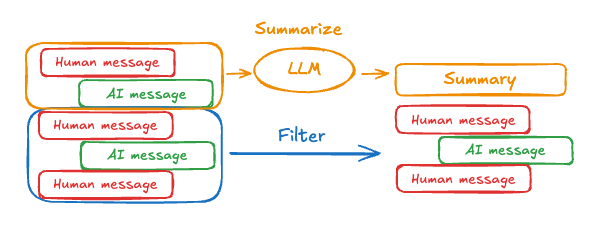 提示和编排逻辑可用于总结消息历史。例如,在 LangGraph 中,你可以扩展 [`MessagesState`](/oss/python/langgraph/graph-api#working-with-messages-in-graph-state) 以包含一个 `summary` 键:
```python theme={"theme":{"light":"catppuccin-latte","dark":"catppuccin-mocha"}}
from langgraph.graph import MessagesState
class State(MessagesState):
summary: str
```
然后,你可以生成聊天历史的摘要,使用任何现有摘要作为下一个摘要的上下文。这个 `summarize_conversation` 节点可以在 `messages` 状态键中积累了一些消息后被调用。
```python theme={"theme":{"light":"catppuccin-latte","dark":"catppuccin-mocha"}}
def summarize_conversation(state: State):
# 首先,我们获取任何现有摘要
summary = state.get("summary", "")
# 创建我们的总结提示
if summary:
# 已经存在一个摘要
summary_message = (
f"This is a summary of the conversation to date: {summary}\n\n"
"Extend the summary by taking into account the new messages above:"
)
else:
summary_message = "Create a summary of the conversation above:"
# 将提示添加到我们的历史中
messages = state["messages"] + [HumanMessage(content=summary_message)]
response = model.invoke(messages)
# 删除除最近 2 条消息外的所有消息
delete_messages = [RemoveMessage(id=m.id) for m in state["messages"][:-2]]
return {"summary": response.content, "messages": delete_messages}
```
```python theme={"theme":{"light":"catppuccin-latte","dark":"catppuccin-mocha"}}
from typing import Any, TypedDict
from langchain.chat_models import init_chat_model
from langchain.messages import AnyMessage
from langchain_core.messages.utils import count_tokens_approximately
from langgraph.graph import StateGraph, START, MessagesState
from langgraph.checkpoint.memory import InMemorySaver
from langmem.short_term import SummarizationNode, RunningSummary # [!code highlight]
model = init_chat_model("claude-sonnet-4-6")
summarization_model = model.bind(max_tokens=128)
class State(MessagesState):
context: dict[str, RunningSummary] # [!code highlight]
class LLMInputState(TypedDict): # [!code highlight]
summarized_messages: list[AnyMessage]
context: dict[str, RunningSummary]
summarization_node = SummarizationNode( # [!code highlight]
token_counter=count_tokens_approximately,
model=summarization_model,
max_tokens=256,
max_tokens_before_summary=256,
max_summary_tokens=128,
)
def call_model(state: LLMInputState): # [!code highlight]
response = model.invoke(state["summarized_messages"])
return {"messages": [response]}
checkpointer = InMemorySaver()
builder = StateGraph(State)
builder.add_node(call_model)
builder.add_node("summarize", summarization_node) # [!code highlight]
builder.add_edge(START, "summarize")
builder.add_edge("summarize", "call_model")
graph = builder.compile(checkpointer=checkpointer)
# 调用图
config = {"configurable": {"thread_id": "1"}}
graph.invoke({"messages": "hi, my name is bob"}, config)
graph.invoke({"messages": "write a short poem about cats"}, config)
graph.invoke({"messages": "now do the same but for dogs"}, config)
final_response = graph.invoke({"messages": "what's my name?"}, config)
final_response["messages"][-1].pretty_print()
print("\nSummary:", final_response["context"]["running_summary"].summary)
```
1. 我们将在 `context` 字段中跟踪我们的运行摘要
(`SummarizationNode` 所期望的)。
1. 定义仅用于过滤
`call_model` 节点输入的私有状态。
1. 我们在这里传递一个私有输入状态,以隔离总结节点返回的消息
```
================================== Ai Message ==================================
From our conversation, I can see that you introduced yourself as Bob. That's the name you shared with me when we began talking.
Summary: In this conversation, I was introduced to Bob, who then asked me to write a poem about cats. I composed a poem titled "The Mystery of Cats" that captured cats' graceful movements, independent nature, and their special relationship with humans. Bob then requested a similar poem about dogs, so I wrote "The Joy of Dogs," which highlighted dogs' loyalty, enthusiasm, and loving companionship. Both poems were written in a similar style but emphasized the distinct characteristics that make each pet special.
```
### 管理检查点
你可以查看和删除检查点存储的信息。
#### 查看线程状态
```python theme={"theme":{"light":"catppuccin-latte","dark":"catppuccin-mocha"}}
config = {
"configurable": {
"thread_id": "1", # [!code highlight]
# 可选地提供特定检查点的 ID,
# 否则将显示最新的检查点
# "checkpoint_id": "1f029ca3-1f5b-6704-8004-820c16b69a5a" # [!code highlight]
}
}
graph.get_state(config) # [!code highlight]
```
```
StateSnapshot(
values={'messages': [HumanMessage(content="hi! I'm bob"), AIMessage(content='Hi Bob! How are you doing today?), HumanMessage(content="what's my name?"), AIMessage(content='Your name is Bob.')]}, next=(),
config={'configurable': {'thread_id': '1', 'checkpoint_ns': '', 'checkpoint_id': '1f029ca3-1f5b-6704-8004-820c16b69a5a'}},
metadata={
'source': 'loop',
'writes': {'call_model': {'messages': AIMessage(content='Your name is Bob.')}},
'step': 4,
'parents': {},
'thread_id': '1'
},
created_at='2025-05-05T16:01:24.680462+00:00',
parent_config={'configurable': {'thread_id': '1', 'checkpoint_ns': '', 'checkpoint_id': '1f029ca3-1790-6b0a-8003-baf965b6a38f'}},
tasks=(),
interrupts=()
)
```
```python theme={"theme":{"light":"catppuccin-latte","dark":"catppuccin-mocha"}}
config = {
"configurable": {
"thread_id": "1", # [!code highlight]
# 可选地提供特定检查点的 ID,
# 否则将显示最新的检查点
# "checkpoint_id": "1f029ca3-1f5b-6704-8004-820c16b69a5a" # [!code highlight]
}
}
checkpointer.get_tuple(config) # [!code highlight]
```
```
CheckpointTuple(
config={'configurable': {'thread_id': '1', 'checkpoint_ns': '', 'checkpoint_id': '1f029ca3-1f5b-6704-8004-820c16b69a5a'}},
checkpoint={
'v': 3,
'ts': '2025-05-05T16:01:24.680462+00:00',
'id': '1f029ca3-1f5b-6704-8004-820c16b69a5a',
'channel_versions': {'__start__': '00000000000000000000000000000005.0.5290678567601859', 'messages': '00000000000000000000000000000006.0.3205149138784782', 'branch:to:call_model': '00000000000000000000000000000006.0.14611156755133758'}, 'versions_seen': {'__input__': {}, '__start__': {'__start__': '00000000000000000000000000000004.0.5736472536395331'}, 'call_model': {'branch:to:call_model': '00000000000000000000000000000005.0.1410174088651449'}},
'channel_values': {'messages': [HumanMessage(content="hi! I'm bob"), AIMessage(content='Hi Bob! How are you doing today?), HumanMessage(content="what's my name?"), AIMessage(content='Your name is Bob.')]},
},
metadata={
'source': 'loop',
'writes': {'call_model': {'messages': AIMessage(content='Your name is Bob.')}},
'step': 4,
'parents': {},
'thread_id': '1'
},
parent_config={'configurable': {'thread_id': '1', 'checkpoint_ns': '', 'checkpoint_id': '1f029ca3-1790-6b0a-8003-baf965b6a38f'}},
pending_writes=[]
)
```
#### 查看线程的历史记录
```python theme={"theme":{"light":"catppuccin-latte","dark":"catppuccin-mocha"}}
config = {
"configurable": {
"thread_id": "1" # [!code highlight]
}
}
list(graph.get_state_history(config)) # [!code highlight]
```
```
[
StateSnapshot(
values={'messages': [HumanMessage(content="hi! I'm bob"), AIMessage(content='Hi Bob! How are you doing today? Is there anything I can help you with?'), HumanMessage(content="what's my name?"), AIMessage(content='Your name is Bob.')]},
next=(),
config={'configurable': {'thread_id': '1', 'checkpoint_ns': '', 'checkpoint_id': '1f029ca3-1f5b-6704-8004-820c16b69a5a'}},
metadata={'source': 'loop', 'writes': {'call_model': {'messages': AIMessage(content='Your name is Bob.')}}, 'step': 4, 'parents': {}, 'thread_id': '1'},
created_at='2025-05-05T16:01:24.680462+00:00',
parent_config={'configurable': {'thread_id': '1', 'checkpoint_ns': '', 'checkpoint_id': '1f029ca3-1790-6b0a-8003-baf965b6a38f'}},
tasks=(),
interrupts=()
),
StateSnapshot(
values={'messages': [HumanMessage(content="hi! I'm bob"), AIMessage(content='Hi Bob! How are you doing today? Is there anything I can help you with?'), HumanMessage(content="what's my name?")]},
next=('call_model',),
config={'configurable': {'thread_id': '1', 'checkpoint_ns': '', 'checkpoint_id': '1f029ca3-1790-6b0a-8003-baf965b6a38f'}},
metadata={'source': 'loop', 'writes': None, 'step': 3, 'parents': {}, 'thread_id': '1'},
created_at='2025-05-05T16:01:23.863421+00:00',
parent_config={...}
tasks=(PregelTask(id='8ab4155e-6b15-b885-9ce5-bed69a2c305c', name='call_model', path=('__pregel_pull', 'call_model'), error=None, interrupts=(), state=None, result={'messages': AIMessage(content='Your name is Bob.')}),),
interrupts=()
),
StateSnapshot(
values={'messages': [HumanMessage(content="hi! I'm bob"), AIMessage(content='Hi Bob! How are you doing today? Is there anything I can help you with?')]},
next=('__start__',),
config={...},
metadata={'source': 'input', 'writes': {'__start__': {'messages': [{'role': 'user', 'content': "what's my name?"}]}}, 'step': 2, 'parents': {}, 'thread_id': '1'},
created_at='2025-05-05T16:01:23.863173+00:00',
parent_config={...}
tasks=(PregelTask(id='24ba39d6-6db1-4c9b-f4c5-682aeaf38dcd', name='__start__', path=('__pregel_pull', '__start__'), error=None, interrupts=(), state=None, result={'messages': [{'role': 'user', 'content': "what's my name?"}]}),),
interrupts=()
),
StateSnapshot(
values={'messages': [HumanMessage(content="hi! I'm bob"), AIMessage(content='Hi Bob! How are you doing today? Is there anything I can help you with?')]},
next=(),
config={...},
metadata={'source': 'loop', 'writes': {'call_model': {'messages': AIMessage(content='Hi Bob! How are you doing today? Is there anything I can help you with?')}}, 'step': 1, 'parents': {}, 'thread_id': '1'},
created_at='2025-05-05T16:01:23.862295+00:00',
parent_config={...}
tasks=(),
interrupts=()
),
StateSnapshot(
values={'messages': [HumanMessage(content="hi! I'm bob")]},
next=('call_model',),
config={...},
metadata={'source': 'loop', 'writes': None, 'step': 0, 'parents': {}, 'thread_id': '1'},
created_at='2025-05-05T16:01:22.278960+00:00',
parent_config={...}
tasks=(PregelTask(id='8cbd75e0-3720-b056-04f7-71ac805140a0', name='call_model', path=('__pregel_pull', 'call_model'), error=None, interrupts=(), state=None, result={'messages': AIMessage(content='Hi Bob! How are you doing today? Is there anything I can help you with?')}),),
interrupts=()
),
StateSnapshot(
values={'messages': []},
next=('__start__',),
config={'configurable': {'thread_id': '1', 'checkpoint_ns': '', 'checkpoint_id': '1f029ca3-0870-6ce2-bfff-1f3f14c3e565'}},
metadata={'source': 'input', 'writes': {'__start__': {'messages': [{'role': 'user', 'content': "hi! I'm bob"}]}}, 'step': -1, 'parents': {}, 'thread_id': '1'},
created_at='2025-05-05T16:01:22.277497+00:00',
parent_config=None,
tasks=(PregelTask(id='d458367b-8265-812c-18e2-33001d199ce6', name='__start__', path=('__pregel_pull', '__start__'), error=None, interrupts=(), state=None, result={'messages': [{'role': 'user', 'content': "hi! I'm bob"}]}),),
interrupts=()
)
]
```
```python theme={"theme":{"light":"catppuccin-latte","dark":"catppuccin-mocha"}}
config = {
"configurable": {
"thread_id": "1" # [!code highlight]
}
}
list(checkpointer.list(config)) # [!code highlight]
```
```
[
CheckpointTuple(
config={'configurable': {'thread_id': '1', 'checkpoint_ns': '', 'checkpoint_id': '1f029ca3-1f5b-6704-8004-820c16b69a5a'}},
checkpoint={
'v': 3,
'ts': '2025-05-05T16:01:24.680462+00:00',
'id': '1f029ca3-1f5b-6704-8004-820c16b69a5a',
'channel_versions': {'__start__': '00000000000000000000000000000005.0.5290678567601859', 'messages': '00000000000000000000000000000006.0.3205149138784782', 'branch:to:call_model': '00000000000000000000000000000006.0.14611156755133758'},
'versions_seen': {'__input__': {}, '__start__': {'__start__': '00000000000000000000000000000004.0.5736472536395331'}, 'call_model': {'branch:to:call_model': '00000000000000000000000000000005.0.1410174088651449'}},
'channel_values': {'messages': [HumanMessage(content="hi! I'm bob"), AIMessage(content='Hi Bob! How are you doing today? Is there anything I can help you with?'), HumanMessage(content="what's my name?"), AIMessage(content='Your name is Bob.')]},
},
metadata={'source': 'loop', 'writes': {'call_model': {'messages': AIMessage(content='Your name is Bob.')}}, 'step': 4, 'parents': {}, 'thread_id': '1'},
parent_config={'configurable': {'thread_id': '1', 'checkpoint_ns': '', 'checkpoint_id': '1f029ca3-1790-6b0a-8003-baf965b6a38f'}},
pending_writes=[]
),
CheckpointTuple(
config={'configurable': {'thread_id': '1', 'checkpoint_ns': '', 'checkpoint_id': '1f029ca3-1790-6b0a-8003-baf965b6a38f'}},
checkpoint={
'v': 3,
'ts': '2025-05-05T16:01:23.863421+00:00',
'id': '1f029ca3-1790-6b0a-8003-baf965b6a38f',
'channel_versions': {'__start__': '00000000000000000000000000000005.0.5290678567601859', 'messages': '00000000000000000000000000000006.0.3205149138784782', 'branch:to:call_model': '00000000000000000000000000000006.0.14611156755133758'},
'versions_seen': {'__input__': {}, '__start__': {'__start__': '00000000000000000000000000000004.0.5736472536395331'}, 'call_model': {'branch:to:call_model': '00000000000000000000000000000005.0.1410174088651449'}},
'channel_values': {'messages': [HumanMessage(content="hi! I'm bob"), AIMessage(content='Hi Bob! How are you doing today? Is there anything I can help you with?'), HumanMessage(content="what's my name?")], 'branch:to:call_model': None}
},
metadata={'source': 'loop', 'writes': None, 'step': 3, 'parents': {}, 'thread_id': '1'},
parent_config={...},
pending_writes=[('8ab4155e-6b15-b885-9ce5-bed69a2c305c', 'messages', AIMessage(content='Your name is Bob.'))]
),
CheckpointTuple(
config={...},
checkpoint={
'v': 3,
'ts': '2025-05-05T16:01:23.863173+00:00',
'id': '1f029ca3-1790-616e-8002-9e021694a0cd',
'channel_versions': {'__start__': '00000000000000000000000000000004.0.5736472536395331', 'messages': '00000000000000000000000000000003.0.7056767754077798', 'branch:to:call_model': '00000000000000000000000000000003.0.22059023329132854'},
'versions_seen': {'__input__': {}, '__start__': {'__start__': '00000000000000000000000000000001.0.7040775356287469'}, 'call_model': {'branch:to:call_model': '00000000000000000000000000000002.0.9300422176788571'}},
'channel_values': {'__start__': {'messages': [{'role': 'user', 'content': "what's my name?"}]}, 'messages': [HumanMessage(content="hi! I'm bob"), AIMessage(content='Hi Bob! How are you doing today? Is there anything I can help you with?')]}
},
metadata={'source': 'input', 'writes': {'__start__': {'messages': [{'role': 'user', 'content': "what's my name?"}]}}, 'step': 2, 'parents': {}, 'thread_id': '1'},
parent_config={...},
pending_writes=[('24ba39d6-6db1-4c9b-f4c5-682aeaf38dcd', 'messages', [{'role': 'user', 'content': "what's my name?"}]), ('24ba39d6-6db1-4c9b-f4c5-682aeaf38dcd', 'branch:to:call_model', None)]
),
CheckpointTuple(
config={...},
checkpoint={
'v': 3,
'ts': '2025-05-05T16:01:23.862295+00:00',
'id': '1f029ca3-178d-6f54-8001-d7b180db0c89',
'channel_versions': {'__start__': '00000000000000000000000000000002.0.18673090920108737', 'messages': '00000000000000000000000000000003.0.7056767754077798', 'branch:to:call_model': '00000000000000000000000000000003.0.22059023329132854'},
'versions_seen': {'__input__': {}, '__start__': {'__start__': '00000000000000000000000000000001.0.7040775356287469'}, 'call_model': {'branch:to:call_model': '00000000000000000000000000000002.0.9300422176788571'}},
'channel_values': {'messages': [HumanMessage(content="hi! I'm bob"), AIMessage(content='Hi Bob! How are you doing today? Is there anything I can help you with?')]}
},
metadata={'source': 'loop', 'writes': {'call_model': {'messages': AIMessage(content='Hi Bob! How are you doing today? Is there anything I can help you with?')}}, 'step': 1, 'parents': {}, 'thread_id': '1'},
parent_config={...},
pending_writes=[]
),
CheckpointTuple(
config={...},
checkpoint={
'v': 3,
'ts': '2025-05-05T16:01:22.278960+00:00',
'id': '1f029ca3-0874-6612-8000-339f2abc83b1',
'channel_versions': {'__start__': '00000000000000000000000000000002.0.18673090920108737', 'messages': '00000000000000000000000000000002.0.30296526818059655', 'branch:to:call_model': '00000000000000000000000000000002.0.9300422176788571'},
'versions_seen': {'__input__': {}, '__start__': {'__start__': '00000000000000000000000000000001.0.7040775356287469'}},
'channel_values': {'messages': [HumanMessage(content="hi! I'm bob")], 'branch:to:call_model': None}
},
metadata={'source': 'loop', 'writes': None, 'step': 0, 'parents': {}, 'thread_id': '1'},
parent_config={...},
pending_writes=[('8cbd75e0-3720-b056-04f7-71ac805140a0', 'messages', AIMessage(content='Hi Bob! How are you doing today? Is there anything I can help you with?'))]
),
CheckpointTuple(
config={'configurable': {'thread_id': '1', 'checkpoint_ns': '', 'checkpoint_id': '1f029ca3-0870-6ce2-bfff-1f3f14c3e565'}},
checkpoint={
'v': 3,
'ts': '2025-05-05T16:01:22.277497+00:00',
'id': '1f029ca3-0870-6ce2-bfff-1f3f14c3e565',
'channel_versions': {'__start__': '00000000000000000000000000000001.0.7040775356287469'},
'versions_seen': {'__input__': {}},
'channel_values': {'__start__': {'messages': [{'role': 'user', 'content': "hi! I'm bob"}]}}
},
metadata={'source': 'input', 'writes': {'__start__': {'messages': [{'role': 'user', 'content': "hi! I'm bob"}]}}, 'step': -1, 'parents': {}, 'thread_id': '1'},
parent_config=None,
pending_writes=[('d458367b-8265-812c-18e2-33001d199ce6', 'messages', [{'role': 'user', 'content': "hi! I'm bob"}]), ('d458367b-8265-812c-18e2-33001d199ce6', 'branch:to:call_model', None)]
)
]
```
#### 删除线程的所有检查点
```python theme={"theme":{"light":"catppuccin-latte","dark":"catppuccin-mocha"}}
thread_id = "1"
checkpointer.delete_thread(thread_id)
```
## 数据库管理
如果你使用任何基于数据库的持久化实现(如 Postgres 或 Redis)来存储短期和/或长期内存,你需要在将其与数据库一起使用之前运行迁移以设置所需的模式。
按照惯例,大多数特定于数据库的库在检查点或存储实例上定义一个 `setup()` 方法来运行所需的迁移。但是,你应该检查你的 [`BaseCheckpointSaver`](https://reference.langchain.com/python/langgraph/checkpoints/#langgraph.checkpoint.base.BaseCheckpointSaver) 或 [`BaseStore`](https://reference.langchain.com/python/langchain-core/stores/BaseStore) 的具体实现,以确认确切的方法名称和用法。
我们建议将迁移作为专用的部署步骤运行,或者你可以确保它们在服务器启动时运行。
***
提示和编排逻辑可用于总结消息历史。例如,在 LangGraph 中,你可以扩展 [`MessagesState`](/oss/python/langgraph/graph-api#working-with-messages-in-graph-state) 以包含一个 `summary` 键:
```python theme={"theme":{"light":"catppuccin-latte","dark":"catppuccin-mocha"}}
from langgraph.graph import MessagesState
class State(MessagesState):
summary: str
```
然后,你可以生成聊天历史的摘要,使用任何现有摘要作为下一个摘要的上下文。这个 `summarize_conversation` 节点可以在 `messages` 状态键中积累了一些消息后被调用。
```python theme={"theme":{"light":"catppuccin-latte","dark":"catppuccin-mocha"}}
def summarize_conversation(state: State):
# 首先,我们获取任何现有摘要
summary = state.get("summary", "")
# 创建我们的总结提示
if summary:
# 已经存在一个摘要
summary_message = (
f"This is a summary of the conversation to date: {summary}\n\n"
"Extend the summary by taking into account the new messages above:"
)
else:
summary_message = "Create a summary of the conversation above:"
# 将提示添加到我们的历史中
messages = state["messages"] + [HumanMessage(content=summary_message)]
response = model.invoke(messages)
# 删除除最近 2 条消息外的所有消息
delete_messages = [RemoveMessage(id=m.id) for m in state["messages"][:-2]]
return {"summary": response.content, "messages": delete_messages}
```
```python theme={"theme":{"light":"catppuccin-latte","dark":"catppuccin-mocha"}}
from typing import Any, TypedDict
from langchain.chat_models import init_chat_model
from langchain.messages import AnyMessage
from langchain_core.messages.utils import count_tokens_approximately
from langgraph.graph import StateGraph, START, MessagesState
from langgraph.checkpoint.memory import InMemorySaver
from langmem.short_term import SummarizationNode, RunningSummary # [!code highlight]
model = init_chat_model("claude-sonnet-4-6")
summarization_model = model.bind(max_tokens=128)
class State(MessagesState):
context: dict[str, RunningSummary] # [!code highlight]
class LLMInputState(TypedDict): # [!code highlight]
summarized_messages: list[AnyMessage]
context: dict[str, RunningSummary]
summarization_node = SummarizationNode( # [!code highlight]
token_counter=count_tokens_approximately,
model=summarization_model,
max_tokens=256,
max_tokens_before_summary=256,
max_summary_tokens=128,
)
def call_model(state: LLMInputState): # [!code highlight]
response = model.invoke(state["summarized_messages"])
return {"messages": [response]}
checkpointer = InMemorySaver()
builder = StateGraph(State)
builder.add_node(call_model)
builder.add_node("summarize", summarization_node) # [!code highlight]
builder.add_edge(START, "summarize")
builder.add_edge("summarize", "call_model")
graph = builder.compile(checkpointer=checkpointer)
# 调用图
config = {"configurable": {"thread_id": "1"}}
graph.invoke({"messages": "hi, my name is bob"}, config)
graph.invoke({"messages": "write a short poem about cats"}, config)
graph.invoke({"messages": "now do the same but for dogs"}, config)
final_response = graph.invoke({"messages": "what's my name?"}, config)
final_response["messages"][-1].pretty_print()
print("\nSummary:", final_response["context"]["running_summary"].summary)
```
1. 我们将在 `context` 字段中跟踪我们的运行摘要
(`SummarizationNode` 所期望的)。
1. 定义仅用于过滤
`call_model` 节点输入的私有状态。
1. 我们在这里传递一个私有输入状态,以隔离总结节点返回的消息
```
================================== Ai Message ==================================
From our conversation, I can see that you introduced yourself as Bob. That's the name you shared with me when we began talking.
Summary: In this conversation, I was introduced to Bob, who then asked me to write a poem about cats. I composed a poem titled "The Mystery of Cats" that captured cats' graceful movements, independent nature, and their special relationship with humans. Bob then requested a similar poem about dogs, so I wrote "The Joy of Dogs," which highlighted dogs' loyalty, enthusiasm, and loving companionship. Both poems were written in a similar style but emphasized the distinct characteristics that make each pet special.
```
### 管理检查点
你可以查看和删除检查点存储的信息。
#### 查看线程状态
```python theme={"theme":{"light":"catppuccin-latte","dark":"catppuccin-mocha"}}
config = {
"configurable": {
"thread_id": "1", # [!code highlight]
# 可选地提供特定检查点的 ID,
# 否则将显示最新的检查点
# "checkpoint_id": "1f029ca3-1f5b-6704-8004-820c16b69a5a" # [!code highlight]
}
}
graph.get_state(config) # [!code highlight]
```
```
StateSnapshot(
values={'messages': [HumanMessage(content="hi! I'm bob"), AIMessage(content='Hi Bob! How are you doing today?), HumanMessage(content="what's my name?"), AIMessage(content='Your name is Bob.')]}, next=(),
config={'configurable': {'thread_id': '1', 'checkpoint_ns': '', 'checkpoint_id': '1f029ca3-1f5b-6704-8004-820c16b69a5a'}},
metadata={
'source': 'loop',
'writes': {'call_model': {'messages': AIMessage(content='Your name is Bob.')}},
'step': 4,
'parents': {},
'thread_id': '1'
},
created_at='2025-05-05T16:01:24.680462+00:00',
parent_config={'configurable': {'thread_id': '1', 'checkpoint_ns': '', 'checkpoint_id': '1f029ca3-1790-6b0a-8003-baf965b6a38f'}},
tasks=(),
interrupts=()
)
```
```python theme={"theme":{"light":"catppuccin-latte","dark":"catppuccin-mocha"}}
config = {
"configurable": {
"thread_id": "1", # [!code highlight]
# 可选地提供特定检查点的 ID,
# 否则将显示最新的检查点
# "checkpoint_id": "1f029ca3-1f5b-6704-8004-820c16b69a5a" # [!code highlight]
}
}
checkpointer.get_tuple(config) # [!code highlight]
```
```
CheckpointTuple(
config={'configurable': {'thread_id': '1', 'checkpoint_ns': '', 'checkpoint_id': '1f029ca3-1f5b-6704-8004-820c16b69a5a'}},
checkpoint={
'v': 3,
'ts': '2025-05-05T16:01:24.680462+00:00',
'id': '1f029ca3-1f5b-6704-8004-820c16b69a5a',
'channel_versions': {'__start__': '00000000000000000000000000000005.0.5290678567601859', 'messages': '00000000000000000000000000000006.0.3205149138784782', 'branch:to:call_model': '00000000000000000000000000000006.0.14611156755133758'}, 'versions_seen': {'__input__': {}, '__start__': {'__start__': '00000000000000000000000000000004.0.5736472536395331'}, 'call_model': {'branch:to:call_model': '00000000000000000000000000000005.0.1410174088651449'}},
'channel_values': {'messages': [HumanMessage(content="hi! I'm bob"), AIMessage(content='Hi Bob! How are you doing today?), HumanMessage(content="what's my name?"), AIMessage(content='Your name is Bob.')]},
},
metadata={
'source': 'loop',
'writes': {'call_model': {'messages': AIMessage(content='Your name is Bob.')}},
'step': 4,
'parents': {},
'thread_id': '1'
},
parent_config={'configurable': {'thread_id': '1', 'checkpoint_ns': '', 'checkpoint_id': '1f029ca3-1790-6b0a-8003-baf965b6a38f'}},
pending_writes=[]
)
```
#### 查看线程的历史记录
```python theme={"theme":{"light":"catppuccin-latte","dark":"catppuccin-mocha"}}
config = {
"configurable": {
"thread_id": "1" # [!code highlight]
}
}
list(graph.get_state_history(config)) # [!code highlight]
```
```
[
StateSnapshot(
values={'messages': [HumanMessage(content="hi! I'm bob"), AIMessage(content='Hi Bob! How are you doing today? Is there anything I can help you with?'), HumanMessage(content="what's my name?"), AIMessage(content='Your name is Bob.')]},
next=(),
config={'configurable': {'thread_id': '1', 'checkpoint_ns': '', 'checkpoint_id': '1f029ca3-1f5b-6704-8004-820c16b69a5a'}},
metadata={'source': 'loop', 'writes': {'call_model': {'messages': AIMessage(content='Your name is Bob.')}}, 'step': 4, 'parents': {}, 'thread_id': '1'},
created_at='2025-05-05T16:01:24.680462+00:00',
parent_config={'configurable': {'thread_id': '1', 'checkpoint_ns': '', 'checkpoint_id': '1f029ca3-1790-6b0a-8003-baf965b6a38f'}},
tasks=(),
interrupts=()
),
StateSnapshot(
values={'messages': [HumanMessage(content="hi! I'm bob"), AIMessage(content='Hi Bob! How are you doing today? Is there anything I can help you with?'), HumanMessage(content="what's my name?")]},
next=('call_model',),
config={'configurable': {'thread_id': '1', 'checkpoint_ns': '', 'checkpoint_id': '1f029ca3-1790-6b0a-8003-baf965b6a38f'}},
metadata={'source': 'loop', 'writes': None, 'step': 3, 'parents': {}, 'thread_id': '1'},
created_at='2025-05-05T16:01:23.863421+00:00',
parent_config={...}
tasks=(PregelTask(id='8ab4155e-6b15-b885-9ce5-bed69a2c305c', name='call_model', path=('__pregel_pull', 'call_model'), error=None, interrupts=(), state=None, result={'messages': AIMessage(content='Your name is Bob.')}),),
interrupts=()
),
StateSnapshot(
values={'messages': [HumanMessage(content="hi! I'm bob"), AIMessage(content='Hi Bob! How are you doing today? Is there anything I can help you with?')]},
next=('__start__',),
config={...},
metadata={'source': 'input', 'writes': {'__start__': {'messages': [{'role': 'user', 'content': "what's my name?"}]}}, 'step': 2, 'parents': {}, 'thread_id': '1'},
created_at='2025-05-05T16:01:23.863173+00:00',
parent_config={...}
tasks=(PregelTask(id='24ba39d6-6db1-4c9b-f4c5-682aeaf38dcd', name='__start__', path=('__pregel_pull', '__start__'), error=None, interrupts=(), state=None, result={'messages': [{'role': 'user', 'content': "what's my name?"}]}),),
interrupts=()
),
StateSnapshot(
values={'messages': [HumanMessage(content="hi! I'm bob"), AIMessage(content='Hi Bob! How are you doing today? Is there anything I can help you with?')]},
next=(),
config={...},
metadata={'source': 'loop', 'writes': {'call_model': {'messages': AIMessage(content='Hi Bob! How are you doing today? Is there anything I can help you with?')}}, 'step': 1, 'parents': {}, 'thread_id': '1'},
created_at='2025-05-05T16:01:23.862295+00:00',
parent_config={...}
tasks=(),
interrupts=()
),
StateSnapshot(
values={'messages': [HumanMessage(content="hi! I'm bob")]},
next=('call_model',),
config={...},
metadata={'source': 'loop', 'writes': None, 'step': 0, 'parents': {}, 'thread_id': '1'},
created_at='2025-05-05T16:01:22.278960+00:00',
parent_config={...}
tasks=(PregelTask(id='8cbd75e0-3720-b056-04f7-71ac805140a0', name='call_model', path=('__pregel_pull', 'call_model'), error=None, interrupts=(), state=None, result={'messages': AIMessage(content='Hi Bob! How are you doing today? Is there anything I can help you with?')}),),
interrupts=()
),
StateSnapshot(
values={'messages': []},
next=('__start__',),
config={'configurable': {'thread_id': '1', 'checkpoint_ns': '', 'checkpoint_id': '1f029ca3-0870-6ce2-bfff-1f3f14c3e565'}},
metadata={'source': 'input', 'writes': {'__start__': {'messages': [{'role': 'user', 'content': "hi! I'm bob"}]}}, 'step': -1, 'parents': {}, 'thread_id': '1'},
created_at='2025-05-05T16:01:22.277497+00:00',
parent_config=None,
tasks=(PregelTask(id='d458367b-8265-812c-18e2-33001d199ce6', name='__start__', path=('__pregel_pull', '__start__'), error=None, interrupts=(), state=None, result={'messages': [{'role': 'user', 'content': "hi! I'm bob"}]}),),
interrupts=()
)
]
```
```python theme={"theme":{"light":"catppuccin-latte","dark":"catppuccin-mocha"}}
config = {
"configurable": {
"thread_id": "1" # [!code highlight]
}
}
list(checkpointer.list(config)) # [!code highlight]
```
```
[
CheckpointTuple(
config={'configurable': {'thread_id': '1', 'checkpoint_ns': '', 'checkpoint_id': '1f029ca3-1f5b-6704-8004-820c16b69a5a'}},
checkpoint={
'v': 3,
'ts': '2025-05-05T16:01:24.680462+00:00',
'id': '1f029ca3-1f5b-6704-8004-820c16b69a5a',
'channel_versions': {'__start__': '00000000000000000000000000000005.0.5290678567601859', 'messages': '00000000000000000000000000000006.0.3205149138784782', 'branch:to:call_model': '00000000000000000000000000000006.0.14611156755133758'},
'versions_seen': {'__input__': {}, '__start__': {'__start__': '00000000000000000000000000000004.0.5736472536395331'}, 'call_model': {'branch:to:call_model': '00000000000000000000000000000005.0.1410174088651449'}},
'channel_values': {'messages': [HumanMessage(content="hi! I'm bob"), AIMessage(content='Hi Bob! How are you doing today? Is there anything I can help you with?'), HumanMessage(content="what's my name?"), AIMessage(content='Your name is Bob.')]},
},
metadata={'source': 'loop', 'writes': {'call_model': {'messages': AIMessage(content='Your name is Bob.')}}, 'step': 4, 'parents': {}, 'thread_id': '1'},
parent_config={'configurable': {'thread_id': '1', 'checkpoint_ns': '', 'checkpoint_id': '1f029ca3-1790-6b0a-8003-baf965b6a38f'}},
pending_writes=[]
),
CheckpointTuple(
config={'configurable': {'thread_id': '1', 'checkpoint_ns': '', 'checkpoint_id': '1f029ca3-1790-6b0a-8003-baf965b6a38f'}},
checkpoint={
'v': 3,
'ts': '2025-05-05T16:01:23.863421+00:00',
'id': '1f029ca3-1790-6b0a-8003-baf965b6a38f',
'channel_versions': {'__start__': '00000000000000000000000000000005.0.5290678567601859', 'messages': '00000000000000000000000000000006.0.3205149138784782', 'branch:to:call_model': '00000000000000000000000000000006.0.14611156755133758'},
'versions_seen': {'__input__': {}, '__start__': {'__start__': '00000000000000000000000000000004.0.5736472536395331'}, 'call_model': {'branch:to:call_model': '00000000000000000000000000000005.0.1410174088651449'}},
'channel_values': {'messages': [HumanMessage(content="hi! I'm bob"), AIMessage(content='Hi Bob! How are you doing today? Is there anything I can help you with?'), HumanMessage(content="what's my name?")], 'branch:to:call_model': None}
},
metadata={'source': 'loop', 'writes': None, 'step': 3, 'parents': {}, 'thread_id': '1'},
parent_config={...},
pending_writes=[('8ab4155e-6b15-b885-9ce5-bed69a2c305c', 'messages', AIMessage(content='Your name is Bob.'))]
),
CheckpointTuple(
config={...},
checkpoint={
'v': 3,
'ts': '2025-05-05T16:01:23.863173+00:00',
'id': '1f029ca3-1790-616e-8002-9e021694a0cd',
'channel_versions': {'__start__': '00000000000000000000000000000004.0.5736472536395331', 'messages': '00000000000000000000000000000003.0.7056767754077798', 'branch:to:call_model': '00000000000000000000000000000003.0.22059023329132854'},
'versions_seen': {'__input__': {}, '__start__': {'__start__': '00000000000000000000000000000001.0.7040775356287469'}, 'call_model': {'branch:to:call_model': '00000000000000000000000000000002.0.9300422176788571'}},
'channel_values': {'__start__': {'messages': [{'role': 'user', 'content': "what's my name?"}]}, 'messages': [HumanMessage(content="hi! I'm bob"), AIMessage(content='Hi Bob! How are you doing today? Is there anything I can help you with?')]}
},
metadata={'source': 'input', 'writes': {'__start__': {'messages': [{'role': 'user', 'content': "what's my name?"}]}}, 'step': 2, 'parents': {}, 'thread_id': '1'},
parent_config={...},
pending_writes=[('24ba39d6-6db1-4c9b-f4c5-682aeaf38dcd', 'messages', [{'role': 'user', 'content': "what's my name?"}]), ('24ba39d6-6db1-4c9b-f4c5-682aeaf38dcd', 'branch:to:call_model', None)]
),
CheckpointTuple(
config={...},
checkpoint={
'v': 3,
'ts': '2025-05-05T16:01:23.862295+00:00',
'id': '1f029ca3-178d-6f54-8001-d7b180db0c89',
'channel_versions': {'__start__': '00000000000000000000000000000002.0.18673090920108737', 'messages': '00000000000000000000000000000003.0.7056767754077798', 'branch:to:call_model': '00000000000000000000000000000003.0.22059023329132854'},
'versions_seen': {'__input__': {}, '__start__': {'__start__': '00000000000000000000000000000001.0.7040775356287469'}, 'call_model': {'branch:to:call_model': '00000000000000000000000000000002.0.9300422176788571'}},
'channel_values': {'messages': [HumanMessage(content="hi! I'm bob"), AIMessage(content='Hi Bob! How are you doing today? Is there anything I can help you with?')]}
},
metadata={'source': 'loop', 'writes': {'call_model': {'messages': AIMessage(content='Hi Bob! How are you doing today? Is there anything I can help you with?')}}, 'step': 1, 'parents': {}, 'thread_id': '1'},
parent_config={...},
pending_writes=[]
),
CheckpointTuple(
config={...},
checkpoint={
'v': 3,
'ts': '2025-05-05T16:01:22.278960+00:00',
'id': '1f029ca3-0874-6612-8000-339f2abc83b1',
'channel_versions': {'__start__': '00000000000000000000000000000002.0.18673090920108737', 'messages': '00000000000000000000000000000002.0.30296526818059655', 'branch:to:call_model': '00000000000000000000000000000002.0.9300422176788571'},
'versions_seen': {'__input__': {}, '__start__': {'__start__': '00000000000000000000000000000001.0.7040775356287469'}},
'channel_values': {'messages': [HumanMessage(content="hi! I'm bob")], 'branch:to:call_model': None}
},
metadata={'source': 'loop', 'writes': None, 'step': 0, 'parents': {}, 'thread_id': '1'},
parent_config={...},
pending_writes=[('8cbd75e0-3720-b056-04f7-71ac805140a0', 'messages', AIMessage(content='Hi Bob! How are you doing today? Is there anything I can help you with?'))]
),
CheckpointTuple(
config={'configurable': {'thread_id': '1', 'checkpoint_ns': '', 'checkpoint_id': '1f029ca3-0870-6ce2-bfff-1f3f14c3e565'}},
checkpoint={
'v': 3,
'ts': '2025-05-05T16:01:22.277497+00:00',
'id': '1f029ca3-0870-6ce2-bfff-1f3f14c3e565',
'channel_versions': {'__start__': '00000000000000000000000000000001.0.7040775356287469'},
'versions_seen': {'__input__': {}},
'channel_values': {'__start__': {'messages': [{'role': 'user', 'content': "hi! I'm bob"}]}}
},
metadata={'source': 'input', 'writes': {'__start__': {'messages': [{'role': 'user', 'content': "hi! I'm bob"}]}}, 'step': -1, 'parents': {}, 'thread_id': '1'},
parent_config=None,
pending_writes=[('d458367b-8265-812c-18e2-33001d199ce6', 'messages', [{'role': 'user', 'content': "hi! I'm bob"}]), ('d458367b-8265-812c-18e2-33001d199ce6', 'branch:to:call_model', None)]
)
]
```
#### 删除线程的所有检查点
```python theme={"theme":{"light":"catppuccin-latte","dark":"catppuccin-mocha"}}
thread_id = "1"
checkpointer.delete_thread(thread_id)
```
## 数据库管理
如果你使用任何基于数据库的持久化实现(如 Postgres 或 Redis)来存储短期和/或长期内存,你需要在将其与数据库一起使用之前运行迁移以设置所需的模式。
按照惯例,大多数特定于数据库的库在检查点或存储实例上定义一个 `setup()` 方法来运行所需的迁移。但是,你应该检查你的 [`BaseCheckpointSaver`](https://reference.langchain.com/python/langgraph/checkpoints/#langgraph.checkpoint.base.BaseCheckpointSaver) 或 [`BaseStore`](https://reference.langchain.com/python/langchain-core/stores/BaseStore) 的具体实现,以确认确切的方法名称和用法。
我们建议将迁移作为专用的部署步骤运行,或者你可以确保它们在服务器启动时运行。
***
[将这些文档连接](/use-these-docs)到 Claude、VSCode 等,通过 MCP 获取实时答案。
[在 GitHub 上编辑此页面](https://github.com/langchain-ai/docs/edit/main/src/oss/langgraph/add-memory.mdx) 或 [提交问题](https://github.com/langchain-ai/docs/issues/new/choose)。