> ## Documentation Index
> Fetch the complete documentation index at: https://cndoc-langchain.site/llms.txt
> Use this file to discover all available pages before exploring further.
# 防护栏
> 为您的代理实施安全检查和内容过滤
防护栏通过在代理执行的关键点验证和过滤内容,帮助您构建安全、合规的AI应用程序。它们可以检测敏感信息、执行内容策略、验证输出,并在问题发生前防止不安全的行为。
常见用例包括:
* 防止个人身份信息泄露
* 检测和阻止提示注入攻击
* 阻止不当或有害内容
* 执行业务规则和合规要求
* 验证输出质量和准确性
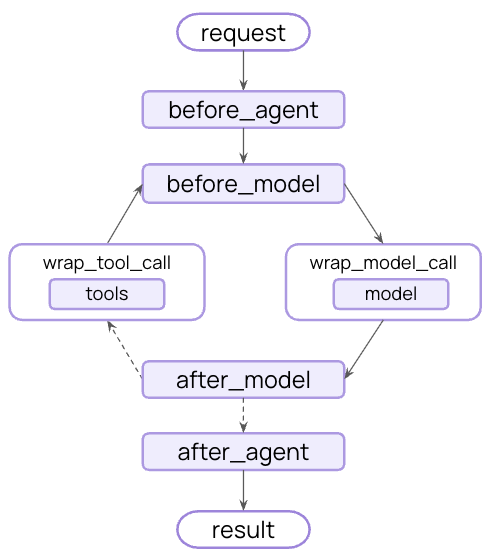
您可以使用[中间件](/oss/python/langchain/middleware)在战略点拦截执行来实现防护栏——在代理开始前、完成后,或在模型和工具调用前后。
防护栏可以通过两种互补的方法实现:
使用基于规则的逻辑,如正则表达式模式、关键词匹配或显式检查。快速、可预测且经济高效,但可能遗漏细微的违规行为。
使用LLM或分类器通过语义理解评估内容。能捕捉规则遗漏的微妙问题,但速度较慢且成本较高。
LangChain提供了内置防护栏(例如,[PII检测](#pii-detection)、[Human in the Loop](#human-in-the-loop))和一个灵活的中间件系统,用于使用任一方法构建自定义防护栏。
## 内置防护栏
### PII检测
LangChain提供内置中间件,用于检测和处理对话中的个人身份信息(PII)。此中间件可以检测常见的PII类型,如电子邮件、信用卡、IP地址等。
PII检测中间件适用于具有合规要求的医疗保健和金融应用、需要清理日志的客户服务代理,以及通常任何处理敏感用户数据的应用程序。
PII中间件支持多种处理检测到的PII的策略:
| 策略 | 描述 | 示例 |
| -------- | --------------------------- | --------------------- |
| `redact` | 替换为 `[REDACTED_{PII_TYPE}]` | `[REDACTED_EMAIL]` |
| `mask` | 部分遮蔽(例如,最后4位数字) | `****-****-****-1234` |
| `hash` | 替换为确定性哈希值 | `a8f5f167...` |
| `block` | 检测到时引发异常 | 抛出错误 |
```python theme={"theme":{"light":"catppuccin-latte","dark":"catppuccin-mocha"}}
from langchain.agents import create_agent
from langchain.agents.middleware import PIIMiddleware
agent = create_agent(
model="gpt-5.4",
tools=[customer_service_tool, email_tool],
middleware=[
# 在发送到模型之前,对用户输入中的电子邮件进行脱敏
PIIMiddleware(
"email",
strategy="redact",
apply_to_input=True,
),
# 对用户输入中的信用卡进行遮蔽
PIIMiddleware(
"credit_card",
strategy="mask",
apply_to_input=True,
),
# 阻止API密钥 - 如果检测到则引发错误
PIIMiddleware(
"api_key",
detector=r"sk-[a-zA-Z0-9]{32}",
strategy="block",
apply_to_input=True,
),
],
)
# 当用户提供PII时,它将根据策略进行处理
result = agent.invoke({
"messages": [{"role": "user", "content": "My email is john.doe@example.com and card is 5105-1051-0510-5100"}]
})
```
**内置PII类型:**
* `email` - 电子邮件地址
* `credit_card` - 信用卡号(Luhn验证)
* `ip` - IP地址
* `mac_address` - MAC地址
* `url` - URL
**配置选项:**
| 参数 | 描述 | 默认值 |
| ----------------------- | --------------------------------------------------- | ------------ |
| `pii_type` | 要检测的PII类型(内置或自定义) | 必需 |
| `strategy` | 如何处理检测到的PII(`"block"`、`"redact"`、`"mask"`、`"hash"`) | `"redact"` |
| `detector` | 自定义检测器函数或正则表达式模式 | `None`(使用内置) |
| `apply_to_input` | 在模型调用前检查用户消息 | `True` |
| `apply_to_output` | 在模型调用后检查AI消息 | `False` |
| `apply_to_tool_results` | 在执行后检查工具结果消息 | `False` |
有关PII检测功能的完整详细信息,请参阅[中间件文档](/oss/python/langchain/middleware#pii-detection)。
### Human in the Loop
LangChain提供内置中间件,用于在执行敏感操作前要求人工批准。这是高风险决策最有效的防护栏之一。
Human in the Loop中间件适用于金融交易和转账、删除或修改生产数据、向外部方发送通信,以及任何具有重大业务影响的操作。
```python theme={"theme":{"light":"catppuccin-latte","dark":"catppuccin-mocha"}}
from langchain.agents import create_agent
from langchain.agents.middleware import HumanInTheLoopMiddleware
from langgraph.checkpoint.memory import InMemorySaver
from langgraph.types import Command
agent = create_agent(
model="gpt-5.4",
tools=[search_tool, send_email_tool, delete_database_tool],
middleware=[
HumanInTheLoopMiddleware(
interrupt_on={
# 敏感操作需要批准
"send_email": True,
"delete_database": True,
# 自动批准安全操作
"search": False,
}
),
],
# 在中断之间持久化状态
checkpointer=InMemorySaver(),
)
# Human in the Loop需要线程ID进行持久化
config = {"configurable": {"thread_id": "some_id"}}
# 代理将在执行敏感工具前暂停并等待批准
result = agent.invoke(
{"messages": [{"role": "user", "content": "Send an email to the team"}]},
config=config
)
result = agent.invoke(
Command(resume={"decisions": [{"type": "approve"}]}),
config=config # 使用相同的线程ID恢复暂停的对话
)
```
有关实现审批工作流的完整详细信息,请参阅[Human in the
Loop文档](/oss/python/langchain/human-in-the-loop)。
## 自定义防护栏
对于更复杂的防护栏,您可以创建在代理执行前或后运行的自定义中间件。这使您能够完全控制验证逻辑、内容过滤和安全检查。
### 代理前防护栏
使用“代理前”钩子在每次调用开始时验证请求一次。这适用于会话级检查,如身份验证、速率限制或在任何处理开始前阻止不当请求。
```python title="类语法" theme={"theme":{"light":"catppuccin-latte","dark":"catppuccin-mocha"}}
from typing import Any
from langchain.agents.middleware import AgentMiddleware, AgentState, hook_config
from langgraph.runtime import Runtime
class ContentFilterMiddleware(AgentMiddleware):
"""确定性防护栏:阻止包含禁止关键词的请求。"""
def __init__(self, banned_keywords: list[str]):
super().__init__()
self.banned_keywords = [kw.lower() for kw in banned_keywords]
@hook_config(can_jump_to=["end"])
def before_agent(self, state: AgentState, runtime: Runtime) -> dict[str, Any] | None:
# 获取第一条用户消息
if not state["messages"]:
return None
first_message = state["messages"][0]
if first_message.type != "human":
return None
content = first_message.content.lower()
# 检查禁止关键词
for keyword in self.banned_keywords:
if keyword in content:
# 在任何处理前阻止执行
return {
"messages": [{
"role": "assistant",
"content": "I cannot process requests containing inappropriate content. Please rephrase your request."
}],
"jump_to": "end"
}
return None
# 使用自定义防护栏
from langchain.agents import create_agent
agent = create_agent(
model="gpt-5.4",
tools=[search_tool, calculator_tool],
middleware=[
ContentFilterMiddleware(
banned_keywords=["hack", "exploit", "malware"]
),
],
)
# 此请求将在任何处理前被阻止
result = agent.invoke({
"messages": [{"role": "user", "content": "How do I hack into a database?"}]
})
```
```python title="装饰器语法" theme={"theme":{"light":"catppuccin-latte","dark":"catppuccin-mocha"}}
from typing import Any
from langchain.agents.middleware import before_agent, AgentState, hook_config
from langgraph.runtime import Runtime
banned_keywords = ["hack", "exploit", "malware"]
@before_agent(can_jump_to=["end"])
def content_filter(state: AgentState, runtime: Runtime) -> dict[str, Any] | None:
"""确定性防护栏:阻止包含禁止关键词的请求。"""
# 获取第一条用户消息
if not state["messages"]:
return None
first_message = state["messages"][0]
if first_message.type != "human":
return None
content = first_message.content.lower()
# 检查禁止关键词
for keyword in banned_keywords:
if keyword in content:
# 在任何处理前阻止执行
return {
"messages": [{
"role": "assistant",
"content": "I cannot process requests containing inappropriate content. Please rephrase your request."
}],
"jump_to": "end"
}
return None
# 使用自定义防护栏
from langchain.agents import create_agent
agent = create_agent(
model="gpt-5.4",
tools=[search_tool, calculator_tool],
middleware=[content_filter],
)
# 此请求将在任何处理前被阻止
result = agent.invoke({
"messages": [{"role": "user", "content": "How do I hack into a database?"}]
})
```
### 代理后防护栏
使用“代理后”钩子在返回给用户前验证最终输出一次。这适用于基于模型的安全检查、质量验证或对完整代理响应的最终合规扫描。
```python title="类语法" theme={"theme":{"light":"catppuccin-latte","dark":"catppuccin-mocha"}}
from langchain.agents.middleware import AgentMiddleware, AgentState, hook_config
from langgraph.runtime import Runtime
from langchain.messages import AIMessage
from langchain.chat_models import init_chat_model
from typing import Any
class SafetyGuardrailMiddleware(AgentMiddleware):
"""基于模型的防护栏:使用LLM评估响应安全性。"""
def __init__(self):
super().__init__()
self.safety_model = init_chat_model("gpt-5.4-mini")
@hook_config(can_jump_to=["end"])
def after_agent(self, state: AgentState, runtime: Runtime) -> dict[str, Any] | None:
# 获取最终的AI响应
if not state["messages"]:
return None
last_message = state["messages"][-1]
if not isinstance(last_message, AIMessage):
return None
# 使用模型评估安全性
safety_prompt = f"""Evaluate if this response is safe and appropriate.
Respond with only 'SAFE' or 'UNSAFE'.
Response: {last_message.content}"""
result = self.safety_model.invoke([{"role": "user", "content": safety_prompt}])
if "UNSAFE" in result.content:
last_message.content = "I cannot provide that response. Please rephrase your request."
return None
# 使用安全防护栏
from langchain.agents import create_agent
agent = create_agent(
model="gpt-5.4",
tools=[search_tool, calculator_tool],
middleware=[SafetyGuardrailMiddleware()],
)
result = agent.invoke({
"messages": [{"role": "user", "content": "How do I make explosives?"}]
})
```
```python title="装饰器语法" theme={"theme":{"light":"catppuccin-latte","dark":"catppuccin-mocha"}}
from langchain.agents.middleware import after_agent, AgentState, hook_config
from langgraph.runtime import Runtime
from langchain.messages import AIMessage
from langchain.chat_models import init_chat_model
from typing import Any
safety_model = init_chat_model("gpt-5.4-mini")
@after_agent(can_jump_to=["end"])
def safety_guardrail(state: AgentState, runtime: Runtime) -> dict[str, Any] | None:
"""基于模型的防护栏:使用LLM评估响应安全性。"""
# 获取最终的AI响应
if not state["messages"]:
return None
last_message = state["messages"][-1]
if not isinstance(last_message, AIMessage):
return None
# 使用模型评估安全性
safety_prompt = f"""Evaluate if this response is safe and appropriate.
Respond with only 'SAFE' or 'UNSAFE'.
Response: {last_message.content}"""
result = safety_model.invoke([{"role": "user", "content": safety_prompt}])
if "UNSAFE" in result.content:
last_message.content = "I cannot provide that response. Please rephrase your request."
return None
# 使用安全防护栏
from langchain.agents import create_agent
agent = create_agent(
model="gpt-5.4",
tools=[search_tool, calculator_tool],
middleware=[safety_guardrail],
)
result = agent.invoke({
"messages": [{"role": "user", "content": "How do I make explosives?"}]
})
```
### 组合多个防护栏
您可以通过将多个防护栏添加到中间件数组中来堆叠它们。它们按顺序执行,允许您构建分层保护:
```python theme={"theme":{"light":"catppuccin-latte","dark":"catppuccin-mocha"}}
from langchain.agents import create_agent
from langchain.agents.middleware import PIIMiddleware, HumanInTheLoopMiddleware
agent = create_agent(
model="gpt-5.4",
tools=[search_tool, send_email_tool],
middleware=[
# 第1层:确定性输入过滤器(代理前)
ContentFilterMiddleware(banned_keywords=["hack", "exploit"]),
# 第2层:PII保护(模型前后)
PIIMiddleware("email", strategy="redact", apply_to_input=True),
PIIMiddleware("email", strategy="redact", apply_to_output=True),
# 第3层:敏感工具的人工批准
HumanInTheLoopMiddleware(interrupt_on={"send_email": True}),
# 第4层:基于模型的安全检查(代理后)
SafetyGuardrailMiddleware(),
],
)
```
## 附加资源
* [中间件文档](/oss/python/langchain/middleware) - 自定义中间件完整指南
* [中间件API参考](https://reference.langchain.com/python/langchain/middleware/) - 自定义中间件完整指南
* [Human in the Loop](/oss/python/langchain/human-in-the-loop) - 为敏感操作添加人工审查
* [测试代理](/oss/python/langchain/test/) - 测试安全机制的策略
***
[将这些文档](/use-these-docs)通过MCP连接到Claude、VSCode等,以获取实时答案。
[在GitHub上编辑此页面](https://github.com/langchain-ai/docs/edit/main/src/oss/langchain/guardrails.mdx)或[提交问题](https://github.com/langchain-ai/docs/issues/new/choose)。