= (state) => {
// 通过 Send() API 并行启动部分撰写
return state.sections.map((section) =>
new Send("llmCall", { section })
);
};
// 构建工作流
const orchestratorWorker = new StateGraph(State)
.addNode("orchestrator", orchestrator)
.addNode("llmCall", llmCall)
.addNode("synthesizer", synthesizer)
.addEdge("__start__", "orchestrator")
.addConditionalEdges(
"orchestrator",
assignWorkers,
["llmCall"]
)
.addEdge("llmCall", "synthesizer")
.addEdge("synthesizer", "__end__")
.compile();
// 调用
const state = await orchestratorWorker.invoke({
topic: "创建一份关于 LLM 扩展定律的报告"
});
console.log(state.finalReport);
```
## 评估器-优化器
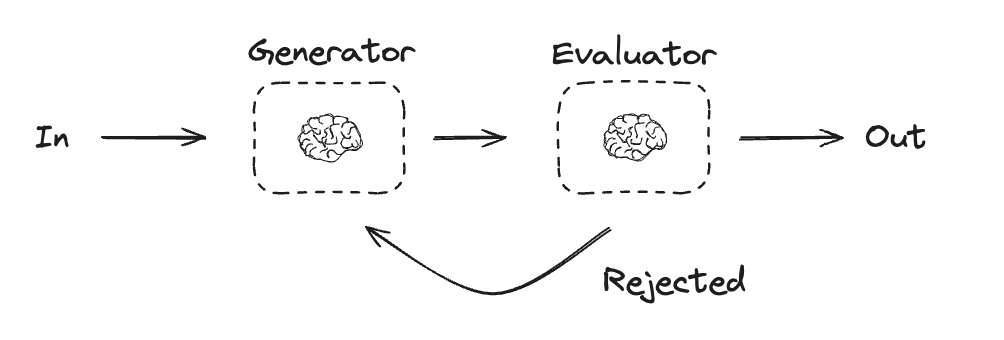
在评估器-优化器工作流中,一次 LLM 调用创建响应,另一次调用评估该响应。如果评估器或[人在回路中](/oss/javascript/langgraph/interrupts)确定响应需要改进,则会提供反馈并重新创建响应。此循环持续进行,直到生成可接受的响应。
评估器-优化器工作流通常在任务有特定成功标准但需要迭代才能满足该标准时使用。例如,在两种语言之间翻译文本时,通常无法完美匹配。可能需要几次迭代才能生成在两种语言中具有相同含义的翻译。
 ```typescript Graph API theme={"theme":{"light":"catppuccin-latte","dark":"catppuccin-mocha"}}
import { StateGraph, StateSchema, GraphNode, ConditionalEdgeRouter } from "@langchain/langgraph";
import * as z from "zod";
// 图状态
const State = new StateSchema({
joke: z.string(),
topic: z.string(),
feedback: z.string(),
funnyOrNot: z.string(),
});
// 用于评估的结构化输出模式
const feedbackSchema = z.object({
grade: z.enum(["funny", "not funny"]).describe(
"判断笑话是否有趣。"
),
feedback: z.string().describe(
"如果笑话不有趣,请提供如何改进的反馈。"
),
});
// 使用结构化输出模式增强 LLM
const evaluator = llm.withStructuredOutput(feedbackSchema);
// 节点
const llmCallGenerator: GraphNode = async (state) => {
// LLM 生成一个笑话
let msg;
if (state.feedback) {
msg = await llm.invoke(
`写一个关于 ${state.topic} 的笑话,但要考虑反馈:${state.feedback}`
);
} else {
msg = await llm.invoke(`写一个关于 ${state.topic} 的笑话`);
}
return { joke: msg.content };
};
const llmCallEvaluator: GraphNode = async (state) => {
// LLM 评估笑话
const grade = await evaluator.invoke(`评估这个笑话 ${state.joke}`);
return { funnyOrNot: grade.grade, feedback: grade.feedback };
};
// 条件边函数,根据评估器的反馈路由回笑话生成器或结束
const routeJoke: ConditionalEdgeRouter = (state) => {
// 根据评估器的反馈路由回笑话生成器或结束
if (state.funnyOrNot === "funny") {
return "Accepted";
} else {
return "Rejected + Feedback";
}
};
// 构建工作流
const optimizerWorkflow = new StateGraph(State)
.addNode("llmCallGenerator", llmCallGenerator)
.addNode("llmCallEvaluator", llmCallEvaluator)
.addEdge("__start__", "llmCallGenerator")
.addEdge("llmCallGenerator", "llmCallEvaluator")
.addConditionalEdges(
"llmCallEvaluator",
routeJoke,
{
// routeJoke 返回的名称 : 下一个要访问的节点名称
"Accepted": "__end__",
"Rejected + Feedback": "llmCallGenerator",
}
)
.compile();
// 调用
const state = await optimizerWorkflow.invoke({ topic: "猫" });
console.log(state.joke);
```
```typescript Functional API theme={"theme":{"light":"catppuccin-latte","dark":"catppuccin-mocha"}}
import * as z from "zod";
import { task, entrypoint } from "@langchain/langgraph";
// 用于评估的结构化输出模式
const feedbackSchema = z.object({
grade: z.enum(["funny", "not funny"]).describe(
"判断笑话是否有趣。"
),
feedback: z.string().describe(
"如果笑话不有趣,请提供如何改进的反馈。"
),
});
// 使用结构化输出模式增强 LLM
const evaluator = llm.withStructuredOutput(feedbackSchema);
// 任务
const llmCallGenerator = task("jokeGenerator", async (params: {
topic: string;
feedback?: z.infer;
}) => {
// LLM 生成一个笑话
const msg = params.feedback
? await llm.invoke(
`写一个关于 ${params.topic} 的笑话,但要考虑反馈:${params.feedback.feedback}`
)
: await llm.invoke(`写一个关于 ${params.topic} 的笑话`);
return msg.content;
});
const llmCallEvaluator = task("jokeEvaluator", async (joke: string) => {
// LLM 评估笑话
return evaluator.invoke(`评估这个笑话 ${joke}`);
});
// 构建工作流
const workflow = entrypoint(
"optimizerWorkflow",
async (topic: string) => {
let feedback: z.infer | undefined;
let joke: string;
while (true) {
joke = await llmCallGenerator({ topic, feedback });
feedback = await llmCallEvaluator(joke);
if (feedback.grade === "funny") {
break;
}
}
return joke;
}
);
// 调用
const stream = await workflow.stream("猫", {
streamMode: "updates",
});
for await (const step of stream) {
console.log(step);
console.log("\n");
}
```
## 代理
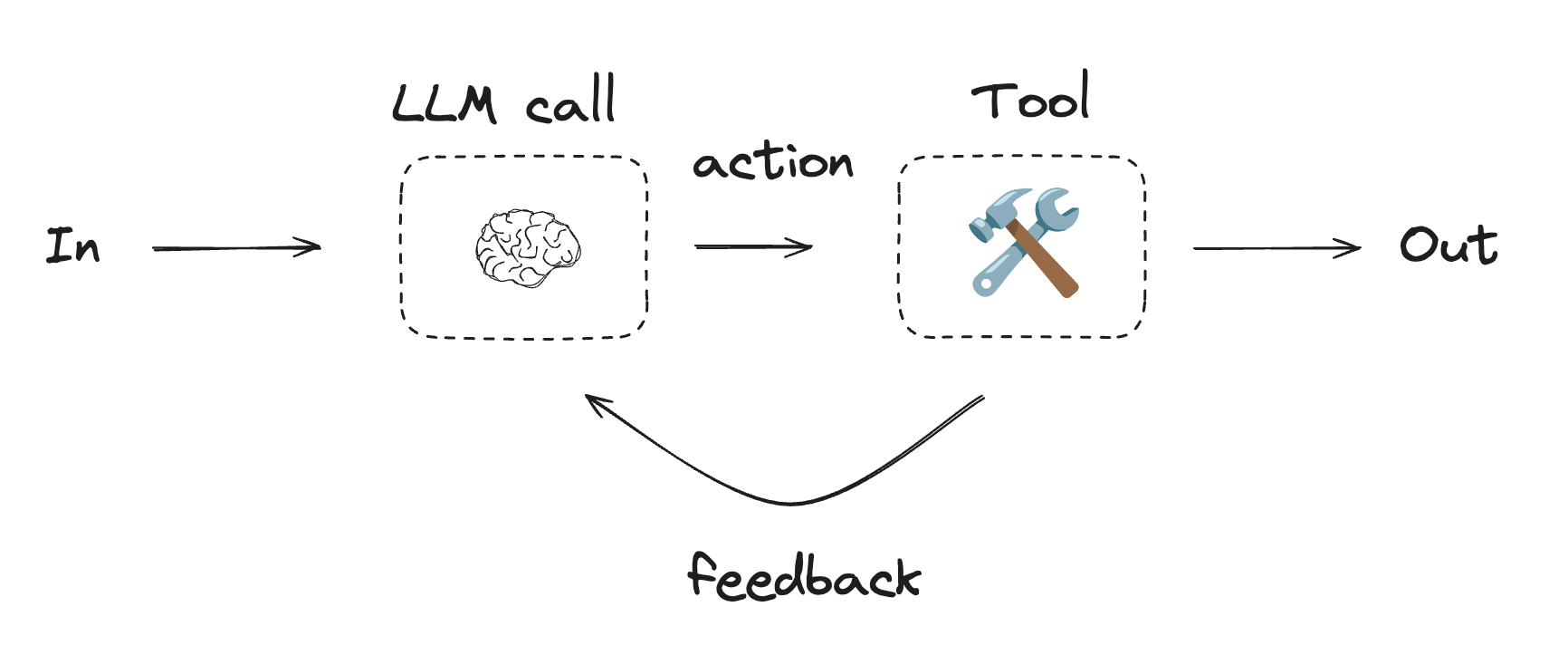
代理通常实现为使用[工具](/oss/javascript/langchain/tools)执行操作的 LLM。它们在持续的反馈循环中运行,用于问题和解决方案不可预测的情况。代理比工作流具有更大的自主权,可以决定使用哪些工具以及如何解决问题。您仍然可以定义可用的工具集和代理行为准则。
```typescript Graph API theme={"theme":{"light":"catppuccin-latte","dark":"catppuccin-mocha"}}
import { StateGraph, StateSchema, GraphNode, ConditionalEdgeRouter } from "@langchain/langgraph";
import * as z from "zod";
// 图状态
const State = new StateSchema({
joke: z.string(),
topic: z.string(),
feedback: z.string(),
funnyOrNot: z.string(),
});
// 用于评估的结构化输出模式
const feedbackSchema = z.object({
grade: z.enum(["funny", "not funny"]).describe(
"判断笑话是否有趣。"
),
feedback: z.string().describe(
"如果笑话不有趣,请提供如何改进的反馈。"
),
});
// 使用结构化输出模式增强 LLM
const evaluator = llm.withStructuredOutput(feedbackSchema);
// 节点
const llmCallGenerator: GraphNode = async (state) => {
// LLM 生成一个笑话
let msg;
if (state.feedback) {
msg = await llm.invoke(
`写一个关于 ${state.topic} 的笑话,但要考虑反馈:${state.feedback}`
);
} else {
msg = await llm.invoke(`写一个关于 ${state.topic} 的笑话`);
}
return { joke: msg.content };
};
const llmCallEvaluator: GraphNode = async (state) => {
// LLM 评估笑话
const grade = await evaluator.invoke(`评估这个笑话 ${state.joke}`);
return { funnyOrNot: grade.grade, feedback: grade.feedback };
};
// 条件边函数,根据评估器的反馈路由回笑话生成器或结束
const routeJoke: ConditionalEdgeRouter = (state) => {
// 根据评估器的反馈路由回笑话生成器或结束
if (state.funnyOrNot === "funny") {
return "Accepted";
} else {
return "Rejected + Feedback";
}
};
// 构建工作流
const optimizerWorkflow = new StateGraph(State)
.addNode("llmCallGenerator", llmCallGenerator)
.addNode("llmCallEvaluator", llmCallEvaluator)
.addEdge("__start__", "llmCallGenerator")
.addEdge("llmCallGenerator", "llmCallEvaluator")
.addConditionalEdges(
"llmCallEvaluator",
routeJoke,
{
// routeJoke 返回的名称 : 下一个要访问的节点名称
"Accepted": "__end__",
"Rejected + Feedback": "llmCallGenerator",
}
)
.compile();
// 调用
const state = await optimizerWorkflow.invoke({ topic: "猫" });
console.log(state.joke);
```
```typescript Functional API theme={"theme":{"light":"catppuccin-latte","dark":"catppuccin-mocha"}}
import * as z from "zod";
import { task, entrypoint } from "@langchain/langgraph";
// 用于评估的结构化输出模式
const feedbackSchema = z.object({
grade: z.enum(["funny", "not funny"]).describe(
"判断笑话是否有趣。"
),
feedback: z.string().describe(
"如果笑话不有趣,请提供如何改进的反馈。"
),
});
// 使用结构化输出模式增强 LLM
const evaluator = llm.withStructuredOutput(feedbackSchema);
// 任务
const llmCallGenerator = task("jokeGenerator", async (params: {
topic: string;
feedback?: z.infer;
}) => {
// LLM 生成一个笑话
const msg = params.feedback
? await llm.invoke(
`写一个关于 ${params.topic} 的笑话,但要考虑反馈:${params.feedback.feedback}`
)
: await llm.invoke(`写一个关于 ${params.topic} 的笑话`);
return msg.content;
});
const llmCallEvaluator = task("jokeEvaluator", async (joke: string) => {
// LLM 评估笑话
return evaluator.invoke(`评估这个笑话 ${joke}`);
});
// 构建工作流
const workflow = entrypoint(
"optimizerWorkflow",
async (topic: string) => {
let feedback: z.infer | undefined;
let joke: string;
while (true) {
joke = await llmCallGenerator({ topic, feedback });
feedback = await llmCallEvaluator(joke);
if (feedback.grade === "funny") {
break;
}
}
return joke;
}
);
// 调用
const stream = await workflow.stream("猫", {
streamMode: "updates",
});
for await (const step of stream) {
console.log(step);
console.log("\n");
}
```
## 代理
代理通常实现为使用[工具](/oss/javascript/langchain/tools)执行操作的 LLM。它们在持续的反馈循环中运行,用于问题和解决方案不可预测的情况。代理比工作流具有更大的自主权,可以决定使用哪些工具以及如何解决问题。您仍然可以定义可用的工具集和代理行为准则。
 要开始使用代理,请参阅[快速入门](/oss/javascript/langchain/quickstart)或阅读更多关于它们在 LangChain 中[如何工作](/oss/javascript/langchain/agents)的信息。
```typescript 使用工具 theme={"theme":{"light":"catppuccin-latte","dark":"catppuccin-mocha"}}
import { tool } from "@langchain/core/tools";
import * as z from "zod";
// 定义工具
const multiply = tool(
({ a, b }) => {
return a * b;
},
{
name: "multiply",
description: "将两个数字相乘",
schema: z.object({
a: z.number().describe("第一个数字"),
b: z.number().describe("第二个数字"),
}),
}
);
const add = tool(
({ a, b }) => {
return a + b;
},
{
name: "add",
description: "将两个数字相加",
schema: z.object({
a: z.number().describe("第一个数字"),
b: z.number().describe("第二个数字"),
}),
}
);
const divide = tool(
({ a, b }) => {
return a / b;
},
{
name: "divide",
description: "将两个数字相除",
schema: z.object({
a: z.number().describe("第一个数字"),
b: z.number().describe("第二个数字"),
}),
}
);
// 使用工具增强 LLM
const tools = [add, multiply, divide];
const toolsByName = Object.fromEntries(tools.map((tool) => [tool.name, tool]));
const llmWithTools = llm.bindTools(tools);
```
```typescript Graph API theme={"theme":{"light":"catppuccin-latte","dark":"catppuccin-mocha"}}
import { StateGraph, StateSchema, MessagesValue, GraphNode, ConditionalEdgeRouter } from "@langchain/langgraph";
import { ToolNode } from "@langchain/langgraph/prebuilt";
import {
SystemMessage,
ToolMessage
} from "@langchain/core/messages";
// 图状态
const State = new StateSchema({
messages: MessagesValue,
});
// 节点
const llmCall: GraphNode = async (state) => {
// LLM 决定是否调用工具
const result = await llmWithTools.invoke([
{
role: "system",
content: "你是一个有用的助手,负责对一组输入执行算术运算。"
},
...state.messages
]);
return {
messages: [result]
};
};
const toolNode = new ToolNode(tools);
// 条件边函数,路由到工具节点或结束
const shouldContinue: ConditionalEdgeRouter = (state) => {
const messages = state.messages;
const lastMessage = messages.at(-1);
// 如果 LLM 进行了工具调用,则执行操作
if (lastMessage?.tool_calls?.length) {
return "toolNode";
}
// 否则,我们停止(回复用户)
return "__end__";
};
// 构建工作流
const agentBuilder = new StateGraph(State)
.addNode("llmCall", llmCall)
.addNode("toolNode", toolNode)
// 添加边以连接节点
.addEdge("__start__", "llmCall")
.addConditionalEdges(
"llmCall",
shouldContinue,
["toolNode", "__end__"]
)
.addEdge("toolNode", "llmCall")
.compile();
// 调用
const messages = [{
role: "user",
content: "将 3 和 4 相加。"
}];
const result = await agentBuilder.invoke({ messages });
console.log(result.messages);
```
```typescript Functional API theme={"theme":{"light":"catppuccin-latte","dark":"catppuccin-mocha"}}
import { task, entrypoint, addMessages } from "@langchain/langgraph";
import { BaseMessageLike, ToolCall } from "@langchain/core/messages";
const callLlm = task("llmCall", async (messages: BaseMessageLike[]) => {
// LLM 决定是否调用工具
return llmWithTools.invoke([
{
role: "system",
content: "你是一个有用的助手,负责对一组输入执行算术运算。"
},
...messages
]);
});
const callTool = task("toolCall", async (toolCall: ToolCall) => {
// 执行工具调用
const tool = toolsByName[toolCall.name];
return tool.invoke(toolCall.args);
});
const agent = entrypoint(
"agent",
async (messages) => {
let llmResponse = await callLlm(messages);
while (true) {
if (!llmResponse.tool_calls?.length) {
break;
}
// 执行工具
const toolResults = await Promise.all(
llmResponse.tool_calls.map((toolCall) => callTool(toolCall))
);
messages = addMessages(messages, [llmResponse, ...toolResults]);
llmResponse = await callLlm(messages);
}
messages = addMessages(messages, [llmResponse]);
return messages;
}
);
// 调用
const messages = [{
role: "user",
content: "将 3 和 4 相加。"
}];
const stream = await agent.stream([messages], {
streamMode: "updates",
});
for await (const step of stream) {
console.log(step);
}
```
***
要开始使用代理,请参阅[快速入门](/oss/javascript/langchain/quickstart)或阅读更多关于它们在 LangChain 中[如何工作](/oss/javascript/langchain/agents)的信息。
```typescript 使用工具 theme={"theme":{"light":"catppuccin-latte","dark":"catppuccin-mocha"}}
import { tool } from "@langchain/core/tools";
import * as z from "zod";
// 定义工具
const multiply = tool(
({ a, b }) => {
return a * b;
},
{
name: "multiply",
description: "将两个数字相乘",
schema: z.object({
a: z.number().describe("第一个数字"),
b: z.number().describe("第二个数字"),
}),
}
);
const add = tool(
({ a, b }) => {
return a + b;
},
{
name: "add",
description: "将两个数字相加",
schema: z.object({
a: z.number().describe("第一个数字"),
b: z.number().describe("第二个数字"),
}),
}
);
const divide = tool(
({ a, b }) => {
return a / b;
},
{
name: "divide",
description: "将两个数字相除",
schema: z.object({
a: z.number().describe("第一个数字"),
b: z.number().describe("第二个数字"),
}),
}
);
// 使用工具增强 LLM
const tools = [add, multiply, divide];
const toolsByName = Object.fromEntries(tools.map((tool) => [tool.name, tool]));
const llmWithTools = llm.bindTools(tools);
```
```typescript Graph API theme={"theme":{"light":"catppuccin-latte","dark":"catppuccin-mocha"}}
import { StateGraph, StateSchema, MessagesValue, GraphNode, ConditionalEdgeRouter } from "@langchain/langgraph";
import { ToolNode } from "@langchain/langgraph/prebuilt";
import {
SystemMessage,
ToolMessage
} from "@langchain/core/messages";
// 图状态
const State = new StateSchema({
messages: MessagesValue,
});
// 节点
const llmCall: GraphNode = async (state) => {
// LLM 决定是否调用工具
const result = await llmWithTools.invoke([
{
role: "system",
content: "你是一个有用的助手,负责对一组输入执行算术运算。"
},
...state.messages
]);
return {
messages: [result]
};
};
const toolNode = new ToolNode(tools);
// 条件边函数,路由到工具节点或结束
const shouldContinue: ConditionalEdgeRouter = (state) => {
const messages = state.messages;
const lastMessage = messages.at(-1);
// 如果 LLM 进行了工具调用,则执行操作
if (lastMessage?.tool_calls?.length) {
return "toolNode";
}
// 否则,我们停止(回复用户)
return "__end__";
};
// 构建工作流
const agentBuilder = new StateGraph(State)
.addNode("llmCall", llmCall)
.addNode("toolNode", toolNode)
// 添加边以连接节点
.addEdge("__start__", "llmCall")
.addConditionalEdges(
"llmCall",
shouldContinue,
["toolNode", "__end__"]
)
.addEdge("toolNode", "llmCall")
.compile();
// 调用
const messages = [{
role: "user",
content: "将 3 和 4 相加。"
}];
const result = await agentBuilder.invoke({ messages });
console.log(result.messages);
```
```typescript Functional API theme={"theme":{"light":"catppuccin-latte","dark":"catppuccin-mocha"}}
import { task, entrypoint, addMessages } from "@langchain/langgraph";
import { BaseMessageLike, ToolCall } from "@langchain/core/messages";
const callLlm = task("llmCall", async (messages: BaseMessageLike[]) => {
// LLM 决定是否调用工具
return llmWithTools.invoke([
{
role: "system",
content: "你是一个有用的助手,负责对一组输入执行算术运算。"
},
...messages
]);
});
const callTool = task("toolCall", async (toolCall: ToolCall) => {
// 执行工具调用
const tool = toolsByName[toolCall.name];
return tool.invoke(toolCall.args);
});
const agent = entrypoint(
"agent",
async (messages) => {
let llmResponse = await callLlm(messages);
while (true) {
if (!llmResponse.tool_calls?.length) {
break;
}
// 执行工具
const toolResults = await Promise.all(
llmResponse.tool_calls.map((toolCall) => callTool(toolCall))
);
messages = addMessages(messages, [llmResponse, ...toolResults]);
llmResponse = await callLlm(messages);
}
messages = addMessages(messages, [llmResponse]);
return messages;
}
);
// 调用
const messages = [{
role: "user",
content: "将 3 和 4 相加。"
}];
const stream = await agent.stream([messages], {
streamMode: "updates",
});
for await (const step of stream) {
console.log(step);
}
```
***
[通过 MCP 将这些文档](/use-these-docs)连接到 Claude、VSCode 等,以获取实时答案。
[在 GitHub 上编辑此页面](https://github.com/langchain-ai/docs/edit/main/src/oss/langgraph/workflows-agents.mdx) 或 [提交问题](https://github.com/langchain-ai/docs/issues/new/choose)。
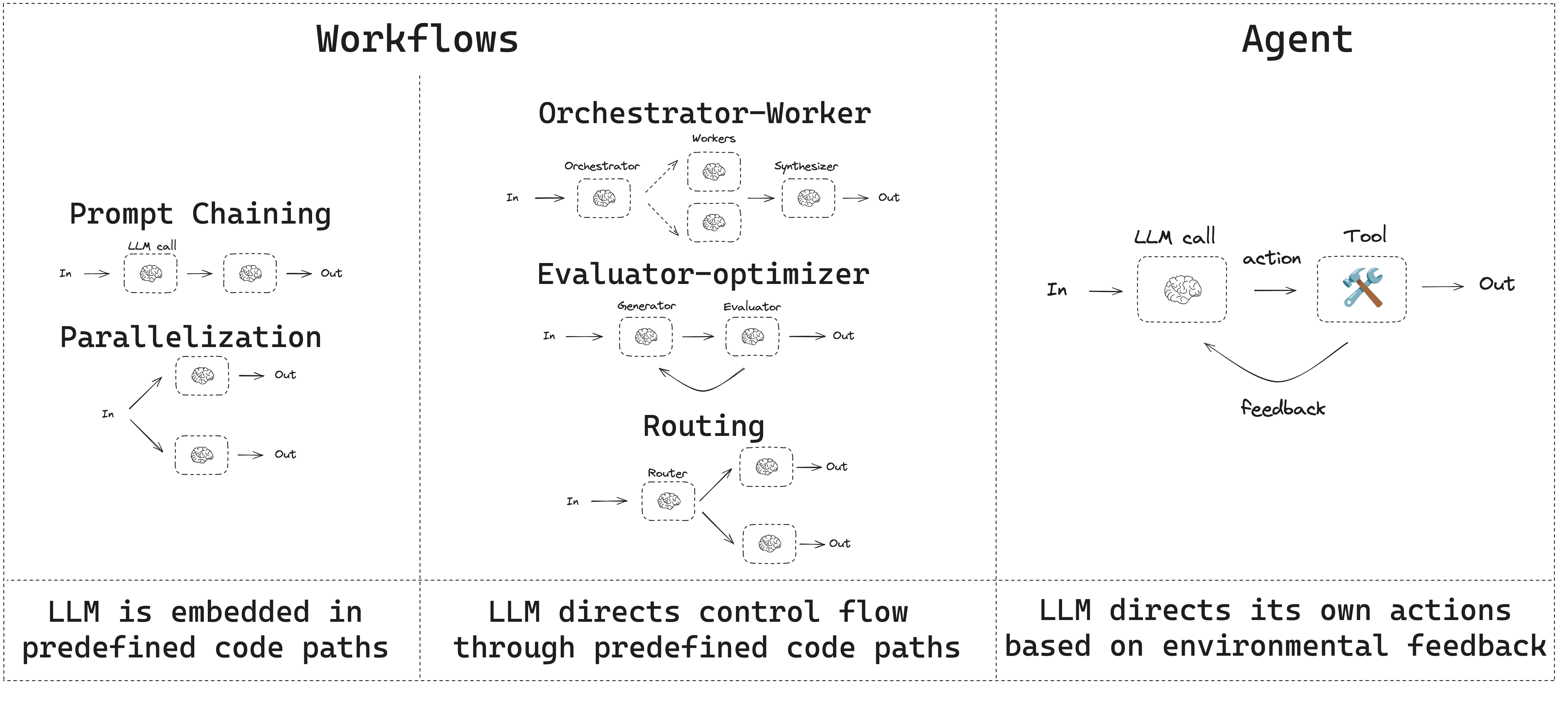 LangGraph 在构建代理和工作流时提供了多项优势,包括[持久化](/oss/javascript/langgraph/persistence)、[流式处理](/oss/javascript/langgraph/streaming),以及对调试和[部署](/oss/javascript/langgraph/deploy)的支持。
## 设置
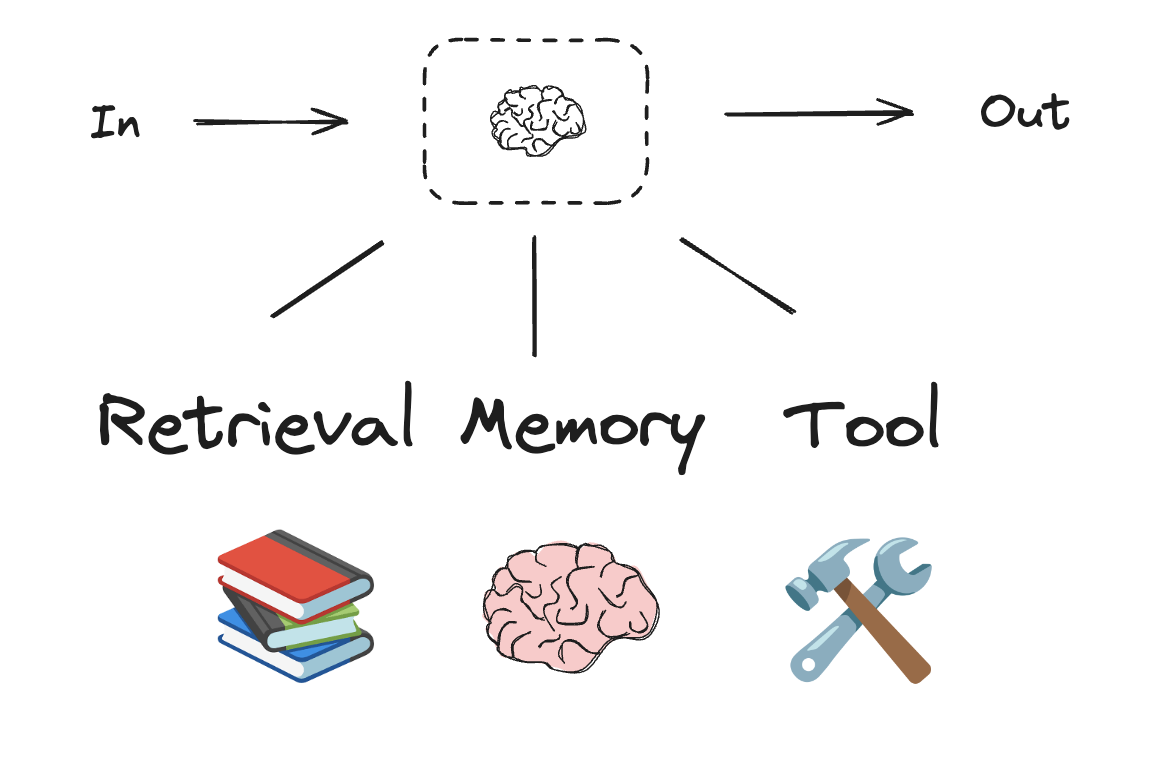
要构建工作流或代理,您可以使用[任何支持结构化输出和工具调用的聊天模型](/oss/javascript/integrations/chat)。以下示例使用 Anthropic:
1. 安装依赖项
LangGraph 在构建代理和工作流时提供了多项优势,包括[持久化](/oss/javascript/langgraph/persistence)、[流式处理](/oss/javascript/langgraph/streaming),以及对调试和[部署](/oss/javascript/langgraph/deploy)的支持。
## 设置
要构建工作流或代理,您可以使用[任何支持结构化输出和工具调用的聊天模型](/oss/javascript/integrations/chat)。以下示例使用 Anthropic:
1. 安装依赖项
 ```typescript theme={"theme":{"light":"catppuccin-latte","dark":"catppuccin-mocha"}}
import * as z from "zod";
import { tool } from "langchain";
// 结构化输出的模式
const SearchQuery = z.object({
search_query: z.string().describe("为网络搜索优化的查询。"),
justification: z
.string()
.describe("为什么此查询与用户的请求相关。"),
});
// 使用结构化输出模式增强 LLM
const structuredLlm = llm.withStructuredOutput(SearchQuery);
// 调用增强后的 LLM
const output = await structuredLlm.invoke(
"钙 CT 评分与高胆固醇有何关系?"
);
// 定义一个工具
const multiply = tool(
({ a, b }) => {
return a * b;
},
{
name: "multiply",
description: "将两个数字相乘",
schema: z.object({
a: z.number(),
b: z.number(),
}),
}
);
// 使用工具增强 LLM
const llmWithTools = llm.bindTools([multiply]);
// 使用触发工具调用的输入调用 LLM
const msg = await llmWithTools.invoke("2 乘以 3 是多少?");
// 获取工具调用
console.log(msg.tool_calls);
```
## 提示链
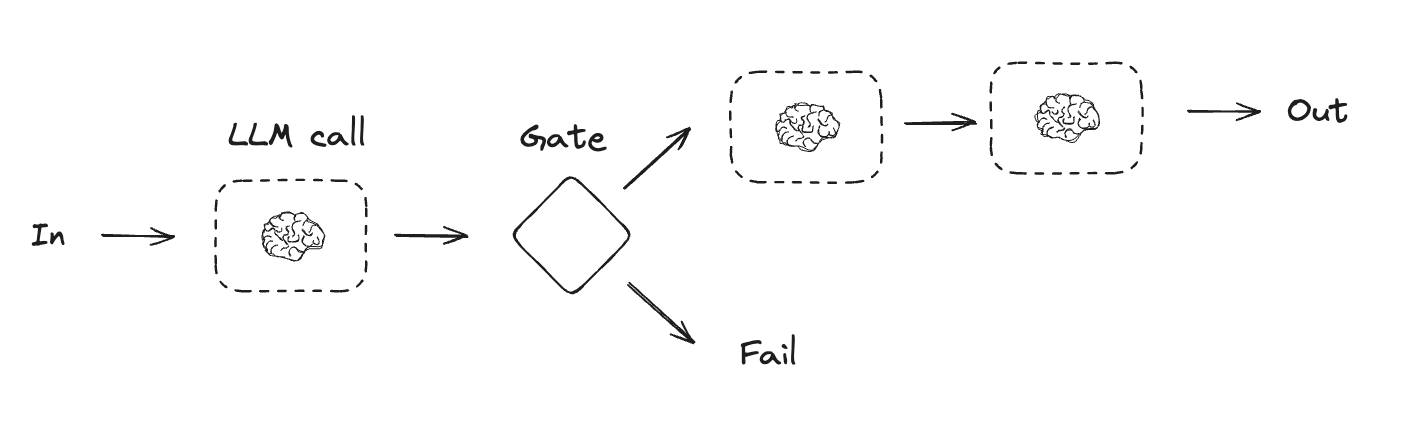
提示链是指每次 LLM 调用都处理前一次调用的输出。它通常用于执行可以分解为更小、可验证步骤的明确任务。一些示例包括:
* 将文档翻译成不同语言
* 验证生成内容的一致性
```typescript theme={"theme":{"light":"catppuccin-latte","dark":"catppuccin-mocha"}}
import * as z from "zod";
import { tool } from "langchain";
// 结构化输出的模式
const SearchQuery = z.object({
search_query: z.string().describe("为网络搜索优化的查询。"),
justification: z
.string()
.describe("为什么此查询与用户的请求相关。"),
});
// 使用结构化输出模式增强 LLM
const structuredLlm = llm.withStructuredOutput(SearchQuery);
// 调用增强后的 LLM
const output = await structuredLlm.invoke(
"钙 CT 评分与高胆固醇有何关系?"
);
// 定义一个工具
const multiply = tool(
({ a, b }) => {
return a * b;
},
{
name: "multiply",
description: "将两个数字相乘",
schema: z.object({
a: z.number(),
b: z.number(),
}),
}
);
// 使用工具增强 LLM
const llmWithTools = llm.bindTools([multiply]);
// 使用触发工具调用的输入调用 LLM
const msg = await llmWithTools.invoke("2 乘以 3 是多少?");
// 获取工具调用
console.log(msg.tool_calls);
```
## 提示链
提示链是指每次 LLM 调用都处理前一次调用的输出。它通常用于执行可以分解为更小、可验证步骤的明确任务。一些示例包括:
* 将文档翻译成不同语言
* 验证生成内容的一致性
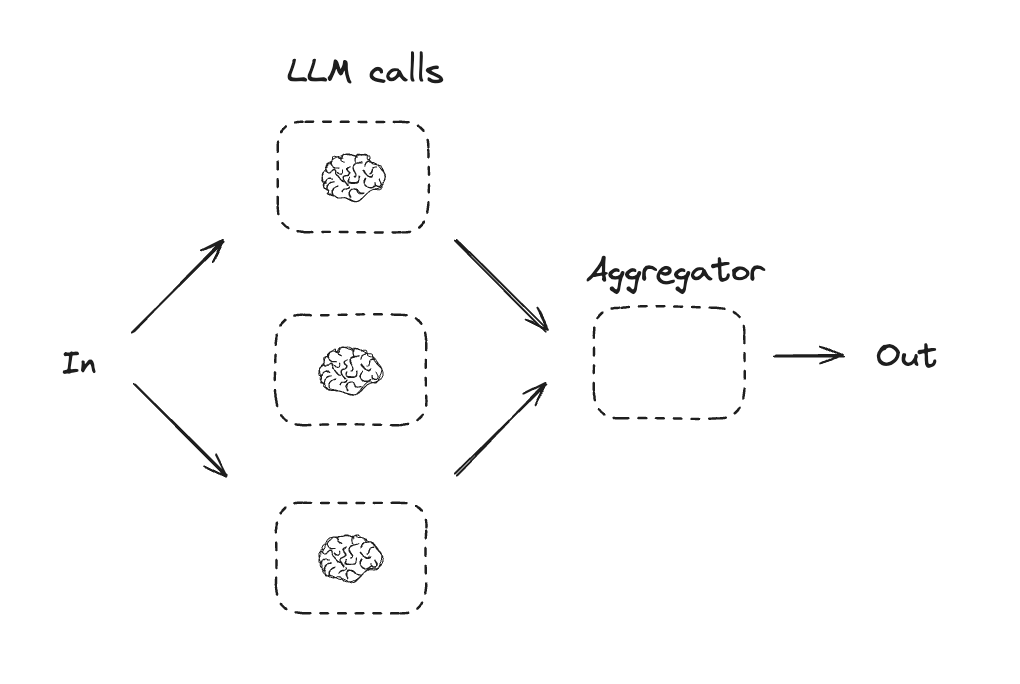
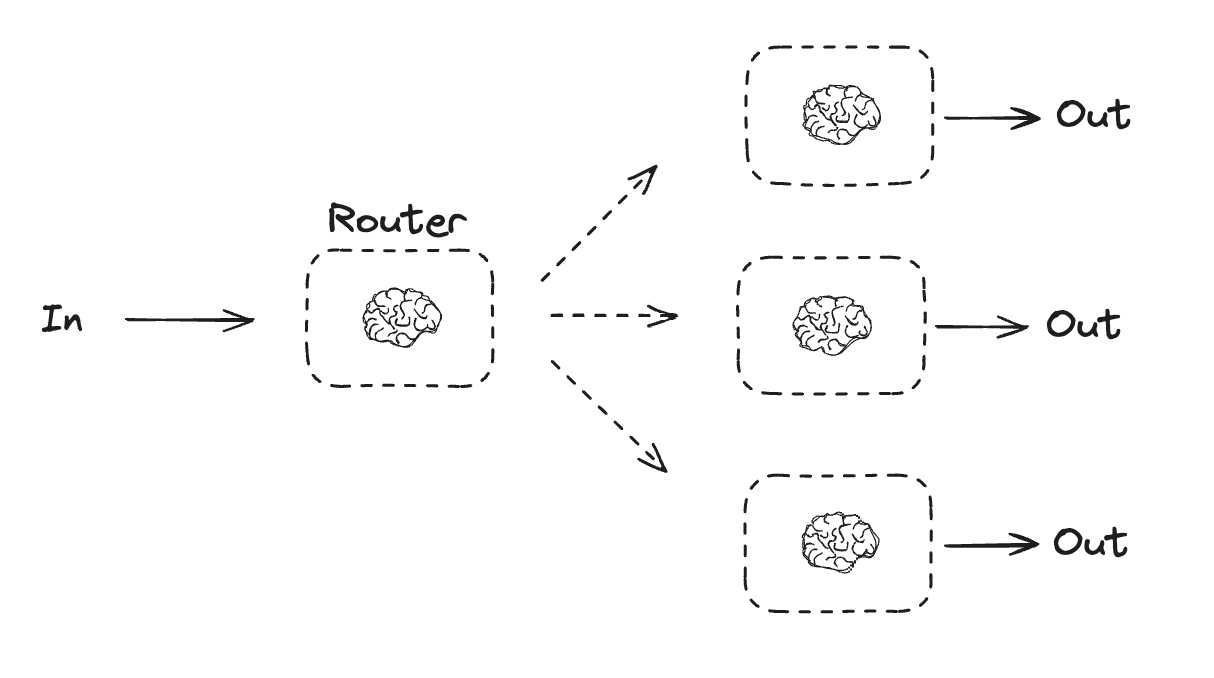
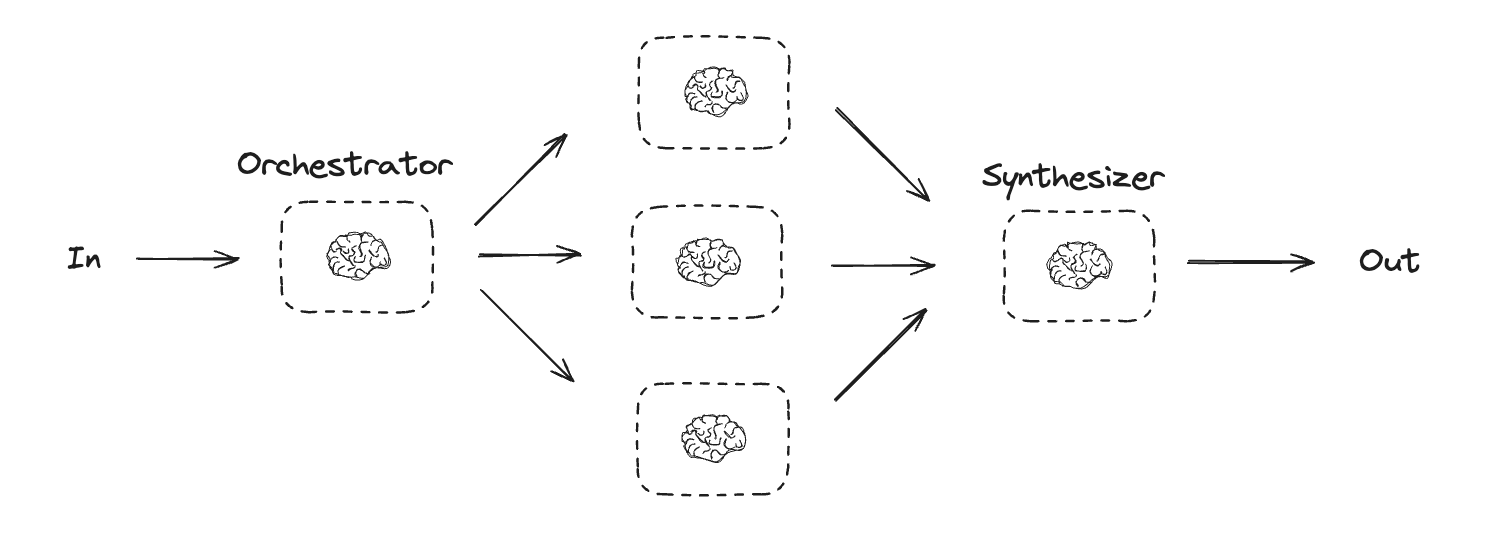 编排器-工作者工作流提供了更大的灵活性,通常在子任务无法像[并行化](#parallelization)那样预先定义时使用。这在编写代码或需要跨多个文件更新内容的工作流中很常见。例如,需要在未知数量的文档中更新多个 Python 库安装说明的工作流可能会使用这种模式。