```
如果你正在将 LangChain.js 与 LangSmith 一起使用,并且不在无服务器环境中,我们还建议显式设置以下内容以减少延迟:
`export LANGCHAIN_CALLBACKS_BACKGROUND=true`
如果你在无服务器环境中,我们建议设置相反的值以允许追踪在函数结束前完成:
`export LANGCHAIN_CALLBACKS_BACKGROUND=false`
### 2. 记录追踪
无需额外代码即可将追踪记录到 LangSmith。只需像往常一样运行你的 LangChain 代码。
```python Python theme={"theme":{"light":"catppuccin-latte","dark":"catppuccin-mocha"}}
from langchain_openai import ChatOpenAI
from langchain_core.prompts import ChatPromptTemplate
from langchain_core.output_parsers import StrOutputParser
prompt = ChatPromptTemplate.from_messages([
("system", "You are a helpful assistant. Please respond to the user's request only based on the given context."),
("user", "Question: {question}\nContext: {context}")
])
model = ChatOpenAI(model="gpt-5.4-mini")
output_parser = StrOutputParser()
chain = prompt | model | output_parser
question = "Can you summarize this morning's meetings?"
context = "During this morning's meeting, we solved all world conflict."
chain.invoke({"question": question, "context": context})
```
```typescript TypeScript theme={"theme":{"light":"catppuccin-latte","dark":"catppuccin-mocha"}}
import { ChatOpenAI } from "@langchain/openai";
import { ChatPromptTemplate } from "@langchain/core/prompts";
import { StringOutputParser } from "@langchain/core/output_parsers";
const prompt = ChatPromptTemplate.fromMessages([
["system", "You are a helpful assistant. Please respond to the user's request only based on the given context."],
["user", "Question: {question}\nContext: {context}"],
]);
const model = new ChatOpenAI({ modelName: "gpt-5.4-mini" });
const outputParser = new StringOutputParser();
const chain = prompt.pipe(model).pipe(outputParser);
const question = "Can you summarize this morning's meetings?"
const context = "During this morning's meeting, we solved all world conflict."
await chain.invoke({ question: question, context: context });
```
### 3. 查看你的追踪
默认情况下,追踪将记录到名为 `default` 的项目中。你可以[在 LangSmith 中公开查看](https://smith.langchain.com/public/e6a46eb2-d785-4804-a1e3-23f167a04300/r)使用上述代码记录的追踪示例。
## 选择性追踪
[上一节](#快速开始)展示了如何通过设置单个环境变量来追踪应用程序中所有 LangChain 可运行对象的调用。虽然这是一种方便的入门方式,但你可能只想追踪特定的调用或应用程序的部分。
在 Python 中有两种方法:手动传入 `LangChainTracer` 实例作为[回调](https://reference.langchain.com/python/langchain_core/callbacks/),或使用 [`tracing_context` 上下文管理器](https://reference.langchain.com/python/langsmith/observability/sdk/run_helpers/#langsmith.run_helpers.tracing_context)。
在 JS/TS 中,你可以传入 [`LangChainTracer`](https://reference.langchain.com/javascript/classes/_langchain_core.tracers_tracer_langchain.LangChainTracer.html) 实例作为回调。
```python Python theme={"theme":{"light":"catppuccin-latte","dark":"catppuccin-mocha"}}
# 你可以选择特定的调用进行追踪...
import langsmith as ls
with ls.tracing_context(enabled=True):
chain.invoke({"question": "Am I using a callback?", "context": "I'm using a callback"})
# 这将不会被追踪(假设未设置 LANGSMITH_TRACING)
chain.invoke({"question": "Am I being traced?", "context": "I'm not being traced"})
# 即使 LANGSMITH_TRACING=true,这也不会被追踪
with ls.tracing_context(enabled=False):
chain.invoke({"question": "Am I being traced?", "context": "I'm not being traced"})
```
```typescript TypeScript theme={"theme":{"light":"catppuccin-latte","dark":"catppuccin-mocha"}}
// 你可以配置一个 LangChainTracer 实例来追踪特定的调用。
import { LangChainTracer } from "@langchain/core/tracers/tracer_langchain";
const tracer = new LangChainTracer();
await chain.invoke(
{
question: "Am I using a callback?",
context: "I'm using a callback"
},
{ callbacks: [tracer] }
);
```
## 记录到特定项目
### 静态配置
如[追踪概念指南](/langsmith/observability-concepts)中所述,LangSmith 使用项目概念来分组追踪。如果未指定,追踪器项目将设置为默认值。你可以设置 `LANGSMITH_PROJECT` 环境变量来为整个应用程序运行配置自定义项目名称。这应在执行应用程序之前完成。
```bash theme={"theme":{"light":"catppuccin-latte","dark":"catppuccin-mocha"}}
export LANGSMITH_PROJECT=my-project
```
`LANGSMITH_PROJECT` 标志仅在 JS SDK 版本 >= 0.2.16 中受支持,如果你使用的是旧版本,请改用 `LANGCHAIN_PROJECT`。
### 动态配置
这主要建立在[上一节](#选择性追踪)的基础上,允许你为特定的 `LangChainTracer` 实例设置项目名称,或在 Python 中作为 `tracing_context` 上下文管理器的参数。
```python Python theme={"theme":{"light":"catppuccin-latte","dark":"catppuccin-mocha"}}
# 你可以使用 project_name 参数设置项目名称。
import langsmith as ls
with ls.tracing_context(project_name="My Project", enabled=True):
chain.invoke({"question": "Am I using a context manager?", "context": "I'm using a context manager"})
```
```typescript TypeScript theme={"theme":{"light":"catppuccin-latte","dark":"catppuccin-mocha"}}
// 你可以为特定的追踪器实例设置项目名称:
import { LangChainTracer } from "@langchain/core/tracers/tracer_langchain";
const tracer = new LangChainTracer({ projectName: "My Project" });
await chain.invoke(
{
question: "Am I using a callback?",
context: "I'm using a callback"
},
{ callbacks: [tracer] }
);
```
## 向追踪添加元数据和标签
你可以通过在 [`RunnableConfig`](https://reference.langchain.com/python/langchain_core/runnables/?h=runnablecon#langchain_core.runnables.RunnableConfig) 中提供任意元数据和标签来注释你的追踪。这对于将附加信息与追踪关联非常有用,例如执行环境或发起它的用户。有关如何按元数据和标签查询追踪和运行的信息,请参阅[查询追踪(SDK)](/langsmith/export-traces)。
当你将元数据或标签附加到可运行对象(通过 [`RunnableConfig`](https://reference.langchain.com/python/langchain-core/runnables/config/RunnableConfig) 或在运行时通过调用参数)时,它们会被该可运行对象的所有子可运行对象继承。
```python Python theme={"theme":{"light":"catppuccin-latte","dark":"catppuccin-mocha"}}
from langchain_openai import ChatOpenAI
from langchain_core.prompts import ChatPromptTemplate
from langchain_core.output_parsers import StrOutputParser
prompt = ChatPromptTemplate.from_messages([
("system", "You are a helpful AI."),
("user", "{input}")
])
# 标签 "model-tag" 和元数据 {"model-key": "model-value"} 将仅附加到 ChatOpenAI 运行
chat_model = ChatOpenAI().with_config({"tags": ["model-tag"], "metadata": {"model-key": "model-value"}})
output_parser = StrOutputParser()
# 标签和元数据可以通过 RunnableConfig 配置
chain = (prompt | chat_model | output_parser).with_config({"tags": ["config-tag"], "metadata": {"config-key": "config-value"}})
# 标签和元数据也可以在运行时传递
chain.invoke({"input": "What is the meaning of life?"}, {"tags": ["invoke-tag"], "metadata": {"invoke-key": "invoke-value"}})
```
```typescript TypeScript theme={"theme":{"light":"catppuccin-latte","dark":"catppuccin-mocha"}}
import { ChatOpenAI } from "@langchain/openai";
import { ChatPromptTemplate } from "@langchain/core/prompts";
import { StringOutputParser } from "@langchain/core/output_parsers";
const prompt = ChatPromptTemplate.fromMessages([
["system", "You are a helpful AI."],
["user", "{input}"]
])
// 标签 "model-tag" 和元数据 {"model-key": "model-value"} 将仅附加到 ChatOpenAI 运行
const model = new ChatOpenAI().withConfig({ tags: ["model-tag"], metadata: { "model-key": "model-value" } });
const outputParser = new StringOutputParser();
// 标签和元数据可以通过 RunnableConfig 配置
const chain = (prompt.pipe(model).pipe(outputParser)).withConfig({"tags": ["config-tag"], "metadata": {"config-key": "top-level-value"}});
// 标签和元数据也可以在运行时传递
await chain.invoke({input: "What is the meaning of life?"}, {tags: ["invoke-tag"], metadata: {"invoke-key": "invoke-value"}})
```
## 自定义运行名称
你可以在调用或流式传输 LangChain 代码时通过在 [Config](https://reference.langchain.com/python/langchain_core/runnables/?h=runnablecon#langchain_core.runnables.RunnableConfig) 中提供名称来自定义给定运行的名称。此名称用于在 LangSmith 中标识运行,并可用于过滤和分组运行。该名称也用作 LangSmith UI 中运行的标题。这可以通过在构造时在 [`RunnableConfig`](https://reference.langchain.com/python/langchain-core/runnables/config/RunnableConfig) 对象中设置 `run_name`,或在 JS/TS 中在调用参数中传递 `run_name` 来实现。
```python Python theme={"theme":{"light":"catppuccin-latte","dark":"catppuccin-mocha"}}
# 在 LangChain 中进行追踪时,运行名称默认为被追踪对象的类名(例如 'ChatOpenAI')。
configured_chain = chain.with_config({"run_name": "MyCustomChain"})
configured_chain.invoke({"input": "What is the meaning of life?"})
# 你也可以在调用时配置运行名称,如下所示
chain.invoke({"input": "What is the meaning of life?"}, {"run_name": "MyCustomChain"})
```
```typescript TypeScript theme={"theme":{"light":"catppuccin-latte","dark":"catppuccin-mocha"}}
// 在 LangChain 中进行追踪时,运行名称默认为被追踪对象的类名(例如 'ChatOpenAI')。
const configuredChain = chain.withConfig({ runName: "MyCustomChain" });
await configuredChain.invoke({ input: "What is the meaning of life?" });
// 你也可以在调用时配置运行名称,如下所示
await chain.invoke({ input: "What is the meaning of life?" }, {runName: "MyCustomChain"})
```
`run_name` 参数仅更改你调用的可运行对象(例如,链、函数)的名称。它不会重命名调用 LLM 对象(如 [`ChatOpenAI`](https://reference.langchain.com/python/langchain-openai/chat_models/base/ChatOpenAI) (`gpt-5.4-mini`))时自动创建的嵌套运行。在示例中,外层运行将在 LangSmith 中显示为 `MyCustomChain`,而嵌套的 LLM 运行仍显示模型的默认名称。
要为 LLM 运行提供更有意义的名称,你可以:
* 将模型包装在另一个可运行对象中,并为该步骤分配一个 `run_name`。
* 使用追踪装饰器或辅助函数(例如,Python 中的 `@traceable`,或 JS/TS 中来自 `langsmith` 的 `traceable`)在模型调用周围创建自定义运行。
## 在追踪中覆盖模型名称
追踪 LangChain 模型调用时,LangSmith 会自动捕获 API 调用中使用的模型标识符。但是,你可能希望在追踪中显示不同的、更具描述性的名称,以便于组织或区分不同的模型配置。你可以通过在构造或配置 LangChain 模型时传递 `ls_model_name` [元数据参数](/langsmith/ls-metadata-parameters#ls_model_name)来实现。
这在以下情况下特别有用:
* 使用自托管或本地模型,其中模型 ID 可能不具描述性。
* 使用相同模型但不同配置,并希望在追踪中区分它们。
* 为模型创建别名,使追踪对你的团队更具可读性。
* 在不同部署环境中标准化模型名称。
```python Python theme={"theme":{"light":"catppuccin-latte","dark":"catppuccin-mocha"}}
from langchain_openai import ChatOpenAI
from langchain_ollama import ChatOllama
# 为本地模型覆盖模型名称
llm = ChatOllama(
model="llama2:13b-chat", # 实际模型 ID
metadata={"ls_model_name": "llama2-13b-production"} # 在 LangSmith 中显示的名称
)
# 或者使用 OpenAI 来区分配置
llm_creative = ChatOpenAI(
model="gpt-5.4",
temperature=0.9,
metadata={"ls_model_name": "gpt-5.4-creative"}
)
llm_factual = ChatOpenAI(
model="gpt-5.4",
temperature=0.1,
metadata={"ls_model_name": "gpt-5.4-factual"}
)
# 当模型在链中使用时,元数据会被继承
result = llm.invoke("What is the meaning of life?")
```
```typescript TypeScript theme={"theme":{"light":"catppuccin-latte","dark":"catppuccin-mocha"}}
import { ChatOpenAI } from "@langchain/openai";
import { ChatOllama } from "@langchain/ollama";
// 为本地模型覆盖模型名称
const llm = new ChatOllama({
model: "llama2:13b-chat", // 实际模型 ID
metadata: { ls_model_name: "llama2-13b-production" } // 在 LangSmith 中显示的名称
});
// 或者使用 OpenAI 来区分配置
const llmCreative = new ChatOpenAI({
modelName: "gpt-5.4",
temperature: 0.9,
metadata: { ls_model_name: "gpt-5.4-creative" }
});
const llmFactual = new ChatOpenAI({
modelName: "gpt-5.4",
temperature: 0.1,
metadata: { ls_model_name: "gpt-5.4-factual" }
});
// 当模型在链中使用时,元数据会被继承
const result = await llm.invoke("What is the meaning of life?");
```
当你在模型的元数据中传递 `ls_model_name` 时,此名称将出现在涉及该模型实例的所有追踪的 LangSmith UI 中。这适用于任何 LangChain 聊天模型或 LLM,并且会被使用该模型的所有运行继承,包括当它是链的一部分时。
`ls_model_name` 元数据参数也用于[成本跟踪](/langsmith/cost-tracking)。与 `ls_provider` 参数结合使用时,LangSmith 可以自动计算自定义或自托管模型的成本。有关所有可用元数据参数的更多信息,请参阅[元数据参数参考](/langsmith/ls-metadata-parameters)。
## 自定义运行 ID
你可以在调用或流式传输 LangChain 代码时通过在 [Config](https://reference.langchain.com/python/langchain_core/runnables/?h=runnablecon#langchain_core.runnables.RunnableConfig) 中提供 ID 来自定义给定运行的 ID。此 ID 用于在 LangSmith 中唯一标识运行,并可用于查询特定运行。该 ID 对于链接不同系统中的运行或实现自定义跟踪逻辑非常有用。这可以通过在构造时在 [`RunnableConfig`](https://reference.langchain.com/python/langchain-core/runnables/config/RunnableConfig) 对象中设置 `run_id`,或在调用参数中传递 `run_id` 来实现。
此功能目前不直接支持 LLM 对象。
```python Python theme={"theme":{"light":"catppuccin-latte","dark":"catppuccin-mocha"}}
import uuid
my_uuid = uuid.uuid4()
# 你可以在调用时配置运行 ID:
chain.invoke({"input": "What is the meaning of life?"}, {"run_id": my_uuid})
```
```typescript TypeScript theme={"theme":{"light":"catppuccin-latte","dark":"catppuccin-mocha"}}
import { v4 as uuidv4 } from 'uuid';
const myUuid = uuidv4();
// 你可以在调用时配置运行 ID,如下所示
await chain.invoke({ input: "What is the meaning of life?" }, { runId: myUuid });
```
请注意,如果你在追踪的**根**(即顶层运行)执行此操作,该运行 ID 将用作 `trace_id`。
## 访问 LangChain 调用的运行(跨度)ID
当你调用 LangChain 对象时,你可以手动指定调用的运行 ID。此运行 ID 可用于在 LangSmith 中查询运行。
在 JS/TS 中,你可以使用 `RunCollectorCallbackHandler` 实例来访问运行 ID。
```python Python theme={"theme":{"light":"catppuccin-latte","dark":"catppuccin-mocha"}}
import uuid
from langchain_openai import ChatOpenAI
from langchain_core.prompts import ChatPromptTemplate
from langchain_core.output_parsers import StrOutputParser
prompt = ChatPromptTemplate.from_messages([
("system", "You are a helpful assistant. Please respond to the user's request only based on the given context."),
("user", "Question: {question}\n\nContext: {context}")
])
model = ChatOpenAI(model="gpt-5.4-mini")
output_parser = StrOutputParser()
chain = prompt | model | output_parser
question = "Can you summarize this morning's meetings?"
context = "During this morning's meeting, we solved all world conflict."
my_uuid = uuid.uuid4()
result = chain.invoke({"question": question, "context": context}, {"run_id": my_uuid})
print(my_uuid)
```
```typescript TypeScript theme={"theme":{"light":"catppuccin-latte","dark":"catppuccin-mocha"}}
import { ChatOpenAI } from "@langchain/openai";
import { ChatPromptTemplate } from "@langchain/core/prompts";
import { StringOutputParser } from "@langchain/core/output_parsers";
import { RunCollectorCallbackHandler } from "@langchain/core/tracers/run_collector";
const prompt = ChatPromptTemplate.fromMessages([
["system", "You are a helpful assistant. Please respond to the user's request only based on the given context."],
["user", "Question: {question}\n\nContext: {context}"],
]);
const model = new ChatOpenAI({ modelName: "gpt-5.4-mini" });
const outputParser = new StringOutputParser();
const chain = prompt.pipe(model).pipe(outputParser);
const runCollector = new RunCollectorCallbackHandler();
const question = "Can you summarize this morning's meetings?"
const context = "During this morning's meeting, we solved all world conflict."
await chain.invoke(
{ question: question, context: context },
{ callbacks: [runCollector] }
);
const runId = runCollector.tracedRuns[0].id;
console.log(runId);
```
## 确保在退出前提交所有追踪
在 LangChain Python 中,LangSmith 的追踪在后台线程中完成,以避免阻碍你的生产应用程序。这意味着你的进程可能在所有追踪成功发布到 LangSmith 之前结束。这在无服务器环境中尤其普遍,因为一旦你的链或代理完成,你的虚拟机可能会立即终止。
你可以通过将 `LANGCHAIN_CALLBACKS_BACKGROUND` 环境变量设置为 `"false"` 来使回调同步。
对于两种语言,LangChain 都提供了方法来在退出应用程序之前等待追踪提交。以下是一个示例:
```python Python theme={"theme":{"light":"catppuccin-latte","dark":"catppuccin-mocha"}}
from langchain_openai import ChatOpenAI
from langchain_core.tracers.langchain import wait_for_all_tracers
llm = ChatOpenAI()
try:
llm.invoke("Hello, World!")
finally:
wait_for_all_tracers()
```
```typescript TypeScript theme={"theme":{"light":"catppuccin-latte","dark":"catppuccin-mocha"}}
import { awaitAllCallbacks } from "@langchain/core/callbacks/promises";
try {
const llm = new ChatOpenAI();
const response = await llm.invoke("Hello, World!");
} catch (e) {
// 处理错误
} finally {
await awaitAllCallbacks();
}
```
## 不设置环境变量进行追踪
如其他指南中所述,以下环境变量允许你配置追踪启用、API 端点、API 密钥和追踪项目:
* `LANGSMITH_TRACING`
* `LANGSMITH_API_KEY`
* `LANGSMITH_ENDPOINT`
* `LANGSMITH_PROJECT`
然而,在某些环境中,无法设置环境变量。在这些情况下,你可以以编程方式设置追踪配置。
这主要建立在[上一节](#选择性追踪)的基础上。
```python Python theme={"theme":{"light":"catppuccin-latte","dark":"catppuccin-mocha"}}
import langsmith as ls
# 你可以使用 API 密钥和 API URL 创建客户端实例
client = ls.Client(
api_key="YOUR_API_KEY", # 可以从密钥管理器中检索
api_url="https://api.smith.langchain.com", # 根据需要使用自托管、欧盟 (GCP) (`eu.api...`) 或美国 (AWS) (`aws.api...`)
)
# 你可以将客户端和 project_name 传递给 tracing_context
with ls.tracing_context(client=client, project_name="test-no-env", enabled=True):
chain.invoke({"question": "Am I using a callback?", "context": "I'm using a callback"})
```
```typescript TypeScript theme={"theme":{"light":"catppuccin-latte","dark":"catppuccin-mocha"}}
import { LangChainTracer } from "@langchain/core/tracers/tracer_langchain";
import { Client } from "langsmith";
// 你可以使用 API 密钥和 API URL 创建客户端实例
const client = new Client(
{
apiKey: "YOUR_API_KEY",
apiUrl: "https://api.smith.langchain.com", // 根据需要使用自托管、欧盟 (GCP) (`eu.api...`) 或美国 (AWS) (`aws.api...`)
}
);
// 你可以将客户端和 project_name 传递给 LangChainTracer 实例
const tracer = new LangChainTracer({client, projectName: "test-no-env"});
await chain.invoke(
{
question: "Am I using a callback?",
context: "I'm using a callback",
},
{ callbacks: [tracer] }
);
```
## 使用 LangChain(Python)进行分布式追踪
LangSmith 支持使用 LangChain Python 进行分布式追踪。这允许你链接不同服务和应用程序中的运行(跨度)。其原理与 LangSmith SDK 的[分布式追踪指南](/langsmith/distributed-tracing)类似。
```python theme={"theme":{"light":"catppuccin-latte","dark":"catppuccin-mocha"}}
import langsmith
from langchain_core.runnables import chain
from langsmith.run_helpers import get_current_run_tree
# -- 此代码应在单独的文件或服务中 --
@chain
def child_chain(inputs):
return inputs["test"] + 1
def child_wrapper(x, headers):
with langsmith.tracing_context(parent=headers):
child_chain.invoke({"test": x})
# -- 此代码应在单独的文件或服务中 --
@chain
def parent_chain(inputs):
rt = get_current_run_tree()
headers = rt.to_headers()
# ... 使用 headers 向另一个服务发出请求
# headers 应传递给另一个服务,最终传递给 child_wrapper 函数
parent_chain.invoke({"test": 1})
```
## LangChain(Python)和 LangSmith SDK 之间的互操作性
如果你在应用程序的一部分使用 LangChain,在其他部分使用 LangSmith SDK(参见[自定义检测](/langsmith/annotate-code)),你仍然可以无缝地追踪整个应用程序。
LangChain 对象在 `traceable` 函数内调用时将被追踪,并作为 `traceable` 函数的子运行绑定。
```python theme={"theme":{"light":"catppuccin-latte","dark":"catppuccin-mocha"}}
from langchain_openai import ChatOpenAI
from langchain_core.prompts import ChatPromptTemplate
from langchain_core.output_parsers import StrOutputParser
from langsmith import traceable
prompt = ChatPromptTemplate.from_messages([
("system", "You are a helpful assistant. Please respond to the user's request only based on the given context."),
("user", "Question: {question}\nContext: {context}")
])
model = ChatOpenAI(model="gpt-5.4-mini")
output_parser = StrOutputParser()
chain = prompt | model | output_parser
# 上面的链将作为 traceable 函数的子运行被追踪
@traceable(
tags=["openai", "chat"],
metadata={"foo": "bar"}
)
def invoke_runnnable(question, context):
result = chain.invoke({"question": question, "context": context})
return "The response is: " + result
invoke_runnnable("Can you summarize this morning's meetings?", "During this morning's meeting, we solved all world conflict.")
```
这将产生以下追踪树: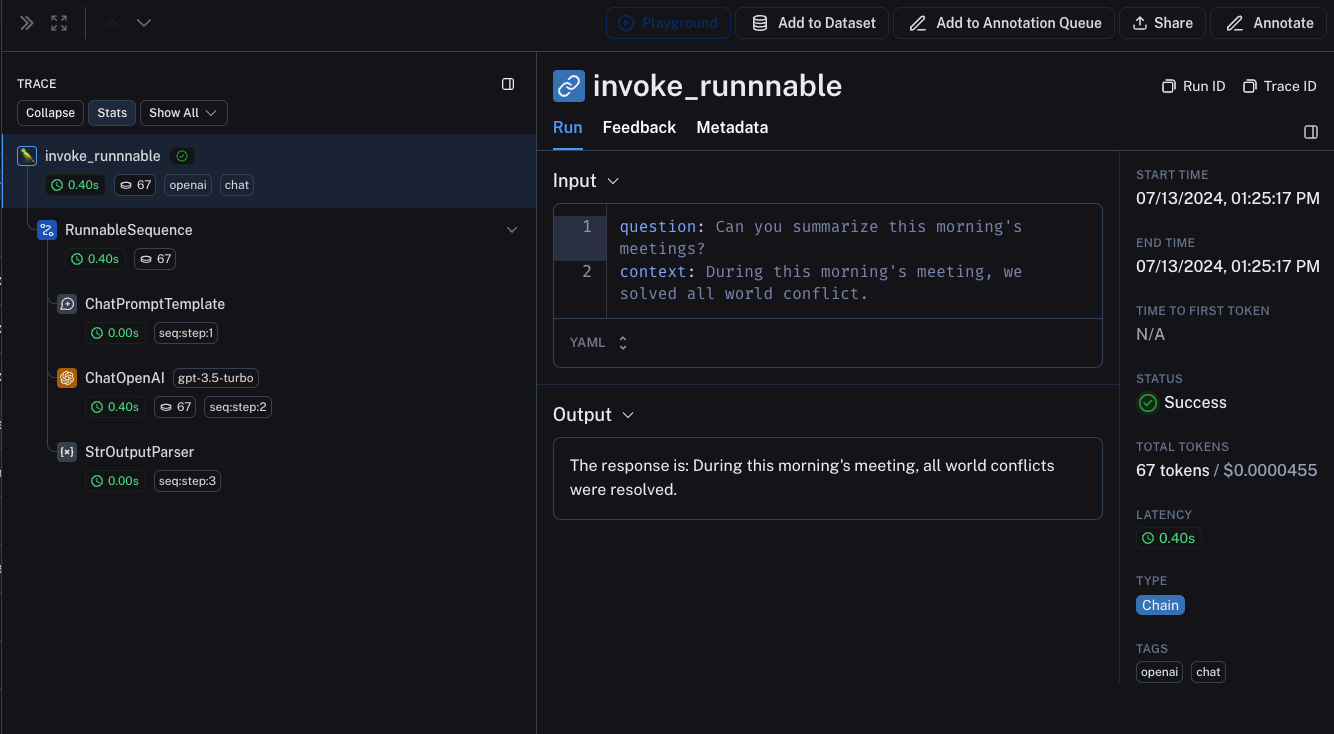 ## LangChain.JS 和 LangSmith SDK 之间的互操作性
### 在 `traceable` 内追踪 LangChain 对象(仅限 JS)
从 `langchain@0.2.x` 开始,LangChain 对象在 `@traceable` 函数内使用时会自动被追踪,继承 traceable 函数的客户端、标签、元数据和项目名称。
对于低于 `0.2.x` 的旧版本 LangChain,你需要手动传递从 `@traceable` 中找到的追踪上下文创建的 `LangChainTracer` 实例。
```typescript theme={"theme":{"light":"catppuccin-latte","dark":"catppuccin-mocha"}}
import { ChatOpenAI } from "@langchain/openai";
import { ChatPromptTemplate } from "@langchain/core/prompts";
import { StringOutputParser } from "@langchain/core/output_parsers";
import { getLangchainCallbacks } from "langsmith/langchain";
const prompt = ChatPromptTemplate.fromMessages([
[
"system",
"You are a helpful assistant. Please respond to the user's request only based on the given context.",
],
["user", "Question: {question}\nContext: {context}"],
]);
const model = new ChatOpenAI({ modelName: "gpt-5.4-mini" });
const outputParser = new StringOutputParser();
const chain = prompt.pipe(model).pipe(outputParser);
const main = traceable(
async (input: { question: string; context: string }) => {
const callbacks = await getLangchainCallbacks();
const response = await chain.invoke(input, { callbacks });
return response;
},
{ name: "main" }
);
```
### 通过 `traceable` / RunTree API 追踪 LangChain 子运行(仅限 JS)
我们正在努力改进 `traceable` 和 LangChain 之间的互操作性。将 LangChain 与 `traceable` 结合使用时存在以下限制:
1. 修改从 RunnableLambda 上下文的 `getCurrentRunTree()` 获取的 RunTree 将导致无操作。
2. 不鼓励遍历通过 `getCurrentRunTree()` 从 RunnableLambda 获取的 RunTree,因为它可能不包含所有 RunTree 节点。
3. 不同的子运行可能具有相同的 `execution_order` 和 `child_execution_order` 值。因此在极端情况下,一些运行可能最终顺序不同,具体取决于 `start_time`。
在某些用例中,你可能希望将 `traceable` 函数作为 RunnableSequence 的一部分运行,或通过 `RunTree` API 命令式地追踪 LangChain 运行的子运行。从 LangSmith 0.1.39 和 @langchain/core 0.2.18 开始,你可以直接在 RunnableLambda 内调用 `traceable` 包装的函数。
```typescript theme={"theme":{"light":"catppuccin-latte","dark":"catppuccin-mocha"}}
import { traceable } from "langsmith/traceable";
import { RunnableLambda } from "@langchain/core/runnables";
import { RunnableConfig } from "@langchain/core/runnables";
const tracedChild = traceable((input: string) => `Child Run: ${input}`, {
name: "Child Run",
});
const parrot = new RunnableLambda({
func: async (input: { text: string }, config?: RunnableConfig) => {
return await tracedChild(input.text);
},
});
```
## LangChain.JS 和 LangSmith SDK 之间的互操作性
### 在 `traceable` 内追踪 LangChain 对象(仅限 JS)
从 `langchain@0.2.x` 开始,LangChain 对象在 `@traceable` 函数内使用时会自动被追踪,继承 traceable 函数的客户端、标签、元数据和项目名称。
对于低于 `0.2.x` 的旧版本 LangChain,你需要手动传递从 `@traceable` 中找到的追踪上下文创建的 `LangChainTracer` 实例。
```typescript theme={"theme":{"light":"catppuccin-latte","dark":"catppuccin-mocha"}}
import { ChatOpenAI } from "@langchain/openai";
import { ChatPromptTemplate } from "@langchain/core/prompts";
import { StringOutputParser } from "@langchain/core/output_parsers";
import { getLangchainCallbacks } from "langsmith/langchain";
const prompt = ChatPromptTemplate.fromMessages([
[
"system",
"You are a helpful assistant. Please respond to the user's request only based on the given context.",
],
["user", "Question: {question}\nContext: {context}"],
]);
const model = new ChatOpenAI({ modelName: "gpt-5.4-mini" });
const outputParser = new StringOutputParser();
const chain = prompt.pipe(model).pipe(outputParser);
const main = traceable(
async (input: { question: string; context: string }) => {
const callbacks = await getLangchainCallbacks();
const response = await chain.invoke(input, { callbacks });
return response;
},
{ name: "main" }
);
```
### 通过 `traceable` / RunTree API 追踪 LangChain 子运行(仅限 JS)
我们正在努力改进 `traceable` 和 LangChain 之间的互操作性。将 LangChain 与 `traceable` 结合使用时存在以下限制:
1. 修改从 RunnableLambda 上下文的 `getCurrentRunTree()` 获取的 RunTree 将导致无操作。
2. 不鼓励遍历通过 `getCurrentRunTree()` 从 RunnableLambda 获取的 RunTree,因为它可能不包含所有 RunTree 节点。
3. 不同的子运行可能具有相同的 `execution_order` 和 `child_execution_order` 值。因此在极端情况下,一些运行可能最终顺序不同,具体取决于 `start_time`。
在某些用例中,你可能希望将 `traceable` 函数作为 RunnableSequence 的一部分运行,或通过 `RunTree` API 命令式地追踪 LangChain 运行的子运行。从 LangSmith 0.1.39 和 @langchain/core 0.2.18 开始,你可以直接在 RunnableLambda 内调用 `traceable` 包装的函数。
```typescript theme={"theme":{"light":"catppuccin-latte","dark":"catppuccin-mocha"}}
import { traceable } from "langsmith/traceable";
import { RunnableLambda } from "@langchain/core/runnables";
import { RunnableConfig } from "@langchain/core/runnables";
const tracedChild = traceable((input: string) => `Child Run: ${input}`, {
name: "Child Run",
});
const parrot = new RunnableLambda({
func: async (input: { text: string }, config?: RunnableConfig) => {
return await tracedChild(input.text);
},
});
```
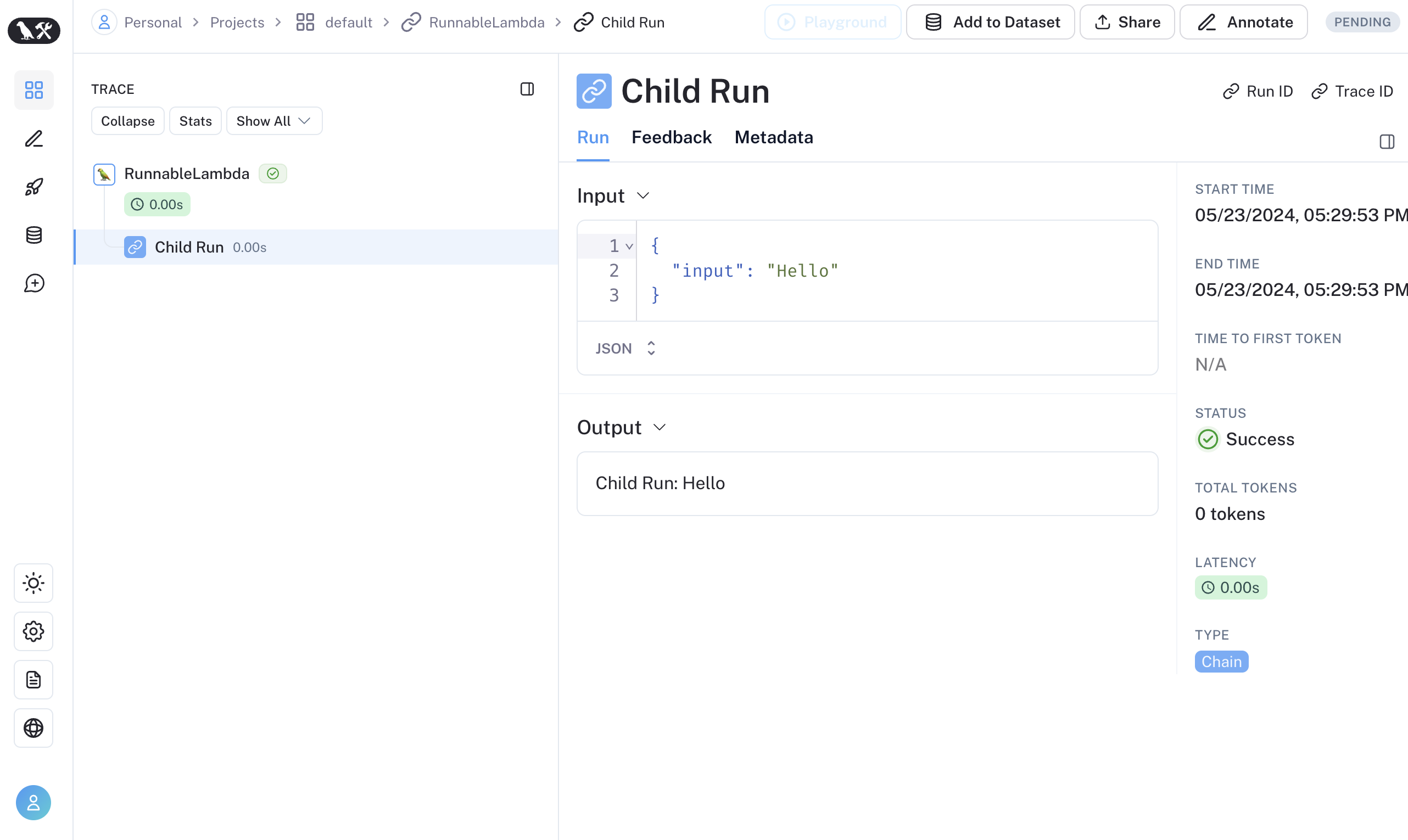 或者,你可以使用 `RunTree.fromRunnableConfig` 将 LangChain 的 [`RunnableConfig`](https://reference.langchain.com/python/langchain-core/runnables/config/RunnableConfig) 转换为等效的 RunTree 对象,或将 [`RunnableConfig`](https://reference.langchain.com/python/langchain-core/runnables/config/RunnableConfig) 作为 `traceable` 包装函数的第一个参数传递。
```typescript Traceable theme={"theme":{"light":"catppuccin-latte","dark":"catppuccin-mocha"}}
import { traceable } from "langsmith/traceable";
import { RunnableLambda } from "@langchain/core/runnables";
import { RunnableConfig } from "@langchain/core/runnables";
const tracedChild = traceable((input: string) => `Child Run: ${input}`, {
name: "Child Run",
});
const parrot = new RunnableLambda({
func: async (input: { text: string }, config?: RunnableConfig) => {
// 将 config 传递给现有的 traceable 函数
await tracedChild(config, input.text);
return input.text;
},
});
```
```typescript Run Tree theme={"theme":{"light":"catppuccin-latte","dark":"catppuccin-mocha"}}
import { RunTree } from "langsmith/run_trees";
import { RunnableLambda } from "@langchain/core/runnables";
import { RunnableConfig } from "@langchain/core/runnables";
const parrot = new RunnableLambda({
func: async (input: { text: string }, config?: RunnableConfig) => {
// 从 RunnableLambda 的 RunnableConfig 创建 RunTree
const childRunTree = RunTree.fromRunnableConfig(config, {
name: "Child Run",
});
childRunTree.inputs = { input: input.text };
await childRunTree.postRun();
childRunTree.outputs = { output: `Child Run: ${input.text}` };
await childRunTree.patchRun();
return input.text;
},
});
```
如果你更喜欢视频教程,请查看 LangSmith 课程介绍中的[替代追踪方式视频](https://academy.langchain.com/pages/intro-to-langsmith-preview)。
***
或者,你可以使用 `RunTree.fromRunnableConfig` 将 LangChain 的 [`RunnableConfig`](https://reference.langchain.com/python/langchain-core/runnables/config/RunnableConfig) 转换为等效的 RunTree 对象,或将 [`RunnableConfig`](https://reference.langchain.com/python/langchain-core/runnables/config/RunnableConfig) 作为 `traceable` 包装函数的第一个参数传递。
```typescript Traceable theme={"theme":{"light":"catppuccin-latte","dark":"catppuccin-mocha"}}
import { traceable } from "langsmith/traceable";
import { RunnableLambda } from "@langchain/core/runnables";
import { RunnableConfig } from "@langchain/core/runnables";
const tracedChild = traceable((input: string) => `Child Run: ${input}`, {
name: "Child Run",
});
const parrot = new RunnableLambda({
func: async (input: { text: string }, config?: RunnableConfig) => {
// 将 config 传递给现有的 traceable 函数
await tracedChild(config, input.text);
return input.text;
},
});
```
```typescript Run Tree theme={"theme":{"light":"catppuccin-latte","dark":"catppuccin-mocha"}}
import { RunTree } from "langsmith/run_trees";
import { RunnableLambda } from "@langchain/core/runnables";
import { RunnableConfig } from "@langchain/core/runnables";
const parrot = new RunnableLambda({
func: async (input: { text: string }, config?: RunnableConfig) => {
// 从 RunnableLambda 的 RunnableConfig 创建 RunTree
const childRunTree = RunTree.fromRunnableConfig(config, {
name: "Child Run",
});
childRunTree.inputs = { input: input.text };
await childRunTree.postRun();
childRunTree.outputs = { output: `Child Run: ${input.text}` };
await childRunTree.patchRun();
return input.text;
},
});
```
如果你更喜欢视频教程,请查看 LangSmith 课程介绍中的[替代追踪方式视频](https://academy.langchain.com/pages/intro-to-langsmith-preview)。
***
[将这些文档连接](/use-these-docs)到 Claude、VSCode 等,通过 MCP 获取实时答案。
[在 GitHub 上编辑此页面](https://github.com/langchain-ai/docs/edit/main/src/langsmith/trace-with-langchain.mdx) 或 [提交问题](https://github.com/langchain-ai/docs/issues/new/choose)。