> ## Documentation Index
> Fetch the complete documentation index at: https://cndoc-langchain.site/llms.txt
> Use this file to discover all available pages before exploring further.

# 在提示中包含多模态内容

某些应用程序基于多模态内容构建，例如可以回答关于PDF或图像问题的聊天机器人。在这些情况下，您需要在提示中包含多模态内容，并测试模型回答相关内容问题的能力。

Playground支持两种在提示中整合多模态内容的方法：

1. 内联内容：将静态文件（图像、PDF、音频）直接嵌入您的提示中。当您希望在所有提示使用中始终包含相同的多模态内容时，这是理想的选择。例如，您可以包含一个参考图像，以帮助规范模型的响应。

2. 模板变量：为附件创建动态占位符，每次可以填充不同的内容。这种方法提供了更大的灵活性，允许您：

   * 测试模型如何处理不同的输入
   * 创建可重复使用的提示，适用于不同的内容

<Note>
  并非所有模型都支持多模态内容。在使用Playground中的多模态功能之前，请确保您选择的模型支持您要使用的文件类型。
</Note>

## 内联内容

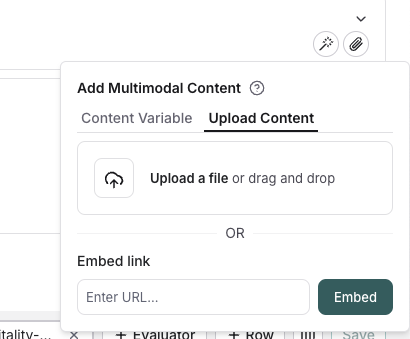
点击您要添加多模态内容的消息中的文件图标。在 `Upload content` 标签下，您可以上传文件并将其内联包含在提示中。

<img src="https://mintcdn.com/other-405835d4/HWk8WH3Ivd1grcHm/langsmith/images/upload-inline-multimodal-content.png?fit=max&auto=format&n=HWk8WH3Ivd1grcHm&q=85&s=389319f9e08afb1156d4f059802ee728" alt="上传内联多模态内容" width="410" height="339" data-path="langsmith/images/upload-inline-multimodal-content.png" />

## 模板变量

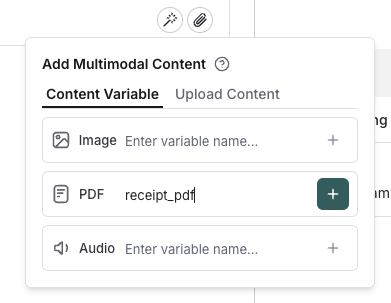
点击您要添加多模态内容的消息中的文件图标。在 `Template variables` 标签下，您可以为特定的附件类型创建模板变量。目前，仅支持图像、PDF和音频文件（.wav、.mp3）。

<img src="https://mintcdn.com/other-405835d4/ozzEsp14Hd9jH9J-/langsmith/images/template-variable-multimodal-content.png?fit=max&auto=format&n=ozzEsp14Hd9jH9J-&q=85&s=1ca4d3be43b645ac065b4c8a236d5b2e" alt="模板变量多模态内容" width="391" height="303" data-path="langsmith/images/template-variable-multimodal-content.png" />

## 填充模板变量

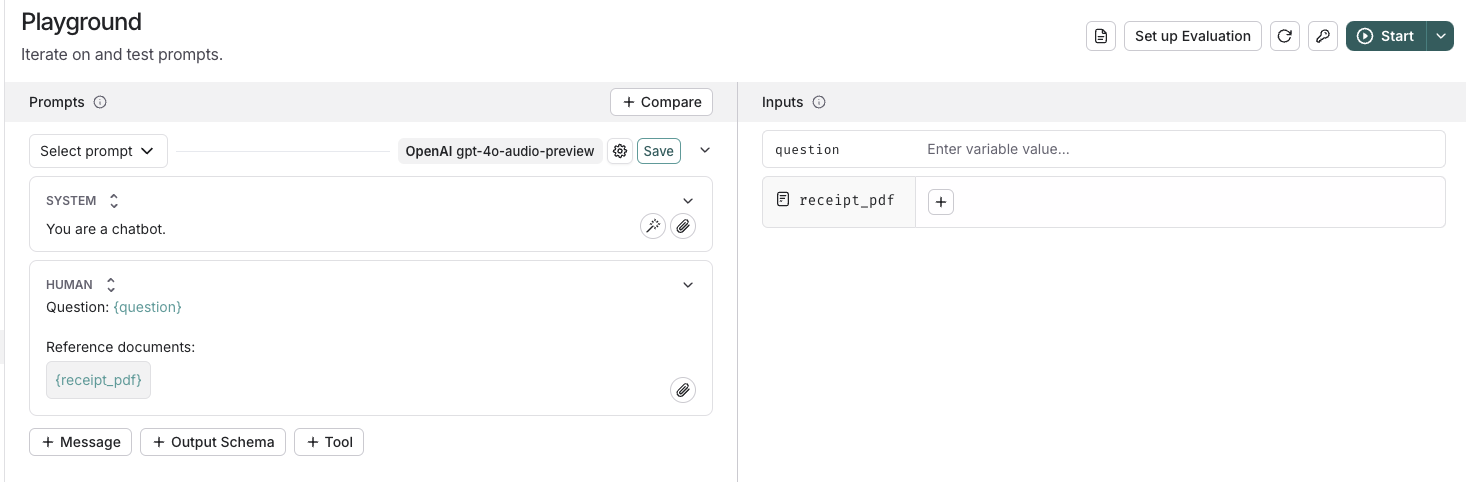
添加模板变量后，您可以使用屏幕右侧的面板为其提供内容。只需点击 `+` 按钮，上传或选择将用于填充模板变量的内容。

<img src="https://mintcdn.com/other-405835d4/X4LKQZjW6RjHveuz/langsmith/images/manual-prompt-multimodal.png?fit=max&auto=format&n=X4LKQZjW6RjHveuz&q=85&s=b06c44ca657b3645ffec092ce5fd1344" alt="手动提示多模态" width="1466" height="482" data-path="langsmith/images/manual-prompt-multimodal.png" />

## 运行评估

手动测试提示后，您可以[运行评估](/langsmith/evaluate-with-attachments?mode=ui)，以查看提示在示例黄金数据集上的表现。

***

<div className="source-links">
  <Callout icon="terminal-2">
    [连接这些文档](/use-these-docs)到Claude、VSCode等，通过MCP获取实时答案。
  </Callout>

  <Callout icon="edit">
    [在GitHub上编辑此页面](https://github.com/langchain-ai/docs/edit/main/src/langsmith/multimodal-content.mdx)或[提交问题](https://github.com/langchain-ai/docs/issues/new/choose)。
  </Callout>
</div>