> ## Documentation Index
> Fetch the complete documentation index at: https://cndoc-langchain.site/llms.txt
> Use this file to discover all available pages before exploring further.
# 记录多模态追踪
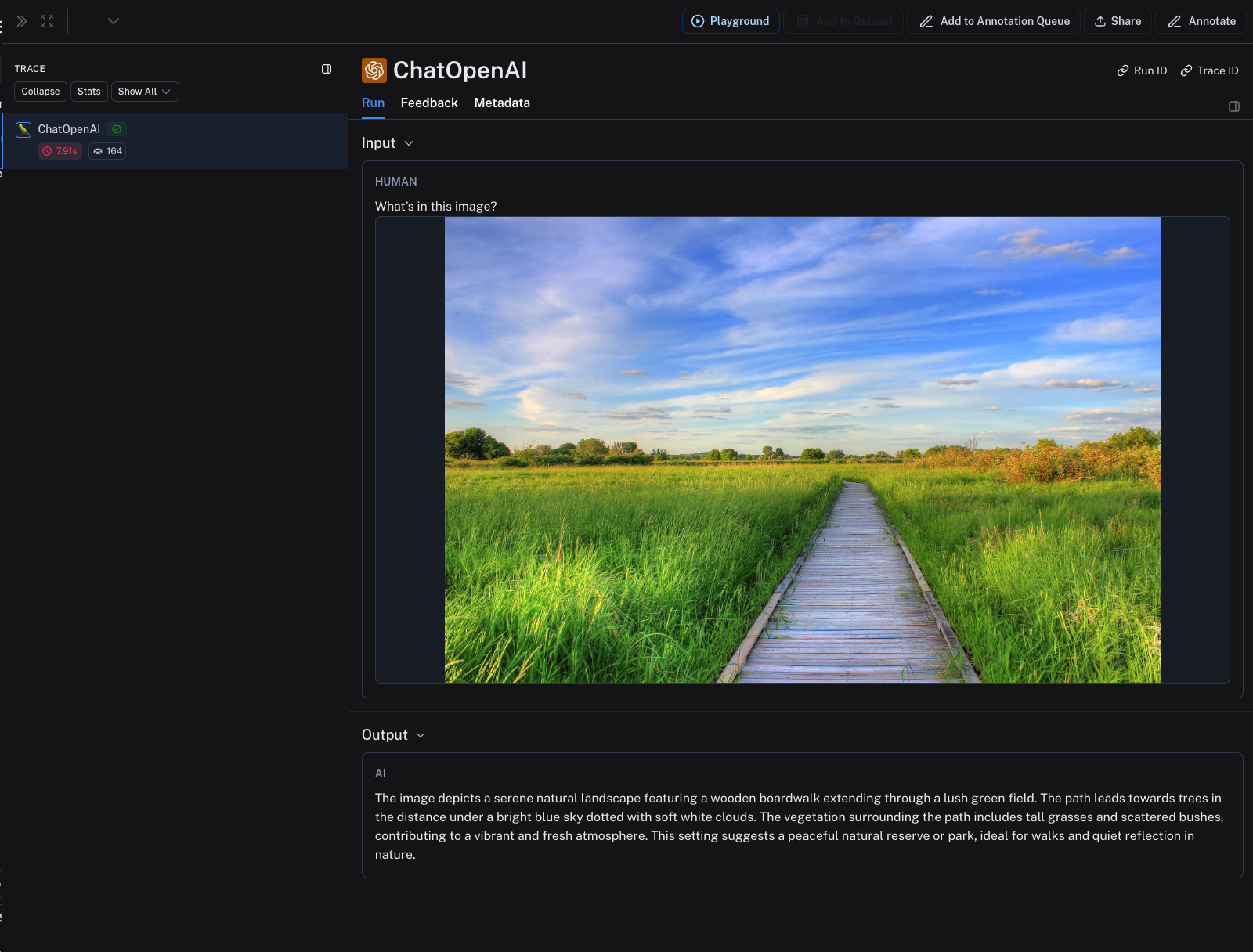
LangSmith 支持将图像作为追踪的一部分进行记录和渲染。目前此功能支持多模态 LLM 运行。
要记录图像,请在 Python 或 TypeScript 中分别使用 `wrap_openai`/ `wrapOpenAI`,并将图像 URL 或 base64 编码图像作为输入的一部分传递。
```python Python theme={"theme":{"light":"catppuccin-latte","dark":"catppuccin-mocha"}}
from openai import OpenAI
from langsmith.wrappers import wrap_openai
client = wrap_openai(OpenAI())
response = client.chat.completions.create(
model="gpt-4-turbo",
messages=[
{
"role": "user",
"content": [
{"type": "text", "text": "What's in this image?"},
{
"type": "image_url",
"image_url": {
"url": "https://upload.wikimedia.org/wikipedia/commons/thumb/d/dd/Gfp-wisconsin-madison-the-nature-boardwalk.jpg/2560px-Gfp-wisconsin-madison-the-nature-boardwalk.jpg",
},
},
],
}
],
)
print(response.choices[0])
```
```typescript TypeScript theme={"theme":{"light":"catppuccin-latte","dark":"catppuccin-mocha"}}
import OpenAI from "openai";
import { wrapOpenAI } from "langsmith/wrappers";
// 包装 OpenAI 客户端以自动记录追踪
const wrappedClient = wrapOpenAI(new OpenAI());
const response = await wrappedClient.chat.completions.create({
model: "gpt-4-turbo",
messages: [
{
role: "user",
content: [
{ type: "text", text: "What's in this image?" },
{
type: "image_url",
image_url: {
"url": "https://upload.wikimedia.org/wikipedia/commons/thumb/d/dd/Gfp-wisconsin-madison-the-nature-boardwalk.jpg/2560px-Gfp-wisconsin-madison-the-nature-boardwalk.jpg",
},
},
],
},
],
});
console.log(response.choices[0]);
```
图像将在 LangSmith UI 中作为追踪的一部分进行渲染。
 ***
***
[连接这些文档](/use-these-docs) 到 Claude、VSCode 等,通过 MCP 获取实时答案。
[在 GitHub 上编辑此页面](https://github.com/langchain-ai/docs/edit/main/src/langsmith/log-multimodal-traces.mdx) 或 [提交问题](https://github.com/langchain-ai/docs/issues/new/choose)。