> ## Documentation Index
> Fetch the complete documentation index at: https://cndoc-langchain.site/llms.txt
> Use this file to discover all available pages before exploring further.
# 如何运行成对评估
概念:[成对评估](/langsmith/evaluation-concepts#pairwise)
LangSmith 支持以比较方式评估**现有**实验。您无需一次评估一个输出,而是可以对来自多个实验的输出进行相互评分。在本指南中,您将使用 [`evaluate()`](https://docs.smith.langchain.com/reference/python/evaluation/langsmith.evaluation._runner.evaluate) 和两个现有实验来[定义评估器](#define-a-pairwise-evaluator)并[运行成对评估](#run-a-pairwise-evaluation)。最后,您将使用 LangSmith UI 来[查看成对实验](#view-pairwise-experiments)。
## 先决条件
* 如果您尚未创建要比较的实验,请查看[快速入门](/langsmith/evaluation-quickstart)或[操作指南](/langsmith/evaluate-llm-application)以开始使用评估。
* 本指南需要 `langsmith` Python 版本 `>=0.2.0` 或 JS 版本 `>=0.2.9`。
您也可以使用 [`evaluate_comparative()`](https://docs.smith.langchain.com/reference/python/evaluation/langsmith.evaluation._runner.evaluate_comparative) 来处理两个以上的现有实验。
## `evaluate()` 比较参数
最简单的情况下,`evaluate` / `aevaluate` 函数接受以下参数:
| 参数 | 描述 |
| ------------ | --------------------------------------- |
| `target` | 您希望相互比较的两个**现有实验**的列表。这些可以是 uuid 或实验名称。 |
| `evaluators` | 您希望附加到此评估的成对评估器列表。有关如何定义这些评估器,请参阅下面的部分。 |
除了这些,您还可以传递以下可选参数:
| 参数 | 描述 |
| ---------------------------------------- | ---------------------------------------------------------------------------------------------------------- |
| `randomize_order` / `randomizeOrder` | 一个可选的布尔值,指示是否应为每次评估随机化输出的顺序。这是最小化提示中位置偏差的一种策略:通常,LLM 会根据顺序偏向于其中一个响应。这主要应通过提示工程来解决,但这是另一种可选的缓解措施。默认为 False。 |
| `experiment_prefix` / `experimentPrefix` | 附加到成对实验名称开头的前缀。默认为 None。 |
| `description` | 成对实验的描述。默认为 None。 |
| `max_concurrency` / `maxConcurrency` | 要运行的最大并发评估数。默认为 5。 |
| `client` | 要使用的 LangSmith 客户端。默认为 None。 |
| `metadata` | 要附加到您的成对实验的元数据。默认为 None。 |
| `load_nested` / `loadNested` | 是否加载实验的所有子运行。当为 False 时,只有根跟踪会传递给您的评估器。默认为 False。 |
## 定义成对评估器
成对评估器只是具有预期签名的函数。
### 评估器参数
自定义评估器函数必须具有特定的参数名称。它们可以接受以下参数的任意子集:
* `inputs: dict`:对应于数据集中单个示例的输入字典。
* `outputs: list[dict]`:一个包含两个项目的列表,包含每个实验在给定输入上产生的字典输出。
* `reference_outputs` / `referenceOutputs: dict`:与示例关联的参考输出字典(如果可用)。
* `runs: list[Run]`:一个包含两个项目的列表,包含两个实验在给定示例上生成的完整 [Run](/langsmith/run-data-format) 对象。如果您需要访问中间步骤或有关每次运行的元数据,请使用此项。
* `example: Example`:完整的数据集 [Example](/langsmith/example-data-format),包括示例输入、输出(如果可用)和元数据(如果可用)。
对于大多数用例,您只需要 `inputs`、`outputs` 和 `reference_outputs` / `referenceOutputs`。`runs` 和 `example` 仅在您需要应用程序实际输入和输出之外的一些额外跟踪或示例元数据时才有用。
### 评估器输出
自定义评估器应返回以下类型之一:
Python 和 JS/TS
* `dict`:包含以下键的字典:
* `key`,表示将被记录的反馈键。
* `scores`,从运行 ID 到该运行分数的映射。
* `comment`,一个字符串。最常用于模型推理。
目前仅限 Python
* `list[int | float | bool]`:一个包含两个项目的分数列表。假定该列表与 `runs` / `outputs` 评估器参数具有相同的顺序。评估器函数名称用作反馈键。
请注意,您应选择一个与您运行上的标准反馈不同的反馈键。我们建议在成对反馈键前加上 `pairwise_` 或 `ranked_` 前缀。
## 运行成对评估
以下示例使用[一个提示](https://smith.langchain.com/hub/langchain-ai/pairwise-evaluation-2),要求 LLM 在两个 AI 助手响应之间决定哪个更好。它使用结构化输出来解析 AI 的响应:0、1 或 2。
在下面的 Python 示例中,我们从 [LangChain Hub](/langsmith/manage-prompts#public-prompt-hub) 拉取[这个结构化提示](https://smith.langchain.com/hub/langchain-ai/pairwise-evaluation-2),并将其与 LangChain 聊天模型包装器一起使用。
**使用 LangChain 是完全可选的。** 为了说明这一点,TypeScript 示例直接使用 OpenAI SDK。
* Python:需要 `langsmith>=0.2.0`
* TypeScript:需要 `langsmith>=0.2.9`
```python Python theme={"theme":{"light":"catppuccin-latte","dark":"catppuccin-mocha"}}
from langchain_classic import hub
from langchain.chat_models import init_chat_model
from langsmith import evaluate
# 查看提示:https://smith.langchain.com/hub/langchain-ai/pairwise-evaluation-2
prompt = hub.pull("langchain-ai/pairwise-evaluation-2")
model = init_chat_model("gpt-5.4")
chain = prompt | model
def ranked_preference(inputs: dict, outputs: list[dict]) -> list:
# 假设示例输入有一个 'question' 键,实验输出有一个 'answer' 键。
response = chain.invoke({
"question": inputs["question"],
"answer_a": outputs[0].get("answer", "N/A"),
"answer_b": outputs[1].get("answer", "N/A"),
})
if response["Preference"] == 1:
scores = [1, 0]
elif response["Preference"] == 2:
scores = [0, 1]
else:
scores = [0, 0]
return scores
evaluate(
("experiment-1", "experiment-2"), # 替换为您的实验名称/ID
evaluators=[ranked_preference],
randomize_order=True,
max_concurrency=4,
)
```
```typescript TypeScript theme={"theme":{"light":"catppuccin-latte","dark":"catppuccin-mocha"}}
import { evaluate} from "langsmith/evaluation";
import { Run } from "langsmith/schemas";
import { wrapOpenAI } from "langsmith/wrappers";
import OpenAI from "openai";
import { z } from "zod";
const openai = wrapOpenAI(new OpenAI());
async function rankedPreference({
inputs,
runs,
}: {
inputs: Record;
runs: Run[];
}) {
const scores: Record = {};
const [runA, runB] = runs;
if (!runA || !runB) throw new Error("Expected at least two runs");
const payload = {
question: inputs.question,
answer_a: runA?.outputs?.output ?? "N/A",
answer_b: runB?.outputs?.output ?? "N/A",
};
const output = await openai.chat.completions.create({
model: "gpt-4-turbo",
messages: [
{
role: "system",
content: [
"请作为公正的评委,评估下面显示的两个 AI 助手对用户问题的回答质量。",
"您应该选择更好地遵循用户指令并回答用户问题的助手。",
"您的评估应考虑诸如其回答的帮助性、相关性、准确性、深度、创造性和详细程度等因素。",
"通过比较两个回答并提供简短解释来开始您的评估。",
"避免任何位置偏见,并确保回答呈现的顺序不会影响您的决定。",
"不要让回答的长度影响您的评估。不要偏爱某些助手的名称。尽可能保持客观。",
].join(" "),
},
{
role: "user",
content: [
`[用户问题] ${payload.question}`,
`[助手 A 回答的开始] ${payload.answer_a} [助手 A 回答的结束]`,
`[助手 B 回答的开始] ${payload.answer_b} [助手 B 回答的结束]`,
].join("\n\n"),
},
],
tool_choice: {
type: "function",
function: { name: "Score" },
},
tools: [
{
type: "function",
function: {
name: "Score",
description: [
`在提供解释后,严格遵循此格式输出您的最终裁决:`,
`如果基于上述因素,助手 A 的回答更好,则输出 "1"。`,
`如果基于上述因素,助手 B 的回答更好,则输出 "2"。`,
`如果是平局,则输出 "0"。`,
].join(" "),
parameters: {
type: "object",
properties: {
Preference: {
type: "integer",
description: "更喜欢哪个助手的回答?",
},
},
},
},
},
],
});
const { Preference } = z
.object({ Preference: z.number() })
.parse(
JSON.parse(output.choices[0].message.tool_calls[0].function.arguments)
);
if (Preference === 1) {
scores[runA.id] = 1;
scores[runB.id] = 0;
} else if (Preference === 2) {
scores[runA.id] = 0;
scores[runB.id] = 1;
} else {
scores[runA.id] = 0;
scores[runB.id] = 0;
}
return { key: "ranked_preference", scores };
}
await evaluate(["earnest-name-40", "reflecting-pump-91"], {
evaluators: [rankedPreference],
});
```
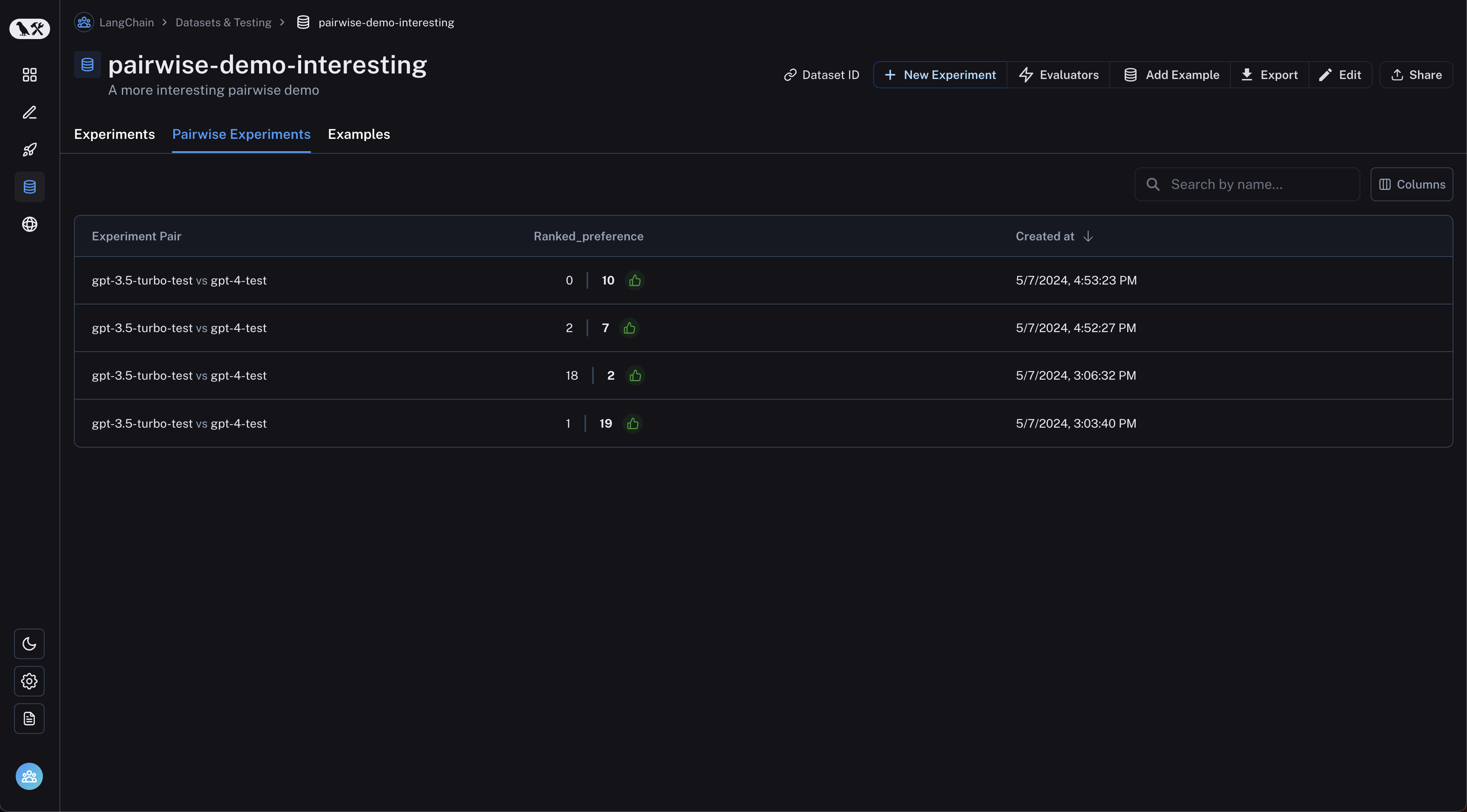
## 查看成对实验
从数据集页面导航到“成对实验”选项卡:
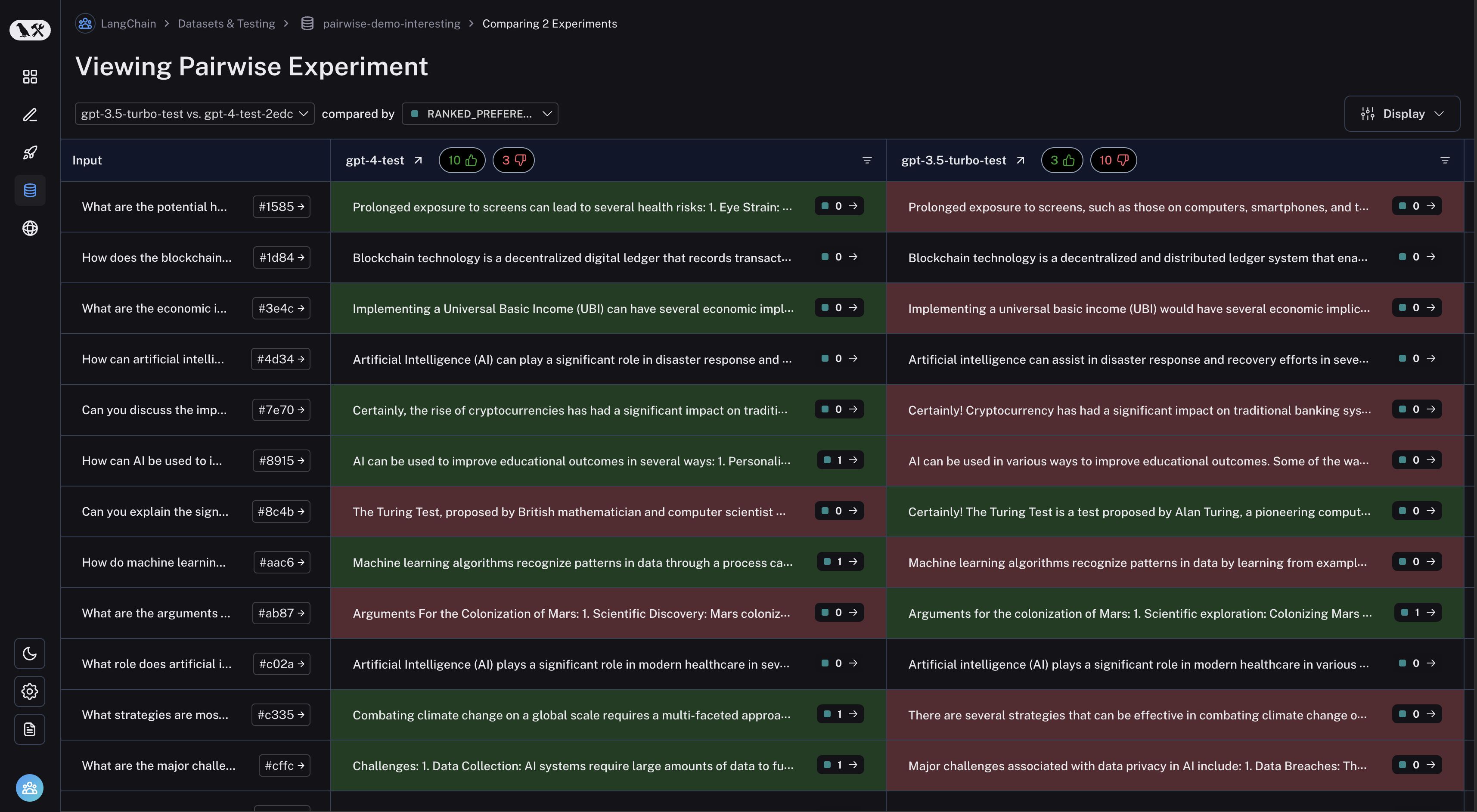
 单击您想要检查的成对实验,您将被带到比较视图:
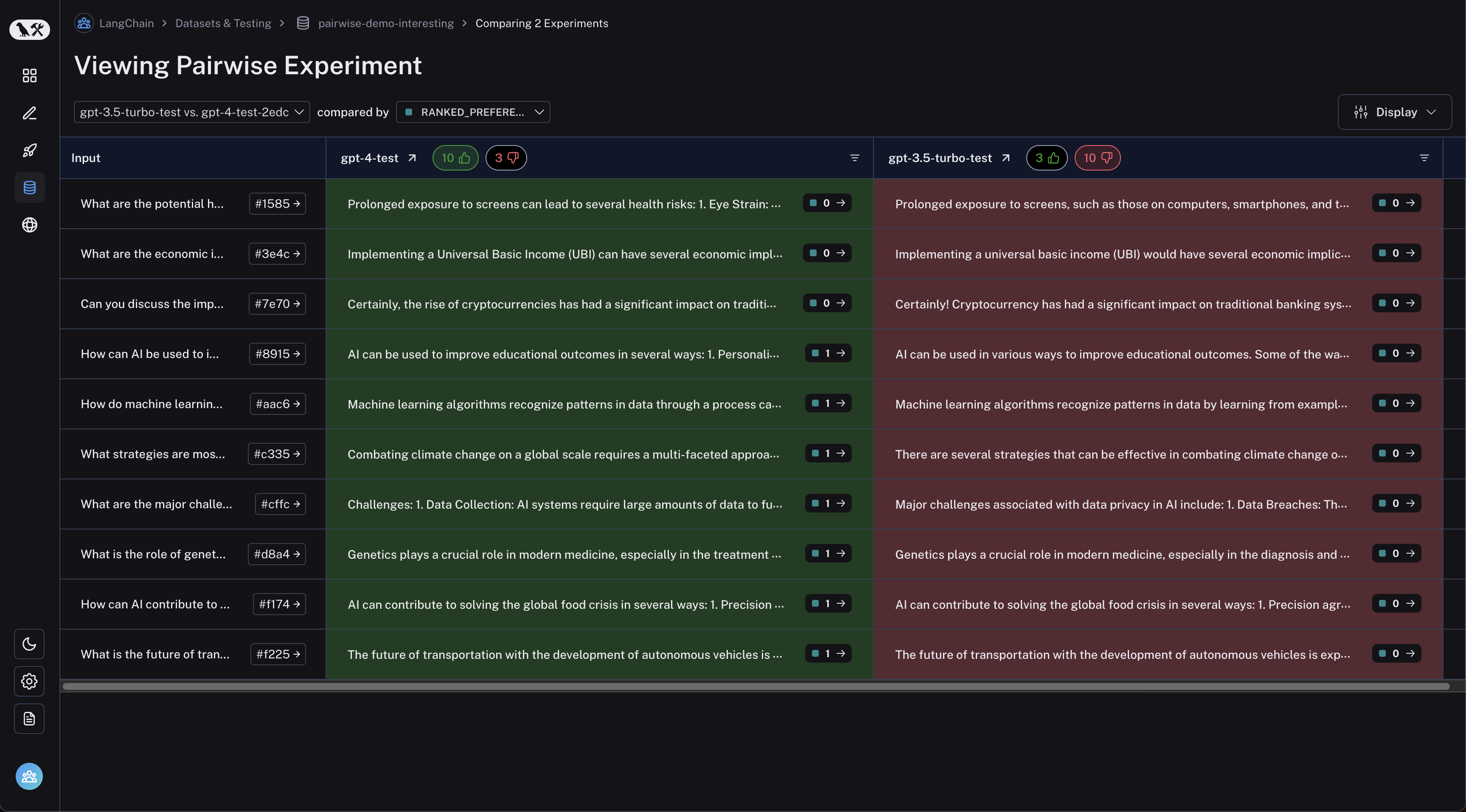
 您可以通过单击表格标题中的点赞/点踩按钮来筛选第一个实验更好或反之亦然的运行:
 ***
***
[将这些文档](/use-these-docs)通过 MCP 连接到 Claude、VSCode 等,以获取实时答案。
[在 GitHub 上编辑此页面](https://github.com/langchain-ai/docs/edit/main/src/langsmith/evaluate-pairwise.mdx) 或 [提交问题](https://github.com/langchain-ai/docs/issues/new/choose)。