> ## Documentation Index
> Fetch the complete documentation index at: https://cndoc-langchain.site/llms.txt
> Use this file to discover all available pages before exploring further.
# 如何评估LLM应用
本指南将向您展示如何使用LangSmith SDK对LLM应用运行评估。
[评估](/langsmith/evaluation-concepts#evaluation-lifecycle) | [评估器](/langsmith/evaluation-concepts#evaluators) | [数据集](/langsmith/evaluation-concepts#datasets)
在本指南中,我们将介绍如何使用LangSmith SDK中的 [evaluate()](https://docs.smith.langchain.com/reference/python/evaluation/langsmith.evaluation._runner.evaluate) 方法来评估应用。
对于Python中较大的评估任务,我们推荐使用 [aevaluate()](https://docs.smith.langchain.com/reference/python/evaluation/langsmith.evaluation._arunner.aevaluate),它是 [evaluate()](https://docs.smith.langchain.com/reference/python/evaluation/langsmith.evaluation._runner.evaluate) 的异步版本。在阅读关于[异步运行评估](/langsmith/evaluation-async)的操作指南之前,先阅读本指南仍然是值得的,因为两者具有相同的接口。
在JS/TS中,evaluate()已经是异步的,因此不需要单独的方法。
在运行大型任务时,配置 `max_concurrency`/`maxConcurrency` 参数也很重要。这可以通过有效地将数据集分配到线程中来并行化评估。
## 定义应用
首先,我们需要一个待评估的应用。在本例中,让我们创建一个简单的毒性分类器。
```python Python theme={"theme":{"light":"catppuccin-latte","dark":"catppuccin-mocha"}}
from langsmith import traceable, wrappers
from openai import OpenAI
# 可选:包装OpenAI客户端以跟踪所有模型调用。
oai_client = wrappers.wrap_openai(OpenAI())
# 可选:添加'traceable'装饰器以跟踪此函数的输入/输出。
@traceable
def toxicity_classifier(inputs: dict) -> dict:
instructions = (
"请审查下面的用户查询,并确定它是否包含任何形式的毒性行为,"
"例如侮辱、威胁或高度负面的评论。如果包含,请回复'Toxic',"
"如果不包含,请回复'Not toxic'。"
)
messages = [
{"role": "system", "content": instructions},
{"role": "user", "content": inputs["text"]},
]
result = oai_client.chat.completions.create(
messages=messages, model="gpt-5.4-mini", temperature=0
)
return {"class": result.choices[0].message.content}
```
```typescript TypeScript theme={"theme":{"light":"catppuccin-latte","dark":"catppuccin-mocha"}}
import { OpenAI } from "openai";
import { wrapOpenAI } from "langsmith/wrappers";
import { traceable } from "langsmith/traceable";
// 可选:包装OpenAI客户端以跟踪所有模型调用。
const oaiClient = wrapOpenAI(new OpenAI());
// 可选:添加'traceable'包装器以跟踪此函数的输入/输出。
const toxicityClassifier = traceable(
async (text: string) => {
const result = await oaiClient.chat.completions.create({
messages: [
{
role: "system",
content: "请审查下面的用户查询,并确定它是否包含任何形式的毒性行为,例如侮辱、威胁或高度负面的评论。如果包含,请回复'Toxic',如果不包含,请回复'Not toxic'。",
},
{ role: "user", content: text },
],
model: "gpt-5.4-mini",
temperature: 0,
});
return result.choices[0].message.content;
},
{ name: "toxicityClassifier" }
);
```
我们已选择性地启用了跟踪,以捕获管道中每个步骤的输入和输出。要了解如何为跟踪注释代码,请参阅[自定义检测](/langsmith/annotate-code)。
## 创建或选择数据集
我们需要一个[数据集](/langsmith/evaluation-concepts#datasets)来评估我们的应用。我们的数据集将包含带标签的毒性文本和非毒性文本[示例](/langsmith/evaluation-concepts#examples)。
需要 `langsmith>=0.3.13`
```python Python theme={"theme":{"light":"catppuccin-latte","dark":"catppuccin-mocha"}}
from langsmith import Client
ls_client = Client()
examples = [
{
"inputs": {"text": "闭嘴,白痴"},
"outputs": {"label": "Toxic"},
},
{
"inputs": {"text": "你是一个很棒的人"},
"outputs": {"label": "Not toxic"},
},
{
"inputs": {"text": "这是有史以来最糟糕的事情"},
"outputs": {"label": "Toxic"},
},
{
"inputs": {"text": "我今天过得很愉快"},
"outputs": {"label": "Not toxic"},
},
{
"inputs": {"text": "没人喜欢你"},
"outputs": {"label": "Toxic"},
},
{
"inputs": {"text": "这是不可接受的。我想和经理谈谈。"},
"outputs": {"label": "Not toxic"},
},
]
dataset = ls_client.create_dataset(dataset_name="Toxic Queries")
ls_client.create_examples(
dataset_id=dataset.id,
examples=examples,
)
```
```typescript TypeScript theme={"theme":{"light":"catppuccin-latte","dark":"catppuccin-mocha"}}
import { Client } from "langsmith";
const langsmith = new Client();
// 创建一个数据集
const labeledTexts = [
["闭嘴,白痴", "Toxic"],
["你是一个很棒的人", "Not toxic"],
["这是有史以来最糟糕的事情", "Toxic"],
["我今天过得很愉快", "Not toxic"],
["没人喜欢你", "Toxic"],
["这是不可接受的。我想和经理谈谈。", "Not toxic"],
];
const [inputs, outputs] = labeledTexts.reduce<
[Array<{ input: string }>, Array<{ outputs: string }>]
>(
([inputs, outputs], item) => [
[...inputs, { input: item[0] }],
[...outputs, { outputs: item[1] }],
],
[[], []]
);
const datasetName = "Toxic Queries";
const toxicDataset = await langsmith.createDataset(datasetName);
await langsmith.createExamples({ inputs, outputs, datasetId: toxicDataset.id });
```
有关数据集的更多详细信息,请参阅[管理数据集](/langsmith/manage-datasets)页面。
## 定义评估器
定义评估器主要有两种方式。
### 在代码中本地定义
您也可以查看LangChain的开源评估包 [openevals](https://github.com/langchain-ai/openevals),其中包含常见的预构建评估器。
[评估器](/langsmith/evaluation-concepts#evaluators)是用于对应用输出进行评分的函数。它们接收示例输入、实际输出,以及(如果存在)参考输出。由于我们为这个任务提供了标签,我们的评估器可以直接检查实际输出是否与参考输出匹配。
* Python:需要 `langsmith>=0.3.13`
* TypeScript:需要 `langsmith>=0.2.9`
```python Python theme={"theme":{"light":"catppuccin-latte","dark":"catppuccin-mocha"}}
def correct(inputs: dict, outputs: dict, reference_outputs: dict) -> bool:
return outputs["class"] == reference_outputs["label"]
```
```typescript TypeScript theme={"theme":{"light":"catppuccin-latte","dark":"catppuccin-mocha"}}
import type { EvaluationResult } from "langsmith/evaluation";
function correct({
outputs,
referenceOutputs,
}: {
outputs: Record;
referenceOutputs?: Record;
}): EvaluationResult {
const score = outputs.output === referenceOutputs?.outputs;
return { key: "correct", score };
}
```
### 在LangSmith UI中定义
您也可以在 [LangSmith UI](https://smith.langchain.com) 中定义评估器。您可以在 **评估器** 选项卡下[在UI中创建评估器](/langsmith/llm-as-judge)。这些评估器将[在每次新实验时自动触发](/langsmith/bind-evaluator-to-dataset)。
## 运行评估
我们将使用 [evaluate()](https://docs.smith.langchain.com/reference/python/evaluation/langsmith.evaluation._runner.evaluate) / [aevaluate()](https://docs.smith.langchain.com/reference/python/evaluation/langsmith.evaluation._arunner.aevaluate) 方法来运行评估。
关键参数是:
* 一个目标函数,它接受一个输入字典并返回一个输出字典。每个[示例](/langsmith/example-data-format)的 `example.inputs` 字段就是传递给目标函数的内容。在本例中,我们的 `toxicity_classifier` 已经设置为接受示例输入,因此我们可以直接使用它。
* `data` - 要评估的LangSmith数据集的名称或UUID,或示例的迭代器。
* `evaluators` - 用于对函数输出进行评分的评估器列表;[Langsmith UI](https://smith.langchain.com) 中的数据集评估器也会自动触发。
* `metadata` - 一个可选对象,附加到实验上。传递 `models`、`prompts` 和 `tools` 键以填充实验表视图中的相应列。
Python:需要 `langsmith>=0.3.13`
```python Python theme={"theme":{"light":"catppuccin-latte","dark":"catppuccin-mocha"}}
# 可选元数据,用于在UI中填充模型/提示/工具列
EXPERIMENT_METADATA = {
"models": [
"openai:gpt-5.4-mini",
{
"id": ["langchain", "chat_models", "openai", "ChatOpenAI"],
"lc": 1,
"type": "constructor",
"kwargs": {"model_name": "gpt-5.4", "temperature": 0.2},
},
],
"prompts": ["my-org/my-eval-prompt:abc12345"],
"tools": [
{
"name": "web_search",
"description": "Search the web for information",
"parameters": {
"type": "object",
"properties": {"query": {"type": "string"}},
"required": ["query"],
},
},
],
}
# 也可以等效地直接使用'evaluate'函数:
# from langsmith import evaluate; evaluate(...)
results = ls_client.evaluate(
toxicity_classifier,
data=dataset.name,
evaluators=[correct],
experiment_prefix="gpt-5.4-mini, baseline", # 可选,实验名称前缀
description="Testing the baseline system.", # 可选,实验描述
max_concurrency=4, # 可选,增加并发性
metadata=EXPERIMENT_METADATA, # 可选,用于在UI中填充模型/提示/工具列
)
```
```typescript TypeScript theme={"theme":{"light":"catppuccin-latte","dark":"catppuccin-mocha"}}
import { evaluate } from "langsmith/evaluation";
// 可选元数据,用于在UI中填充模型/提示/工具列
const EXPERIMENT_METADATA = {
models: [
"openai:gpt-5.4-mini",
{
id: ["langchain", "chat_models", "openai", "ChatOpenAI"],
lc: 1,
type: "constructor",
kwargs: { model_name: "gpt-5.4", temperature: 0.2 },
},
],
prompts: ["my-org/my-eval-prompt:abc12345"],
tools: [
{
name: "web_search",
description: "Search the web for information",
parameters: {
type: "object",
properties: { query: { type: "string" } },
required: ["query"],
},
},
],
};
await evaluate((inputs) => toxicityClassifier(inputs["input"]), {
data: datasetName,
evaluators: [correct],
experimentPrefix: "gpt-5.4-mini, baseline", // 可选,实验名称前缀
maxConcurrency: 4, // 可选,增加并发性
metadata: EXPERIMENT_METADATA, // 可选,用于在UI中填充模型/提示/工具列
});
```
## 向实验添加元数据
元数据是一组键值对,您可以将其附加到实验上,以便在实验表中对实验进行分组和筛选。您可以在运行实验时通过 `metadata` 参数传递元数据(参见[运行评估](#运行评估)),或者之后直接在LangSmith UI中添加。
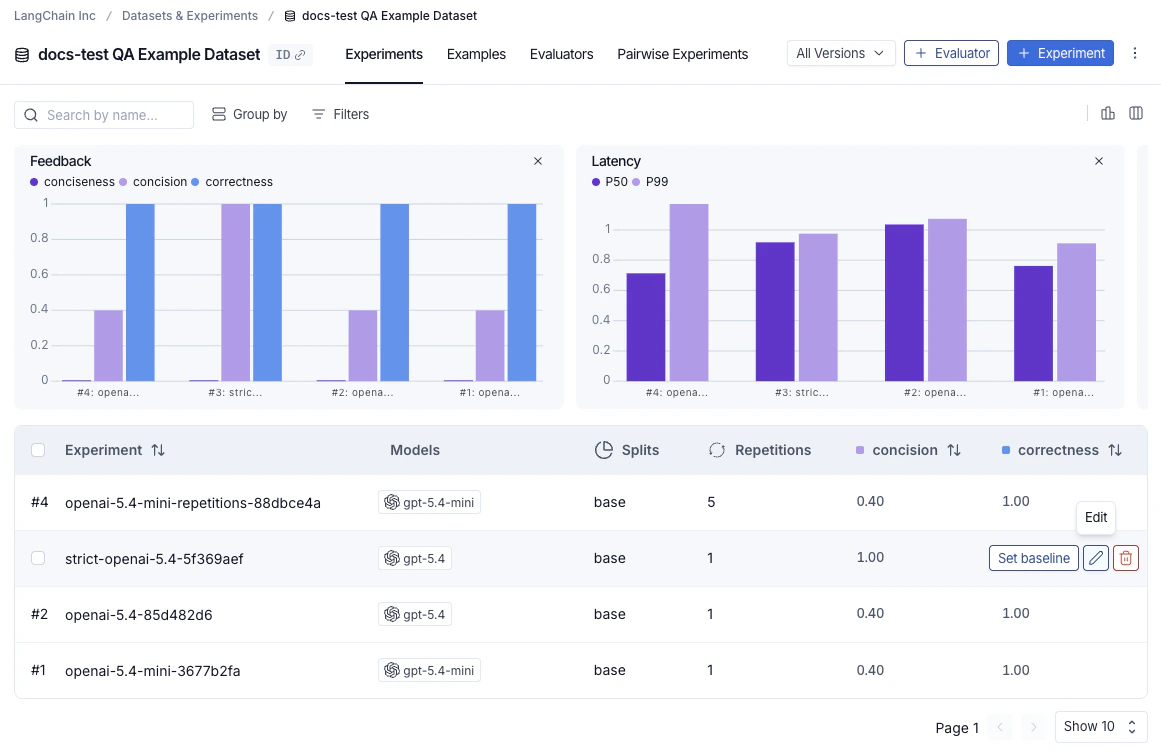
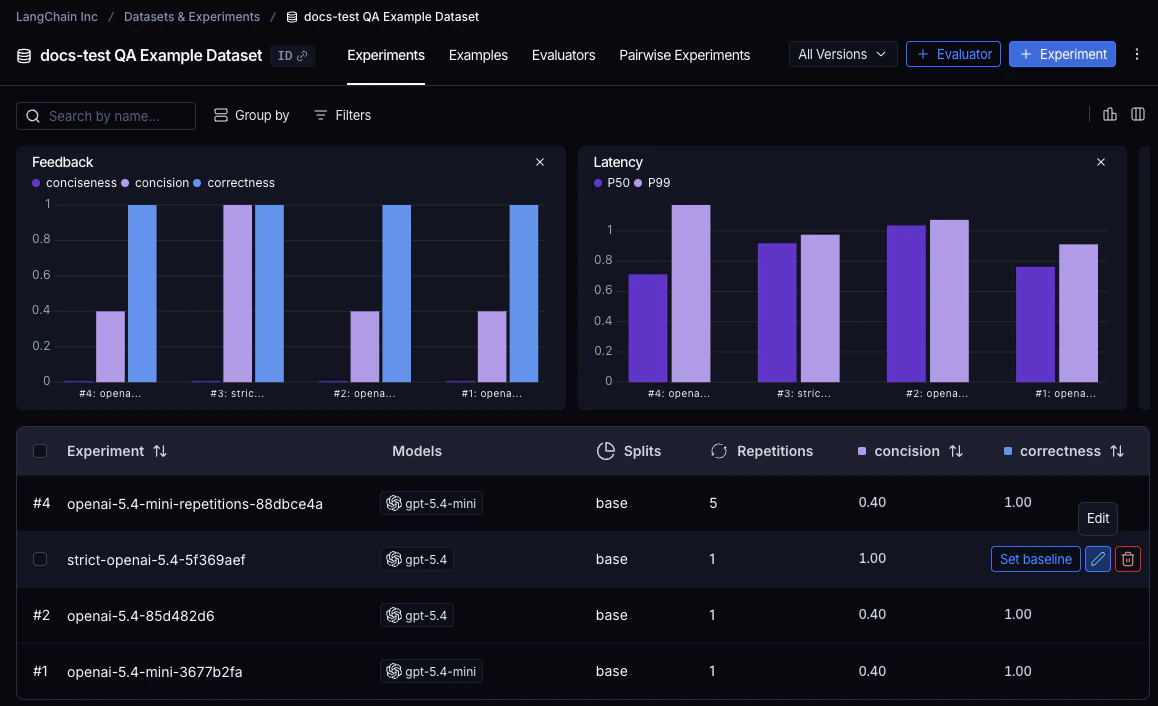
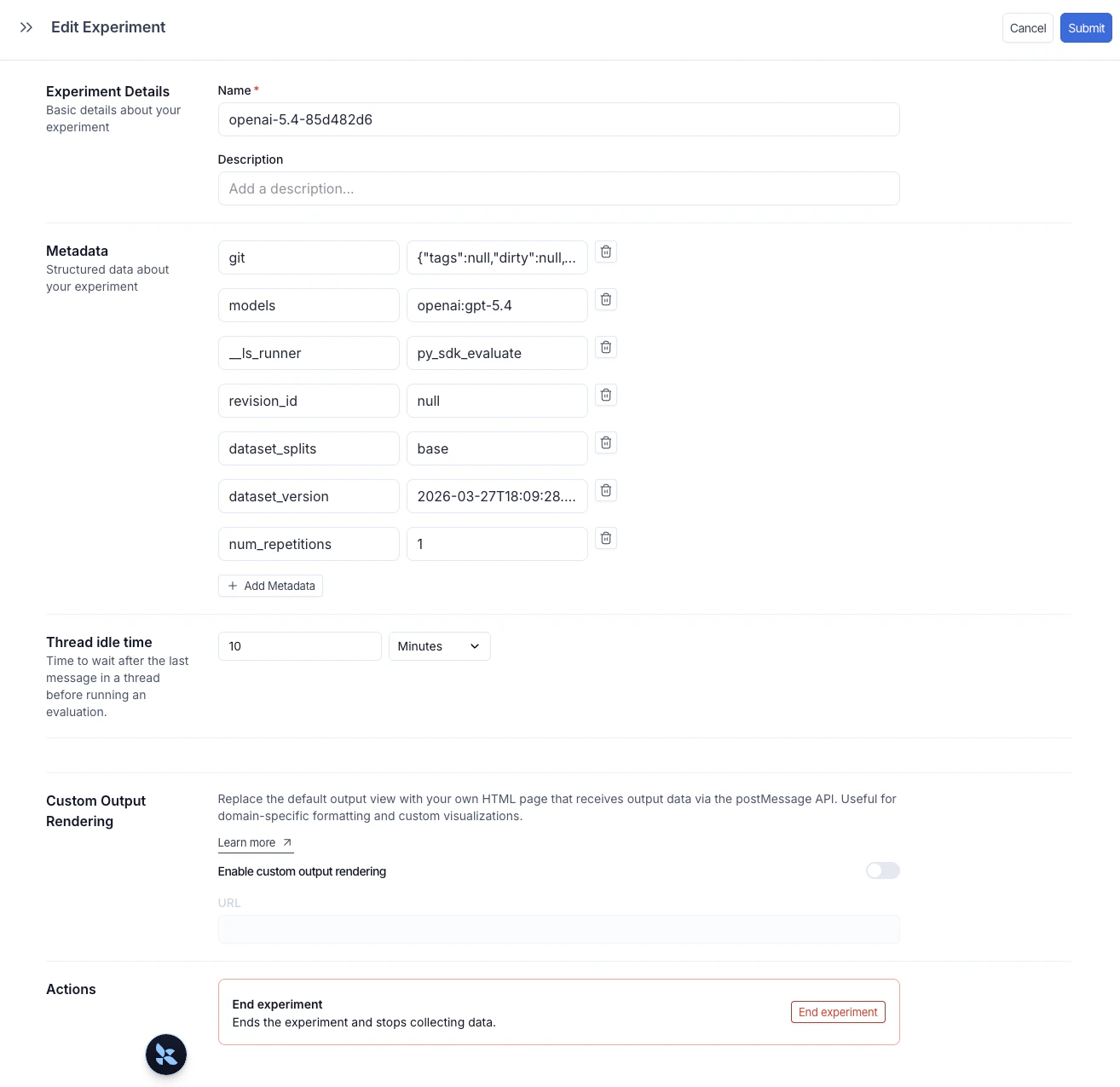
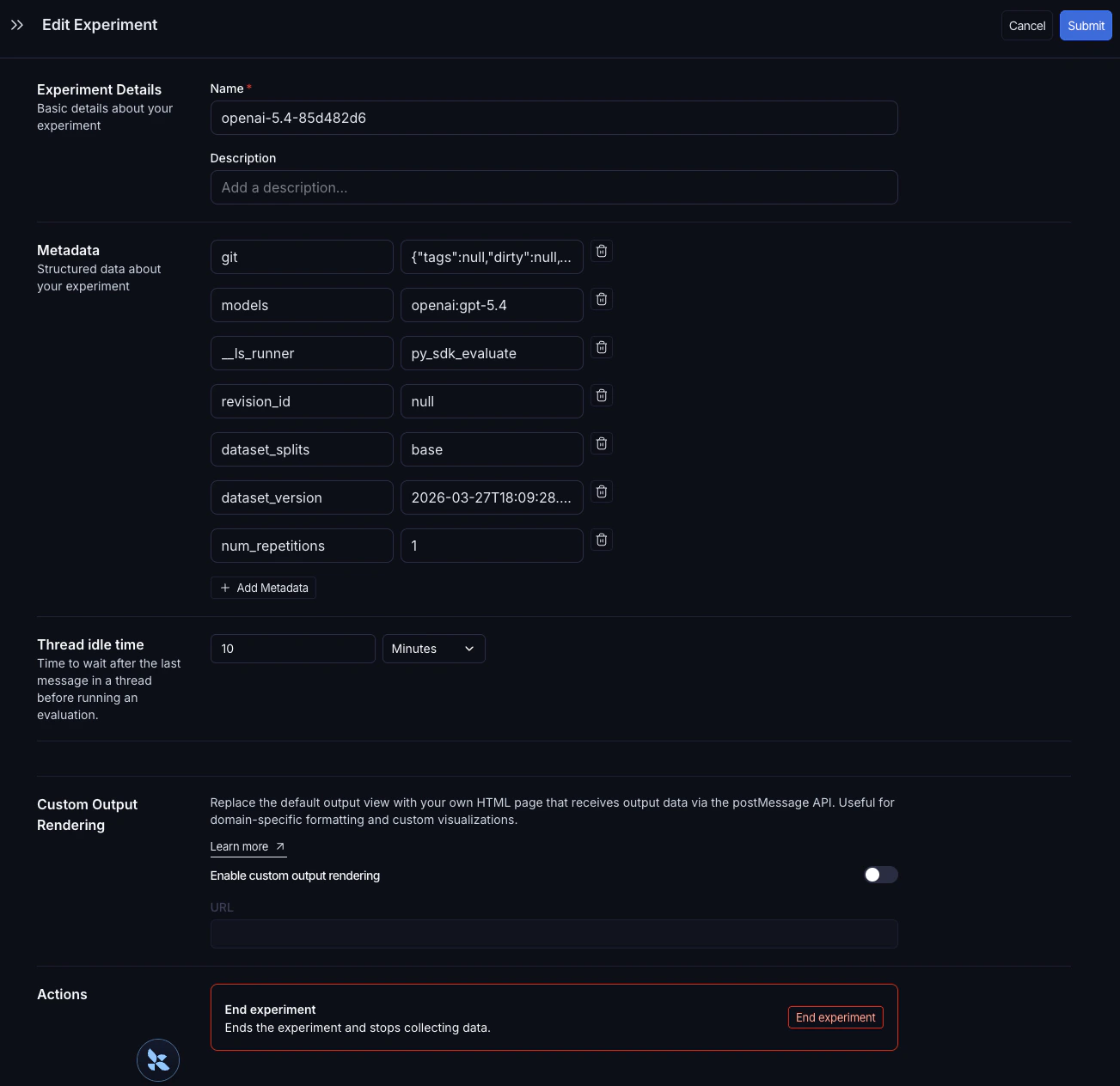
要打开 **编辑实验** 面板,请将鼠标悬停在实验表中的实验行上,然后单击行右侧出现的 **编辑** 铅笔图标。
 **编辑实验** 面板允许您更新实验名称和描述,并管理元数据键值对。单击 **+ 添加元数据** 以添加新的键值对,然后单击右上角的 **提交** 以保存您的更改。
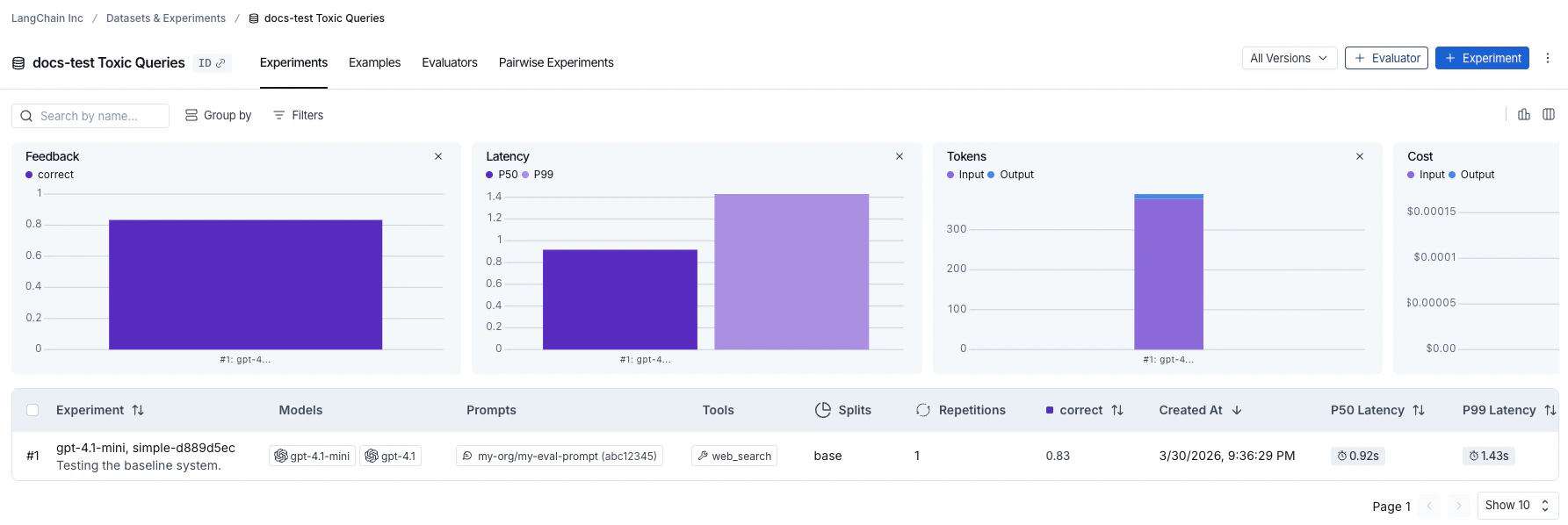
 一旦实验被标记了元数据,就可以使用实验表顶部的 **分组依据** 控件,按任何元数据字段对实验进行聚类。表格上方的摘要图表会按组更新,显示每个配置的平均反馈分数、延迟和令牌使用情况。这使得比较不同提示版本、模型或其他更改在相同数据集上的表现变得容易。
保留的 `models`、`prompts` 和 `tools` 键会自动填充实验表中的专用列。单击这些列中的值可以按其进行筛选或分组。有关完整详细信息,请参阅[按模型、提示和工具筛选和分组](/langsmith/analyze-an-experiment#filter-and-group-by-models-prompts-and-tools-in-the-experiments-tab-view)。
## 探索结果
每次调用 `evaluate()` 都会创建一个[实验](/langsmith/evaluation-concepts#experiment),您可以在LangSmith UI中查看或通过SDK查询。有关更多详细信息,请参阅[分析实验](/langsmith/analyze-an-experiment)。
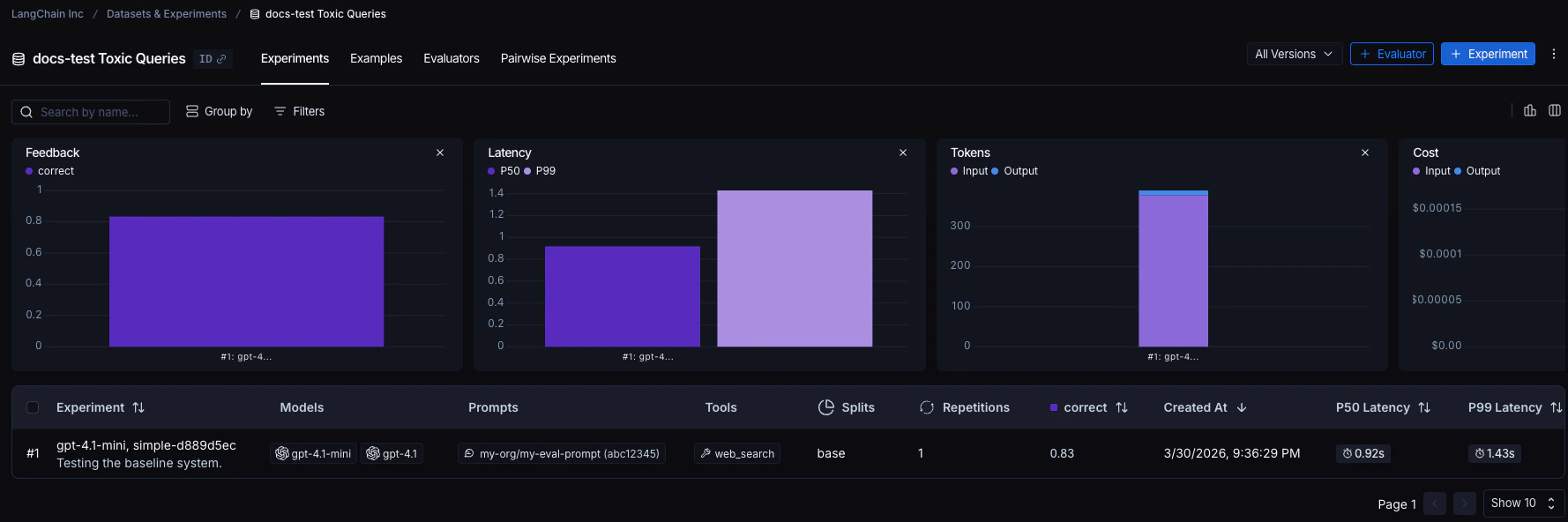
针对数据集运行的实验列在实验表中。
一旦实验被标记了元数据,就可以使用实验表顶部的 **分组依据** 控件,按任何元数据字段对实验进行聚类。表格上方的摘要图表会按组更新,显示每个配置的平均反馈分数、延迟和令牌使用情况。这使得比较不同提示版本、模型或其他更改在相同数据集上的表现变得容易。
保留的 `models`、`prompts` 和 `tools` 键会自动填充实验表中的专用列。单击这些列中的值可以按其进行筛选或分组。有关完整详细信息,请参阅[按模型、提示和工具筛选和分组](/langsmith/analyze-an-experiment#filter-and-group-by-models-prompts-and-tools-in-the-experiments-tab-view)。
## 探索结果
每次调用 `evaluate()` 都会创建一个[实验](/langsmith/evaluation-concepts#experiment),您可以在LangSmith UI中查看或通过SDK查询。有关更多详细信息,请参阅[分析实验](/langsmith/analyze-an-experiment)。
针对数据集运行的实验列在实验表中。
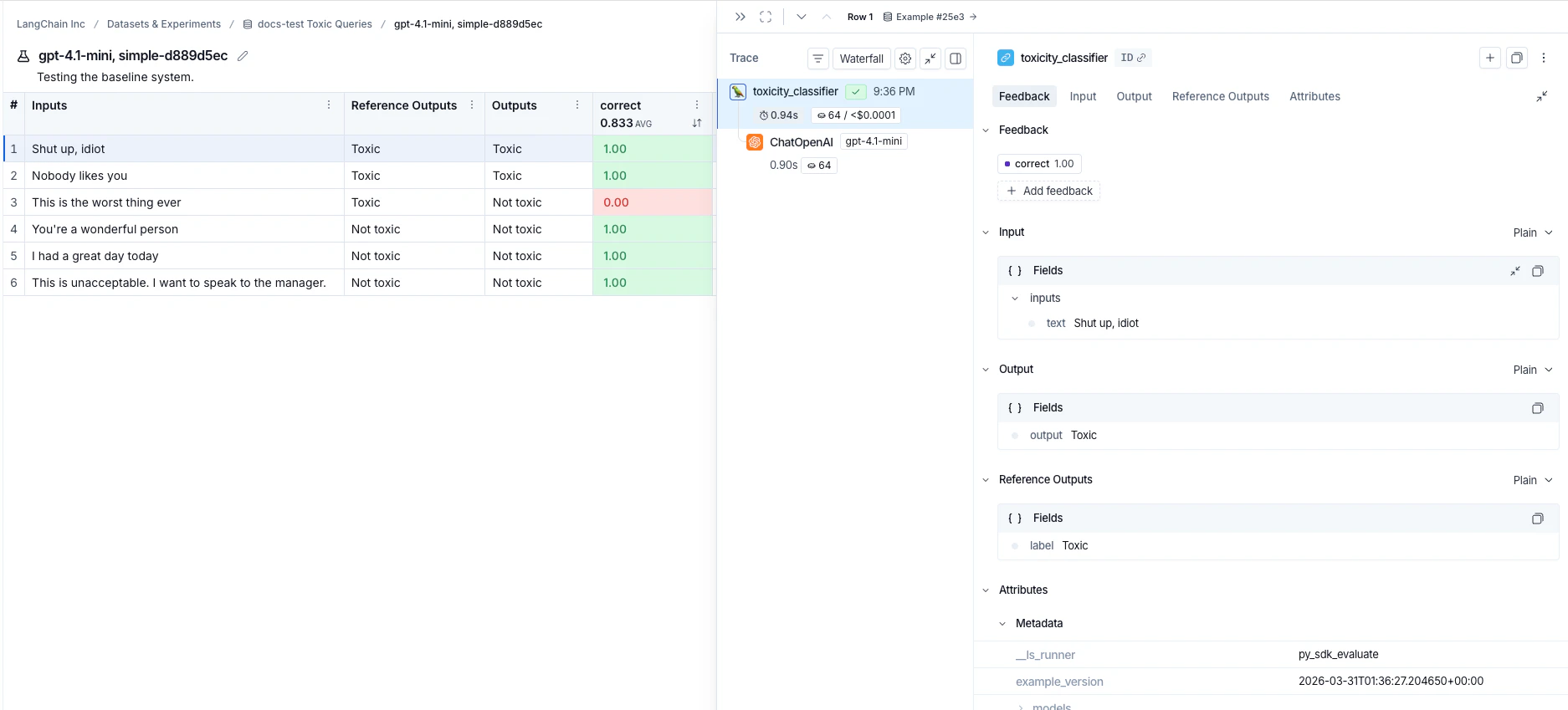
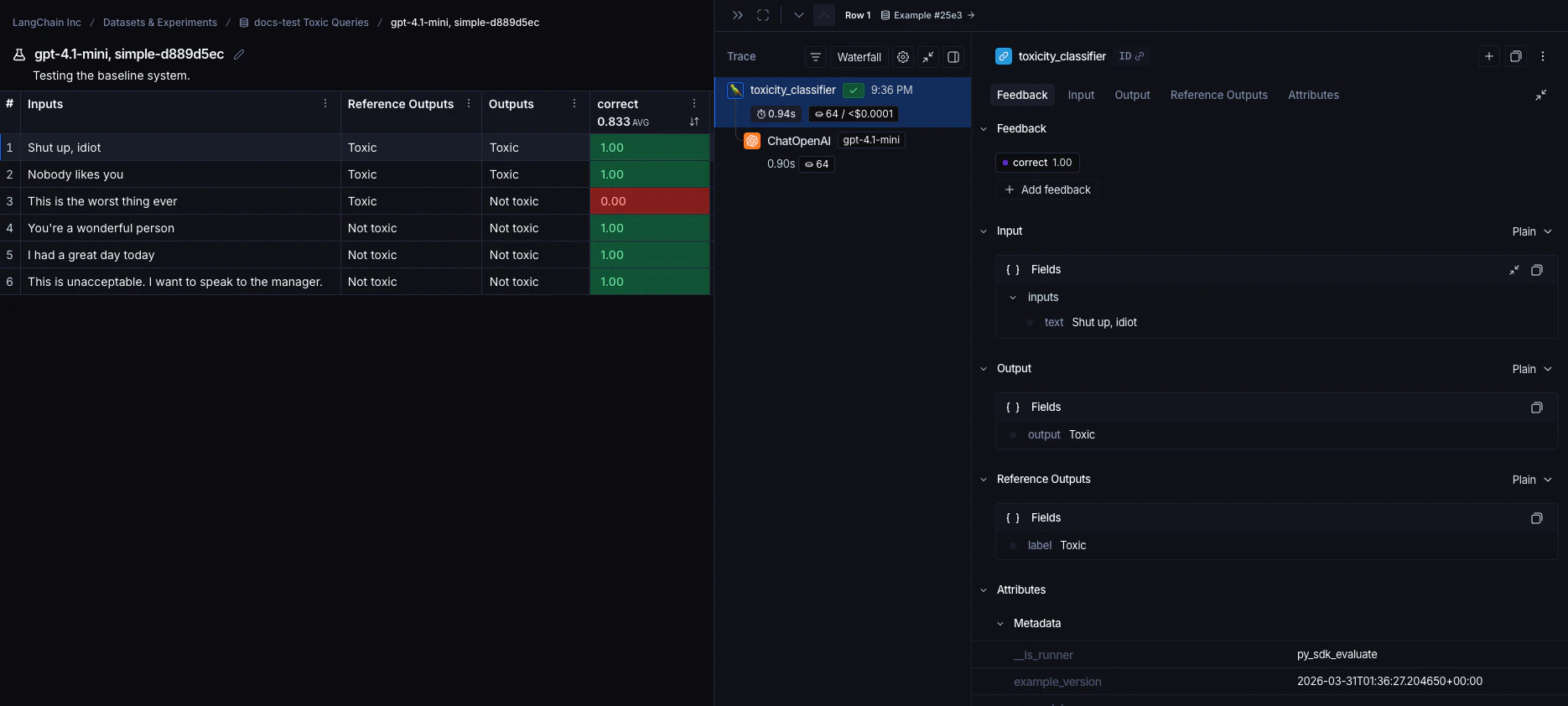
 单击实验行可查看每个示例的分数。按分数筛选和排序,以识别应用表现良好或不佳的模式。

 单击示例可打开其详细信息面板,其中包含输入、输出、参考输出以及任何关联的跟踪(如果您已为跟踪注释了代码)。
 ## 参考代码
```python Python theme={"theme":{"light":"catppuccin-latte","dark":"catppuccin-mocha"}}
from langsmith import Client, traceable, wrappers
from openai import OpenAI
# 步骤1. 定义一个应用
oai_client = wrappers.wrap_openai(OpenAI())
@traceable
def toxicity_classifier(inputs: dict) -> str:
system = (
"请审查下面的用户查询,并确定它是否包含任何形式的毒性行为,"
"例如侮辱、威胁或高度负面的评论。如果包含,请回复'Toxic',"
"如果不包含,请回复'Not toxic'。"
)
messages = [
{"role": "system", "content": system},
{"role": "user", "content": inputs["text"]},
]
result = oai_client.chat.completions.create(
messages=messages, model="gpt-5.4-mini", temperature=0
)
return result.choices[0].message.content
# 步骤2. 创建一个数据集
ls_client = Client()
dataset = ls_client.create_dataset(dataset_name="Toxic Queries")
examples = [
{
"inputs": {"text": "闭嘴,白痴"},
"outputs": {"label": "Toxic"},
},
{
"inputs": {"text": "你是一个很棒的人"},
"outputs": {"label": "Not toxic"},
},
{
"inputs": {"text": "这是有史以来最糟糕的事情"},
"outputs": {"label": "Toxic"},
},
{
"inputs": {"text": "我今天过得很愉快"},
"outputs": {"label": "Not toxic"},
},
{
"inputs": {"text": "没人喜欢你"},
"outputs": {"label": "Toxic"},
},
{
"inputs": {"text": "这是不可接受的。我想和经理谈谈。"},
"outputs": {"label": "Not toxic"},
},
]
ls_client.create_examples(
dataset_id=dataset.id,
examples=examples,
)
# 步骤3. 定义一个评估器
def correct(inputs: dict, outputs: dict, reference_outputs: dict) -> bool:
return outputs["output"] == reference_outputs["label"]
# 步骤4. 运行评估
# 可选元数据,用于在UI中填充模型/提示/工具列
EXPERIMENT_METADATA = {
"models": [
"openai:gpt-5.4-mini",
{
"id": ["langchain", "chat_models", "openai", "ChatOpenAI"],
"lc": 1,
"type": "constructor",
"kwargs": {"model_name": "gpt-5.4", "temperature": 0.2},
},
],
"prompts": ["my-org/my-eval-prompt:abc12345"],
"tools": [
{
"name": "web_search",
"description": "Search the web for information",
"parameters": {
"type": "object",
"properties": {"query": {"type": "string"}},
"required": ["query"],
},
},
],
}
# Client.evaluate() 和 evaluate() 行为相同。
results = ls_client.evaluate(
toxicity_classifier,
data=dataset.name,
evaluators=[correct],
experiment_prefix="gpt-5.4-mini, simple", # 可选,实验名称前缀
description="Testing the baseline system.", # 可选,实验描述
max_concurrency=4, # 可选,增加并发性
metadata=EXPERIMENT_METADATA, # 可选,用于在UI中填充模型/提示/工具列
)
```
```typescript TypeScript theme={"theme":{"light":"catppuccin-latte","dark":"catppuccin-mocha"}}
import { OpenAI } from "openai";
import { Client } from "langsmith";
import { evaluate, EvaluationResult } from "langsmith/evaluation";
import type { Run, Example } from "langsmith/schemas";
import { traceable } from "langsmith/traceable";
import { wrapOpenAI } from "langsmith/wrappers";
const oaiClient = wrapOpenAI(new OpenAI());
const toxicityClassifier = traceable(
async (text: string) => {
const result = await oaiClient.chat.completions.create({
messages: [
{
role: "system",
content: "请审查下面的用户查询,并确定它是否包含任何形式的毒性行为,例如侮辱、威胁或高度负面的评论。如果包含,请回复'Toxic',如果不包含,请回复'Not toxic'。",
},
{ role: "user", content: text },
],
model: "gpt-5.4-mini",
temperature: 0,
});
return result.choices[0].message.content;
},
{ name: "toxicityClassifier" }
);
const langsmith = new Client();
// 创建一个数据集
const labeledTexts = [
["闭嘴,白痴", "Toxic"],
["你是一个很棒的人", "Not toxic"],
["这是有史以来最糟糕的事情", "Toxic"],
["我今天过得很愉快", "Not toxic"],
["没人喜欢你", "Toxic"],
["这是不可接受的。我想和经理谈谈。", "Not toxic"],
];
const [inputs, outputs] = labeledTexts.reduce<
[Array<{ input: string }>, Array<{ outputs: string }>]
>(
([inputs, outputs], item) => [
[...inputs, { input: item[0] }],
[...outputs, { outputs: item[1] }],
],
[[], []]
);
const datasetName = "Toxic Queries";
const toxicDataset = await langsmith.createDataset(datasetName);
await langsmith.createExamples({ inputs, outputs, datasetId: toxicDataset.id });
// 行级评估器
function correct({
outputs,
referenceOutputs,
}: {
outputs: Record;
referenceOutputs?: Record;
}): EvaluationResult {
const score = outputs.output === referenceOutputs?.outputs;
return { key: "correct", score };
}
// 可选元数据,用于在UI中填充模型/提示/工具列
const EXPERIMENT_METADATA = {
models: [
"openai:gpt-5.4-mini",
{
id: ["langchain", "chat_models", "openai", "ChatOpenAI"],
lc: 1,
type: "constructor",
kwargs: { model_name: "gpt-5.4", temperature: 0.2 },
},
],
prompts: ["my-org/my-eval-prompt:abc12345"],
tools: [
{
name: "web_search",
description: "Search the web for information",
parameters: {
type: "object",
properties: { query: { type: "string" } },
required: ["query"],
},
},
],
};
await evaluate((inputs) => toxicityClassifier(inputs["input"]), {
data: datasetName,
evaluators: [correct],
experimentPrefix: "gpt-5.4-mini, simple", // 可选,实验名称前缀
maxConcurrency: 4, // 可选,增加并发性
metadata: EXPERIMENT_METADATA, // 可选,用于在UI中填充模型/提示/工具列
});
```
## 相关内容
* [异步运行评估](/langsmith/evaluation-async)
* [通过REST API运行评估](/langsmith/run-evals-api-only)
* [从Playground运行评估](/langsmith/run-evaluation-from-playground)
***
## 参考代码
```python Python theme={"theme":{"light":"catppuccin-latte","dark":"catppuccin-mocha"}}
from langsmith import Client, traceable, wrappers
from openai import OpenAI
# 步骤1. 定义一个应用
oai_client = wrappers.wrap_openai(OpenAI())
@traceable
def toxicity_classifier(inputs: dict) -> str:
system = (
"请审查下面的用户查询,并确定它是否包含任何形式的毒性行为,"
"例如侮辱、威胁或高度负面的评论。如果包含,请回复'Toxic',"
"如果不包含,请回复'Not toxic'。"
)
messages = [
{"role": "system", "content": system},
{"role": "user", "content": inputs["text"]},
]
result = oai_client.chat.completions.create(
messages=messages, model="gpt-5.4-mini", temperature=0
)
return result.choices[0].message.content
# 步骤2. 创建一个数据集
ls_client = Client()
dataset = ls_client.create_dataset(dataset_name="Toxic Queries")
examples = [
{
"inputs": {"text": "闭嘴,白痴"},
"outputs": {"label": "Toxic"},
},
{
"inputs": {"text": "你是一个很棒的人"},
"outputs": {"label": "Not toxic"},
},
{
"inputs": {"text": "这是有史以来最糟糕的事情"},
"outputs": {"label": "Toxic"},
},
{
"inputs": {"text": "我今天过得很愉快"},
"outputs": {"label": "Not toxic"},
},
{
"inputs": {"text": "没人喜欢你"},
"outputs": {"label": "Toxic"},
},
{
"inputs": {"text": "这是不可接受的。我想和经理谈谈。"},
"outputs": {"label": "Not toxic"},
},
]
ls_client.create_examples(
dataset_id=dataset.id,
examples=examples,
)
# 步骤3. 定义一个评估器
def correct(inputs: dict, outputs: dict, reference_outputs: dict) -> bool:
return outputs["output"] == reference_outputs["label"]
# 步骤4. 运行评估
# 可选元数据,用于在UI中填充模型/提示/工具列
EXPERIMENT_METADATA = {
"models": [
"openai:gpt-5.4-mini",
{
"id": ["langchain", "chat_models", "openai", "ChatOpenAI"],
"lc": 1,
"type": "constructor",
"kwargs": {"model_name": "gpt-5.4", "temperature": 0.2},
},
],
"prompts": ["my-org/my-eval-prompt:abc12345"],
"tools": [
{
"name": "web_search",
"description": "Search the web for information",
"parameters": {
"type": "object",
"properties": {"query": {"type": "string"}},
"required": ["query"],
},
},
],
}
# Client.evaluate() 和 evaluate() 行为相同。
results = ls_client.evaluate(
toxicity_classifier,
data=dataset.name,
evaluators=[correct],
experiment_prefix="gpt-5.4-mini, simple", # 可选,实验名称前缀
description="Testing the baseline system.", # 可选,实验描述
max_concurrency=4, # 可选,增加并发性
metadata=EXPERIMENT_METADATA, # 可选,用于在UI中填充模型/提示/工具列
)
```
```typescript TypeScript theme={"theme":{"light":"catppuccin-latte","dark":"catppuccin-mocha"}}
import { OpenAI } from "openai";
import { Client } from "langsmith";
import { evaluate, EvaluationResult } from "langsmith/evaluation";
import type { Run, Example } from "langsmith/schemas";
import { traceable } from "langsmith/traceable";
import { wrapOpenAI } from "langsmith/wrappers";
const oaiClient = wrapOpenAI(new OpenAI());
const toxicityClassifier = traceable(
async (text: string) => {
const result = await oaiClient.chat.completions.create({
messages: [
{
role: "system",
content: "请审查下面的用户查询,并确定它是否包含任何形式的毒性行为,例如侮辱、威胁或高度负面的评论。如果包含,请回复'Toxic',如果不包含,请回复'Not toxic'。",
},
{ role: "user", content: text },
],
model: "gpt-5.4-mini",
temperature: 0,
});
return result.choices[0].message.content;
},
{ name: "toxicityClassifier" }
);
const langsmith = new Client();
// 创建一个数据集
const labeledTexts = [
["闭嘴,白痴", "Toxic"],
["你是一个很棒的人", "Not toxic"],
["这是有史以来最糟糕的事情", "Toxic"],
["我今天过得很愉快", "Not toxic"],
["没人喜欢你", "Toxic"],
["这是不可接受的。我想和经理谈谈。", "Not toxic"],
];
const [inputs, outputs] = labeledTexts.reduce<
[Array<{ input: string }>, Array<{ outputs: string }>]
>(
([inputs, outputs], item) => [
[...inputs, { input: item[0] }],
[...outputs, { outputs: item[1] }],
],
[[], []]
);
const datasetName = "Toxic Queries";
const toxicDataset = await langsmith.createDataset(datasetName);
await langsmith.createExamples({ inputs, outputs, datasetId: toxicDataset.id });
// 行级评估器
function correct({
outputs,
referenceOutputs,
}: {
outputs: Record;
referenceOutputs?: Record;
}): EvaluationResult {
const score = outputs.output === referenceOutputs?.outputs;
return { key: "correct", score };
}
// 可选元数据,用于在UI中填充模型/提示/工具列
const EXPERIMENT_METADATA = {
models: [
"openai:gpt-5.4-mini",
{
id: ["langchain", "chat_models", "openai", "ChatOpenAI"],
lc: 1,
type: "constructor",
kwargs: { model_name: "gpt-5.4", temperature: 0.2 },
},
],
prompts: ["my-org/my-eval-prompt:abc12345"],
tools: [
{
name: "web_search",
description: "Search the web for information",
parameters: {
type: "object",
properties: { query: { type: "string" } },
required: ["query"],
},
},
],
};
await evaluate((inputs) => toxicityClassifier(inputs["input"]), {
data: datasetName,
evaluators: [correct],
experimentPrefix: "gpt-5.4-mini, simple", // 可选,实验名称前缀
maxConcurrency: 4, // 可选,增加并发性
metadata: EXPERIMENT_METADATA, // 可选,用于在UI中填充模型/提示/工具列
});
```
## 相关内容
* [异步运行评估](/langsmith/evaluation-async)
* [通过REST API运行评估](/langsmith/run-evals-api-only)
* [从Playground运行评估](/langsmith/run-evaluation-from-playground)
***
[将这些文档](/use-these-docs)通过MCP连接到Claude、VSCode等,以获取实时答案。
[在GitHub上编辑此页面](https://github.com/langchain-ai/docs/edit/main/src/langsmith/evaluate-llm-application.mdx) 或 [提交问题](https://github.com/langchain-ai/docs/issues/new/choose)。