> ## Documentation Index
> Fetch the complete documentation index at: https://cndoc-langchain.site/llms.txt
> Use this file to discover all available pages before exploring further.
# 连接自定义模型
演练场允许您使用自己的自定义模型。您可以部署一个模型服务器,通过 [LangServe](https://github.com/langchain-ai/langserve)(一个用于部署 LangChain 应用程序的开源库)来公开您的模型 API。在后台,演练场将与您的模型服务器交互以生成响应。
## 部署自定义模型服务器
为了方便您,我们提供了一个[示例模型服务器](https://github.com/langchain-ai/langsmith-model-server)作为参考。我们强烈建议您使用该示例模型服务器作为起点。
根据您的模型是指令风格还是聊天风格,您需要分别实现 `custom_model.py` 或 `custom_chat_model.py`。
## 添加可配置字段
使用不同的参数配置模型通常很有用。这些参数可能包括 temperature、model\_name、max\_tokens 等。
要使您的模型在演练场中可配置,您需要在模型服务器中添加可配置字段。这些字段可用于从演练场更改模型参数。
您可以通过在 `config.py` 文件中实现 `with_configurable_fields` 函数来添加可配置字段。您可以
```python theme={"theme":{"light":"catppuccin-latte","dark":"catppuccin-mocha"}}
def with_configurable_fields(self) -> Runnable:
"""公开您希望在演练场中可配置的字段。我们将自动将这些字段暴露给
演练场。如果您不想公开任何字段,可以删除此方法。"""
return self.configurable_fields(n=ConfigurableField(
id="n",
name="字符数",
description="从输入提示返回的字符数。",
))
```
## 在演练场中使用模型
部署模型服务器后,您可以在演练场中使用它。进入演练场,对于聊天风格模型或指令风格模型,分别选择 `ChatCustomModel` 或 `CustomModel` 提供程序。
输入 `URL`。演练场将自动检测可用的端点和可配置字段。然后,您可以使用所需的参数调用模型。
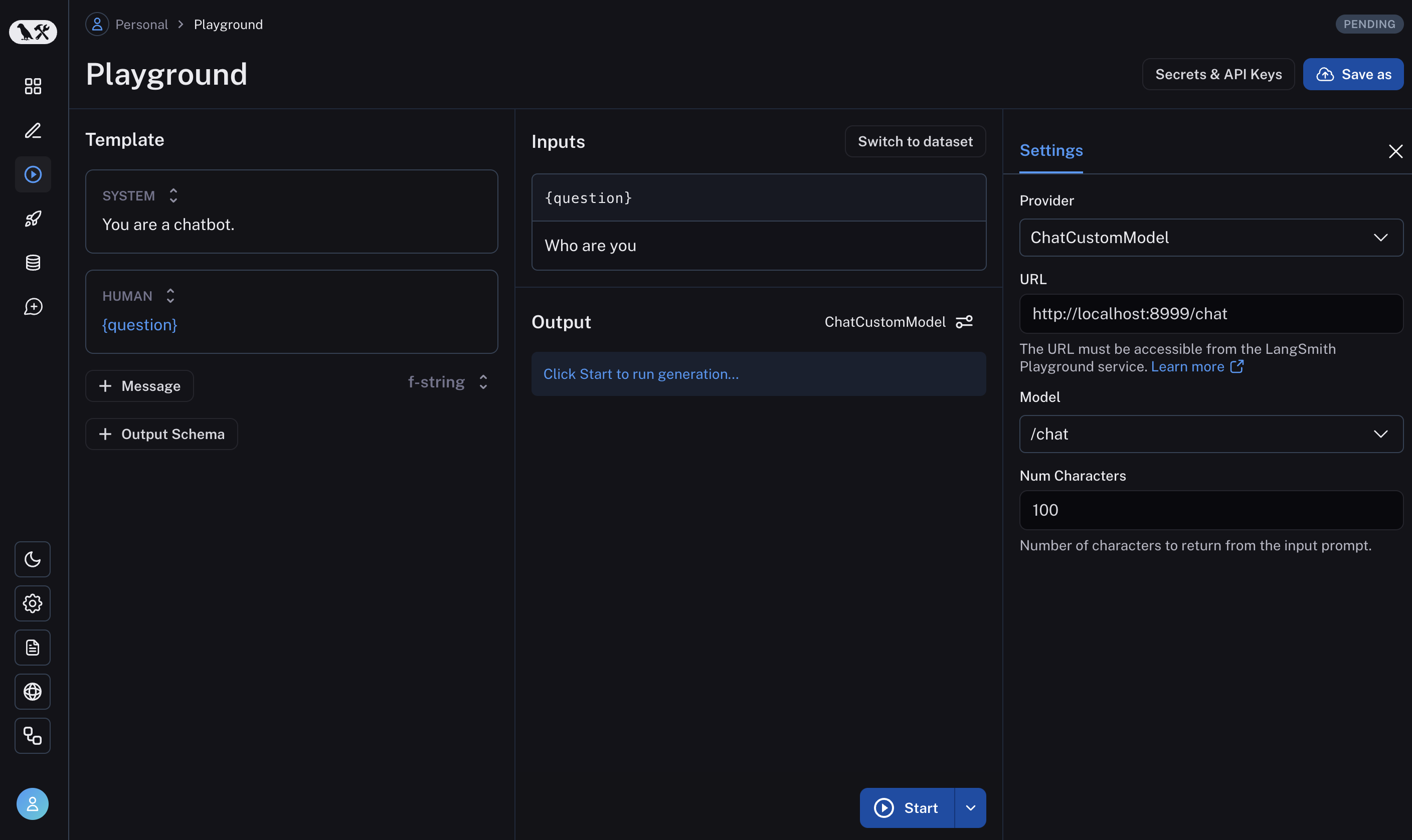 如果一切设置正确,您应该在演练场中看到模型的响应以及在 `with_configurable_fields` 中指定的可配置字段。
更多信息,请参阅[如何存储模型配置以供后续使用](/langsmith/managing-model-configurations)。
***
如果一切设置正确,您应该在演练场中看到模型的响应以及在 `with_configurable_fields` 中指定的可配置字段。
更多信息,请参阅[如何存储模型配置以供后续使用](/langsmith/managing-model-configurations)。
***
[将这些文档](/use-these-docs)通过 MCP 连接到 Claude、VSCode 等,以获取实时答案。
[在 GitHub 上编辑此页面](https://github.com/langchain-ai/docs/edit/main/src/langsmith/custom-endpoint.mdx) 或 [提交问题](https://github.com/langchain-ai/docs/issues/new/choose)。