> ## Documentation Index
> Fetch the complete documentation index at: https://cndoc-langchain.site/llms.txt
> Use this file to discover all available pages before exploring further.
# 在 Azure 上自托管 LangSmith
在 [Microsoft Azure](https://azure.microsoft.com/) 上运行 LangSmith 时,您可以选择 [完全自托管](/langsmith/self-hosted) 或 [混合](/langsmith/hybrid) 模式进行设置。完全自托管模式部署一个完整的 LangSmith 平台,包含可观测性功能以及创建代理部署的选项。混合模式仅包含在您的云内数据平面中运行代理所需的基础设施,而我们的 SaaS 提供控制平面和可观测性功能。
本页面提供:
* [初始设置步骤](#initial-setup),用于部署到 AKS、配置托管服务以及设置身份验证。
* [Azure 特定的架构模式](#reference-architecture) 和参考图。
* [计算和网络指南](#compute-and-networking-on-azure) 和最佳实践。
* [安全和访问控制](#security-and-access-control) 建议,适用于 Azure 部署。
LangChain 提供专门用于 Azure 的 Terraform 模块,以帮助为 LangSmith 配置基础设施。这些模块可以快速设置 AKS 集群、Azure Database for PostgreSQL、Azure Managed Redis、Blob Storage 和网络资源。
查看 [Azure Terraform 模块](https://github.com/langchain-ai/terraform/tree/main/modules/azure) 以获取文档和示例。
## 初始设置
遵循 [Kubernetes 安装指南](/langsmith/kubernetes)。LangSmith 已在 Azure Kubernetes Service (AKS) 上进行测试。
**AKS 特定说明:**
* LangSmith 适用于标准 AKS 集群
* 使用 Azure Disk 存储类作为持久卷
对于生产部署,请连接到 Azure 托管服务:
在 Azure Blob 中存储跟踪数据
PostgreSQL 数据库
用于缓存的 Redis
分析数据库
使用 [Azure Workload Identity](https://azure.github.io/azure-workload-identity/docs/introduction.html) 对 LangSmith Pod 进行身份验证以访问 Azure 服务。
**关键页面:**
* [Azure Blob 托管标识](/langsmith/self-host-blob-storage#azure-blob-storage)
* [Azure Database Entra 身份验证](/langsmith/self-host-external-postgres#iam-authentication)
* [Azure Cache Entra 身份验证](/langsmith/self-host-external-redis#iam-authentication)
完成这些初始设置步骤后,您可以查看下面完整的 Azure 架构和最佳实践。
## 参考架构
我们建议使用 Azure 的托管服务来提供一个可扩展、安全且有弹性的平台。以下架构适用于自托管和混合部署:
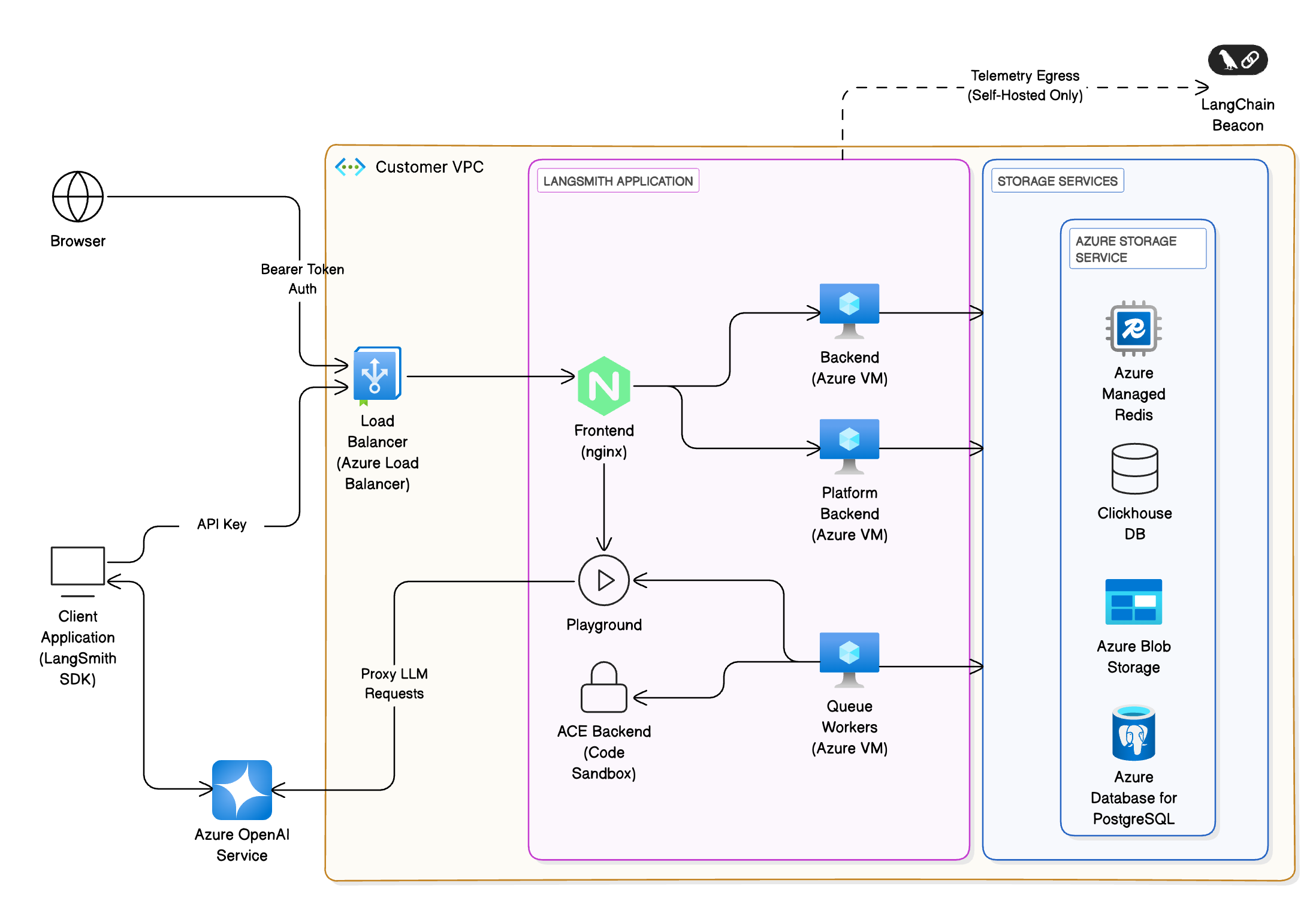 * **客户端接口**:用户通过 Web 浏览器或 LangChain SDK 与 LangSmith 交互。所有流量终止于 [Azure Load Balancer](https://azure.microsoft.com/en-us/products/load-balancer/),并被路由到 [AKS](https://azure.microsoft.com/en-us/products/kubernetes-service/) 集群内的前端 (NGINX),然后在必要时被路由到集群内的另一个服务。
* **存储服务**:平台需要用于跟踪、元数据和缓存的持久存储。在 Azure 上,推荐的服务是:
* **[Azure Database for PostgreSQL (Flexible Server)](https://azure.microsoft.com/en-us/products/postgresql/)** 用于事务数据(例如,运行、项目)。Azure 的高可用性选项在另一个区域配置备用副本;数据同步提交到主服务器和备用服务器。LangSmith 需要 PostgreSQL 14 或更高版本。
* **[Azure Managed Redis](https://azure.microsoft.com/en-us/products/managed-redis/)** 用于队列和缓存。最佳实践包括存储小值并将大对象拆分为多个键,使用管道以最大化吞吐量,并确保客户端和服务器位于同一区域。您也可以使用 [Azure Cache for Redis](https://azure.microsoft.com/en-us/products/cache),以单实例或集群模式运行。LangSmith 需要 Redis OSS 5 或更高版本。
* **ClickHouse** 用于跟踪的高容量分析。我们建议使用 [外部托管的 ClickHouse 解决方案](/langsmith/self-host-external-clickhouse)。如果出于安全或合规原因无法使用该方案,请使用开源操作符在 AKS 上部署 ClickHouse 集群。确保跨 [可用性区域](https://learn.microsoft.com/en-us/azure/reliability/availability-zones-overview) 进行复制以确保持久性。混合部署不需要 Clickhouse。
* **[Azure Blob Storage](https://azure.microsoft.com/en-us/products/storage/blobs/)** 用于大型工件。使用冗余存储配置,如读取访问地域冗余 (RA-GRS) 或地域区域冗余 (RA-GZRS) 存储,并设计应用程序在中断期间从辅助区域读取。
## Azure 上的计算和网络
### Azure Kubernetes Service (AKS)
[AKS](https://azure.microsoft.com/en-us/products/kubernetes-service/) 是生产部署的推荐计算平台。本节概述了规划设置时的关键考虑因素。
#### 网络模型
对于生产集群,使用 [Azure CNI](https://learn.microsoft.com/en-us/azure/aks/configure-azure-cni) 网络。此模型将集群集成到现有虚拟网络中,为每个 Pod 和节点分配 IP 地址,并允许直接连接到本地或其他 Azure 服务。确保子网有足够的 IP 用于节点和 Pod,避免地址范围重叠,并为扩展事件分配额外的 IP 空间。
#### 入口和负载均衡
使用 Kubernetes Ingress 资源和控制器来分发 HTTP/HTTPS 流量。入口控制器在第 7 层运行,可以根据 URL 路径路由流量并处理 TLS 终止。与第 4 层负载均衡器相比,它们减少了公共 IP 地址的数量。使用 [应用程序路由加载项](https://learn.microsoft.com/en-us/azure/aks/app-routing) 来获取与 [Azure DNS](https://azure.microsoft.com/en-us/products/dns/) 和 [Key Vault](https://azure.microsoft.com/en-us/products/key-vault/) 集成的托管 NGINX 入口控制器,用于 SSL 证书。
#### Web 应用程序防火墙 (WAF)
为了提供针对攻击的额外保护,请部署 [WAF](https://learn.microsoft.com/en-us/azure/web-application-firewall/overview),例如 [Azure Application Gateway](https://azure.microsoft.com/en-us/products/application-gateway/)。WAF 使用 OWASP 规则过滤流量,并可以在流量到达 AKS 集群之前终止 TLS。
#### 网络策略
应用 [Kubernetes 网络策略](https://learn.microsoft.com/en-us/azure/aks/use-network-policies) 以限制 Pod 之间的流量,并减少受损工作负载的影响。在创建集群时启用网络策略支持,并根据应用程序连接性设计规则。
#### 高可用性
跨 [可用性区域](https://learn.microsoft.com/en-us/azure/reliability/availability-zones-overview) 配置节点池,并对所有部署使用 Pod 中断预算 (PDB) 和多个副本。设置 Pod 资源请求和限制;[AKS 资源管理最佳实践](https://learn.microsoft.com/en-us/azure/aks/developer-best-practices-resource-management) 建议设置 CPU 和内存限制以防止 Pod 消耗所有资源。使用 [Cluster Autoscaler](https://learn.microsoft.com/en-us/azure/aks/cluster-autoscaler) 和 [Vertical Pod Autoscaler](https://learn.microsoft.com/en-us/azure/aks/vertical-pod-autoscaler) 来自动扩展节点池和调整 Pod 资源。
### 网络和身份
#### 虚拟网络集成
将 AKS 部署到其自己的 [虚拟网络](https://azure.microsoft.com/en-us/products/virtual-network/) 中,并为集群、数据库、Redis 和存储端点创建单独的子网。使用 [Private Link](https://azure.microsoft.com/en-us/products/private-link/) 和 [服务终结点](https://learn.microsoft.com/en-us/azure/virtual-network/virtual-network-service-endpoints-overview) 将流量保持在您的虚拟网络内,避免暴露于公共互联网。
#### 身份验证
将 LangSmith 与 [Microsoft Entra ID](https://www.microsoft.com/en-us/security/business/identity-access/microsoft-entra-id) (Azure AD) 集成以实现单点登录。使用 Azure AD OAuth2 获取承载令牌,并分配角色以控制对 UI 和 API 的访问。
## 存储和数据服务
### Azure Database for PostgreSQL
#### 高可用性
使用具有高可用性模式的 [Flexible Server](https://learn.microsoft.com/en-us/azure/postgresql/flexible-server/overview)。Azure 在同一可用性区域内(区域)或跨区域(区域冗余)配置备用副本。数据同步提交到主服务器和备用服务器,确保已提交的数据不会丢失。区域冗余配置将备用服务器放在不同的区域以防止区域中断,但可能会增加写入延迟。
#### 备份和灾难恢复
启用 [自动备份](https://learn.microsoft.com/en-us/azure/postgresql/flexible-server/concepts-backup-restore) 并配置地域冗余备份存储以防止区域范围的中断。对于关键应用程序,在辅助区域创建只读副本。
#### 扩展
选择与工作负载匹配的适当 SKU;Flexible Server 允许独立扩展计算和存储。通过 [Azure Monitor](https://azure.microsoft.com/en-us/products/monitor/) 监控指标并配置警报。
### Azure Managed Redis
#### 持久性和冗余
选择提供复制和持久性的层。配置 Redis 持久性或数据备份以确保持久性。对于高可用性,根据层使用 [活动地域复制](https://learn.microsoft.com/en-us/azure/redis/how-to-active-geo-replication) 或区域冗余缓存。
### Azure 上的 ClickHouse
ClickHouse 用于分析工作负载(跟踪和反馈)。如果您无法使用外部托管解决方案,请使用 Helm 或官方操作符在 AKS 上部署 ClickHouse 集群。为了弹性,在节点和可用性区域之间复制数据。考虑使用 [Azure Disks](https://azure.microsoft.com/en-us/products/storage/disks/) 作为本地存储,并将其挂载为 StatefulSets。
### Azure Blob Storage
#### 冗余
根据您的恢复目标选择冗余配置。使用 [读取访问地域冗余 (RA-GRS) 或地域区域冗余 (RA-GZRS) 存储](https://learn.microsoft.com/en-us/azure/storage/common/storage-redundancy),并设计应用程序在主区域中断期间将读取切换到辅助区域。
#### 命名和分区
使用可提高跨分区负载均衡的命名约定,并计划最大并发客户端数量。遵守 Azure 的可扩展性和容量目标,必要时跨多个存储帐户分区数据。
#### 网络
通过 [专用终结点](https://learn.microsoft.com/en-us/azure/storage/common/storage-private-endpoints) 访问 Blob 存储,或使用 SAS 令牌和 CORS 规则以启用直接客户端访问。
## 安全和访问控制
### Azure Key Vault
#### 每个应用程序和环境使用单独的保管库
将数据库连接字符串和 API 密钥等机密存储在 [Azure Key Vault](https://azure.microsoft.com/en-us/products/key-vault/) 中。为每个应用程序和环境(开发、测试、生产)使用专用的保管库,以限制安全漏洞的影响。
#### 访问控制
使用 [RBAC 权限模型](https://learn.microsoft.com/en-us/azure/key-vault/general/rbac-guide) 在保管库范围分配角色,并限制对所需主体的访问。使用 Private Link 和防火墙限制网络访问。
#### 数据保护和日志记录
启用 [软删除和清除保护](https://learn.microsoft.com/en-us/azure/key-vault/general/soft-delete-overview) 以防止意外删除。打开日志记录并为 Key Vault 访问事件配置警报。
### 网络安全
#### 入口隔离
仅通过入口控制器或 WAF 公开前端服务。其他服务应为内部服务,并通过集群网络进行通信。
#### RBAC 和 Pod 安全
使用 [Kubernetes RBAC](https://kubernetes.io/docs/reference/access-authn-authz/rbac/) 控制谁可以部署、修改或读取资源。启用 [Pod 安全准入](https://kubernetes.io/docs/concepts/security/pod-security-admission/) 以强制执行基线、受限或特权配置文件。
#### 机密管理
使用 [CSI Secret Store](https://learn.microsoft.com/en-us/azure/aks/csi-secrets-store-driver) 将 Key Vault 中的机密挂载到 Pod 中。避免将机密存储在环境变量或配置文件中。
## 可观测性和监控
配置您的 LangSmith 实例以 [导出遥测数据](/langsmith/export-backend),以便您可以使用 Azure 的服务来监控它。
### Azure Monitor
使用 [Azure Monitor](https://azure.microsoft.com/en-us/products/monitor/) 获取指标、日志和警报。主动监控涉及在关键信号(如节点 CPU/内存利用率、Pod 状态和服务延迟)上配置警报。Azure Monitor 警报会在超过预定义阈值时通知您。
### 托管 Prometheus 和 Grafana
启用 [Azure Monitor 托管 Prometheus](https://learn.microsoft.com/en-us/azure/azure-monitor/essentials/prometheus-metrics-overview) 以收集 Kubernetes 指标。将其与 [Grafana 仪表板](https://azure.microsoft.com/en-us/products/managed-grafana/) 结合使用以进行可视化。定义服务级别目标 (SLO) 并相应地配置警报。
### Container Insights
安装 [Container Insights](https://learn.microsoft.com/en-us/azure/azure-monitor/containers/container-insights-overview) 以从 AKS 节点和 Pod 捕获日志和指标。使用 [Azure Log Analytics 工作区](https://learn.microsoft.com/en-us/azure/azure-monitor/logs/log-analytics-overview) 查询和分析日志。
### 应用程序日志记录
确保 LangSmith 服务将日志输出到 stdout/stderr,并通过 [Fluent Bit](https://fluentbit.io/) 或 Azure Monitor 代理转发它们。
## 持续集成
* 管理 [LangSmith 部署](/langsmith/deployment) 的首选方法是创建一个 CI 流程,该流程构建 [Agent Server](/langsmith/agent-server) 镜像并将其推送到 [Azure Container Registry](https://azure.microsoft.com/en-us/products/container-registry)。在将新版本部署到暂存或生产环境之前,为拉取请求创建测试部署。
***
* **客户端接口**:用户通过 Web 浏览器或 LangChain SDK 与 LangSmith 交互。所有流量终止于 [Azure Load Balancer](https://azure.microsoft.com/en-us/products/load-balancer/),并被路由到 [AKS](https://azure.microsoft.com/en-us/products/kubernetes-service/) 集群内的前端 (NGINX),然后在必要时被路由到集群内的另一个服务。
* **存储服务**:平台需要用于跟踪、元数据和缓存的持久存储。在 Azure 上,推荐的服务是:
* **[Azure Database for PostgreSQL (Flexible Server)](https://azure.microsoft.com/en-us/products/postgresql/)** 用于事务数据(例如,运行、项目)。Azure 的高可用性选项在另一个区域配置备用副本;数据同步提交到主服务器和备用服务器。LangSmith 需要 PostgreSQL 14 或更高版本。
* **[Azure Managed Redis](https://azure.microsoft.com/en-us/products/managed-redis/)** 用于队列和缓存。最佳实践包括存储小值并将大对象拆分为多个键,使用管道以最大化吞吐量,并确保客户端和服务器位于同一区域。您也可以使用 [Azure Cache for Redis](https://azure.microsoft.com/en-us/products/cache),以单实例或集群模式运行。LangSmith 需要 Redis OSS 5 或更高版本。
* **ClickHouse** 用于跟踪的高容量分析。我们建议使用 [外部托管的 ClickHouse 解决方案](/langsmith/self-host-external-clickhouse)。如果出于安全或合规原因无法使用该方案,请使用开源操作符在 AKS 上部署 ClickHouse 集群。确保跨 [可用性区域](https://learn.microsoft.com/en-us/azure/reliability/availability-zones-overview) 进行复制以确保持久性。混合部署不需要 Clickhouse。
* **[Azure Blob Storage](https://azure.microsoft.com/en-us/products/storage/blobs/)** 用于大型工件。使用冗余存储配置,如读取访问地域冗余 (RA-GRS) 或地域区域冗余 (RA-GZRS) 存储,并设计应用程序在中断期间从辅助区域读取。
## Azure 上的计算和网络
### Azure Kubernetes Service (AKS)
[AKS](https://azure.microsoft.com/en-us/products/kubernetes-service/) 是生产部署的推荐计算平台。本节概述了规划设置时的关键考虑因素。
#### 网络模型
对于生产集群,使用 [Azure CNI](https://learn.microsoft.com/en-us/azure/aks/configure-azure-cni) 网络。此模型将集群集成到现有虚拟网络中,为每个 Pod 和节点分配 IP 地址,并允许直接连接到本地或其他 Azure 服务。确保子网有足够的 IP 用于节点和 Pod,避免地址范围重叠,并为扩展事件分配额外的 IP 空间。
#### 入口和负载均衡
使用 Kubernetes Ingress 资源和控制器来分发 HTTP/HTTPS 流量。入口控制器在第 7 层运行,可以根据 URL 路径路由流量并处理 TLS 终止。与第 4 层负载均衡器相比,它们减少了公共 IP 地址的数量。使用 [应用程序路由加载项](https://learn.microsoft.com/en-us/azure/aks/app-routing) 来获取与 [Azure DNS](https://azure.microsoft.com/en-us/products/dns/) 和 [Key Vault](https://azure.microsoft.com/en-us/products/key-vault/) 集成的托管 NGINX 入口控制器,用于 SSL 证书。
#### Web 应用程序防火墙 (WAF)
为了提供针对攻击的额外保护,请部署 [WAF](https://learn.microsoft.com/en-us/azure/web-application-firewall/overview),例如 [Azure Application Gateway](https://azure.microsoft.com/en-us/products/application-gateway/)。WAF 使用 OWASP 规则过滤流量,并可以在流量到达 AKS 集群之前终止 TLS。
#### 网络策略
应用 [Kubernetes 网络策略](https://learn.microsoft.com/en-us/azure/aks/use-network-policies) 以限制 Pod 之间的流量,并减少受损工作负载的影响。在创建集群时启用网络策略支持,并根据应用程序连接性设计规则。
#### 高可用性
跨 [可用性区域](https://learn.microsoft.com/en-us/azure/reliability/availability-zones-overview) 配置节点池,并对所有部署使用 Pod 中断预算 (PDB) 和多个副本。设置 Pod 资源请求和限制;[AKS 资源管理最佳实践](https://learn.microsoft.com/en-us/azure/aks/developer-best-practices-resource-management) 建议设置 CPU 和内存限制以防止 Pod 消耗所有资源。使用 [Cluster Autoscaler](https://learn.microsoft.com/en-us/azure/aks/cluster-autoscaler) 和 [Vertical Pod Autoscaler](https://learn.microsoft.com/en-us/azure/aks/vertical-pod-autoscaler) 来自动扩展节点池和调整 Pod 资源。
### 网络和身份
#### 虚拟网络集成
将 AKS 部署到其自己的 [虚拟网络](https://azure.microsoft.com/en-us/products/virtual-network/) 中,并为集群、数据库、Redis 和存储端点创建单独的子网。使用 [Private Link](https://azure.microsoft.com/en-us/products/private-link/) 和 [服务终结点](https://learn.microsoft.com/en-us/azure/virtual-network/virtual-network-service-endpoints-overview) 将流量保持在您的虚拟网络内,避免暴露于公共互联网。
#### 身份验证
将 LangSmith 与 [Microsoft Entra ID](https://www.microsoft.com/en-us/security/business/identity-access/microsoft-entra-id) (Azure AD) 集成以实现单点登录。使用 Azure AD OAuth2 获取承载令牌,并分配角色以控制对 UI 和 API 的访问。
## 存储和数据服务
### Azure Database for PostgreSQL
#### 高可用性
使用具有高可用性模式的 [Flexible Server](https://learn.microsoft.com/en-us/azure/postgresql/flexible-server/overview)。Azure 在同一可用性区域内(区域)或跨区域(区域冗余)配置备用副本。数据同步提交到主服务器和备用服务器,确保已提交的数据不会丢失。区域冗余配置将备用服务器放在不同的区域以防止区域中断,但可能会增加写入延迟。
#### 备份和灾难恢复
启用 [自动备份](https://learn.microsoft.com/en-us/azure/postgresql/flexible-server/concepts-backup-restore) 并配置地域冗余备份存储以防止区域范围的中断。对于关键应用程序,在辅助区域创建只读副本。
#### 扩展
选择与工作负载匹配的适当 SKU;Flexible Server 允许独立扩展计算和存储。通过 [Azure Monitor](https://azure.microsoft.com/en-us/products/monitor/) 监控指标并配置警报。
### Azure Managed Redis
#### 持久性和冗余
选择提供复制和持久性的层。配置 Redis 持久性或数据备份以确保持久性。对于高可用性,根据层使用 [活动地域复制](https://learn.microsoft.com/en-us/azure/redis/how-to-active-geo-replication) 或区域冗余缓存。
### Azure 上的 ClickHouse
ClickHouse 用于分析工作负载(跟踪和反馈)。如果您无法使用外部托管解决方案,请使用 Helm 或官方操作符在 AKS 上部署 ClickHouse 集群。为了弹性,在节点和可用性区域之间复制数据。考虑使用 [Azure Disks](https://azure.microsoft.com/en-us/products/storage/disks/) 作为本地存储,并将其挂载为 StatefulSets。
### Azure Blob Storage
#### 冗余
根据您的恢复目标选择冗余配置。使用 [读取访问地域冗余 (RA-GRS) 或地域区域冗余 (RA-GZRS) 存储](https://learn.microsoft.com/en-us/azure/storage/common/storage-redundancy),并设计应用程序在主区域中断期间将读取切换到辅助区域。
#### 命名和分区
使用可提高跨分区负载均衡的命名约定,并计划最大并发客户端数量。遵守 Azure 的可扩展性和容量目标,必要时跨多个存储帐户分区数据。
#### 网络
通过 [专用终结点](https://learn.microsoft.com/en-us/azure/storage/common/storage-private-endpoints) 访问 Blob 存储,或使用 SAS 令牌和 CORS 规则以启用直接客户端访问。
## 安全和访问控制
### Azure Key Vault
#### 每个应用程序和环境使用单独的保管库
将数据库连接字符串和 API 密钥等机密存储在 [Azure Key Vault](https://azure.microsoft.com/en-us/products/key-vault/) 中。为每个应用程序和环境(开发、测试、生产)使用专用的保管库,以限制安全漏洞的影响。
#### 访问控制
使用 [RBAC 权限模型](https://learn.microsoft.com/en-us/azure/key-vault/general/rbac-guide) 在保管库范围分配角色,并限制对所需主体的访问。使用 Private Link 和防火墙限制网络访问。
#### 数据保护和日志记录
启用 [软删除和清除保护](https://learn.microsoft.com/en-us/azure/key-vault/general/soft-delete-overview) 以防止意外删除。打开日志记录并为 Key Vault 访问事件配置警报。
### 网络安全
#### 入口隔离
仅通过入口控制器或 WAF 公开前端服务。其他服务应为内部服务,并通过集群网络进行通信。
#### RBAC 和 Pod 安全
使用 [Kubernetes RBAC](https://kubernetes.io/docs/reference/access-authn-authz/rbac/) 控制谁可以部署、修改或读取资源。启用 [Pod 安全准入](https://kubernetes.io/docs/concepts/security/pod-security-admission/) 以强制执行基线、受限或特权配置文件。
#### 机密管理
使用 [CSI Secret Store](https://learn.microsoft.com/en-us/azure/aks/csi-secrets-store-driver) 将 Key Vault 中的机密挂载到 Pod 中。避免将机密存储在环境变量或配置文件中。
## 可观测性和监控
配置您的 LangSmith 实例以 [导出遥测数据](/langsmith/export-backend),以便您可以使用 Azure 的服务来监控它。
### Azure Monitor
使用 [Azure Monitor](https://azure.microsoft.com/en-us/products/monitor/) 获取指标、日志和警报。主动监控涉及在关键信号(如节点 CPU/内存利用率、Pod 状态和服务延迟)上配置警报。Azure Monitor 警报会在超过预定义阈值时通知您。
### 托管 Prometheus 和 Grafana
启用 [Azure Monitor 托管 Prometheus](https://learn.microsoft.com/en-us/azure/azure-monitor/essentials/prometheus-metrics-overview) 以收集 Kubernetes 指标。将其与 [Grafana 仪表板](https://azure.microsoft.com/en-us/products/managed-grafana/) 结合使用以进行可视化。定义服务级别目标 (SLO) 并相应地配置警报。
### Container Insights
安装 [Container Insights](https://learn.microsoft.com/en-us/azure/azure-monitor/containers/container-insights-overview) 以从 AKS 节点和 Pod 捕获日志和指标。使用 [Azure Log Analytics 工作区](https://learn.microsoft.com/en-us/azure/azure-monitor/logs/log-analytics-overview) 查询和分析日志。
### 应用程序日志记录
确保 LangSmith 服务将日志输出到 stdout/stderr,并通过 [Fluent Bit](https://fluentbit.io/) 或 Azure Monitor 代理转发它们。
## 持续集成
* 管理 [LangSmith 部署](/langsmith/deployment) 的首选方法是创建一个 CI 流程,该流程构建 [Agent Server](/langsmith/agent-server) 镜像并将其推送到 [Azure Container Registry](https://azure.microsoft.com/en-us/products/container-registry)。在将新版本部署到暂存或生产环境之前,为拉取请求创建测试部署。
***
[将这些文档](/use-these-docs) 通过 MCP 连接到 Claude、VSCode 等,以获取实时答案。
[在 GitHub 上编辑此页面](https://github.com/langchain-ai/docs/edit/main/src/langsmith/azure-self-hosted.mdx) 或 [提交问题](https://github.com/langchain-ai/docs/issues/new/choose)。